
 YouTube Automation
Best AI SEO Tools for Small Businesses 2026 – 9 Proven Picks (Blog#: 88)

Every day, bigger competitors take customers that could be yours, simply because Google cannot find your business. The best AI SEO tools for small businesses 2026 are no longer only for big brands with large budgets. They are now a smart and affordable way for small businesses to compete and grow.
Many small business owners are already ranking higher on Google, getting more customers, and growing faster without hiring expensive SEO agencies. They are doing this by using the right AI SEO tools for small businesses. You have worked hard to build your business, and you should not stay invisible online while others get the clicks, calls, and sales that could be yours.
In this guide, you will discover 9 proven AI SEO tools that actually work in 2026, so you can stop guessing, improve your rankings, and turn your website into a machine that brings in real customers.
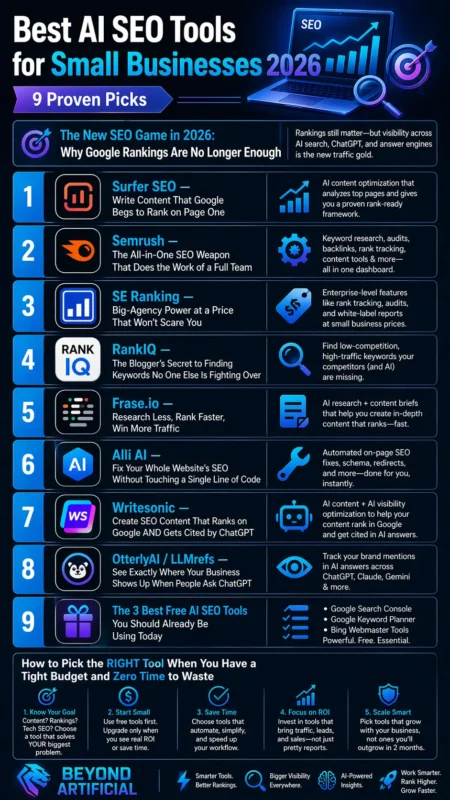
If you are trying to understand how AI is actually changing marketing in 2026, then this guide on AI tools for digital marketing will give you a much clearer picture of where everything is heading.
The New SEO Game in 2026: Why Google Rankings Are No Longer Enough
I need to be honest, if you think ranking on Google’s first page means your business is fully winning in 2026, you are missing a big part of the game. People are not only using Google now. They are also asking tools like ChatGPT, Perplexity, and Google Gemini for recommendations. These AI tools choose trusted sources to mention, not just the websites ranking at number one.
Here is the problem: many businesses are not being mentioned at all. Not because competitors are better, but because their content is not made in a way that AI tools can understand and trust. So here is what you should do. First, open ChatGPT or Perplexity and search the way your customer would. For example, type “best plumber near me” or “affordable bakery in my city.” Then check if your business appears or if it is missing completely.
Second, start using GEO, which means Generative Engine Optimization. This simply means writing your content in a clear question-and-answer style, so AI tools can easily read it, trust it, and recommend it to users. Third, keep your website structure clean. Use one clear H1 heading, organize your content in a simple order, and add FAQ sections. AI tools understand well-structured pages better, and these pages have a higher chance of being mentioned.
The good news is that AI visibility can improve faster than traditional SEO. Normal SEO can take 6 to 12 months, but with the right changes, AI tools may start noticing your business much sooner. This means small improvements today can bring results faster than you expect.
1. Surfer SEO: Write Content That Google Begs to Rank on Page One
Instead of guessing what Google wants, Surfer SEO shows you how to write content that can rank for your target keywords. It not only helps you find keywords, but it also helps you improve the full article so it performs better. Real tests have shown strong results. Many Surfer-optimized articles performed better than normal articles, and several reached Google’s first page within a few weeks. For a small business, that kind of growth can make a big difference.
Here is the first tip: when you use Surfer’s Content Editor, do not only focus on getting a green score. Read the keyword suggestions carefully and use them naturally in your headings and subheadings. Google pays a lot of attention to these areas. The second tip is to connect Surfer with Google Docs or your WordPress website. This helps writers see suggestions while writing, instead of fixing everything later and wasting time.
The third tip is for small budgets. If $89 per month feels expensive, start by using Surfer only for your 3 most important pages. Optimize those first, watch the results, and then slowly improve more pages as traffic grows.
Most users start seeing ranking improvements within 4 to 8 weeks if they follow Surfer’s suggestions correctly. Stay consistent, trust the process, and give it enough time to work
2. Semrush: The All-in-One SEO Weapon That Does the Work of a Full Team
Imagine waking up one day and knowing exactly which keywords your biggest competitor is ranking for, which pages are taking your customers, and what problems your website needs fixed, all in one place, without hiring an SEO expert. That is what Semrush helps you do. After real testing, Semrush became one of the most complete SEO tools in 2026. It helps with keyword research, site audits, competitor analysis, content optimization, backlink tracking, and ranking reports, all inside one dashboard.
Many users also say the best part is how much time it saves. Instead of using many different tools, you can manage SEO, business listings, and competitor research in one place, which is very helpful for small teams. Here is the first tip: when you open Semrush, go to the “Keyword Gap” tool first. Add your website and your top two competitors’ websites. Semrush will show you the keywords they rank for that your website is missing. This can quickly show you new opportunities.
The second tip is for budget planning. If $139 per month feels too expensive, start with the Pro plan. It gives you keyword tracking, multiple projects, and strong competitor research, which is usually enough for a small business starting with SEO. The third tip is to run a full Site Audit in your first week. Fix the critical errors first before working on content. Technical SEO problems can hurt your rankings even if your content is good.
A smart move is to use Semrush’s free trial first. This lets you test the main features on your own website, check your competitors, and see real results before spending money.
3. SE Ranking: Big-Agency Power at a Price That Would not Scare You
Let me be honest, one of the biggest problems for small business owners is spending money on expensive SEO tools that were made for big agencies, not for small businesses with limited budgets. That is where SE Ranking helps. SE Ranking gives you many of the same features as bigger tools like Semrush and Ahrefs, but at a much lower price. It includes rank tracking, site audits, keyword research, backlink monitoring, and competitor analysis in one place.
Many small business owners like it because it is affordable, simple to use, and still gives strong results. If you cannot spend $200 or more every month on SEO tools, SE Ranking can be a much better choice. Here is the first tip: after signing up, go to the Website Audit tool and run a full check on your website. It works like a doctor for your site and finds technical problems that may be hurting your Google rankings without you knowing.
The second tip is very important for local businesses. If your business works in a specific city or area, turn on local rank tracking. This helps you see your rankings in exact cities or zip codes, which is very useful for getting better results in Google Maps and local search. The third tip is to use the AI Search Toolkit inside SE Ranking. This feature helps you check if tools like ChatGPT and Google AI Overviews are mentioning your business or ignoring it. This is very important for SEO in 2026.
The best part is the price. You can start with the Essential plan for around $52 per month, track up to 500 keywords, and get the main tools a small business needs without spending too much money.
4. RankIQ: The Blogger’s Secret to Finding Keywords No One Else Is Fighting Over
You know that frustrating feeling when you spend weeks writing a great blog post, publish it, and then see it stuck on page 6 of Google while bigger websites stay on page 1? RankIQ was made to solve that problem. Instead of giving you very hard keywords to compete for, RankIQ helps you find low-competition, high-traffic keywords that are easier to rank for. It has a large keyword library across many blog niches and shows competition level, traffic estimates, and how long it may take to rank.
Many bloggers say it saves a lot of time. Some have reduced SEO research work by a huge amount, and others improved old blog posts and finally saw them start ranking better on Google. Here is the first tip: when you use RankIQ, do not choose keywords randomly. First, select your blog niche, then sort by the lowest competition score. These easier keywords give new websites a much better chance to reach page one faster.
The second tip is to use the Title Optimizer every time you write a new post. It helps create strong, keyword-rich titles that can improve your click-through rate. Sometimes, a better title alone can bring much more traffic. The third tip is to go back to your old blog posts that are not performing well. Run them through RankIQ’s content optimizer and spend some time improving them. Updating old content is often much faster than writing new articles, and Google likes fresh and improved pages.
Another good thing is the price. RankIQ costs less than bigger tools like Ahrefs and Semrush, but still helps you find strong keywords that can bring real ranking results.
5. Frase.io: Research Less, Rank Faster, Win More Traffic.
If you have ever sat in front of a blank screen for hours trying to figure out what to write in your blog post, you are not alone. You open competitor sites, switch between tabs, take notes, and still feel confused. Frase.io is made for exactly this problem.
Frase works in a very simple way. You enter your main keyword, and within about 60 seconds, it shows you the top 20 Google results. It then breaks them down for you by showing headings, word count, key topics, and content structure. After that, it gives you a full content brief so you can start writing without wasting time on research.
What makes Frase really useful in 2026 is that it gives two scores: one for Google SEO and one for GEO. This means your content is optimized not only for Google rankings but also for AI tools like ChatGPT and Perplexity, which helps your content get discovered in more places.
Here are some simple tips to use it better: First, do not use Frase only for new blog posts. Take your old blog posts that are not performing well and run them through Frase. It will show you what topics your competitors are covering that you missed. Adding those missing points can quickly improve your traffic. Second, connect your Google Search Console to Frase. This helps the tool analyze your existing content and show you which pages need improvement. It saves you from guessing what to fix. Third, always use the content brief before you start writing. It tells you what to include, what questions to answer, and how long your article should be. This makes writing faster and more focused.
One more interesting thing is that Frase offers a $1 trial, and the Solo plan is around $12.66 per month. That makes it one of the cheapest tools for getting advanced SEO research that normally costs much more.
If you want to start without spending money, these free AI tools for content creators are a perfect place to test and build your workflow first.
6. Alli AI: Fix Your Whole Website’s SEO Without Touching a Single Line of Code.
If you have ever been told by an SEO expert that your website has 200 technical errors, broken tags, missing schema markup, or wrong meta titles, it can feel overwhelming. Most people do not even understand what these issues mean, let alone how to fix them. Alli AI is designed to solve exactly this problem. Alli AI does something different from most SEO tools. Instead of only showing you what is wrong, it actually fixes the issues for you. It can apply SEO changes across your entire website automatically.
You do not need coding skills, and you do not need a developer. Some users even say it helped them reduce up to 75% of their PPC ad spending by improving their organic traffic over time. Here are some simple tips to use it better:
First, after installing Alli AI on your website, don’t approve everything automatically. Go through each suggestion and first fix the most important pages on your site. This helps you see faster improvements in rankings. Second, use the 10-day free trial wisely. Focus only on your top 5 most important pages during this time. Check their performance daily in Google Search Console so you can clearly see if rankings are improving.
Third, turn on the automatic internal linking feature. Many websites miss this, but internal links help search engines understand your content better and can improve your rankings without writing new articles. One more important point is that Alli AI helps with server-side rendering. This can help search engines and AI tools like ChatGPT and Perplexity understand and index your content better, so your website becomes visible in both Google search and AI search results.
7. Writesonic: Create SEO Content That Ranks on Google AND Gets Cited by ChatGPT.
Let me simplify it for you in a clear and easy way: Have you ever wondered what the point of ranking on Google’s first page is when many people now ask ChatGPT or other AI tools for answers instead of searching on Google?
Writesonic is built to solve this modern problem. It helps you with both traditional SEO and AI search optimization at the same time. This means your content can rank on Google and also appear in AI tools like ChatGPT, Perplexity, and Google AI Overviews, all from one platform. One useful thing is that Writesonic uses live Google data when creating content. This helps it avoid outdated information and gives you more accurate and up-to-date content that readers can trust.
Here are some simple tips to use it better: First, before you create any new article, upload 3 to 5 of your best blog posts into Writesonic’s brand voice training tool. This helps the AI learn your writing style, so the new content sounds more like you and less generic. It also reduces editing time. Second, always use “Article Writer 6.0” instead of the Quick Writer. This mode gives you keywords, tone settings, internal linking, and citations from the beginning. It makes your article almost 70% ready before editing.
Third, after publishing, use Writesonic’s GEO tracker. Type the questions your customers would ask in ChatGPT and check if your brand appears in the results. This helps you see if your content is visible in AI search and where competitors might be ahead of you.
Writesonic is also widely used and trusted, with a 4.7/5 rating on Trustpilot and over 30,000 teams using it worldwide.
8. OtterlyAI / LLMrefs: See Exactly Where Your Business Shows Up When People Ask ChatGPT
Here is the same content in much simpler and easier language: Right now, while you are reading this, someone in your city is asking ChatGPT: “best [your service] near me.” In that moment, your competitor’s name may appear, and your business might not show up at all. This can happen every single day without you even knowing. Tools like OtterlyAI and LLMrefs are made to solve this problem. They track how your brand appears in AI tools like ChatGPT, Perplexity, Google AI Overviews, and Gemini. They show you:
- How often your brand is mentioned
- What people are saying about your brand (positive or negative)
- Which websites are being cited
- How do you compare with your competitors
Everything is shown in one simple dashboard. One example showed that Bacula Enterprise became the #1 result in ChatGPT for a keyword after using OtterlyAI. They fixed gaps in their content based on the tool’s data. Here are some simple tips: First, when you set up OtterlyAI, do not just track your brand name. Use its prompt research tool to find real customer questions like “best accountant in [city]” or “affordable marketing agency near me.” These are the questions you should track.
Second, if you want a free option, start with LLMrefs. It has a free plan, so you can test how your brand appears in AI search without paying anything. Once you see competitors showing up and you are missing, you’ll understand why it matters. Third, check your dashboard every week. Do not only look at whether your brand appears. Also, check the sentiment (positive or negative). This helps you see which pages bring real value and which ones are not useful.
OtterlyAI starts at around $29 per month. It tracks your visibility across ChatGPT, Google AI Overviews, Perplexity, and Microsoft Copilot every day
9. The 3 Best Free AI SEO Tools You Should Already Be Using Today
I will simplify this for you in clear, easy language: There are three very powerful free SEO tools that many people don’t use properly. Meanwhile, their competitors are using them every week to get more traffic without spending any money. The first tool is Google Search Console. This is very important because it shows real data directly from Google. It tells you:
- Which keywords is your website ranking for
- Which pages are getting impressions but no clicks
- Which pages have quick opportunities to improve
The second tool is Google Keyword Planner. This tool is special because it uses real Google data. Other tools like Ahrefs or Semrush only estimate numbers, but Keyword Planner shows more accurate search data for free. Here are some simple tips: First, in Google Search Console, go to the “Performance” section. Then filter pages that have more than 100 impressions but fewer than 10 clicks. These pages already appear in Google, but people are not clicking on them. If you improve their titles, you can increase traffic without writing new content.
Second, when you find keywords in Google Keyword Planner, always check them in Google Trends too. This helps you see if the keyword is still popular or losing interest over time. The third tool is AlsoAsked. It shows real questions people search on Google. You get 3 free searches per day. Each question can be turned into:
- A blog post idea
- A FAQ section
- Content that AI tools can easily pick up and use
The main idea is simple: using free tools smartly can give you almost 80% of the results of paid SEO tools. So before paying for expensive tools, it is better to fully use these free ones first.
How to Pick the RIGHT Tool When You Have a Tight Budget and Zero Time to Waste
Right now, you might be feeling overwhelmed. You have seen many SEO tools, some free, some cheap, and some expensive, and now you are not sure which one to choose. You might also be worried about wasting money and not getting results. Here is a simple way to decide. Always start with the free tools first. These are:
- Google Search Console
- Google Analytics 4
- Google Keyword Planner
These tools already give you the basic information most small businesses need. Only buy a paid tool when you clearly understand what problem you are trying to solve, and when that problem is costing you real money. If your business is already making steady income and you want to grow faster without hiring people, then a paid AI SEO tool in the $20–$50 per month range can be very helpful. Tools like SE Ranking or Frase are common starting options for small businesses.
Here are some simple tips: First, before buying any tool, ask yourself: What is my biggest SEO problem right now?
- If you cannot find keywords → use a keyword tool
- If your content is not strong → use an SEO writing tool
- If your website has technical issues → use an SEO audit tool
Do not buy a tool unless it solves a clear problem. Second, do not use two tools that do the same job. This only wastes money and creates confusion. One free tool plus one good paid tool is usually enough for beginners. Third, always use free trials properly. Don’t just click around. Spend at least 30 minutes using it on your real website so you can see if it actually helps you.
Most importantly, remember this: tools alone do not bring results. What matters is how consistently you use them. Even the best tool will not help if you do not apply it regularly.
And if you are serious about growing a business, these AI marketing tools for small businesses can help you scale without spending a huge budget.
FREQUENTLY ASKED QUESTIONS (FAQs)
What AI tool is best for SEO?
There is not one single “best” SEO tool because it really depends on what you need.
- If you want an all-in-one SEO tool, Semrush is a strong option.
- If you mainly want to improve your content, Surfer SEO works well.
- If you are a blogger looking for easy-to-rank keywords, RankIQ is a good choice.
The best approach is simple: first figure out your biggest SEO problem (keywords, content, or technical issues), and then choose the tool that solves that one problem. Do not buy multiple tools at once; start with one and grow from there.
Is SEO dead or evolving in 2026?
SEO is not dead; it has just changed. Old SEO (like keyword stuffing) no longer works. In 2026, search is more focused on AI results, zero-click answers, and topic authority. Now, SEO also includes visibility in AI tools like ChatGPT, Perplexity, and Gemini, not just Google. The good news is simple: businesses that adapt to these changes can still grow and rank strongly for a long time.
Will AI replace SEO?
AI will not replace SEO, but it will change how SEO is done. AI tools can help with research, content ideas, audits, and optimization. However, they cannot fully replace human SEO experts. People are still needed for strategy, creativity, and understanding real business goals. The best way to use AI is to treat it like an assistant; it saves time by doing the hard work, while humans make the final decisions that improve results.
Can ChatGPT do SEO?
Yes, ChatGPT can help with SEO tasks like keyword research, writing meta descriptions, generating content ideas, and improving headings. However, it does not have real-time data and cannot directly check your website or track your rankings. For the best results, use ChatGPT for writing and ideas, and combine it with SEO tools like Ahrefs, SEMrush, or Google Search Console for real data and performance tracking.
What are the best SEO tools for beginners?
Starting SEO does not have to feel complicated. You can begin with free tools like Google Search Console and Ubersuggest. These help you track your website and find keywords easily. When your website grows, you can move to paid tools like Ahrefs, SEMrush, or Moz. These give you deeper insights to improve your SEO even more.
Best AI SEO Tools for Small Businesses 2026 for free
If you read everything in this guide and still feel like SEO is only for big companies with large teams, stop for a moment. That idea is not true. It is one of the biggest misunderstandings in SEO. Today, many free and low-cost AI SEO tools are strong enough to help small businesses improve their rankings quickly, even without spending money.
Experts say that if you use free tools in the right way, you can get around 80% of the results that expensive tools provide. This should actually make you feel hopeful, because you do not need a big budget to start.
Here is a simple roadmap of tools you can use:
- Google Search Console: shows how Google sees your website and what keywords you already rank for
- Google Keyword Planner: helps you find real keywords directly from Google’s data
- AlsoAsked & AnswerThePublic: show real questions people are searching for
- ChatGPT (free version): helps you create content ideas, outlines, and meta descriptions quickly
- Frase.io (trial): helps you research topics and plan content faster
- OtterlyAI or LLMrefs: shows whether your brand appears in AI tools like ChatGPT
The main truth is simple: SEO does not require expensive agencies or high-cost tools. What matters more is using the right tools consistently and correctly. Your competitors are not smarter than you. They just started using these tools earlier. If you start now, you can slowly close that gap and improve your visibility, too.