
 YouTube Automation
Best Free AI Tools for Content Creators – 7 Proven Picks (Blog#: 83)

You put your heart into your content every day, but sometimes the ideas run out, deadlines keep stacking up, and your budget stays tight. That is where the best free AI tools for content creators can help. They are not here to replace your creativity, but to make things easier and take some pressure off.
Creators around the world use these tools to write faster, design better, and stay consistent, without spending any money. They help when you feel burned out, stuck, or overwhelmed with too much to do and too little time.
In this guide, you will find 9 helpful tools that can make your content work feel smoother, easier, and more enjoyable, starting today.
If you are also exploring how creators are actually earning online, you may also like Best AI Tools for Making Money.
Now come to the point:
Why Most Content Creators Work Harder Than Necessary
You wake up tired, open your laptop, and see a long list of work: three posts to write, two videos to edit, and a messy content calendar. And you have not even had your coffee yet. Here is the truth: most content creators do not lack talent; they lack a system. Working harder without the right tools is like trying to fill a bathtub with no plug. No matter how much effort you put in, the results keep slipping away.
Many creators feel burned out, not because they are lazy, but because they’re doing too many things at once without help. So start simple. Pick just one free AI tool this week, not ten. Let it handle one task you do not enjoy, like writing captions or coming up with ideas. One small change can make a big difference. Next, create content in batches. Use AI to plan a full week of ideas in one sitting. This helps you stop rushing from one post to the next.
Also, reuse your content instead of always starting from scratch. One blog post can turn into social media captions, video scripts, and even a newsletter with the help of AI.
You do not need to work ten times harder; you just need smarter tools. And once you realize that, things start to feel much easier.
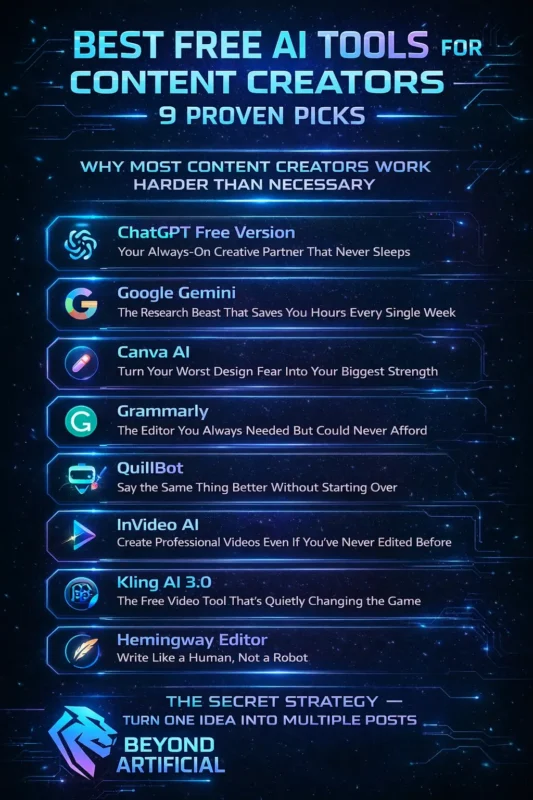
1. ChatGPT Free Version: Your Always-On Creative Partner That Never Sleeps.
Imagine having a creative partner who never gets tired, never judges your ideas, and is always there for you, even at 2 am when your deadline is close and your brain feels empty. That’s what ChatGPT’s free version feels like when you start using it properly. It does not just write for you. It helps you think. You can use it to get blog ideas, make outlines, rewrite unclear sentences, create social media captions, and even plan a whole month of content in one chat, all for free.
The free version now uses GPT-5.2, so you still get a very powerful AI without paying anything. Since there is a daily limit, try to use it wisely. Be clear with your requests. Instead of saying “write a blog intro,” say something like: “write a short emotional blog intro for beginner creators who feel overwhelmed.” You will get much better results.
Start your ChatGPT session with your hardest task first, like ideas or hooks, so you use your best energy on what matters most. You can also create templates once, save them, and reuse them every week. This can save you a lot of time.
ChatGPT is not just a free tool; it feels like a helpful teammate that makes your content work easier and faster.
2. Google Gemini: The Research Beast That Saves You Hours Every Single Week.
If you have ever spent hours researching one blog topic, switching tabs, reading different articles, getting confused, and losing your notes, then Google Gemini’s free version is made to fix exactly that problem. Unlike some other AI tools, Gemini can connect to Google Search. This means it can give you fresh and up-to-date information in seconds, which makes it very useful for content creators in 2026.
It also works well with Google Docs and Gmail, so you can research, write, and organize your content in the same place you already use every day. There is no hard setup or new system to learn. When using Gemini, try asking it to both explain a topic and give you three content ideas at the same time. This saves a lot of time and effort.
You can also use its Deep Research feature to build simple content plans before you start writing. It organizes your information in a clear and useful way. Another smart use is to ask Gemini for trending questions people are searching on Google. You can turn these questions into blog titles or video ideas to improve your SEO.
Google Gemini does not just save time; it gives you more time back so you can focus on creating better content instead of struggling with research.
If you want to understand how Gemini compares with other Google AI features, read about Google Gemini vs Google AI Mode
3. Canva AI: Turn Your Worst Design Fear Into Your Biggest Strength
If the word design makes you nervous because you think you have no creative skills and your graphics always look bad, Canva AI’s free version is made for people like you. Canva AI does not need you to be a designer. You just type what you want, and it creates a professional-looking design in seconds. This can help you feel more confident about your posts.
It also has over 250,000 free templates, a Magic Design feature that builds full layouts from one simple prompt, and a Magic Write tool that helps you write text inside your design. A good way to start is to use Magic Design first. For example, type: “a bold YouTube thumbnail for beginner fitness tips.” This saves a lot of time because AI builds the base for you.
You should also set up your Brand Kit early with your colors and fonts. This helps your content look consistent, which builds trust with your audience. You can also use tools like background remover and Magic Eraser to quickly clean images instead of learning complex software.
When you post your first design, and someone says it looks professional, you will realize you were never bad at design; you just needed better tools.
4. Grammarly: The Editor You Always Needed But Could Never Afford.
There is nothing worse than working hard on your content, publishing it with excitement, and then someone points out a spelling mistake that makes it look unprofessional. Grammarly’s free version is made to help you avoid that situation. Grammarly works in the background inside Google Docs, browsers, WordPress, and many other places where you write. It checks your grammar, improves clarity, and fixes awkward sentences in real time before anyone sees your content.
For people who are not confident in English writing, Grammarly helps remove fear. It makes your writing cleaner and gives you more confidence in your words. A good first step is to install the free Grammarly Chrome extension. It works automatically while you write, so you do not need to copy and paste anything.
Before publishing anything, like a blog post, caption, email, or YouTube description, run it through Grammarly. It helps you check grammar and also the tone of your writing. Pay attention to clarity suggestions as well, not just grammar. Clear writing helps readers understand your message better and stay longer on your content.
With Grammarly, you reduce mistakes and improve quality easily. It’s a simple tool that makes your writing feel more professional and trustworthy.
5. QuillBot: Say the Same Thing Better Without Starting Over.
You know that feeling when you write a sentence, read it many times, and still feel it doesn’t sound right, but you can not think of better words. QuillBot’s free version helps you in that exact situation. QuillBot does not create content from scratch. It takes your writing and rewrites it in a clearer, smoother, and more natural way. This helps you improve your work without starting over.
It can also summarize long articles into short points in seconds, which makes research much easier and less stressful. A good habit is to use QuillBot’s “Fluency” mode before publishing anything. It helps fix sentences that sound awkward or unnatural, which can make readers leave your page. You can also use QuillBot on longer blog posts. Rewrite sections to make them shorter and simpler. This also helps you turn one post into social media captions or short updates.
If you use AI tools like ChatGPT, you can also run the text through QuillBot afterward. This helps make the writing sound more natural and less robotic. QuillBot does not just improve your writing; it helps you feel more confident because your content finally sounds clean and clear.
For more tools that improve your writing quality, check Best Paraphrasing Tools for Content Creation.
6. InVideo AI: Create Professional Videos Even If You’ve Never Edited Before.
If you have been avoiding video content for a long time because the camera scares you, editing feels hard, and the whole process seems too complicated, InVideo AI’s free version can make things much easier for you. InVideo AI lets you type a simple idea in text, and it turns it into a complete video. It adds visuals, voiceover, captions, music, and transitions, all without you needing a camera or editing skills.
The free plan also gives you thousands of templates, AI script writing, and text-to-speech voices. This means you can turn an idea into a full video very quickly. When writing your prompt, always include details like your audience, tone, and purpose. For example: “a 2-minute motivational video for beginner creators who feel overwhelmed, in a friendly and energetic tone.” Better details give better results.
You can also turn your blog posts into videos. Just copy the main points into InVideo and create short videos from them. This is a simple way to reuse your content. Always check the AI script before finishing your video. Change any lines that don’t sound like you, so your content still feels natural and real.
InVideo AI makes video creation simple. Once you see your idea turn into a full video in minutes, you’ll realize video content is not as hard as it used to be.
7. Kling AI 3.0: The Free Video Tool That’s Quietly Changing the Game.
You have probably seen cinematic AI videos on your feed and thought, “There is no way I can make something like that.” Kling AI 3.0’s free version is made to change that belief. Kling AI 3.0 is a tool that turns text or images into videos. You just write a simple prompt, and it creates high-quality, realistic video clips that look like professional film footage. The free plan also gives you daily credits, so you can generate videos without needing a camera, crew, or editing skills.
A smart way to use it is to start with images first. Create a few images, choose the best one, and then turn only that into a video. This helps you save credits and avoid wasting attempts. When writing prompts, use a simple structure: describe the subject, what is happening, the camera movement, and the mood. For example: “a young woman walking in a neon city, slow zoom in, cinematic and dramatic.” Clear prompts give better results.
You can also use Kling clips as background visuals, intro shots, or short b-roll in your social media videos. Even a few seconds can make your content look more professional. Kling AI makes it possible for anyone to create cinematic videos. When people ask what camera you used, you’ll know it was just a simple prompt.
8. Hemingway Editor: Write Like a Human, Not a Robot.
Most people do not stop reading your content because the topic is boring. They stop because the sentences are too long, too heavy, and hard to follow. They leave quietly, and this can hurt your rankings. Hemingway Editor’s free version helps fix this problem. It highlights sentences that are too complex, words that are passive, and extra adverbs that make your writing weaker. It does this in real time and for free, with no signup needed.
It also gives your writing a readability score. For content creators, a good level is Grade 6 to 8. This does not mean your audience is not smart; it just means simple writing is easier to read, keeps attention longer, and performs better on Google. Use Hemingway as the last step before publishing. Paste your final draft, then fix the red-highlighted sentences first because they are the hardest to read. After that, fix the yellow ones. This will instantly make your writing clearer.
If you use ChatGPT or any AI tool, always check the text in Hemingway afterward. AI writing often sounds too formal or robotic, and Hemingway helps make it more natural. Also, pay attention to blue highlights, which show passive voice. Too much passive voice can make writing feel less clear and less human. Good writing does not need to be fancy. It just needs to be clear, simple, and easy to read. Hemingway helps you achieve that every time.
The Secret Strategy: Turn One Idea Into Multiple Posts
Most creators do not struggle because they lack ideas. They struggle because they keep trying to find new ideas every day, while ignoring the content they already have. Here’s the truth: one good idea can be used many times. A single blog post or video can become Instagram captions, YouTube Shorts scripts, a LinkedIn post, a newsletter, and even a Pinterest post, without needing anything new.
Your goal is not to create more. Your goal is to use what you already have in smarter ways. Free AI tools can help you do this easily. Start by taking your best blog post or video and paste it into ChatGPT. Then use a simple prompt like: “Turn this into 5 short social media captions with different tones.” This instantly multiplies your content. You can also use QuillBot to rewrite the same message in a shorter way. This is useful for platforms like Twitter or Instagram, where short content works better.
Try posting your repurposed content on a smaller platform first. See what people like most, then share the best version on bigger platforms. Once you start seeing one piece of content as many different posts, you will never feel stuck again.
FREQUENTLY ASKED QUESTIONS (FAQs)
Which AI tool is 100% free?
Many powerful AI tools are completely free to use with no credit card, no trial, and no expiry. These include ChatGPT, Google Gemini, Canva AI, Grammarly, QuillBot, and Hemingway Editor. They are not limited or useless free versions; they offer real features that can improve your content creation. If you use just one of these tools regularly for a week, you will see that creating better content was always possible for free; you just needed the right tools.
Which free AI is best for content creation?
If you could only choose one free AI tool, ChatGPT is the best starting point because it helps with writing, ideas, outlines, and content planning all in one place. But no single tool does everything perfectly. That’s why the best setup is using a few tools together: ChatGPT for writing, Google Gemini for research, Canva AI for design, and Grammarly for editing. Instead of looking for one perfect tool, build a simple free toolkit. Together, these tools work like a full content team without costing anything.
Is Gemini AI better than ChatGPT?
Neither Gemini nor ChatGPT is always better; they are just good at different things. Gemini is best for research, up-to-date information, and working with Google tools like Docs and Gmail. It helps you find facts quickly. ChatGPT is better for writing, ideas, blog posts, and turning content into different formats. The best approach is to use both together: use Gemini for research and ChatGPT for writing. This helps you create better content in less time.
Which AI is best for content writers?
For content writers, ChatGPT is the best starting tool because it helps with ideas, outlines, drafts, and rewriting. Use it with Grammarly for grammar, QuillBot for better wording, and Hemingway for clear writing. Together, these free tools give you a complete writing system that helps you create professional content easily.
Free AI tools for social media content creation?
If social media content feels hard, like finding ideas, designing posts, writing captions, and making videos, these free AI tools can make it much easier. Canva AI creates ready-to-use designs, ChatGPT writes captions and ideas, InVideo AI and Kling AI turn text into videos, and QuillBot helps you reuse old content in new ways. With these tools, you can plan and create your social media content for many days in just a short time, without stress.
Conclusion:
You started this article feeling stressed, tired, and thinking that good content is only possible for creators with big budgets or teams. But now you know that is not true. Every problem you face, writer’s block, design fear, video anxiety, slow research, and pressure to post every day, has a simple free AI solution.
ChatGPT helps you write and get ideas. Google Gemini makes research fast and easy. Canva AI helps you create designs without skills. Grammarly fixes your writing and makes it clean. QuillBot improves and rewrites your text. InVideo AI and Kling AI help you create videos easily. Hemingway Editor makes your writing simple and clear. And repurposing content helps you turn one idea into many posts.
You do not need to learn everything at once. Just pick one tool that solves your biggest problem and use it every day for a week. That alone can change how you create content. Successful creators are not always the most talented or richest. They are the ones who start using what they already have and take action.
Everything you need is already available to you, for free. Now it’s just about starting.
If you also want to expand into video content, explore the Best Video AI Generator, Powerful Tools for Creators.