
 YouTube Automation
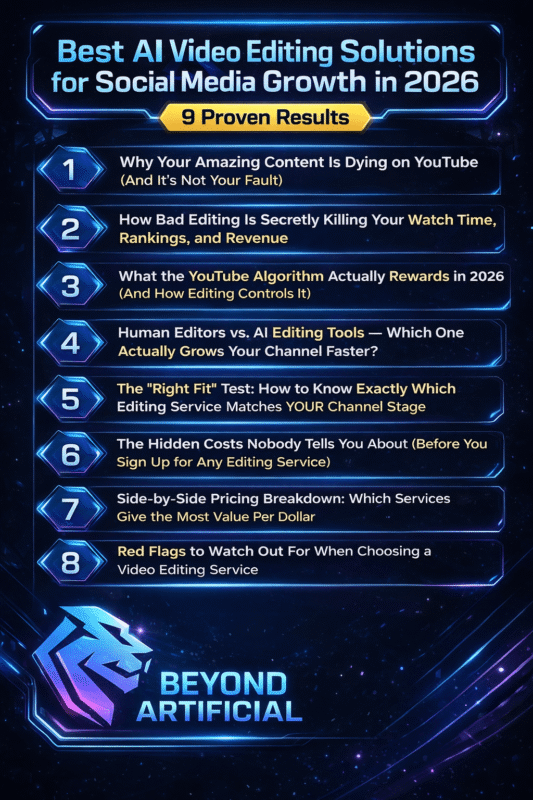
Best AI Video Editing Solutions for Social Media Growth in 2026 – 9 Proven Results (Blog#:78)

You spent hours editing a video… and it barely got views, while someone else’s AI-edited clip went viral. That moment? It is when you realize something isn’t working. Here is the truth: In 2026, the game has changed. The best AI Video Editing Solutions for Social Media Growth are not just saving time; they are helping creators grow faster on TikTok, Reels, and YouTube Shorts.
You do not need expensive gear or a big team anymore. With the right tools, one person can create and post a full week of content in just a few hours. The real problem isn’t your ideas. It is the gap between your raw video and a polished, platform-ready video.
If you are still confused about which tools actually work, check out our detailed guide on the best AI tools for video editing in 2026 to explore the top-performing options.
1. Why Your Amazing Content Is Dying on YouTube (And It is Not Your Fault).
You spend hours filming and editing, hit publish with hope, and wake up to 12 views, most of them your own. That silent pain isn’t because your content is bad. It is because in 2026, the YouTube algorithm judges your video in the first 30 seconds, based on how well it keeps attention. The algorithm does not watch your video; it watches how viewers react. If your pacing is slow, your hook is weak, or your edits feel messy, people leave before your message even starts.
That is why even great ideas fail. Now, YouTube cares more about viewer satisfaction than just watch time. A short, well-edited video that solves a problem can beat a long video that loses attention halfway through. So, the editing you ignore? It is quietly killing your growth. Tip 1: Hook viewers in the first 3 seconds with something strong, a bold line, a surprise, or a visual change. Never start with “Hey guys.”
Tip 2: Check your audience retention in YouTube Studio. Find where people drop off, then re-edit that part to be faster and tighter. Tip 3: Take 3 videos with good topics but low retention. Improve the hook and thumbnail, then check results after 2–3 weeks. You are not failing on YouTube. You are just one smart editing decision away from real growth.
2. How Bad Editing Is Secretly Killing Your Watch Time, Rankings, and Revenue.
Every time someone leaves your video in the first 30 seconds, YouTube notices, and that one exit can hurt your rankings, your revenue, and your growth. Bad editing does not just look unprofessional. It kills your watch time. A viewer who watches 8 minutes is far more valuable than someone who leaves after 20 seconds. So every slow intro, awkward pause, or messy cut is literally costing you money.
YouTube’s algorithm is not about getting more views; it is about keeping viewers satisfied. If people leave your videos early, YouTube stops showing them to new audiences. That is how channels slowly die without realizing it. Tip 1: Go to YouTube Studio and check your audience retention. If people leave before 30%, your intro is too slow; cut it and start faster. Tip 2: Look for drop-offs, replays, and skips in your retention graph. These show exactly what is working and what is not; fix those parts in your next video. Tip 3: Keep your content clean and advertiser-friendly. Better editing + longer watch time = higher earnings.
The truth is simple: Great ideas with bad editing lose every time. If you fix your editing, you fix your growth in 2026. If your videos are not holding attention, here is a deeper breakdown of why people stop watching your videos and how editing plays a major role.”
3. What the YouTube Algorithm Actually Rewards in 2026 (And How Editing Controls It)
Most creators focus on upload schedules, hashtags, and thumbnails, but in 2026, YouTube cares most about one thing: How your editing makes people feel and how long they keep watching. Over 70% of watch time comes from recommendations. That means the algorithm decides if your video gets seen or ignored. And editing controls almost everything the algorithm looks at.
YouTube studies your retention curve. A smooth drop is normal, but a sharp drop within the first 30 seconds signals to YouTube that your hook is weak or misleading. Once that happens, your video stops getting recommended. Tip 1: Do not make videos longer just for length. A tight 6-minute video with high retention beats a slow 15-minute one every time. Tip 2: Cut slow intros. Start fast. Use quick pattern changes and give value early, because every boring second pushes viewers away. Tip 3: Check your retention after 48 hours and again after 7 days. See where people leave or rewatch, and use that data to improve your next video.
The truth is simple: The algorithm is not against you. It rewards good editing. When you focus on the viewer experience rather than just video length, your channel starts to grow.
4. Human Editors vs. AI Editing Tools: Which One Actually Grows Your Channel Faster?
If you have ever stayed up late wondering whether to spend $30 on an AI tool or $200 on a human editor, you are not alone. But here is the truth: In 2026, it is not AI vs human. The real growth comes from using both together. AI tools are powerful. They can edit fast, follow trends, and automate a lot of work. But fully AI-edited videos often feel generic. Clean, but empty. And empty videos do not build loyal audiences.
On the other hand, human editors understand emotion, storytelling, and your unique voice. They create videos that actually make people feel something. And that is what keeps viewers watching. Tip 1: Use AI for speed. Let tools handle captions, silence cuts, and rough edits, then let a human refine the final video for better flow and stronger hooks. Tip 2: Hiring an editor helps you grow faster. You stay consistent, improve quality, and get more time to focus on titles and thumbnails.
Tip 3: The best system is a hybrid. AI handles the technical work. Humans handle strategy, emotion, and quality. So stop thinking it is one or the other. Use AI for speed. Use humans for creativity. That’s how channels actually grow in 2026.
To understand this better, read how video editing affects the YouTube algorithm in 2026 and why editing decisions directly impact your reach.
5. The “Right Fit” Test: How to Know Exactly Which Editing Service Matches YOUR Channel Stage.
Here is something most creators do not realize: Choosing the wrong video editing service can hurt your growth just as much as having no editor at all. If you have ever paid for editing and felt like “this is not my style,” it is not your fault. It’s a mismatch. The best video editing service is not the one that looks the coolest; it is the one that fits your channel, your budget, and your goals.
What works for one creator can completely fail for another. Most people choose the wrong way. They look at fancy edits and price first. But what really matters is this: Does the editor understand your niche, your audience, and your content style? Tip 1: Do a quick “Right Fit Test” before hiring. Ask yourself:
- How many videos do I post monthly?
- What’s my budget per video?
- Do I need simple edits or advanced storytelling?
This alone will eliminate most wrong options. Tip 2: Match the service to your stage. If you are just starting, use a simple, affordable service. As you grow, move to more advanced editors or agencies. Tip 3: Always ask for a test edit. Because the real question isn’t “Are they good?” It’s “Do they understand your content?”
The right editor does not just make your videos look better. They understand your style, keep you consistent, and help your channel grow quietly in the background.
6. The Hidden Costs Nobody Tells You About (Before You Sign Up for Any Editing Service).
You sign up for a video editing service, feeling excited, finally, someone will handle your edits. But a few weeks later, the bill is much higher than expected… and it starts to feel like a mistake. Here is the truth: The biggest trap is the word “unlimited.” There is no real “unlimited” in quality editing. It often means slow delivery, too many revisions, and generic edits that do not match your style.
And that’s not all. Many services hide extra costs, like:
- scriptwriting fees
- extra revision charges
- fast delivery (rush) fees
So your simple plan quietly becomes expensive. Tip 1: Ask these 3 questions before you pay: How many revisions are included?. Are thumbnails, captions, and Shorts included? What’s the cost for faster delivery? This alone can save you from surprise charges.
Tip 2: Think about your time, too. If you spend hours managing edits and giving feedback, you’re losing time you could use to grow your channel. A good service should save your time, not add more stress. Tip 3: Always start with a small trial. Test quality, communication, and speed before committing to a monthly plan. Because cheap and expensive services are not the same, and it’s better to test first than regret later.
The real cost of a bad editing service isn’t just money. It affects your consistency, your audience trust, and your growth. So ask smart questions before you hand over your content.
7. Side-by-Side Pricing Breakdown: Which Services Give the Most Value Per Dollar?
Let’s be honest, looking at editing prices from $80 to $800 per video is confusing and stressful, especially when your budget is tight. Here is the truth most people do not explain: A $150 edit and a $500 edit are not the same. A cheaper edit gives you basic cuts. A higher-end editor gives you better storytelling, stronger hooks, and higher retention.
And that difference directly affects your views, rankings, and earnings. Also, price is not just the number you see. Many cheaper services charge extra for things like thumbnails and captions, short versions, and extra revisions. Better services often include everything in one fixed price. Tip 1: Calculate your real cost per video. Add everything: editing, revisions, thumbnails, captions. Sometimes a higher plan is actually cheaper in the long run.
Tip 2: Track your results. If you are paying more but your retention and views are not improving, the problem is the editor, not the price. Tip 3: If you post 4+ videos a month, go for a monthly plan. It’s usually cheaper, more stable, and easier to manage. The key idea is simple: Do not choose the cheapest option. Choose the one that gives you the best return for your money, because that is what actually grows your channel.
8. Red Flags to Watch Out For When Choosing a Video Editing Service.
Nobody tells you the red flags until it’s too late, you have paid, waited weeks, and the edit still does not match your vision. That “perfect” demo reel you saw? It was probably made for someone else’s style, not yours. Here’s the truth: If many editing services look the same, offer the same promises, and show similar testimonials, you are likely dealing with a content factory. And in those systems, your unique voice gets lost.
Other big warning signs: unclear pricing, slow replies before you even pay, and inconsistent portfolio styles. If they are confused now, they’ll be worse later. Tip 1: Test their communication first. Send a message and see how fast they reply. Slow replies now = slow edits and revisions later. Tip 2: Avoid template-style editing. If every video looks the same, your content loses uniqueness and can even hurt your growth.
Tip 3: Do not wait if things feel wrong. Slow delivery, repeated ideas, poor quality, or hidden charges? Switch early. The longer you stay, the more you lose. The right editor feels like a partner, not just someone doing a job. If it feels like a transaction, trust your gut.
9. Final Verdict: The Best Video Editing Service for YOUR Specific YouTube Goal in 2026.
After everything, the algorithm, pricing, red flags, AI vs human, here is the simple truth: There is no “best” video editing service for everyone. The best one for you is the one that fits: your current channel stage, your content style, your upload frequency, and your growth goal. That is it. Creators who take a few minutes to understand their needs always grow faster than those who blindly copy others.
A good editing service should clearly show: real portfolio work, fast delivery, transparent pricing, and real client results. If it does not, it is not the right fit. Tip 1: Match your service to your goal. If you are starting, choose affordable + fast editing. If you are scaling, invest in higher-quality, strategic editing. Tip 2: Stick with one service for at least 90 days. Do not keep switching; give it time and track results.
Tip 3: Start with a trial. Test the service, then check your retention and growth after 30 days before committing. The goal is simple: Better editing = better retention = more growth. You have already done the research. Now it is time to take action and choose the right editing partner.
Ready to apply everything? Follow this complete AI video editing workflow step by step 2026 guide to start creating faster and smarter.”
FREQUENTLY ASKED QUESTIONS (FAQs)
What is the best AI video editor for social media?
Spending hours editing while others go viral can feel frustrating. Simple answer: CapCut is the best free AI video editor for social media in 2026. It offers auto-captions, templates, smart trimming, and ready-to-post formats for TikTok, Reels, and Shorts, all without any cost or editing skills. In short, it turns raw videos into polished content in minutes.
Is Canva better than CapCut?
CapCut is best for video editing, quick cuts, auto-captions, and ready-to-post videos for TikTok, Reels, and Shorts. Canva is best for design, graphics, animations, and branded content. Simple rule: CapCut = editing or Canva = design.
What are the big 4 of social media tools?
Most creators do not grow because they are missing the right tools. You only need four basics: a video editor like CapCut, a design tool like Canva, a scheduler like Buffer or Later, and an AI writer like ChatGPT or Claude. Together, these tools help you create, design, schedule, and grow your content easily, even for free.
What is the 3:2:1 rule in video editing?
Many creators lose their footage because they do not have a backup system. Use the 3:2:1 Rule: Keep 3 copies of your files, on 2 devices, with 1 stored in the cloud. Simple idea: Follow this from day one, and you will never lose your videos again.
What is the golden rule of video editing?
Most creators focus on effects, but that’s not what makes videos perform. Golden Rule of Editing: If it does not serve the story, cut it out. Simple idea: Every second should keep the viewer interested, or it hurts your video. Follow this, and your videos become more engaging and easier to watch till the end.
Best AI video editing tools for social media growth, free
You are posting regularly, spending hours editing… but your social media still is not growing the way you expected. Meanwhile, you see others going viral with clean, polished videos, and it feels frustrating. That feeling is completely normal. You have the ideas and the passion, but the tools either feel too expensive, too complicated, or just out of reach.
But here’s the shift you need to understand: You do not need expensive software or advanced skills anymore. In 2026, free AI video editing tools have changed everything. They allow you to create high-quality, engaging videos in minutes, not hours or days. The creators who are growing fast right now are not working harder than you. They are simply using AI tools that do most of the heavy work for them.
This guide will show you the exact free AI tools that are helping creators grow on TikTok, Instagram Reels, and YouTube Shorts, so you can finally move from feeling stuck to actually seeing results. Here’s what these tools can do for you:
- Automatically add captions, trim clips, and apply viral-ready templates: all with AI
- Turn one long video into 10 or more short clips with just a few clicks
- Help you grow across TikTok, Reels, and YouTube Shorts without hiring an editor
- Offer real free plans: no watermark, no credit card required
- Show you the same tools top creators are already using in 2026, based on real performance