
 YouTube Automation
Best Video Editing Services for YouTube Growth in 2026 – 9 Proven Results (Blog#: 77)

You are losing subscribers right now, not because your ideas are bad, but because your videos do not look polished enough. The Best AI Video Editing Services for YouTube Growth in 2026 are changing everything. Creators who use them early are growing fast, while others stay stuck editing for hours every day.
These tools do not just cut videos; they turn raw clips into high-quality content that the YouTube algorithm actually pushes. So instead of wasting time editing, you can focus on creating… while AI does the hard work for you.
Inside this guide, you will find 9 proven results that can take your channel from unnoticed to unstoppable.
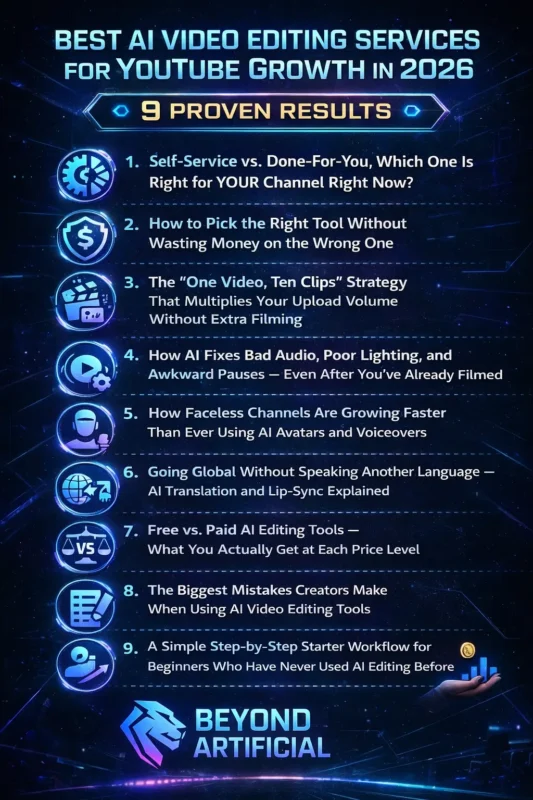
If you are still unsure which tools actually work, you can explore our complete guide on the best AI tools for video editing in 2026 to find the right fit for your workflow.
Now come to the point:
1. Self-Service vs. Done-For-You, Which One Is Right for YOUR Channel Right Now?
If you are confused about whether to edit your videos yourself with AI tools or pay someone to do it, do not worry, you are not alone. And honestly, the decision is simpler than it feels. If you are just starting or on a tight budget, use AI tools like CapCut, Vizard, or Descript. They are cheap (even free) and give you full control while you learn your style. If your channel is already making money and you are posting regularly, then services like Tasty Edits or Increditors can save you time and scale faster.
Tip 1: Ask yourself one simple question: Am I losing views because my editing is bad… or because I am not uploading enough?. If it is consistent, AI tools fix that instantly. Tip 2: Try a free AI tool for 2 weeks. Watch your retention and CTR; if they improve, keep going. Tip 3: If you hire a service, do not give full control right away.
Share your style, your best videos, and test with one video first.
The smartest move in 2026: Start with AI tools → grow your channel → then outsource when it actually makes sense.
2. How to Pick the Right Tool Without Wasting Money on the Wrong One.
Let’s be real: most creators have already wasted money on AI tools that looked amazing but did not help at all. And honestly, that is not your fault. No one teaches you how to choose the right one. Here is the simple rule for 2026: Pick a tool based on your content type first, and your budget second. If a tool is made for podcasts, it wo not work well for gaming or travel videos, and that is where most people lose money.
Before you spend anything, figure out your biggest problem:
- Slow editing
- Bad captions
- No Shorts
- Poor audio
- Inconsistent uploads
The right tool should fix one main problem fast, not try to do everything. Tip 1: Do not pay for multiple tools at once. Write down what each tool does and remove the ones that overlap. This alone can save you $50–$150/month. Tip 2: Test with your own video. Always use your real content during the free trial, not demo clips. That is the only way to know if it truly works for you. Tip 3: Stop switching tools every few weeks. Pick one tool, use it for 30 days, and track your results before deciding to change.
The creators who grow fastest in 2026 are not using the most tools. They are using the right tool, mastering it, and staying consistent every week. To truly understand how these tools save time, check out our guide on how to automate video editing with AI, where we break down the exact process step by step.”
3. The “One Video, Ten Clips” Strategy That Multiplies Your Upload Volume Without Extra Filming.
Imagine this: you record one video… and turn it into 10 uploads, no extra filming, no stress, no burnout. That is the “One Video, Ten Clips” strategy. And if you are not using it, you are leaving a lot of views behind. Every long video you make already has 8–12 short clips inside it, tips, strong opinions, emotional moments, or quick facts. Tools like Opus Clip, Vizard, and Quso AI can find and cut these clips for you in minutes.
Even your old videos are useful. That content sitting in your YouTube Studio can become fresh clips today. Tip 1: Speak in short, clear points. Make your videos easy to cut into 45–60 second clips. Tip 2: Do not post the same clip everywhere. Change the hook for YouTube Shorts, TikTok, and Reels so it fits each platform. Tip 3: Post one clip per day. Spread them over a week and see what performs best, then make more of that style.
Smart creators don’t “post and hope.” They turn one video into a content machine that keeps growing their channel.
4. How AI Fixes Bad Audio, Poor Lighting, and Awkward Pauses, Even After You Have Already Filmed.
You filmed your video… felt proud… then watched it back and noticed bad audio, dark lighting, and too many “um” moments. That feeling? Every creator goes through it.
But here is the good news: in 2026, none of that is a big problem anymore. AI tools can fix almost everything after filming. Tools like Descript, VEED.IO, CapCut, and Opus Clip can:
- Clean bad audio
- Remove filler words
- Fix lighting
- Improve eye contact
And this matters a lot, bad audio alone makes almost 50% of viewers leave instantly. Tip 1: Fix audio first. Clean sound instantly makes your video feel more professional. Tip 2: Do not overdo noise removal. Keep it around 60–70% so your voice still sounds natural. Tip 3: Remove “um” and pause carefully. Let AI do it, but always review to avoid awkward cuts. The best part? You do not need perfect gear anymore.
Just record your video…and let AI fix the rest. Repurposing works even better when combined with strong retention editing. Here is how retention editing doubles your views using simple but powerful techniques.”
5. How Faceless Channels Are Growing Faster Than Ever Using AI Avatars and Voiceovers.
If you are not starting or growing your YouTube channel because you are afraid of being on camera, you are not alone. And here’s the best part: you do not even need to show your face anymore. In 2026, faceless channels are growing fast using AI avatars and voiceovers. Tools like HeyGen, Synthesia, and ElevenLabs can create videos that look and sound very real. Many creators are earning without ever turning on a camera.
The key idea is simple: Educational content → works best with voiceover + visuals. Storytelling/personal content → works better with AI avatars. Tip 1: Do not use default avatars. Create your own unique avatar so your channel stands out. Tip 2: Keep one consistent voice. Using the same voice builds trust and recognition. Tip 3: Be transparent
Add a simple note in your description if you use AI-generated content.
The biggest benefit is that you are free from camera fear, expensive gear, and perfect setups. Now you can focus on what really matters, creating content and growing your channel.
6. Going Global Without Speaking Another Language: AI Translation and Lip-Sync Explained.
Right now, if you only post in English, you are missing billions of viewers who never see your content. And the crazy part? You don’t need to film anything new to reach them. AI can turn your one video into multiple languages. Tools like HeyGen, Rask AI, and ElevenLabs can:
- Translate your video
- Clone your voice
- Sync your lips to match the new language
So it feels like you’re speaking directly to every audience. Important difference:
- Subtitles = text only (most people ignore)
- Dubbing = new voice
- Lip-sync dubbing = best experience (looks natural)
Tip 1: Start with one language. Check your YouTube Analytics → see which countries already watch you → translate for them first. Tip 2: Always review translations
Fix awkward sentences so they sound natural, not robotic. Tip 3: Check YouTube auto-dubbing. Some channels now get free AI dubbing inside YouTube Studio. Smart creators do not just post videos; they turn one video into a global content system that works in every language.
7. Free vs. Paid AI Editing Tools: What You Actually Get at Each Price Level.
If you have ever looked at a pricing page and felt confused, you are not alone. Most creators either pay too early… or stay free and get stuck later. Here is the simple truth for 2026: Free tools are powerful enough to grow a real YouTube channel. For example:
- CapCut → free 1080p, no watermark
- DaVinci Resolve → pro-level editing & color
- Veo 3 → AI B-roll for Shorts
The real difference is not quality, it is limits:
- Fewer exports
- Limited AI credits
- Slower workflow
- Possible watermarks
Golden Rule: Stay on free… until limits start hurting your consistency. If you can not upload because of limits → that is when you upgrade. Tip 1: Avoid monthly plans
Annual plans are usually 30–40% cheaper. Tip 2: Check file access. Make sure you can download your videos even after cancelling. Tip 3: Best free starter stack:
- CapCut → editing
- DaVinci Resolve → color
- ElevenLabs → voiceovers
- Opus Clip → repurposing (trial)
Smart creators do not spend first. They start free, grow, then pay only when it actually saves time or increases results.
8. The Biggest Mistakes Creators Make When Using AI Video Editing Tools.
Let’s be honest: AI tools feel like a superpower at first. But here is the truth: if you rely on them too much, your videos start to feel generic and forgettable. AI can do a lot… but it can not replace your personality. What usually goes wrong:
- Too many AI effects → messy, unprofessional videos
- Ignoring audio → viewers leave instantly
- “Set it and forget it” → small mistakes ruin quality
AI gets you 90–95% there, but that last 5% (your human touch) is what makes people stay, subscribe, and trust you. Tip 1: Add your personality. Include your opinions, humor, and style; that is what people connect with. Tip 2: Always review before posting. Check for caption errors, bad cuts, or audio issues. Tip 3: Do not ignore SEO
Use strong titles, descriptions, and captions so your video can actually rank.
Remember that AI is your helper, not your replacement. The creators who win in 2026 use AI for speed… but still show up with their own voice and creativity.
9. A Simple Step-by-Step Starter Workflow for Beginners Who Have Never Used AI Editing Before.
If AI video tools are making your head spin right now, pause for a second. You’re not behind, and you’re definitely not the only one feeling this way. It just looks complicated from the outside. In reality, it is pretty simple. You are basically doing three things: You decide what you want to make…You describe it in a few words…And the AI helps you turn it into a video. That’s it. No fancy setup, no big learning curve.
And honestly, the best part? You do not have to do everything yourself anymore. The AI handles the boring, heavy stuff, cutting clips, adding music, and subtitles, so you can just focus on your idea. Here is how to make it even easier:
Firstly, know what you are making. Before you start, just ask yourself: Is this a short clip, a tutorial, or something else? That one decision makes everything clearer. Second, keep your prompt simple. Do not overthink it. Just describe what you see in your head. Like: A person talking in a calm room with soft lighting. Simple works better than complicated. Third, always watch it once before posting. AI gets you almost all the way there… but that last little check? That is what makes it feel right.
And here is the truth most people don’t say: You do not need to be perfect to start. Your first video would not be amazing, and that is okay. You will get better just by doing it. So do not wait until you feel “ready.”Just start… and let yourself figure it out along the way.
10. Your Best Next Move Based on Your Channel Size and Budget.
If you have ever looked at a bunch of AI tools and felt stuck, not knowing which one to pick, that is completely normal. Everyone goes through this. Here is the truth: There is no “best” tool for everyone. The right tool depends on your content, your goal, and your budget. So stop comparing yourself to big creators using expensive tools. You do not need that right now. Think of your channel like a simple system:
- One tool for editing
- One for voice or visuals
- Maybe one for growth (like clips or SEO)
That is enough to start. Tip 1: Keep your budget small. Start with $20–$50/month max. Use free versions first and only upgrade when needed. Tip 2: Pick tools based on your content. Faceless channel → use voice + text-to-video tools. On-camera channel → use editing + SEO tools. Tip 3: Repurpose your content (very important). When you grow, use tools like Opus Clip to turn one video into multiple short clips.
Remember: AI tools are just helpers. The real growth comes from your ideas, consistency, and connection with your audience. If you are ready to take action, follow this complete AI video editing workflow step by step 2026 guide to start creating faster today.”
FREQUENTLY ASKED QUESTIONS (FAQs)
Will YouTube allow AI content in 2026?
Yes, YouTube allows AI content in 2026, but only if it is original and valuable. YouTube is not banning AI; it’s banning low-quality and misleading content. Simple rule: Use AI as a tool, but keep your own ideas, script, and personality in every video. To stay safe: Add human creativity to your content. Use the “Modified or Synthetic” label when needed. Avoid mass-producing generic videos. If your content feels real and helpful, YouTube will support it, not punish it.
Is video editing still in demand in 2026?
Yes: video editing is more in demand than ever in 2026. AI video editing is now a top freelance skill, with editors earning $50–$300+ per hour. AI is not replacing editors; it’s helping them work faster and earn more. Simple takeaway: If you combine video editing with AI tools, you can tap into a high-demand, high-income skill.
Which AI is best for creating YouTube videos?
There is no single “best” AI tool for everyone; it depends on your needs. Simple breakdown: Veo 3 → best for cinematic, high-quality videos. CapCut → best all-in-one tool for beginners. Opus Clip / InVideo → best for Shorts & social content. Descript → best for talking-head videos. Key idea: The best tool is the one that fits your content — not the most expensive one.
Which AI is better for video editing?
There is no single “best” tool; it depends on your content. Simple guide: Descript → best for talking-head & podcasts. CapCut → best for Shorts & social videos. Adobe Premiere Pro → best for professional editing. Vizard → best for turning long videos into short clips. Key takeaway: Pick one tool that fits your content, start with free, and focus on creating. AI can save you 60–80% editing time.
Best AI Video Editing Services for Beginners in 2026
You had a great idea… You hit record… You felt excited. And then editing started, and everything just felt heavy, confusing, and honestly… a bit frustrating. If you have ever sat there staring at the timeline thinking, Why is this so hard?. You are not alone. Seriously. Every beginner feels this at some point. The truth is, video editing used to be complicated. Expensive software, too many buttons, hours just to fix one small thing, it made a lot of people give up before they even got started.
But things have changed now. In 2026, free AI video tools have made this whole process so much easier. You do not need to be an expert anymore. You do not need expensive software either. You can literally take your raw video… and let AI handle the messy parts, cutting, captions, cleaning things up, while you focus on your idea. And honestly, that’s the part that matters most.
- It does not matter if right now you feel like:
- “I do not have experience.”
- “I do not have money.”
- “I am not confident yet.”
You can still start. That’s the beauty of it. Without the right tools, this is what usually happens: You spend hours editing one video and still feel it’s not good enough. You pay for software that just confuses you more. Your videos don’t look the way you imagined. You see others growing and wonder what you’re doing wrong. You struggle with things like audio, captions, and formats. But once you start using the right tools… It stops feeling like a struggle. It starts feeling possible.