
 YouTube Automation
How to Edit a TikTok Video After Posting Using AI Tools – 9 Proven Tips (Blog#: 80)

You post your TikTok video… and everything seems fine, until you notice a mistake you can not ignore. Now you are stuck thinking: can you edit TikTok videos after posting, or is it too late? The truth is: you can not fully edit a TikTok video once it’s live. But that’s not the full story.
Because most creators do not realize there are still smart ways to fix, improve, and even recover a video without losing all their views, and this is exactly where AI tools change the game. Instead of deleting your video and starting from zero, you can use these methods to protect your content, save your reach, and keep your growth moving forward.
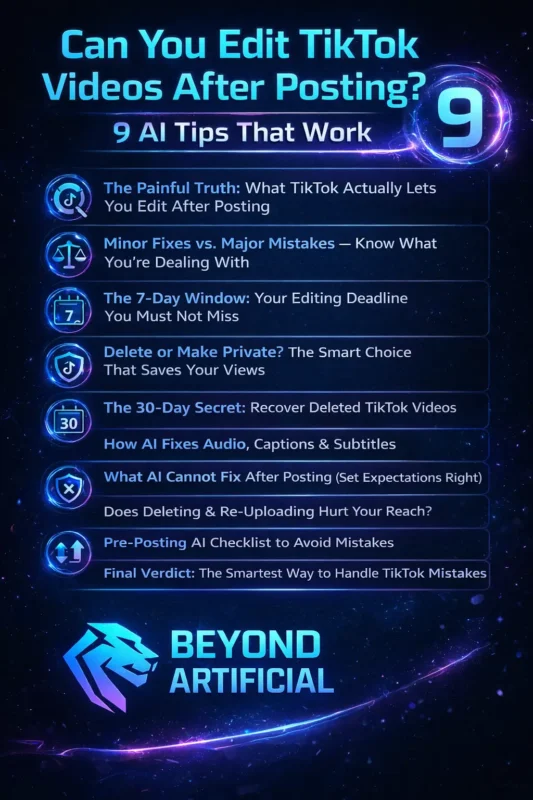
In this guide, you will discover what actually works in 2026, plus 9 AI tips that can turn a “mistake” into a second chance.
If you are unsure which tools can actually help, check out our guide on the best AI tools for video editing in 2026 to see what works right now.
1. The Painful Truth: What TikTok Actually Lets You Edit After Posting
Here is the simple truth: once your TikTok video is posted, you can not change the actual video. You cannot trim clips, fix the audio, or edit the footage, and that can feel frustrating when you notice a mistake after uploading. But it is not completely over. TikTok still gives you a small chance to fix things. For up to 7 days, you can edit your caption, change hashtags, and update the video cover, and these small changes can still improve your results.
You also have the option to hide your video by setting it to “Only Me.” This keeps your video safe while you decide what to do next, without deleting it. A good habit is to act quickly. As soon as you notice a mistake, open your video, tap the three dots, and select “Edit Post.” This takes only a few seconds and can fix small issues without affecting your views.
If your edit gets rejected, don’t change everything at once. Try making one small change at a time, as TikTok often blocks multiple edits together. You can also use this time to improve your hashtags. Updating them with better or trending ones can help your video reach more people, even after posting. So while TikTok only lets you fix small things directly, it still gives you a chance to improve your video, and for bigger fixes, there are smarter methods we’ll cover next.
2. Minor Fixes vs. Major Mistakes: Know What You’re Dealing With.
Before you do anything, take a moment and do not panic, because the biggest mistake is not the typo or wrong clip, it’s reacting too quickly and making the wrong decision. Not every mistake needs fixing. A small issue, like a minor caption typo that doesn’t change the meaning, usually is not a big deal, especially if your video is already getting views. Most people won’t even notice it.
But some mistakes are serious. Things like wrong on-screen text, bad audio, or using the wrong content can affect your video’s performance and credibility. The decision is simple: If it’s a caption or hashtag issue → use “Edit Post”. If the video or audio itself is wrong → save it, delete it, and upload a fixed version. Just remember, when you delete and re-upload, everything resets: views, likes, and comments all go back to zero.
If the mistake is small and your video is already performing, you can even turn it into something positive. Reply in the comments with a simple, honest message, it often builds more connection than a perfect video. If you decide to re-upload, make a small change like trimming a second or adjusting colors. This helps avoid your video being treated as duplicate content.
Before deleting anything, ask yourself one question: “Is this mistake really affecting viewers, or am I just overthinking it?” Most videos take time to grow, so deleting too early can stop that growth completely. The creators who stay calm and make smart decisions always do better than those who panic, so understand the problem first, then act with clarity.
If your videos often feel off, here is a deeper guide on why your videos look unprofessional and how small mistakes impact your content.
3. The 7-Day Window: Your Editing Deadline You Must Not Miss.
Imagine this: it is Day 8 after posting your TikTok video, you finally notice a mistake, you go to fix it… and the edit option is gone. That’s because TikTok only gives you 7 days to edit your caption, hashtags, and cover. After that, everything is locked, and you can not change it anymore. This is why many creators feel stuck, not because the mistake was big, but because they didn’t know this rule.
But here is the smart way to look at it: those 7 days are not just for fixing mistakes, they are a chance to improve your video. You can make small edits during those days to help your video perform better. For example:
- Update hashtags after a couple of days
- Improve your caption with better keywords
- Change the cover to attract more clicks
Instead of editing once and forgetting, think of it as a 7-day optimization window. One important tip: do not rush to edit right after posting. The first few hours are important for your video’s reach, so let it perform naturally before making changes. Also, set a reminder for Day 6. This way, you don’t miss your last chance to make improvements before everything gets locked.
You can even use Day 3 or Day 4 to update hashtags based on new trends, which can help your video reach more people even after it’s already live. Simple idea: The 7-day window is not just a safety feature; it is a powerful opportunity. Creators who use it wisely often get better results than those who ignore it.
4. Delete or Make Private? The Smart Choice That Saves Your Views.
You are about to hit the delete button… your heart is racing… and it feels like the fastest way to fix the problem. But here is the truth: deleting your video can actually hurt your account. TikTok may reduce your reach, not just for that video, but for your next few posts too. A smarter option is to make the video private instead of deleting it.
When you set a video to “Only Me”:
- It disappears from public view
- Your data stays safe
- You get time to fix the issue without rushing
You should only delete a video if the mistake is serious, like wrong information, copyright issues, or a video that has no engagement at all. Simple rule:
Low views won’t hurt your account… but deleting videos can. As soon as you notice a problem, go to the three dots, change privacy to “Only Me,” and give yourself time to think. It takes a few seconds but saves you from making a rushed decision.
If you fix the issue and make the video public again, it can even get new views from a fresh audience. Also, do not panic if your video is not performing in the first few hours. TikTok often pushes videos after 48–72 hours, so deleting too early can stop your growth before it even starts. In simple words: Use the private option as a pause button… and keep the delete button as your last option.
5. The 30-Day Secret: Recover Deleted TikTok Videos.
If you just deleted a TikTok video and instantly regretted it, do not panic. Take a breath. TikTok actually keeps deleted videos for 30 days in a “Recently Deleted” folder. Most creators don’t even know this exists. The best part? If you restore your video from there, it comes back exactly the same, with all your views, likes, and comments still there. You don’t lose your progress.
But you have to act quickly. After 30 days, the video is permanently deleted and cannot be recovered. Also, this only works for posted videos; if you delete a draft, it’s gone instantly. To recover your video: Go to Profile → Menu → Settings & Privacy → Activity Center → Recently Deleted. If the 30 days have already passed, you can try requesting your account data, but you need to act fast because the download link only stays available for a few days.
Another option is to check if someone made a Duet or Stitch with your video; your content might still exist on their account. Simple idea: You have a 30-day safety window, use it before it’s too late.
6. How AI Fixes Audio, Captions & Subtitles.
We’ve all experienced this: you put real effort into a video, but the audio sounds unclear, there’s background noise, and the captions are missing or wrong. It can feel disappointing after all that work. But things are much easier now. AI tools can clean your audio, remove noise, and generate subtitles automatically. What used to take hours can now be done in just a few minutes, and the results are very close to professional quality.
To get the best results, try to record in a quiet place. The cleaner your original audio is, the better the AI will perform. After AI generates your captions, take a moment to review them. Fix any names, brand terms, or small mistakes. This quick step makes your video look much more polished. It’s also better to use closed captions instead of simple subtitles, because they include sounds like music or effects, making your content more accessible and engaging.
And do not forget translation. Many AI tools can translate your subtitles into multiple languages, helping your video reach a much wider audience without extra effort. Simple idea: AI can fix your audio and captions, but a small human touch makes everything look professional.
7. What AI Cannot Fix After Posting (Set Expectations Right).
Let’s be honest, once your video is live, AI can not fix everything. It can not repair a blurry shot, a shaky camera, or something incorrect you said in the video. And if the first impression was not strong, no editing later can fully change how viewers already feel. AI is powerful, but it can not replace a real human connection. If your video does not feel natural or engaging, even the best tools won’t save it.
The real problem is not AI; it’s skipping the final check before posting. A simple habit can fix most of this: Always watch your full video once before you publish it. You’ll quickly notice small mistakes that AI might miss, like awkward pauses or wrong words. Also, don’t ignore your thumbnail, title, and hook. These are what make people click, and they need your attention before posting, not after.
If you realize you said something wrong in your video, don’t hide it. Just pin a comment with the correction. It builds trust and shows honesty. Simple mindset: Every video is a learning step. The creators who grow aren’t perfect; they just learn fast, improve, and keep going.
8. Does Deleting & Re-Uploading Hurt Your Reach?
We have all been there: your video gets very few views, and your first thought is, “I should delete it and post again.” But here is the truth: deleting a video doesn’t help; it actually hurts your growth. When you delete a video, you lose everything it had built: views, likes, comments, and any chance it still had to grow. Sometimes videos pick up after a few days, so deleting too early can stop that growth completely.
A better option is to make the video private or unlisted instead of deleting it. This keeps your data safe and doesn’t affect your overall performance. Also remember, the algorithm doesn’t reward reposting the same video. If you upload it again without real changes, it can be treated as duplicate content and may not perform well. If you do want to repost, improve something first, like your hook, thumbnail, or editing.
The biggest lesson: A low-performing video is not a failure; it’s feedback. Every successful creator has videos that didn’t perform, but they didn’t panic or delete them. They stayed consistent and kept improving. To understand this better, see how video editing affects the YouTube algorithm in 2026 and why editing decisions impact reach.”
9. Pre-Posting AI Checklist to Avoid Mistakes.
You put time and effort into your video… but then rush the final step, hit publish, and suddenly notice a typo, wrong hashtag, or something that just does not feel right. That moment can feel really frustrating. The truth is, most videos don’t fail because of bad ideas; they fail because of small mistakes before posting. A simple check can make a big difference in how your video performs.
The easiest habit to follow: Always watch your full video once before posting, especially on your phone. Most people watch on mobile, and things can look very different on a small screen. Also, do not ignore your title, description, tags, and thumbnail. These small details help your video get discovered, so take a minute to review them properly.
AI tools can help you catch spelling mistakes or small errors, but you should always do a final check yourself.
You understand your message better than any tool. A smart trick many creators use is to keep the video private first. Watch it again, or even share it with a friend for quick feedback, then publish it once you’re sure everything looks right. Simple idea: Take 10–15 minutes before posting, and you can avoid mistakes that cost you views later.
10. Final Verdict: The Smartest Way to Handle TikTok Mistakes.
Let’s be honest, every creator you admire has made mistakes, felt embarrassed, and thought about quitting at some point. The only difference is… they kept going. That’s the real secret. On TikTok, perfection does not win. Content that feels real and natural performs better than something that looks overly polished. People connect with authenticity, not perfection. So instead of trying to be perfect, focus on being genuine.
Creators who grow the fastest stay consistent and create content that feels natural, even if it’s planned. That balance is what keeps people watching and coming back. Tip 1: Use your mistakes as content. Turn your errors, low-view videos, or “I messed up” moments into relatable posts. These often connect more with people. Tip 2: Follow your data. Check which videos get more watch time and engagement. Your analytics already show you what works; use them.
Tip 3: Reply to comments early. Engage with viewers in the first hour after posting. This helps your video reach more people and builds a loyal audience. Final truth: AI can improve your videos, but it can’t replace your mindset, consistency, or courage. And those are the real reasons creators grow.
For a complete step-by-step solution, read our guide on how to fix TikTok videos after posting with AI and apply these strategies effectively.
FREQUENTLY ASKED QUESTIONS (FAQs)
Can AI edit videos for TikTok?
Yes, AI can edit TikTok videos quickly and easily, even if you have no editing experience. It can trim clips, add captions, improve audio, and optimize your video for better engagement, helping you create polished content in minutes instead of hours.
Can you edit a TikTok video you already posted?
No, you can not fully edit a TikTok video after it’s posted, such as changing clips, audio, or visuals. But you can still update captions, hashtags, and cover, or use AI tools to fix and re-upload a better version without losing your growth strategy.
How to edit TikTok AI self?
You can easily edit your TikTok videos using AI tools, even if you have no experience. Just upload your video to an AI editor, and it will automatically trim clips, add captions, improve audio, and make your content ready for posting in minutes.
What is the 3-second rule on TikTok?
The 3-second rule means you must grab the viewer’s attention within the first 3 seconds of your video. Use a strong hook, bold statement, or eye-catching visual at the start, because if people do not stop scrolling instantly, your video will not perform well.
What is the easiest way to edit videos for TikTok?
The easiest way to edit TikTok videos is by using AI editing tools that do most of the work for you. Just upload your video, and the tool can automatically cut clips, add captions, improve audio, and format it perfectly for TikTok, saving you time and effort.
How to edit a TikTok video after posting using AI tools for free
At the end of the day, mistakes on TikTok are normal; what really matters is how you handle them. Instead of panicking, deleting your video, or starting from zero, you now know there are smarter ways to fix, improve, and recover your content without losing your progress.
With the right approach, even a small mistake can turn into a second chance for growth, and this is exactly where most creators fall behind while others move ahead. So if you’ve been wondering how to edit a TikTok video after posting using AI tools for free, the answer is simple: you can’t fully edit it, but you can absolutely fix, optimize, and improve it using the right AI strategies.
And once you start using these methods consistently, you won’t just fix your videos; you will start creating better content every time.