
 YouTube Automation
Best AI Animation Tools: 11 Powerful & Proven Picks (Blog#: 94)

You have a great idea, but every animation tool you try either costs too much, slows down your laptop, or creates old-looking results. And that frustration ends today. The Best AI Animation Tools in this guide give you exactly what you need, whether you are a complete beginner, a busy marketer, or a professional creator tired of wasting time on tools that promise a lot but deliver little.
We personally tested every tool on this list, checked real user reviews, and removed the overhyped options so you only get tools that truly work, and some are even free. The biggest problem for most people is not finding a tool, but finding the right one for their needs, budget, and skill level.
That is exactly what this guide helps you solve. By the time you finish reading, you will know which AI animation tool is best for your project, and you will be able to create amazing animations faster than you thought possible.
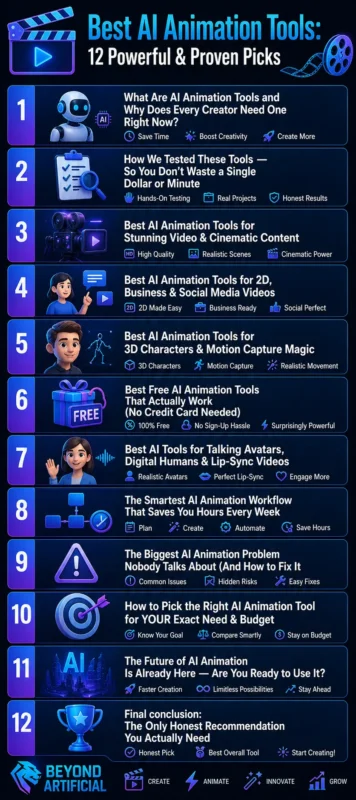
1. What Are AI Animation Tools and Why Does Every Creator Need One Right Now?
If you have ever spent days trying to make a simple animation and ended up frustrated, spending too much money, and getting a result that looks nothing like your idea, you are not alone. AI animation tools can solve this problem. Simply put, AI animation tools are smart software platforms that turn your text, images, or ideas into polished animated videos in just minutes. You do not need an animation degree, an expensive team, or months of learning to use them.
They are very important today because the content world has changed. Animated videos get 34% more engagement than static images, and creators who are not using AI are already falling behind their competitors. One smart tip is to always start with a clear idea or script before using any tool. AI works better when you give it clear direction, think of yourself as the director, and the tool as your production team.
Do not try to create one long video at once. Instead, make your animation step by step, scene by scene. This simple habit can save you hours of frustration and give you much better results. Always test the free version of a tool before paying for it. Many creators spend money on premium plans when the free version already gives them everything they need.
When you choose the right AI animation tool for your skill level, budget, and content type, everything becomes easier. Your ideas come to life, your content looks better, and you stop wasting time on tools that are not right for you.
If you want to explore more powerful AI tools beyond animation, check out this guide on the Best Video AI Generator tools.
2. How We Tested These Tools: So You Do not Waste a Single Dollar or Minute
We have all experienced this: you read a “top tools” article, sign up for a paid plan with excitement, and after two hours, you realize the tool does not do what you actually need. That is why we personally tested every tool on this list using real projects, real prompts, and real budgets, not just marketing promises.
We checked each tool using six important points that matter most to creators:
- output quality
- rendering speed
- beginner-friendly use
- value for money
- usefulness of the free version
- And, most importantly, character and visual consistency across different scenes.
We used the same test prompt for every tool and measured how long each one took to create a useful result. If a tool failed or gave poor results on the first try, it did not make this list, no exceptions. The most important tip from our testing is this: always try the same prompt on two or three different tools before choosing one. The quality difference can be surprising, and this can save you from wasting money.
Never trust only the demo videos on a tool’s website. Those usually show the best possible results. Instead, check real user reviews on Reddit or YouTube, where creators share honest and unfiltered results. If a tool’s free version does not give you at least one useful result without asking for your credit card, skip it. In 2026, the best tools are confident enough to let you test them before paying.
Every tool on this list earned its place through honest and practical testing, so you can trust that this guide will save you time, money, and the frustration of choosing the wrong tool.
3. Best AI Animation Tools for Stunning Video & Cinematic Content.
If you have ever wanted to create videos that look like they came from a Hollywood studio, but your budget is too small, these four tools can completely change that. The best part is, you do not need any filmmaking experience to use them.
- Kling AI 3.0 is one of the best tools for realistic human motion in 2026. It creates natural walking, gestures, facial expressions, and even fabric movement with impressive realism. It is a great choice for cinematic videos with strong character scenes.
- Runway Gen-4.5 offers powerful “Director Mode” camera controls. This means you can pan, zoom, and move through scenes like a real filmmaker.
- Pika Labs is perfect for fast, creative, and stylish short videos, especially for social media content.
- Google Veo 3.1 stands out because it includes built-in audio, making your animations feel complete without extra editing.
The best tip for cinematic results is to use image-to-video instead of text-to-video whenever possible. Starting with an image helps keep your character’s face, style, and lighting consistent from the first frame. This saves you from creating the same clip again and again. Do not try to make one full scene in a single long clip. Instead, create short shots one by one, just like a real director. Then combine them during editing. This simple method gives much better results.
Keep your prompts short, clear, and visual. For example, instead of writing “a person walks through a city,” write “a woman in a red coat walks slowly through a rainy Tokyo street at night, cinematic lighting.” Better prompts create better cinematic results.
With these four tools, Kling AI for realism, Runway for control, Pika Labs for creative speed, and Google Veo for full audio and video, you have everything you need to create videos that grab attention and make people wonder how you made them.
Many of these animation tools also connect with other free AI tools that content creators use daily.
4. Best AI Animation Tools for 2D, Business & Social Media Videos
If you are a marketer, teacher, small business owner, or social media creator with a great idea but think, “I am not a designer, I cannot make animations,” this section is for you. These tools need no design skills and still help you create professional-looking videos.
- Animaker is one of the easiest 2D animation tools for beginners in 2026. It offers more than 1,000 drag-and-drop templates, an AI character builder, built-in voiceovers in 180+ languages, and 4K export quality. You can create a full social media video in less than 30 minutes without using any complex design tools.
- Vyond is a top choice for business teams. Its “Vyond Go” feature can turn your text, documents, or even website links into complete animated videos with AI-written scripts and voiceovers.
- Adobe Express is great for people already using Adobe tools and needing quick branded content.
- Canva with Magic Animate is the easiest one-click option for teams that want professional social media animations without leaving a platform they already know.
A smart tip for business videos is to upload your brand colors, logo, and fonts into the brand kit before creating anything. This helps every video look on-brand automatically and saves a lot of time. Do not make one video and use it everywhere. Instead, resize and adjust it for each platform. A square video works better for Instagram, a vertical one is better for TikTok, and a horizontal one is best for YouTube.
If you are a beginner, start with Animaker’s free plan and practice making your first few videos. Upgrade only when you feel comfortable. Paying too early often leads to frustration and wasted money. With Animaker for beginners, Vyond for business teams, Adobe Express for branded content, and Canva for fast social media videos, these tools prove that you do not need to be a designer or animator to create videos that grow your business and connect with your audience.
5. Best AI Animation Tools for 3D Characters & Motion Capture Magic.
If you have ever watched a 3D animated character move naturally and thought, That must have cost a studio thousands of dollars, the truth is different. In 2026, one person with a laptop and a smartphone can create that same quality alone, and it is much easier than before.
- Cascadeur is one of the best tools in this category. Its AutoPhysics AI helps you set only three key poses, and it automatically creates the movement in between. It adds realistic weight, gravity, balance, and motion, making the animation look like it was made by a professional studio.
- DeepMotion solves a different problem. You simply record yourself moving with your phone, upload the short video, and within minutes, it captures your full body motion and applies it to a 3D character. This saves a lot of money compared to using expensive motion capture studios.
- Krikey.ai is the easiest option for beginners. It lets anyone create talking 3D avatars and animated scenes directly in the browser without needing technical skills.
- Monstermash. Zone is a hidden gem that turns simple 2D drawings into 3D animated characters with one click.
A very important tip for better 3D results is to record your motion video in good lighting and make sure your full body is clearly visible. Poor lighting and blocked body parts are the main reasons why motion capture results look bad. When using Cascadeur, do not skip the “AutoPosing” step before rendering. Let the AI calculate the physical movement first, check the result, and then make small manual changes.
This saves time and gives much more realistic results. If you are new to 3D animation, start with Krikey.ai’s free browser version to learn the basics. Then move to DeepMotion for motion capture and Cascadeur for full control. Trying to learn all the tools at the same time often creates confusion.
With Cascadeur for realistic movement, DeepMotion for video-to-character motion, Krikey.ai for beginner-friendly 3D avatars, and Monstermash. zone for turning sketches into 3D models, 3D animation is no longer only for big studios. Now it is possible for anyone to create amazing results.
6. Best Free AI Animation Tools That Actually Work (No Credit Card Needed)
Let’s be honest, most free AI animation tools online are not truly free. They give you one good result and then quickly ask for your credit card. But the five tools in this section are actually free to start and can help you create professional-quality animations without paying first.
- Viggle AI is one of the best free tools in 2026. You upload any character image, choose a motion, and it creates a full-body animation in less than a minute. The free plan has no watermark and gives you up to 5 ready-to-post animations every day.
- Hailuo AI 2.3 is another powerful free tool. Its Motion Diffusion Engine reduces the shaky “AI jitter” problem and creates smooth cinematic 6-second clips with better face, clothing, and body consistency.
- Kling AI also has a useful free plan. It gives 66 free credits every day, so you can keep practicing and testing without paying.
- Edra helps you create free 2D animations that work well for social media content.
- NoteGPT lets you create quick animated clips without even signing up, making it a great choice for complete beginners.
A smart tip for free tools is to use daily credit refresh wisely. For example, use Kling AI in the morning, Hailuo later in the day, and Viggle in the evening for character animations. Using different free tools together gives you enough content without spending money. Do not waste free credits on long and complex prompts when you are still learning.
Start with short, simple, and clear prompts first. This helps you get better results and understand how the tool works. Always download your animations right after they are created. Many free tools delete your files after 24 to 48 hours, and losing good work because you forgot to save it is very frustrating.
You do not need a subscription, a credit card, or any money to start creating great animations today. Viggle for character motion, Hailuo for cinematic clips, Kling for daily practice, Edra for 2D content, and NoteGPT for quick no-signup creation give you a strong free animation toolkit.
7. Best AI Tools for Talking Avatars, Digital Humans & Lip-Sync Videos
If you feel uncomfortable recording yourself on camera, have problems with bad lighting, or simply do not want your face online, you are not alone. That is exactly why talking avatar and lip-sync AI tools are so useful.
- HeyGen is one of the best tools in this category. It gives you more than 1,000 ready-made avatars, supports lip-sync in 175+ languages, and even lets you create a digital clone of yourself using only a 2-minute video. After that, you do not need to record again.
- Synthesia is very popular for business training videos.
- D-ID can turn one simple photo into a talking person in just a few seconds.
- Vozo AI works well for difficult lip-sync cases like side angles, beards, or facial details because of its Precision Mode.
- ByteDance’s OmniHuman v1.5 creates high-quality full-body digital humans using only one image and one audio file.
One very important tip is to always use clear and noise-free audio. The AI reads your voice to match the lip movement. Even small background noise can make the lips look fake or robotic. Do not upload a long 10-minute video for your first test. Start with a short 15–30 second clip first. This helps you check lip-sync quality, facial expressions, and voice tone before using too many credits.
Another important tip is to download your finished video quickly. Some platforms like D-ID and Vozo delete files after 24–48 hours, and losing a good video can be very frustrating. You do not need a studio, a camera, makeup, or even confidence in front of the camera anymore.
HeyGen for multilingual content, Synthesia for training videos, D-ID for quick social media clips, Vozo for accurate lip-sync, and OmniHuman for cinematic quality give you everything you need to create professional avatar videos.
8. The Smartest AI Animation Workflow That Saves You Hours Every Week
If you have ever spent a whole Sunday trying to finish just one short animation — writing the script, finding visuals, fixing audio, and editing again and again — only to feel like you wasted your time, that cycle can stop today.
In 2026, smart creators do not work harder. They use a simple AI workflow that does most of the work for them automatically.
The basic 5-step workflow is:
- ChatGPT writes the script in seconds.
- Midjourney creates the main images.
- Runway or Kling AI turns those images into animated video clips.
- ElevenLabs adds a professional voiceover.
- OpusClip formats and adds captions for different platforms.
This whole process can take less than 10 minutes when done well. The real power comes from automation tools like Make (formerly Integromat). It connects all these tools. For example, when you add a script in Google Sheets, it can automatically send it to all tools, generate visuals, voice, animation, and even save the final video for you.
One very important tip: always create your key images in Midjourney before using any video tool. Tools like Runway and Kling give much better results when they start from a strong image instead of only text. This alone saves a lot of time and effort. Do not create long videos at the beginning. Start with short 5–10 second clips. Then join them later in editing. This gives you better control and avoids wasting credits on failed long videos.
Another common mistake is skipping planning. Spend 10–15 minutes making a simple shot list before you start. This helps you avoid confusion and reduces the need to remake scenes. You do not need a team, a studio, or advanced skills anymore. With ChatGPT for writing, Midjourney for images, Runway or Kling for animation, ElevenLabs for voice, and Make for automation, solo creators can now produce content that once required full production teams.
For a complete breakdown of content creation tools, you can also explore this list of advanced AI tools for creators.
9. The Biggest AI Animation Problem Nobody Talks About (And How to Fix It)
The honest truth that many AI animation guides do not explain is this: the biggest reason your AI videos look fake or unprofessional is not your prompts or your tools. It is a problem called character inconsistency. This happens when your character changes in every scene, like having a different hair color, a different face, or slightly different features.
This happens because most AI video tools create each frame separately. They do not remember your character from the previous scene. So every new scene is treated like a new guess. That is why tools like Runway, Kling AI, and Sora can produce great single clips but still struggle to keep characters consistent across multiple scenes. Another important issue is copyright risk. In 2025, companies like Disney and Universal took legal action against AI tools like Midjourney because some outputs looked similar to copyrighted characters. This means you should be careful not to create characters that look like existing movie or game characters.
The best way to fix character inconsistency is to lock your character first. Create a clear, detailed reference image of your character before making any video. Then use that same image every time you generate scenes. This helps the AI stay consistent.
Some tools, like Kling’s Elements feature (which uses multiple reference images) or Sora’s character features, can also help keep your character the same in every scene. You should also keep your settings consistent, like using the same seed value, lowering motion strength, and making short clips of 3–5 seconds. Longer videos usually increase mistakes and make the character drift more.
For copyright safety, it is better to create original characters instead of copying famous styles. Tools like Adobe Firefly and OpenAI’s DALL·E 3 help you create safer, original designs. The most important idea is simple: always design your character carefully first, then animate it. When you combine strong original design with AI tools, your videos look more professional, stay consistent, and are safer to use.
10. How to Pick the Right AI Animation Tool for YOUR Exact Need & Budget.
If this has ever happened to you, you spend hours reading “best AI animation tools” articles, get more confused, try a few free trials, dislike all of them, and then give up, you are not alone. The real problem is not choosing tools. The problem is that most articles do not tell you which tool fits your exact needs. Here is a simple breakdown:
If you are a social media creator making TikTok or Instagram Reels, Pika Labs and Kling AI are good choices for short and engaging videos. If you are a small business owner or marketer making explainer videos, Animaker (easy drag-and-drop, budget-friendly) and Vyond (more professional and corporate style) are better for you.
If you are an educator or trainer, Synthesia is a popular option with support for many languages. If you are a game developer or working with 3D animation, DeepMotion works well with Unity and Unreal Engine. For high-quality cinematic videos, Runway is used by professionals for strong motion control. Kling AI also gives similar quality at a lower cost, making it a good budget option.
For safe, copyright-friendly images and assets, Adobe Firefly is a good choice because it is trained on licensed content. A simple budget tip is to always start with free versions first. For example, try tools like Hailuo AI, Kling AI, or LipSync.video before paying anything. The tool that works best for you on the free plan is usually the right one to upgrade later.
Do not buy yearly plans too early. Start with monthly plans, test real projects, and only upgrade when the tool clearly saves you time. Also, do not pay for features you do not need. For example, if you only need lip-sync, a simple tool like Vozo AI may be enough. If you only need short social videos, a cheaper tool like Pika Labs may be better than expensive all-in-one platforms. Before choosing any tool, ask yourself three simple questions:
- What content am I making?
- Will I use this often or rarely?
- Have I tested the free version?
The best AI animation tool is the one that fits your workflow, matches your budget, and feels easy to use, and you can only find it by trying, not just reading lists.
11. The Future of AI Animation Is Already Here: Are You Ready to Use It?
Here is the simple truth: the future of AI animation is not in 2030 or “someday.” It is happening right now in 2026. Some creators are already using it to grow, while others are still debating if AI animation is real. Google’s Google Veo can now create full videos with voice, facial expressions, sound effects, and music all at once. This means you type a prompt and get a finished video without extra editing.
Seedance 2.0 also offers free daily credits and no watermarks, which makes it useful for beginners. Industry leaders are also predicting big change. Some experts believe AI could create a large part of animation and film content in the next few years. This shows how fast the industry is growing. The animation market is growing very quickly, and more marketers are planning to use animation in their work. This means the demand for AI animation skills is increasing.
A useful tip is to start saving good prompts now. Tools like Google Vids give free monthly Veo clips, so you can test and collect prompts that work well. A strong prompt library can help you more than expensive courses. Do not stick to only one tool. Different tools are good for different jobs:
- Google Vids for realistic videos
- OpenAI’s Sora for cinematic storytelling
- Kling AI for strong character motion
- ElevenLabs for voiceovers
The most important idea is this: do not wait. Start learning now, even with free tools. Every week you delay, others improve their skills and move ahead. The best step you can take is simple: choose one free tool today, make your first AI animation in the next 24 hours, and start learning by doing instead of just reading.
If your goal is to grow online traffic and visibility, these AI SEO tools can help you scale faster.
FREQUENTLY ASKED QUESTIONS (FAQs)
Which AI animation tool is best?
The best AI animation tool depends on your goal, budget, and skill level; there is no single perfect option. For free cinematic videos, use Google Vids or Seedance. For short social media videos, try Kling AI or Pika Labs. For training or business videos, Synthesia is a strong choice. For full control and pro editing, use Runway. Always test a few free tools first. The one that feels easiest for you is usually the best choice.
Can ChatGPT create animation?
ChatGPT cannot create animation videos directly, but it helps you make them much easier. You can use ChatGPT to write scripts, plan scenes, and create prompts. Then use tools like Runway, Kling AI, or Sora to turn those prompts into animated videos. You can also add voiceovers with ElevenLabs. ChatGPT plans it, AI tools animate it, and voice tools finish it.
Which AI video generator is best?
There is no single “best” AI video generator; it depends on your goal, budget, and content type. For cinematic 4K videos, use Google Vids (Veo 3.1). For realistic human motion at low cost, use Kling AI. For creative storytelling, Sora is a strong option. For free daily use, Seedance offers good quality with daily credits. Do not look for one tool; test a few, and use the one that fits your needs.
What is the most realistic animation app?
If your goal is realistic AI animation, there is no single best tool; it depends on your needs and budget. For the most realistic cinematic results, Google Vids (Veo 3.1) is one of the top choices with natural motion, lighting, and audio. For realistic human movement at a lower cost, Kling AI is very strong. For free, realistic animation, Hailuo AI 2.3 is a popular option with daily credits. Use a good reference image, keep clips short, and add voiceovers (like ElevenLabs) to make videos look more real.
Will AI replace animators?
AI is not replacing animators, but animators who don’t use AI tools may fall behind. Tools like Runway, Kling AI, and Sora help with time-consuming tasks like in-between animation, rigging, and lip-sync. This allows animators to focus more on creativity, storytelling, and emotional impact. AI handles the hard work, and humans focus on creativity and direction.
Best free AI animation tools
Let’s be honest, you searched for the best free AI animation tools because you are tired of seeing amazing animations online and feeling like that level of creativity is out of reach. It can feel like you need expensive software, advanced skills, or a big budget that you simply do not have yet.
And yes, it is frustrating when “free” tools are not really free. Some add watermarks, some ask for a credit card before you even try them, some delete your work after a short time, and some only give a few seconds of output. That frustration is real, and you deserve better. The good news is that in 2026, some free AI animation tools will be powerful enough to create professional-quality results without paying anything.
Here are some of the best truly free options:
- Pika Labs: Free downloads with no watermark and no credit card needed. Good for beginners.
- Hailuo AI 2.3: Gives daily free credits and creates realistic human motion with cinematic quality.
- Seedance 2.0: Offers daily free credits, 1080p output, and no watermark. One of the best free options overall.
- Kling AI: Gives daily credits for practice and learning, but may add a small watermark on free use.
- Google Vids (Veo 3.1): Free monthly clips for Google users and good cinematic quality.
- Runway: Free credits to test cinematic video tools, but free exports may include a watermark.
- Animaker: Free plan for simple 2D explainer videos and social content.
- Canva: Free animation tools for social media posts and simple motion graphics.
- Blender: Completely free and open-source professional 3D animation software.
- Krikey.ai: Free tool for creating 3D talking avatars without technical skills.
The main idea is simple: you now have free tools that can produce usable animation content without paying. You do not need to start with everything at once. Just pick one tool, try it, and learn step by step.