
 YouTube Automation
Best AI Writing Tools for Beginners – 9 That Actually Work (Blog#: 93)

You stare at a blank screen, your fingers stop moving, and your ideas feel lost somewhere deep inside, and you start wondering if you will ever write something people actually want to read. The good news is that the Best AI Writing Tools for Beginners are made for exactly this problem; they help you move from feeling stuck to creating clear, strong, and polished content.
The even better news? You do not need to be a tech expert, a professional writer, or spend a lot of money to use the best AI writing tools for beginners that actually work in 2026. Whether you want to write SEO blogs that rank on Google, fix grammar mistakes, overcome writer’s block quickly, or create social media posts that get real engagement, the right AI tool can make it much easier, even if you are just starting.
In this guide, you will discover 9 carefully chosen AI writing tools that beginners around the world already use to write faster, smarter, and with more confidence, no experience needed.
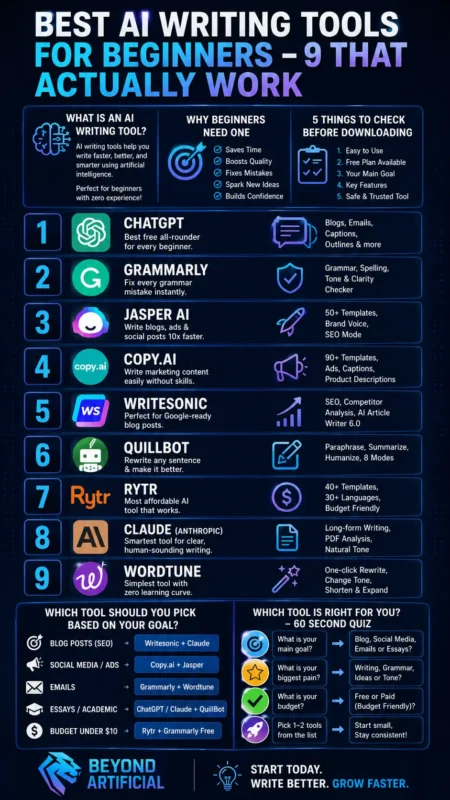
What Is an AI Writing Tool: And Why Beginners Actually Need One
An AI writing tool is smart software that helps you write faster, better, and with fewer mistakes. It understands your words and helps improve your content. Tools like OpenAI ChatGPT, Grammarly, Jasper, Copy.ai, Writesonic, QuillBot, Rytr, Anthropic Claude, and Wordtune all help in different ways.
If you have ever stared at a blank page for 30 minutes, deleted everything, and felt like writing is too hard, that is exactly why these tools exist. They help you stop feeling stuck and make writing much easier. As a beginner, you do not need writing experience, a big budget, or technical skills to start. Most of these tools offer free plans, and you can create your first piece of content in just a few minutes.
Step 1: Start with a clear and detailed prompt. Instead of writing “write a blog post,” write “write a 300-word blog post about healthy breakfast ideas for busy people in a friendly tone.” The more details you give, the better the result will be. Step 2: Do not publish AI content without checking it first. Always read it once and add your own opinion or a personal story. This makes your content feel more real, trustworthy, and better for Google. Step 3: If the content sounds robotic, paste it into Wordtune or QuillBot and use the rephrase option. It can quickly make your writing sound more natural and human.
The truth is, AI writing tools do not replace your voice; they help make it stronger. Once you start using the right one, writing becomes much easier.
If you are a content creator specifically looking for free tools beyond just writing, you will love this detailed guide on the Best Free AI Tools for Content Creators that covers 7 powerful picks for every type of creative work.
5 Things to Check Before Downloading Any AI Writing Tool.
Before you quickly download the first AI writing tool you see on Google, stop for a moment, because choosing the wrong tool can waste your time, cost you money, and make writing even more frustrating. There are 5 important things every beginner should check first:
- Does it have a free plan?
- Does it match your writing goal (blogging, social media, grammar, or SEO)
- Is your content safe and private?
- Does it create Google-friendly content?
- Is it easy to use without technical skills?
Tools like OpenAI ChatGPT, Grammarly, Jasper, Copy.ai, Writesonic, Rytr, QuillBot, Anthropic Claude, and Wordtune are popular because they match these important checks. Many beginners skip these steps and end up paying $50 every month for a tool that does almost the same job as the free version of ChatGPT or Claude. This is a common mistake, and you can avoid it easily.
Step 1: Always start with the free plan first. Tools like Grammarly, ChatGPT, and Rytr offer useful free versions, so test them for at least 3 days before spending any money. Step 2: Before downloading any tool, search its name with “review 2026” on Google and read what real users say. This helps you avoid tools that look great in ads but give poor results in real life.
Step 3: Always check the privacy policy. Make sure the tool clearly says it does not sell or store your writing content. Some cheap AI tools may use your content to train their systems, so protecting your ideas is very important. If you check these 5 things every time, you will save time, money, and energy, and you will choose tools that are truly helpful for beginners like you.
1. ChatGPT: The Best Free All-Rounder That Every Beginner Should Try First
If you have never used an AI writing tool before, OpenAI ChatGPT is the best place to start. It is free, very easy to use, and can help you write blog posts, social media captions, emails, product descriptions, and even full article outlines in less than 60 seconds. This is very helpful when you are a beginner and still learning which tool is best for your needs.
One important thing to know is that ChatGPT can sometimes create content that sounds too general or robotic, especially if your prompt is not clear. That is why you should never publish the raw output directly. Always add your own opinion, voice, or a real personal example. Step 1: Write detailed prompts. Instead of saying write a blog post about fitness, say“write a 400-word beginner-friendly blog post about morning workouts for people with zero motivation, in a warm and encouraging tone. This helps ChatGPT create better and more natural content.
Step 2: After getting content from ChatGPT, check it in Grammarly for grammar and tone mistakes. Then use Wordtune or QuillBot to make it sound more natural. This simple 3-tool process can help beginners create content they feel proud to publish. Step 3: Use the free version of ChatGPT first for at least 2 weeks before thinking about upgrading to ChatGPT Plus. The free version is strong enough for most beginners, and you only need the paid version if you reach the daily message limit often.
Once you start using ChatGPT every day, writing feels much easier, and that scary blank page feeling starts to disappear.
2. Grammarly: Fix Every Grammar Mistake Before Anyone Reads Your Work
Imagine spending one hour writing something you feel proud of, and then someone finds three grammar mistakes in the first paragraph. That embarrassing moment is exactly why Grammarly exists, and it helps prevent it better than many other tools. Grammarly is a free AI writing assistant used by millions of people around the world. It works in the background on platforms you already use, like Gmail, Google Docs, WordPress, Facebook, and WhatsApp Web.
It quickly finds grammar mistakes, spelling errors, punctuation problems, and even checks if your tone sounds rude, too casual, or unclear before anyone reads your message. Unlike OpenAI ChatGPT, Jasper, Copy.ai, Writesonic, Rytr, and Anthropic Claude, which help create content, Grammarly helps improve your writing and makes sure it looks clean, professional, and mistake-free.
Step 1: Install the free Grammarly Chrome extension. It takes only a few minutes, and after that, your emails, social media posts, and blog comments will be checked automatically in real time. This helps you avoid small mistakes and public embarrassment. Step 2: After creating content with ChatGPT, Writesonic, or Rytr, always paste it into Grammarly before publishing. AI-written content can sometimes sound unnatural or have tone problems, and Grammarly can fix this quickly.
Step 3: Use Grammarly’s free Tone Detector when writing professional emails or client messages. It shows how your message may feel to the reader. This can help protect your professional image and improve communication. The free plan of Grammarly is strong enough for most beginners. Start with the free version, build the habit of checking your writing daily, and only upgrade to Pro when you need extra features like plagiarism checking or advanced writing suggestions.
3. Jasper AI: Write Blogs, Ads, and Social Posts 10x Faster
If you have ever spent 5 hours writing one blog post, one Facebook ad, or one Instagram caption, and still felt the result was boring, Jasper AI is made to solve that problem. Jasper uses more than 50 ready-made marketing templates to help you create blog posts, Google ads, Facebook ads, product descriptions, email sequences, and social media posts much faster. What normally takes hours can be done in just minutes.
What makes Jasper different from tools is its Brand Voice feature. This feature learns your writing style, your tone, and your brand personality from a few sample texts. This helps Jasper create content that sounds like you wrote it, not like a robot. One important thing beginners should know is that Jasper starts at $39 per month. It does not have a free plan, only a 7-day free trial.
This means it may not be the best first tool for beginners, but it becomes very useful when you start creating content regularly and need faster professional results. Step 1: Start by using the 7-day free trial fully. On the first day, open the Brand Voice feature and add 3 to 4 samples of your best writing. This helps Jasper learn your style and create more natural content. Step 2: Use Jasper’s blog post template with your target keyword. Then check the draft in Grammarly for grammar fixes and in Writesonic’s SEO checker to make sure the content is good for Google.
This simple 3-tool process helps create strong blog posts. Step 3: If $39 per month feels too expensive, start with Rytr or the free version of ChatGPT first. Build your confidence, and later move to Jasper when you need stronger brand-focused content. When you write your first full blog post in less than 20 minutes with Jasper, writing starts to feel easier, faster, and much more enjoyable.
4. Copy.ai: The Easiest Way to Write Marketing Content Without Any Skills
If you have ever looked at a blank Facebook ad, an empty Instagram caption, or a product description and felt confused about what to write, Copy.ai is made for that problem. It gives you ready-made templates for many types of marketing content. You only need to add your product name, choose your tone, and click generate. This makes writing much faster and easier.
Copy.ai has a free forever plan with access to more than 90 marketing templates. These include Instagram captions, Facebook ads, email subject lines, product descriptions, website headlines, sales copy, and YouTube video titles. This makes Copy.ai one of the most beginner-friendly marketing writing tools compared to others.
One important thing to know is that the free plan has limited word credits, and they can finish quickly. So, use them first for your most important content. Later, you can upgrade if you need unlimited words. Step 1: When you start using Copy.ai, go to the Brand Voice feature first. Add 2 to 3 sentences that explain how your brand speaks. This helps your captions, ads, and emails sound more personal and less robotic.
Step 2: Use Copy.ai to create 5 different versions of the same Facebook ad or Instagram caption. Then check them in Grammarly, choose the best one, and test it. This simple method can improve your marketing results without hiring a copywriter. Step 3: If you want your Copy.ai content to rank on Google, paste it into Writesonic’s SEO checker or ask ChatGPT to optimize it for your target keyword. Copy.ai is great for marketing writing, but it does not have strong built-in SEO tools.
When you publish your first AI-written Instagram caption with Copy.ai, and people start liking, sharing, and commenting, you will see that good marketing is not only about writing skills, but also about using the right tool.
5. Writesonic: Perfect for Beginners Who Want Google-Ready Blog Posts
If you have ever written a blog post with a lot of effort, published it proudly, and then saw it stay on page 10 of Google with no traffic, no clicks, and no readers, Writesonic is made to solve that problem. Writesonic not only helps you write content. It also helps make your content better for Google SEO. It uses real SEO data, live web research, and competitor analysis inside the writing process.
For example, you can type one keyword like best coffee machines for home, and its AI Article Writer quickly checks the web, studies top-ranking pages, checks facts, adds headings, places keywords naturally, and creates a full blog post ready for Google. A task that often takes beginners 6 to 8 hours can be done in less than 10 minutes. This makes Writesonic much more focused on SEO.
One important thing for beginners to know is that Writesonic starts at $39 per month, but it also offers a free trial without needing a credit card. This lets you test the tool before spending money. Step 1: When using Writesonic’s Article Writer, add the URLs of the top 3 Google results for your keyword into the Reference Articles section. This helps the AI understand what strong content looks like and create a better article.
Step 2: After creating your blog post in Writesonic, check it in Grammarly for grammar and tone improvements. Then add one personal story or real experience. Writesonic helps with SEO, but your human voice helps readers trust you. Step 3: If the price feels too high, start with the free version of ChatGPT or use Rytr first. When you become serious about ranking on Google, move to Writesonic because it is much stronger for SEO blogging.
The day your Writesonic blog post reaches page 1 of Google and brings real visitors to your website, all your effort will feel worth it.
If ranking on Google is your main goal and you want to go even deeper into SEO-specific tools, check out this powerful guide on the Best AI SEO Tools for Small Businesses that shows exactly which tools drive real organic traffic in 2026.
6. QuillBot: Rewrite Any Sentence Instantly and Make It Sound Better
You know that bad feeling when you write something, read it again, and it sounds robotic, stiff, and unnatural, like a machine wrote it instead of a real person. QuillBot is made to fix that problem. You simply paste your sentence into QuillBot, and it quickly rewrites it in different styles like Fluency, Formal, Creative, Simple, and Expand. This gives you better versions of the same idea without changing the original meaning.
QuillBot is free for up to 125 words at one time, and its premium plan is also very affordable. This makes it one of the best low-cost writing improvement tools. One of its best features for beginners is the AI Humanizer. It helps turn robotic AI-written content into warm, natural, and human-sounding writing that people enjoy reading.
One important thing to know is that QuillBot does not create content from the beginning like ChatGPT or Jasper. It only improves and rewrites what you already have. So, it works best as your final editing step, not your first writing step. Step 1: Use this simple 3-step process. First, create your draft with ChatGPT or Writesonic. Second, fix grammar with Grammarly. Third, paste everything into QuillBot’s Fluency mode to make it sound smooth and natural. This helps your content feel more human.
Step 2: If you feel your AI-written content sounds robotic or you worry Google may not like it, use QuillBot’s AI Humanizer first. It improves sentence flow and makes the writing feel more real and natural. Step 3: Use QuillBot’s Summarizer for long research articles, competitor blogs, or YouTube transcripts. Turn them into short bullet points first, then use ChatGPT to rewrite those points into your own original article. This saves a lot of time and helps create fresh content.
Once you see how much better your writing looks after using QuillBot, you will want to use it before sending emails, posting captions, or publishing blog posts every time.
If you want to go even further in making your AI content sound completely human and undetectable, do not miss this in-depth guide on the Best AI Humanizer Tools that covers 9 proven hacks every beginner must know in 2026.
7. Rytr: The Most Affordable AI Writing Tool That Actually Works
If you have avoided AI writing tools because many of them cost $39, $49, or even $69 per month, and that feels too expensive, Rytr can be a better choice for you. Rytr helps you create blog posts, social media captions, product descriptions, email copy, and ad content at a much lower price. It is one of the most affordable AI writing tools for beginners who want good results without spending too much money.
Rytr is used by millions of people, supports more than 30 languages, and offers over 40 writing templates for different types of content. It also has a Chrome extension, so you can write directly inside Gmail, WordPress, and Google Docs.
Compared to tools, Rytr is much more budget-friendly. Tools like Grammarly, QuillBot, Anthropic Claude, and Wordtune are useful too, but they focus on different writing needs. One important thing to know is that Rytr works best for short content and first drafts. It is not the best tool for deep, expert-level long articles. It works better when you write section by section and add your own ideas and experience.
Step 1: Do not ask Rytr to write a full article at once. Start with the introduction, then the first heading, then the next section. This helps the content sound better and more natural. Step 2: After creating content in Rytr, paste it into QuillBot’s Fluency mode to improve sentence flow, then check it in Grammarly for grammar mistakes. This simple 3-tool process helps beginners create strong content at a low cost. Step 3: Start with Rytr’s free plan first. It gives you enough space to write your first few blog intros, social media captions, and email drafts. This helps you test the tool before spending money.
When you see that a low-cost tool like Rytr helps you finish work in minutes instead of hours, you realize that AI writing is not only for people with big budgets, it is also for beginners who want to grow faster.
8. Claude (Anthropic): The Smartest Tool for Clear, Human-Sounding Writing
If you have ever read your AI-written content and felt embarrassed because it sounds robotic, cold, or unnatural, then Anthropic Claude is made to fix that problem. Claude is known for creating writing that sounds more natural, human, and easy to read. It usually needs less editing to sound like a real person wrote it.
Claude also has a free plan with no credit card required. You can use it for writing blog posts, emails, social media captions, product descriptions, essays, and even for analyzing long documents like PDFs. This makes it a strong free option compared to Grammarly, QuillBot, and Wordtune. One important thing to know is that Claude’s free plan has a daily message limit. So you should use your messages on your most important tasks first. If you need more, you can upgrade to Claude Pro for $20 per month.
Step 1: If you want Claude to match your writing style, tell it clearly in your prompt. For example, say: “Write in a warm, friendly, and simple tone like I am talking to a friend.” This helps it sound more natural. Step 2: Use Claude to write your first draft. Then paste it into Grammarly to fix grammar, and use QuillBot to improve word choice. This simple 3-step process helps your content sound smooth and natural.
Step 3: You can also give Claude a competitor’s article and ask him to write a better version. This helps you create stronger and more helpful content that can perform better on Google. When you use Claude to fix a robotic paragraph and see it turn into something clear and natural, you will understand why many writers trust it as their main writing tool.
9. Wordtune: The Simplest Tool for Beginners With Zero Learning Curve
If every AI writing tool you have tried feels confusing or too complicated, then Wordtune is a much simpler option. With Wordtune, you just highlight any sentence and click one button. It instantly shows you 5 to 10 better versions of that same sentence. You do not need to write prompts, learn templates, or have any technical skills.
Wordtune works inside tools you already use every day, like Gmail, Google Docs, Microsoft Word, Slack, and WhatsApp Web. It helps you quickly change your tone from casual to formal or formal to friendly with one click.
This makes Wordtune one of the easiest tools for beginners. One important thing to know is that the free plan allows only 10 rewrites per day. So you should use it on your most important sentences like email openings, blog introductions, or social media captions. If you need more, you can upgrade to Premium for $9.99 per month.
Step 1: If English is not your first language and you feel your writing sounds awkward, Wordtune can help a lot. Just highlight your sentence, choose Casual or Formal mode, and it will rewrite it in a more natural way. Step 2: Use this simple workflow: write your draft with ChatGPT or Claude, fix grammar with Grammarly, and then improve sentence flow with Wordtune. This makes your writing clear, smooth, and more professional.
Step 3: Use Wordtune’s “Shorten” feature to make long paragraphs shorter. This helps you write more clearly and keeps your readers interested. When someone reads your writing and says it sounds clear and professional, that confidence is what Wordtune helps you build quickly and easily.
Which AI Writing Tool Should You Pick Based on YOUR Goal? (Blog / Social Media / Emails / Essays)
One of the biggest mistakes beginners make is downloading a popular AI writing tool without thinking about their real goal. After spending hours learning it, they realize it does not actually help with what they needed. That is why choosing the right tool for your goal is the most important step before you start writing. Here is a simple guide to help you choose:
- For Google-ranking blog posts, use Writesonic for SEO and research, and Anthropic Claude for natural, human-sounding writing.
- For social media captions and ads, use Copy.ai or Jasper.
- For professional emails, use Grammarly with Wordtune.
- For essays and long writing, use OpenAI ChatGPT or Claude, then improve it with QuillBot.
- If your budget is low, use Rytr with Grammarly’s free plan.
The key idea is this: you do not need only one tool. You need a small combination of tools based on your goal. For example:
- ChatGPT helps you create ideas
- Writesonic helps with SEO and Google ranking
- Grammarly fixes grammar mistakes
- QuillBot improves and rewrites text
- Jasper keeps the brand tone consistent
- Copy.ai speeds up marketing content
- Rytr is good for low-cost writing
- Claude writes in a natural human style
- Wordtune improves sentence flow
When you combine just two tools for your goal, your writing becomes much stronger and more professional.
Step 1: For blogging, use this free setup: ChatGPT to write, Writesonic to improve SEO, and Grammarly to fix grammar. This simple stack is enough to create strong blog posts without spending money. Step 2: For emails, install Grammarly and use Wordtune together. Before sending any email, run it through both tools. This makes your message sound clearer and more professional in under one minute.
Step 3: For essays, write your first draft in ChatGPT or Claude, then rewrite it using QuillBot, and finally check it in Grammarly. This helps you create clean and original writing. In the end, successful beginners are not the ones using the most expensive tool. They are the ones who choose the right small tool combination and use it every day.
Which Tool Is Right for You?: A Simple 60-Second Quiz
If you are stuck and do not know which AI writing tool to choose, this 60-second quiz will save you from confusion and frustration. First, ask yourself what hurts you the most: writing blogs that do not rank, messy social media captions, embarrassing grammar mistakes, or sentences that sound robotic and fake.
If your goal is SEO blogs, go for Writesonic or Anthropic Claude; for marketing content, choose Copy.ai or Jasper; for clean grammar and emails, use Grammarly or Wordtune; and for rewriting or humanizing text, use QuillBot or ChatGPT. The biggest gap most competitors miss is that beginners do not need ONE perfect tool: they need ONE goal-first tool that actually solves their problem.
Instead of overwhelming them with features. Step 1: If you feel stuck, pick only one goal for 7 days (like write 3 blogs or fix emails) and stick to just 2 tools max so you do not waste time switching. Another smart trick is to start with free versions first because even ChatGPT, Claude, and Grammarly’s free plans are powerful enough to test your real need.
Also, always match the tool to the task, not popularity, because the best tool is the one that removes your biggest writing pain instantly. Finally, remember this emotional truth: clarity beats complexity every time, and once you choose the right tool for your goal, writing stops feeling stressful and starts feeling easy and fast.
FREQUENTLY ASKED QUESTIONS (FAQs)
What is the best AI writing tool for a complete beginner?
ChatGPT is the best AI writing tool for complete beginners because it requires no setup, no technical skills, and it is free to use. You simply type what you need, a blog post, an email, a caption, and it writes it for you in seconds. It is the easiest starting point before trying any other tool.
Are there any free AI writing tools for beginners?
Yes, several powerful AI writing tools are completely free for beginners. ChatGPT offers a free plan with no word limits for basic use. Grammarly has a free version that checks grammar and rewrites sentences. Rytr gives 10,000 characters per month free with no credit card needed. These three free tools alone are enough for any beginner to start writing better content today.
Can AI writing tools replace a human writer?
No, AI writing tools cannot replace a human writer, and they are not designed to. They work as your smart assistant that writes the first draft fast, but the final result always needs your personal touch, your experience, and your editing. Think of AI as a tool that saves you 70% of the time, not one that does 100% of the work for you.
Which AI writing tool is best for writing blog posts as a beginner?
For writing blog posts as a beginner, ChatGPT or Claude are the best choices because they write in a natural, conversational tone without requiring you to learn complicated templates or settings. If you also want your blog posts to rank on Google, Writesonic is a great next step because it adds SEO guidance as you write.
Will Google penalize my content if I use AI writing tools?
Google does not penalize content just because AI helped write it. What Google penalizes is low-quality, unhelpful, and copied content, , whether written by a human or AI. If you use AI writing tools to create genuinely helpful, well-edited content that adds value for your reader, your content will rank normally. The key is always to add your own expertise and editing on top of what the AI produces.
What is the difference between ChatGPT and Jasper for beginners?
ChatGPT is a free, open, conversational AI that beginners can use for anything, such as blog posts, emails, captions, and ideas. Jasper is a paid professional tool designed for marketing teams and businesses with brand guidelines. For a beginner, ChatGPT is the right starting point because it costs nothing and does the job well. Jasper only makes sense once you are running a business or a content team and need advanced features like brand voice consistency.
Best AI writing tools for beginners free
If you thought AI writing tools were only for people with money, experience, or technical skills, this is the truth you need to hear: the best free AI writing tools for beginners are real, easy to use, and can help you start writing better today. You do not need to spend any money to write faster, better, and with more confidence. Free tools are already strong enough for most beginners.
Right now, you can use OpenAI ChatGPT for writing blog posts, captions, and emails, Grammarly for fixing grammar mistakes, Anthropic Claude for natural human-like writing, QuillBot for rewriting sentences, Rytr for short content, Copy.ai for marketing content, and Wordtune for improving sentence flow.
Here is a simple, free beginner starter pack:
- ChatGPT (Free): Write blogs, emails, captions, and outlines
- Grammarly (Free): Fix grammar and tone mistakes
- Claude (Free): Natural long-form writing and PDF analysis
- QuillBot (Free): Rewrite and humanize content
- Rytr (Free): emplates for blogs, ads, and emails
- Copy.ai (Free): Marketing templates and social media content
- Wordtune (Free): Quick sentence improvement
You do not need to learn all the tools at once. Just choose one free tool that solves your biggest writing problem and use it for 7 days. Always add your own opinion, story, or personal touch to the content. This makes your writing stronger and more trustworthy. The writers who succeed with AI are not the ones who spend the most money. They are the ones who start with free tools, stay consistent, and keep improving.
Your blank page problem can end today, just open one tool and start writing.
Now that you know the best AI writing tools, if you want to explore the complete world of AI-powered content creation beyond writing, from video to design to social media, this guide on the Best AI Tools for Content Creation in 2026 is your perfect next step.”