
 YouTube Automation
Best AI tools for social media content creation in 2026 – 9 Proven Picks (Blog#: 90)

You sit in front of a blank screen, your ideas are gone, the deadline is close, and your competitors keep posting amazing content every single day. This is exactly why the best AI tools for social media content creation in 2026 matter so much. Right now, 96% of social media managers use AI tools every day, according to PostEverywhere, not because it is trendy, but because creating great content alone can feel exhausting.
The best AI tools for social media content creation do not replace your voice; they help save your time and energy, so your real creativity can grow. But here is the truth nobody talks about: choosing the wrong tool does not save time, it wastes even more of it.
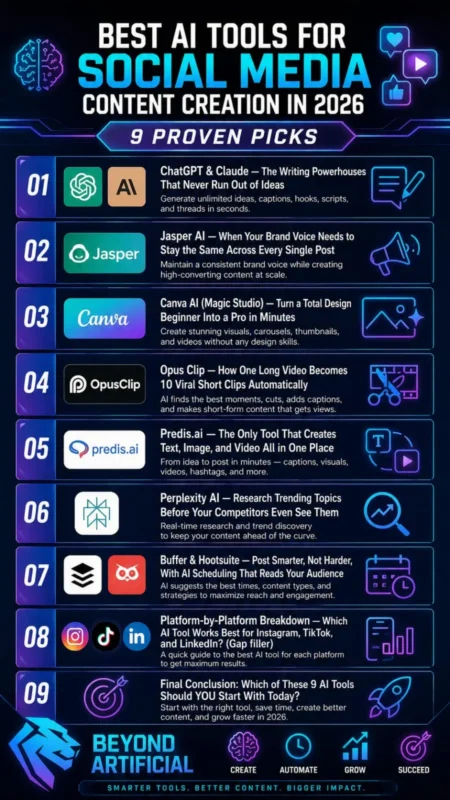
In this guide, you will discover 9 proven tools that actually work in 2026, tools that help real people stay consistent, create better content, and grow faster without feeling burned out.
If you are just starting out and want to explore tools without spending money, you can also check this guide on the best free AI tools for content creators, which breaks down simple tools you can start using today.
The “Too Many Tools” Trap: And How to Avoid It.
You open ChatGPT for captions, Canva for graphics, Opus Clip for videos, Buffer for scheduling, and Jasper for brand voice. Before you realize it, you spend more time switching between tools than actually creating content. That frustrating feeling of doing everything but finishing nothing is called the Too Many Tools Trap.
Most creators fall into this trap because every new AI tool promises to solve their problems. But using too many tools at once hurts your focus, wastes your budget, and turns a 30-minute task into a stressful 3-hour job. The real problem is that many AI tools only handle one small task, which makes it harder to build a smooth workflow. According to Supergrow, instead of saving time, people often end up managing tools instead of managing content.
Tip #1: Start with only 2 to 3 tools. For example, use ChatGPT for writing ideas, Canva AI for visuals, and Buffer for scheduling. Learn these well before adding more. Tip #2: If you want to avoid using too many tools, try an all-in-one platform like Predis.ai. It helps you create text, images, and videos in one place, so you do not need to switch between apps. Tip #3: Find your biggest content problem first. If writing captions takes the most time, solve that one problem with one tool before looking for others.
Tip #4: Do not start more than two free trials at the same time. Testing too many tools can be just as confusing as using too many. Pick one tool, use it for 7 days, and then decide.
1. ChatGPT & Claude: The Writing Powerhouses That Never Run Out of Ideas.
You know that frustrating feeling when you sit down to write a caption and your mind goes blank. You have a great product and a great story, but the words just do not come. This is exactly where ChatGPT and Claude can help. Use ChatGPT when you need fast ideas and many options. Use Claude when you want writing that sounds more natural and human. Together, these two tools help you from the first idea all the way to a finished caption ready to post.
According to PostEverywhere, ChatGPT is great for brainstorming, and Claude is better for final writing. Stormy AI also suggests using ChatGPT first for ideas and then Claude for polishing the final version. This simple combo can save you hours of writing every week.
Tip #1: Ask ChatGPT to create a full month of content ideas in one prompt. For example: “Give me 30 content ideas for your niche for Instagram, LinkedIn, and TikTok.” This helps you avoid running out of ideas. Tip #2: Train Claude with your brand voice. Paste 3 to 5 of your best old posts and say, “Write in exactly this tone and style.” The result will sound much more like you. Tip #3: Do not accept the first draft. Always ask for 3 different versions of each caption. Then combine the best hook from one with the best ending from another for stronger content.
Tip #4: Use ChatGPT’s memory feature to save your brand details, audience, and tone. This way, future prompts become faster because you do not need to explain everything again.
2. Jasper AI: When Your Brand Voice Needs to Stay the Same Across Every Single Post
Have you ever read your Instagram caption and then looked at your LinkedIn post and thought, Do these even sound like the same brand? That confusing and embarrassing feeling is exactly what Jasper AI helps fix. When different writers or freelancers create content, the tone often changes. Over time, this makes your brand look inconsistent and can reduce audience trust. According to AITroTools, this weakens your brand identity.
Jasper solves this by helping you train it with your brand voice once. After that, every caption, post, and ad sounds like it came from the same person. You can upload your best-performing content or simply add your website URL. Jasper then creates a brand asset that it uses for future content. This means your whole team can create content with the same tone and style.
According to The Brand Algorithm, this helps you stop rewriting your team’s work and start publishing with more confidence. Tip #1: Do not skip the Knowledge Base setup in Jasper. Upload your product details, brand rules, and your best old posts before creating anything. This helps your content sound like your real brand instead of generic AI writing. Tip #2: Use Jasper’s Campaigns feature. With one short brief, you can create an Instagram caption, a LinkedIn post, and an email newsletter at the same time. It saves a lot of time.
Tip #3: Create different tone settings for each platform. Keep Instagram fun and casual, and make LinkedIn more professional. Jasper can handle both styles easily.
Tip #4: Start with Jasper’s 7-day free trial. Use the first two days only for training your brand voice. The best results come from setting up the tool properly before asking it to create content.
3. Canva AI (Magic Studio): Turn a Total Design Beginner Into a Pro in Minutes.
You spend hours looking at a blank screen, trying to make one Instagram graphic look professional, but the final design still looks weak and unpolished. That frustrating feeling changes when you use Canva AI Magic Studio. With a simple text prompt, Canva can create a professional and editable graphic in just a few seconds.
Magic Studio puts everything in one place. Instead of using ChatGPT for writing, another AI tool for images, and Photoshop for editing, you can do design, writing, photo editing, and even video creation inside Canva itself. According to GraphiCarola, this helps creators stop wasting time switching between apps and focus on making better content. SaasCRMreview also found that Canva AI can save around 70% of design time for social media content.
Tip #1: Set up your Brand Kit first. Upload your logo, brand colors, and fonts before using any template. This helps every AI design match your brand automatically, so you do not need to fix colors again and again. Tip #2: Use Magic Resize every time. Create one Instagram post, then let Canva quickly resize it for LinkedIn, TikTok, Facebook, and Twitter Stories. This saves you from designing the same post many times.
Tip #3: Try the Bulk Create feature if you manage many products or campaigns. Upload a simple spreadsheet, and Canva AI can create many personalized posts at once. Many creators do not even know this feature exists. Tip #4: Use your AI credits wisely. Pick one day each week to create all your visuals together. According to Aiworthit, the 500 monthly credit limit works better when you batch your work instead of designing one post every day. This simple habit saves both time and stress.
If you want to go beyond content creation and understand how AI fits into full marketing strategies, this guide on AI tools for digital marketing in 2026 will help you connect all the pieces.
4. Opus Clip: How One Long Video Becomes 10 Viral Short Clips Automatically
You record a great one-hour podcast and put real effort into every word. But then you spend the next four hours searching through the video just to find one good 30-second clip for TikTok. That tiring process becomes much easier with Opus Clip. You simply paste your video link into Opus Clip, and its AI scans the full video. It finds the most interesting moments and creates 10 to 15 short vertical clips ready to post.
These clips come with captions, automatic reframing, and even a Virality Score to help you choose the best ones. According to Opus Clip, the AI looks for strong opinions, emotional moments, and useful tips. It then creates clips with captions and vertical formatting. This means one podcast, webinar, or YouTube video can become a full week of content for TikTok, Instagram Reels, and YouTube Shorts.
ToolJunction reports that users save up to 85% of their time compared to manual clipping. This means less time editing and more time creating new content.
Tip #1: Upload videos that are at least 10 minutes long. According to Cloudseed, longer videos give the AI more content to work with and usually create better clips. Short videos give fewer strong moments to choose from. Tip #2: Do not post all your clips on the same day. Spread them across the week so your content stays active and reaches new people daily.
Tip #3: Always check that the clip starts with a strong hook in the first 3 seconds. The Virality Score helps, but you should still review each clip yourself. Sometimes you may need to edit or remove some clips. Tip #4: Start with the free 90-credit Pro trial. According to Unkoa Marketing, no credit card is needed. This lets you test Opus Clip with your real videos before spending money and helps you decide if it fits your workflow.
5. Predis.ai: The Only Tool That Creates Text, Image, and Video All in One Place
You open ChatGPT for the caption, Canva for the graphic, another tool for the video, and then Buffer for scheduling. By the time you publish one post, a lot of time is gone, and you still have many platforms left to manage. This stressful switching between tabs and tools is exactly what Predis.ai was made to solve. With one simple text prompt, Predis.ai can create your caption, visual design, hashtags, and even a short video inside one dashboard.
It is ready to schedule and publish in just a few minutes. According to Skypage, this is like the difference between getting only the ingredients and getting the full cake already made. Instead of joining different tools together, you can focus on planning and publishing faster.
What makes Predis.ai special is its built-in Competitor Analysis and Engagement Prediction features. You can see what type of content works best for your competitors and also check how your own post may perform before publishing it. Tip #1: Start by creating a carousel post first. According to Digitalbydefault, this is one of Predis.ai’s strongest features and gives you the best first experience with the platform.
Tip #2: Add the social media handles of your top 2 to 3 competitors into the Competitor Analysis feature. This helps you see their posting style, best-performing content, and engagement rates, which gives you valuable strategy ideas. Tip #3: If you have an e-commerce store on Shopify or WooCommerce, connect your product catalog on the first day. Predis.ai can use your product images, prices, and details to create ready-to-post videos, ads, and carousels automatically.
Tip #4: Always spend one minute checking every AI-generated post before scheduling it. Sometimes AI can add small wrong details, and fixing them early helps protect your brand reputation.
6. Perplexity AI: Research Trending Topics Before Your Competitors Even See Them
You spend 45 minutes searching Google for your next post, reading old articles, clicking ads, and doubting every number you find. Meanwhile, your competitor posts about the same trend days before you because they finished their research much faster. That frustrating feeling of always being late is exactly what Perplexity AI helps solve.
Perplexity searches the live web in real time, checks many sources at once, and gives you a clear research summary with citations in just a few minutes.
Every important claim is linked back to its original source. According to SimilarLabs, research becomes 3 to 5 times faster with Perplexity compared to normal search. This means you spend less time researching and more time creating content. One powerful feature is the Discover feed and Deep Research mode. Discover shows trending topics and breaking news based on your interests. According to Fello AI, this helps you find what is becoming popular in your niche before everyone else does.
Tip #1: Use the “Social” focus mode when you need content ideas. It pulls real conversations from places like Reddit and Twitter, so you can see what people are talking about right now. Tip #2: Use Deep Research mode before writing posts that need strong facts. According to Perplexity, it can do many searches, read hundreds of sources, and create a full report with citations in under 3 minutes.
Tip #3: Build a simple “Research → Write” system. First, use Perplexity to collect trusted facts. Then paste that research into ChatGPT or Claude and ask it to write your social media post using only those facts. This makes your content more accurate and trustworthy. Tip #4: Always open at least one citation before using any number or statistic. Perplexity is very helpful, but sometimes it can misinterpret a source. One wrong fact in your post can hurt your audience’s trust.
7. Buffer & Hootsuite: Post Smarter, Not Harder, With AI Scheduling That Reads Your Audience.
Every morning, you wake up knowing you need to write a caption for Instagram, another for LinkedIn, and one more for TikTok. Then you have to post all of them manually and repeat the same tiring process every single day. This daily stress becomes much easier when you use scheduling tools like Buffer or Hootsuite.
These tools let you create and schedule a full week of content in one focused session. After that, the AI posts everything for you at the best time when your audience is most active. Hootsuite’s OwlyWriter AI uses your past engagement data to suggest the best posting times for each platform. According to Techno-Pulse, this helps your content reach more people without extra work.
A simple rule for 2026 is this: choose Buffer if you are a solo creator or small business and want affordable scheduling. Choose Hootsuite if you manage many accounts, need social listening, or work with a team. According to TaskROI, Buffer costs much less than Hootsuite for solo creators while still covering the main scheduling features. Choosing the right tool saves both time and money.
Tip #1: Use content batching. Set aside 90 minutes every Monday morning to create and schedule all your posts for the week. Then close the apps and stop posting manually until next Monday. This turns daily stress into a simple weekly system. Tip #2: Use Hootsuite’s OwlyWriter URL-to-post feature. Paste a blog post link, article, or product page, and it can create captions for Instagram, LinkedIn, and TikTok in seconds. This helps you turn old content into new social posts easily.
Tip #3: If your budget is small, start with Buffer’s free plan. You get 3 channels, an AI assistant for caption ideas, and no time limits. This is enough for many solo creators to test the system before spending money. Tip #4: In both tools, always check the “best time to post” data for your own account. General advice, like posting at 9 AM on Tuesday, is based on average users, but your audience may be active at a completely different time.
8. Platform-by-Platform Breakdown: Which AI Tool Works Best for Instagram, TikTok, and LinkedIn?
You write a great LinkedIn post, copy the same content to Instagram and TikTok, and then get almost no engagement on all three platforms. You sit there wondering what went wrong. The truth is simple: each platform works differently. Using the same content and the same AI tool for all three is one of the biggest reasons creators fail. Instagram is a visual platform. It rewards beautiful designs and consistent branding.
Use Canva AI Magic Studio for graphics and Reel covers, CapCut for Reels with auto-captions and trending templates, and Jasper AI for captions that match your brand voice. TikTok is all about strong hooks. Your first 1.5 seconds decide if people keep watching. Use ChatGPT to create 20 different hook ideas quickly, then use Opus Clip to turn long videos into short TikTok-ready clips. This helps you stay consistent even when you do not record new videos.
LinkedIn rewards depth, trust, and a human voice. Use Claude to turn your long blog posts into strong LinkedIn content that sounds natural and personal instead of robotic.
Tip #1: Use Canva’s Magic Switch feature. Create one Instagram post, and Canva can quickly turn it into a TikTok background, a LinkedIn header, and even a Pinterest pin. This saves a lot of time and removes the need to redesign everything. Tip #2: For LinkedIn, post from your personal profile instead of your company page. Personal profiles usually get much more reach. Then use Claude or ChatGPT to keep your writing personal and real, because people ignore content that sounds too corporate.
Tip #3: For TikTok and Instagram Reels, use CapCut’s Script-to-Video AI feature. Paste your ChatGPT hook and script into CapCut, and it can add B-roll, captions, and music automatically. This can reduce your editing time from hours to just minutes.
9. Final Conclusion: Which of These 9 AI Tools Should YOU Start With Today?
After reading about these 9 AI tools, you might feel both excited and a bit overwhelmed. You may be thinking which one to try first and worrying about choosing the wrong one. Here is the simple answer: start with ChatGPT.
If you do nothing else today, open ChatGPT for free, describe your business in two sentences, and ask it to give you 5 social media post ideas. This takes less than 5 minutes, costs nothing, and shows you how AI actually helps in real time before you spend any money.
AI tools are now basic tools in 2026. But according to Hootsuite, what really makes a brand stand out is authenticity. Tools alone are not enough; you still need your own voice, story, and real human emotion. The best way to use AI is simple: you add the idea, AI helps with the heavy work, and you finish it with your own human touch. According to Logicballs, this mix of human + AI creates content that feels real and engaging.
Tip #1: Start with only one tool and use it for 30 days. Do not add more tools too quickly. Someone who deeply understands ChatGPT will always do better than someone who uses 10 tools without focus. Tip #2: Choose your first tool based on your biggest problem. If writing captions takes your time, start with ChatGPT or Claude. If your visuals look weak, start with Canva. If you make videos but do not reuse them, start with Opus Clip.
Tip #3: Every Monday, check your best-performing posts. See which tool helped create them, and focus more on that tool and content style. Your own data is the best guide.
Tip #4: Always read AI content out loud before posting. If it sounds robotic or unnatural, rewrite it in your own words. According to Sprout Social, real connection comes from human storytelling, not perfect AI writing.
If you are running a business and want tools that focus more on growth and marketing results, this guide on AI marketing tools for small businesses is a perfect next step.
FREQUENTLY ASKED QUESTIONS (FAQs)
Which AI is best for content creators?
If you are a content creator who has lots of ideas but not enough time, there is no single “best” AI tool. The best option is the right combination of tools for your needs. In 2026, popular tools include ChatGPT and Claude for writing, Jasper for brand voice, and Descript or Opus Clip for turning videos into short clips. Start simple: use ChatGPT and Canva for free. This helps you write better, design faster, and stay consistent without burnout.
How to use AI for social media content creation?
Feeling stuck staring at a blank caption box every day? That is not a creativity problem; it is a workflow problem. AI can fix it quickly. Use ChatGPT to write captions and content ideas. Use Canva AI to create visuals. Use Buffer to schedule posts for the best time. All of these tools have free options. Think of AI as a first-draft tool, not a final publishing tool, Krumzi. You add your voice, AI does the hard work, and you stay consistent without burnout.
What is the golden rule of using AI?
The main rule of using AI is simple: AI is your co-pilot, not your replacement. Do not ask AI to fully write your content. Instead, use it as a helper for ideas and research. Then add your own experience, thoughts, and solutions on top. According to Medium, content that mixes AI help with real human input builds more trust and performs better. Always edit the output and add your own voice. According to Aurora, this helps your content feel natural and not robotic.
Which AI is good for social media?
The “best” AI for social media is not just one tool. It is about using the right tool for the right task. For captions and ideas, use ChatGPT. For visuals, use Canva AI. For scheduling posts, use Buffer. All of these have free plans that work well. According to Hootsuite Blog, using the right tools together helps you stay consistent and organized. AI can also save up to 80% of your time and improve engagement, according to PostEverywhere. Instead of searching for one perfect tool, start using the right combination for your needs.
Can ChatGPT generate creative content?
Yes, and it works very well when you stay in control of the creative direction. ChatGPT does not replace your ideas; it helps expand them. It can give you new angles, hooks, captions, and even full content plans quickly. According to Blaze, it can help create everything from social media captions to 30-day content calendars in minutes. But the key point is this: ChatGPT gives you the first draft, not the final version. Your brand voice, ideas, and personal touch are what make the content stand out. According to Thryv, combining AI output with your own input is what leads to better engagement and results.
Free Best AI tools for social media content creation in 2026
Free Best You did not start your social media journey to feel tired every day, stuck staring at a blank screen, and watching others post while you struggle to even begin writing. This feeling of creative burnout is very real, and it quietly slows down your growth. The truth is simple: creating fresh content every day is exhausting. According to Growly Digital, most people do not quit because they lack skill, but because they do not have the right tools.
But things have changed now. The best AI tools for social media content creation (even the free ones) are no longer just for big brands. They are now a simple way for anyone to stay consistent and creative without spending money. AI tools for social media content creation
Here is what AI can help you do:
- No more creative blocks: AI can generate captions, ideas, and visuals in seconds
- No design skills needed: tools like Canva AI help you look professional easily
- No big budget required: tools like ChatGPT, Canva, Buffer, and Opus Clip all have free, useful versions
- No wasted hours: AI can reduce content creation time by up to 80% and improve results significantly, according to PostEverywhere
- No team needed: AI tools let one person do the work of a small content team, according to Piktochart
The scroll stops here. Your content journey can start now, and you can begin for free.