
 YouTube Automation
Best AI Tools for Content Creation in 2026 -9 Powerful Picks (Blog#: 86)

You are spending hours creating content but still getting no results, and deep down, you know something is missing. The best AI tools for content creation in 2026 are not just helping creators work faster; they are changing who succeeds online and who gets left behind.
Right now, these tools are helping your competitors while you are still doing everything the hard way, manually, slowly, and with more stress. Every video you edit by hand, every script you write from scratch, and every thumbnail you struggle to design takes away time you can never get back.
This guide gives you 9 powerful AI tools that real creators, especially video editors and YouTube automation experts, are using to create more content, feel less stress, and finally grow the way they always wanted.
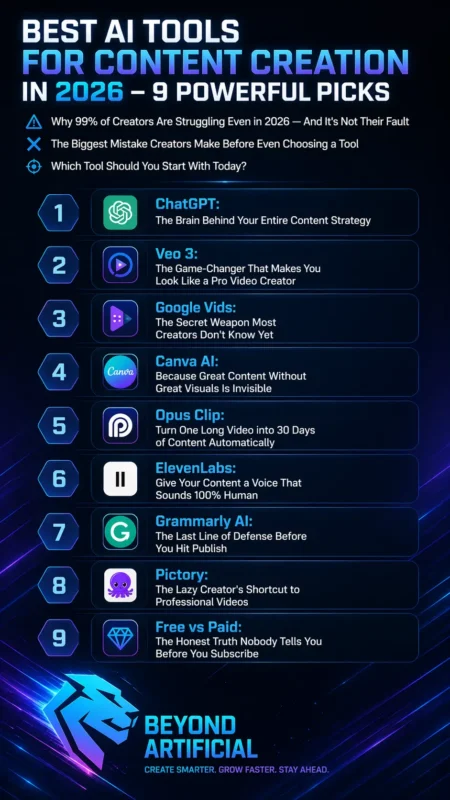
Why 99% of Creators Are Struggling Even in 2026: And It is Not Their Fault
You wake up every day with many ideas in your mind, but when it is time to create, that energy suddenly disappears, and honestly, that is normal. Most creators in 2026 are struggling not because they lack talent, but because they do not know how to use the right tools to work smarter. The real problem is doing everything by hand, writing scripts, editing videos, designing thumbnails, and posting content.
While competitors are using AI tools to handle these tasks and create 10x more content in less time. So here is the first tip: stop trying to do everything alone and choose just one AI tool this week, even the free version of ChatGPT, and use it only for writing video scripts first. When that becomes easy, add one more tool, because real success comes step by step.
Another important tip is this: when you feel stuck or tired, it often means that the task should be automated. Listen to that feeling instead of forcing yourself to keep going. You are not behind, and you are not failing; you may just be one good AI tool away from becoming the creator you always wanted to be.
If you are just getting started and budget is a concern right now, you will love our detailed guide on the Best Free AI Tools for Content Creators that covers what you can start using today without spending a single dollar.
The Biggest Mistake Creators Make Before Even Choosing a Tool
Here is something most people never tell you: the biggest mistake creators make happens before they even start using an AI tool. That mistake is buying a tool without knowing what problem they need to solve first. You watch YouTube, see someone praising a new AI tool, get excited, pay for it, and after a few weeks, that tool is just sitting there unused, while your content still does not grow.
That feeling of wasting money is frustrating. The truth is, most creators do not fail because the AI tools are bad. They fail because they never stop and ask one simple question: “What task wastes most of my time?”
So here is the first tip: before using any tool, take a notebook and write down your three biggest content problems. Maybe it is writing scripts, editing videos, or making thumbnails. That list will help you choose the right tool. Another smart tip is to always start with the free version of a tool for at least two weeks before paying for it. The free version can tell you if the tool is really useful for you. Also, never subscribe to more than two AI tools at the same time. Too many tools can make you feel confused and overwhelmed.
Remember, one AI tool used the right way is always better than ten tools used without a clear plan. So slow down, think carefully, and choose with your mind, not just your excitement.
1. ChatGPT: The Brain Behind Your Entire Content Strategy
If you have ever looked at a blank screen for a long time, trying to decide what to post, what title to use, or how to start your script, then ChatGPT is the perfect tool for that problem. Think of it like a smart friend who is always available, never gets tired, never judges your ideas, and helps you turn simple thoughts into a real content plan in minutes.
In 2026, the creators growing the fastest are not always the most talented ones; they are the ones using ChatGPT to help with every part of their content, from YouTube scripts to blog outlines and social media captions. Here is the first tip: before asking ChatGPT anything, start your prompt with: Act as a YouTube content strategist for your niche or channel. This small step makes the answer much more specific and useful.
Another powerful tip is to paste your old content into ChatGPT and ask it to turn it into five different formats, like Shorts scripts, tweets, or email newsletters. This way, one piece of content can be used in many ways. If the result sounds too robotic, simply type: “Make this sound more human and conversational.” ChatGPT can quickly rewrite it in a warmer and more natural tone.
Start with the free version today, share your niche, your audience, and your style, and it will feel like you have your own content team helping you, even if you are working alone.
2. Veo 3: The Game-Changer That Makes You Look Like a Pro Video Creator.
Imagine writing just two or three sentences and seeing a professional, cinematic video appear in front of you, no camera, no studio, and no editing skills needed. That is exactly what Veo 3 does, and it still feels amazing every time. If you have ever felt bad watching other creators post beautiful videos while you have no budget, no equipment, and no idea how they do it, Veo 3 helps solve that problem. It was made to remove the gap between you and bigger creators.
This is Google DeepMind’s powerful AI video tool in 2026. What makes it special is that it can create video, background music, sound effects, and even realistic voices from just one text prompt, no extra tools and no extra steps.
Here is the first tip: when writing your prompt for Veo 3, describe the scene like you are talking to a filmmaker. For example: “A confident young woman walking through a neon-lit city street at night, cinematic lighting, slow motion.” This gives much better results. Another useful tip is to use Veo 3 for YouTube intro clips, product showcase videos, or faceless channel b-roll. These are the parts that used to cost a lot of money to outsource, but now they can be made in just a few minutes.
If the price feels too high, start with Google AI Studio, where you can try Veo 3 with limited free generations before paying. The moment you start using Veo 3, you stop feeling like a small creator, because your videos can look so professional that people may never believe you made them alone at home.
3. Google Vids: The Secret Weapon Most Creators Do not Know Yet.
Many creators still spend hours using Canva or pay someone to edit videos, while Google Vids is already available inside Google and is free for many users. It is a powerful tool that can make video creation much easier. Google Vids is not talked about enough, even though it can save creators a lot of time. You simply type a text prompt, and it automatically creates a full video with scenes, stock footage, voiceover, background music, and even a storyboard — without using a complicated editing timeline.
What makes it even better is that it supports vertical 9:16 videos for YouTube Shorts, TikTok, and Instagram Reels, along with the normal YouTube video format. This means one tool can help you create content for all platforms. Here is the first tip: type “vids.new” in your browser and start your first project today. The design feels very similar to Google Slides, so if you know how to make a presentation, you can learn Google Vids quickly.
Another helpful tip is to check if your Google account already has Google Workspace access. Many people already have free access to Google Vids features, but do not realize it and keep paying for other tools. Also, write your script first in Google Docs and then move it into Google Vids. Since it works well with Google Drive, this simple habit makes your final videos look cleaner and more professional.
You are not late to this tool: in fact, you are early. Creators who start using Google Vids now can look much more professional in the next few months, while others are still searching for the right video tool.
4. Canva AI: Because Great Content Without Great Visuals Is Invisible.
You can write a great script and edit a perfect video, but still get no clicks. In 2026, if your thumbnail and visuals do not catch attention in the first second, people will scroll past your content. This is where Canva AI helps a lot. Before Canva AI, making a strong YouTube thumbnail often meant hiring a designer, spending hours in Adobe Photoshop, or using a simple design that did not look professional. Now, Canva AI helps you create professional thumbnails, social media posts, and video covers in just minutes, even if you have no design skills.
What makes Canva AI special in 2026 is that you can choose a template, change images with AI Dream Lab, remove backgrounds, resize designs for YouTube, Instagram, and TikTok, and even write captions, all in one place. You do not need to switch between many apps anymore.
Here is the first tip: set up your Brand Kit in Canva today. Add your logo, brand colors, and fonts. This saves time because you do not need to create your design style again and again for every new post or thumbnail. Another useful tip is to use Canva’s Magic Resize feature. After making one YouTube thumbnail, you can quickly turn the same design into a YouTube Shorts cover, an Instagram post, and a Pinterest pin with one click. This saves a lot of time.
If your budget is small, the free plan of Canva is enough to start. It gives access to many templates and basic AI tools that can already make your content look much better than most beginners. Your content deserves attention, and with Canva AI helping your visuals, more people will stop scrolling and start watching.
5. Opus Clip: Turn One Long Video into 30 Days of Content Automatically
Imagine spending three hours recording one good YouTube video, and then feeling stressed because you still need content for Instagram Reels, YouTube Shorts, and TikTok. Doing all of that by hand takes too much time. This is where Opus Clip can completely help you. Opus Clip takes your long video and uses AI to find the best and most interesting moments.
It adds captions, changes the video into vertical 9:16 format for Shorts and Reels, and even gives each clip a Virality Score, so you know which clips are best to post first. It does all of this automatically while you do other work. The best part is that one 30-minute video can give you 10 to 20 short clips ready to post. This means one video can help fill your content calendar for weeks without extra editing.
Here is the first tip: go to opus.pro and try the free plan first. It gives you 60 credits every month, which is enough to test how the tool works and see if it helps your workflow. Another smart tip is to choose your content type before processing the video. Selecting options like “YouTube,” “podcast,” or “vlog” helps the AI understand your content better and choose stronger clips. When your clips are ready, do not post only the one with the highest Virality Score. Try posting two or three different clips from the same video on different days.
This helps you learn what type of content your audience likes most. You already have valuable content inside your old videos. Opus Clip helps you find it, improve it, and share it without feeling tired or overwhelmed.
If you want to go even deeper into the world of AI video tools specifically, we have already tested and ranked the Best Video AI Generator options available right now, and the results will genuinely surprise you.
6. ElevenLabs: Give Your Content a Voice That Sounds 100% Human
If showing your face on camera makes you nervous, or if you have been delaying your YouTube channel because you feel shy or uncomfortable, ElevenLabs can help you a lot. It removes that problem and lets you create content without being on screen. ElevenLabs is an AI voice tool that sounds very real, warm, and natural. Many people say it sounds so human that it is hard to tell the difference between ElevenLabs and a real voice actor.
This makes it perfect for faceless YouTube channels, video scripts, and YouTube automation content. Before, creators had to pay a lot of money to hire voice actors for every script. Now, with ElevenLabs, you can create high-quality voiceovers in seconds for a much lower cost.
Here is the first tip: spend time choosing the right voice from the large voice library before creating anything. The voice you choose becomes part of your channel’s identity, so test many voices with your real script before deciding. Another useful tip for faceless YouTube creators is to lower the “Stability” slider to around 40–50%. This makes the voice sound more natural and less robotic because real people do not speak in the exact same way every time.
Start with the free plan first to test the quality. But if you want to earn money from your content, you may need the Starter plan, which gives you commercial rights for monetization. Your voice should not stop you from starting. ElevenLabs gives you a strong, professional voice that is ready for your first video today.
7. Grammarly AI: The Last Line of Defense Before You Hit Publish
You know that bad feeling when you publish a blog post or video description, and someone points out a spelling mistake or a strange sentence in the comments. It can make your content look unprofessional and make all your hard work feel wasted. This is where Grammarly helps a lot. In 2026, Grammarly is more than just a grammar checker. It is a full AI writing tool that fixes grammar mistakes, improves unclear sentences, checks your tone, looks for plagiarism, and even helps create short content: all in one place.
What makes it very useful for creators is that it works inside Google Docs, WordPress, YouTube description boxes, and social media captions. This means it helps you while you are already writing, without opening another tool. Here is the first tip: always check AI-written content with Grammarly before publishing. Whether you use ChatGPT or another AI tool, Grammarly helps improve the final result and makes it sound more natural and professional.
Another helpful tip is to use Grammarly’s Tone Detector before posting on social media. It can show if your message sounds too rude, too cold, or too formal when you actually want it to sound friendly and warm. Start with Grammarly’s free plan first. Even the free version can catch common grammar mistakes, improve clarity, and give you helpful AI prompts every month. This is enough for many beginners.
Your content may be smart and creative, but even one small grammatical mistake can make people leave. Grammarly helps make sure your work looks polished before you press publish.
And if you want to take your content creation skills one step further into actual marketing and business growth, do not miss our complete breakdown of the
Best AI Tools for Digital Marketing in 2026. It will completely change how you think about growing online.
8. Pictory: The Lazy Creator’s Shortcut to Professional Videos
If you have ever spent hours writing a blog post with full research and effort, but it only gets a few views, you are not alone. In 2026, many people prefer watching videos instead of reading long articles. This is where Pictory becomes very useful. Pictory takes your blog post or script and turns it into a video automatically. You just paste your blog link or text, click a button, and within a few minutes, it creates a full video with stock footage, captions, transitions, and voiceover. You do not need any editing skills.
The best part is that Pictory works in your browser, so you do not need a powerful computer or technical knowledge. You can directly use the videos on YouTube, LinkedIn, or Instagram. Here is the first tip: Use the “Blog to Video” feature on your older blog posts first. These posts already bring traffic, and adding a video can help keep visitors on your page longer.
Another useful tip is to change a few of the stock video clips that Pictory selects automatically. This small step only takes a few minutes but makes your video look more natural and professional. If you run a faceless YouTube channel or a YouTube automation channel, Pictory can save you a lot of time. It helps you turn written content into videos without recording your voice or showing your face.
You already have content on your blog. Pictory simply helps you turn it into videos that can work for you all day, even when you are not online.
9. Free vs Paid: The Honest Truth Nobody Tells You Before You Subscribe
Let me help you avoid a mistake that has already cost many creators money. The biggest problem is not choosing the wrong AI tool: it is paying for a tool too early, before you even know if you need it. The truth is, for the first 3 to 6 months of content creation, free tools like ChatGPT, Canva, and Grammarly are enough for most beginners. You can grow a lot without spending any money at the start.
You should only upgrade to a paid plan when the free version starts slowing your work, wasting your time every day, or stopping you from earning money because of missing commercial rights. If none of these problems exist, you do not need to pay yet. Here is the first tip: always use the free version of any tool for at least two weeks while doing real content work. Not just testing, but actually creating videos, posts, or scripts. This will clearly show you if you need the paid plan or not.
Another important tip is to never use more than two paid tools at the same time. Too many tools can make you confused and less productive. Focus on solving your biggest problem first, then add another tool only when needed. Also, always check the commercial rights before using any tool for monetized content. Some free plans, like ElevenLabs, may not allow monetization, and missing this detail can cause problems later.
Build slowly, start free, and only upgrade when your work truly needs it. Do not let excitement push you into spending money too early.
Which Tool Should You Start With Today?
I know exactly how you feel right now. You have read everything, you feel excited, but also a little overwhelmed. That small voice asking, Where do I even start? It is normal; it actually means you are ready to begin. Here is the simple truth: if you are a video creator or running a YouTube automation channel, start with ChatGPT today for your scripts. Then use Canva this week for thumbnails.
After that, in the third week, add tools like Opus Clip or Pictory to reuse your videos. This simple 3-step path is enough to get started without stress. If you are a blogger or write content, start with ChatGPT for writing, Grammarly for editing, and Canva for visuals. All of these have free versions and are strong enough to help you start without spending money in the beginning.
Here is the most important tip: do not wait until everything feels perfect. In AI tools, people who start imperfectly today always grow faster than people who keep waiting. The perfect time never really comes. Another helpful tip is to set just 30 minutes this week to start. Do not spend that time researching more tools or watching videos. Open ChatGPT, write your niche, and ask it to create your first piece of content. This one step will teach you more than anything else.
Every successful creator started from a blank page, just like you. The only difference is that they began. You already have the tools and knowledge; now all you need is to start.
Now that you know exactly which AI tools to use for content creation, the next exciting step is learning how to turn that content into real income, and our guide on the Best AI Tools for Making Money reveals 9 proven secrets that successful creators are quietly using right now.
FREQUENTLY ASKED QUESTIONS (FAQs)
What are the AI content creation trends in 2026?
In 2026, AI tools can do much more than just write text. One simple prompt can now help create a blog post, video, voiceover, captions, and visuals together. Successful creators do not rely on AI alone. They use it to save time on simple tasks while keeping their own ideas and storytelling at the center. To stay ahead, learn how to write good prompts, use a few tools together in one workflow, and always add your own thoughts and experience. This human touch is what makes your content trusted and valuable.
What is the best AI tool for content writing in 2026?
In 2026, ChatGPT is one of the most powerful tools for content writing. It helps create scripts, blog posts, captions, emails, and video descriptions in one place. The key is to give clear instructions. Mention your niche, audience, and tone so the content matches your style. For better results, use ChatGPT for writing and Grammarly for editing. Together, they help you create clean, professional content.
Which is the best AI to use in 2026?
If you are a content creator in 2026, the best single AI tool to start with is ChatGPT. It helps with writing, ideas, research, scripts, captions, and content planning all in one place. Most successful creators also combine tools. They use ChatGPT for writing, Canva for visuals, and tools like Opus Clip or Veo 3 for video content. Start with ChatGPT first, use it for a few weeks, and then slowly add other tools as needed.
Is ChatGPT or Gemini better?
In 2026, neither tool is “better” for everything; they are just different. ChatGPT is better for content creation like YouTube scripts, blog posts, captions, and long-form writing. It gives more polished and structured results. Gemini is better for real-time research and working inside Google tools like Docs, Gmail, and Drive. If your main goal is creating content and growing your audience, start with ChatGPT. If you mostly work in Google’s ecosystem, Gemini may fit you better.
Will AI replace content creators?
No, AI is not replacing content creators. In fact, most creators using AI tools are seeing better productivity and higher income. AI helps with fast and repetitive tasks, while humans still control ideas, strategy, creativity, and storytelling. AI cannot replace your personal voice or emotional connection with your audience. That is what people trust and follow. Creators who avoid AI may fall behind. The smart approach is to use AI as a helpful tool, not a replacement.
Best AI tools for content creation in 2026, free
You have been watching other creators grow their channels, build audiences, and make great content. The only thing stopping you might be the belief that you need expensive AI tools to start. But that belief is holding you back more than anything else. The truth is, in 2026, many powerful AI tools already have free versions.
Thousands of creators are building real channels and even earning money without paying anything in the beginning. Here is what free AI tools can do for you right now:
- Write your scripts and blog posts in minutes using ChatGPT’s free plan. No more staring at a blank page.
- Create eye-catching thumbnails and designs using the Canva free version. You do not need design skills.
- Fix grammar and improve your writing before posting using the Grammarly free plan. This helps you avoid simple mistakes.
- Turn long videos into short clips using the Opus Clip free plan. One video can give you many posts.
- Create voiceovers for faceless content using ElevenLabs free tier.
You do not need money to start. You just need to start using what is already available.