
 YouTube Automation
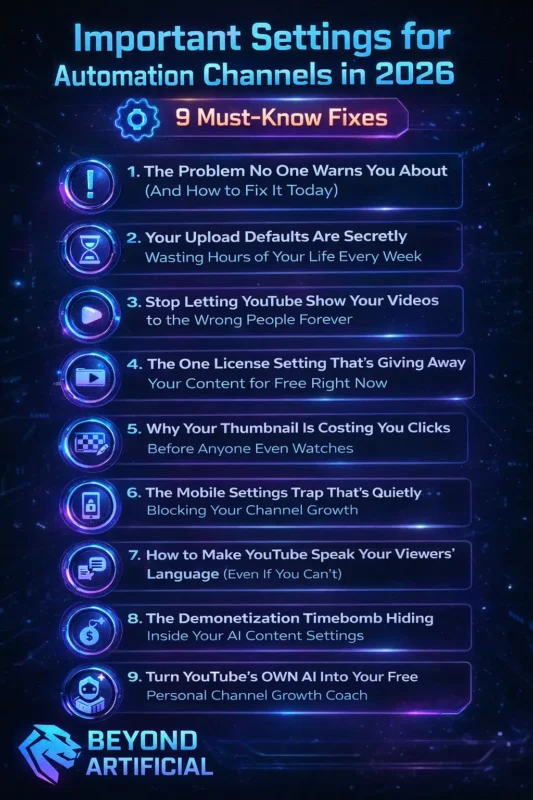
Important Settings for Automation Channels in 2026 -9 Must Know Fixes(Blog#:64)

Right now, the most Important YouTube Settings You Must Know in 2026 are changing faster than most creators can keep up with. And every day you ignore them, the algorithm quietly pushes your videos deeper into the void. These 9 fixes are not complicated, but skipping even one can cost you real views, real subscribers, and real money you have already worked hard to earn.
You have invested your time, your energy, and maybe even your savings into this channel. And the painful truth is… it is not your content holding you back, it is a few wrong settings silently killing your growth.
This guide gives you the exact fixes top automation creators are using right now, so you can stop guessing, stop losing, and finally start winning the game you have already committed to.
Keep reading… because one small fix could change everything.
Before fixing anything, you need to understand whether YouTube automation is actually worth it and what most beginners misunderstand.
1. The Problem No One Warns You About (And How to Fix It Today)
You have been uploading videos, working hard, but your channel still feels stuck. And honestly, that frustration is real. The truth is, the problem is not your content, your niche, or even your thumbnails. In 2026, it is your channel settings. There are small, hidden settings inside YouTube Studio that quietly work against you. Most creators never notice them, and by the time they do, months of effort are already wasted.
Here is what you need to fix right now: First, go to YouTube Studio → Settings → Channel → Basic Info. Make sure your channel description clearly explains your niche. If it is vague or empty, YouTube will not understand your content. Next, check your country setting in Advanced Settings. If it is wrong, YouTube may show your videos to the wrong audience.
Also, make sure your channel is NOT set to “Made for Kids.” This one mistake can remove comments, notifications, and recommendations. Fix these three things today, and your channel will finally have a fair chance to grow. Because the real problem was never your content, it was the settings no one told you about.
2. Your Upload Defaults Are Secretly Wasting Hours of Your Life Every Week.
If you are typing the same description, tags, and links every time you upload, you are wasting hours every week. And yes, that frustration is real… but it is fixable. YouTube already has a solution called Upload Defaults, but most creators ignore it. This one setting can save you up to 10 minutes on every upload. And while you are wasting time, others are using it to grow faster.
Here is what to do: Go to YouTube Studio → Settings → Upload Defaults. Add your description, subscribe CTA, social links, and your main tags. Now every time you upload, all of this will be added automatically. Important: Upload Defaults only work when you upload from your browser (YouTube website). They do not work on mobile or some editing tools, and this is where many creators get confused.
Also, set your default visibility to Private. This gives you time to fix your title, thumbnail, and description before going public. Do this once, and every future upload becomes faster and easier. Because your channel shouldn’t waste your time, it should save it.
3. Stop Letting YouTube Show Your Videos to the Wrong People Forever.
Imagine spending weeks making a video, hitting publish with hope, and then getting almost no views. That pain is real. The truth is, YouTube might be showing your video to the wrong audience. You would not get any warning. No alert. No message. Your videos just underperform, and you think the problem is your content. But in 2026, the real problem is often your settings.
Here is what to fix: First, go to YouTube Studio → Settings → Channel → Advanced Settings. Make sure your video category is correct. A wrong category sends your video to the wrong audience and kills your click rate. Next, check your Audience setting. Set it to: “No, this channel is not made for kids.” If this is wrong, you lose comments, notifications, and recommendations.
Also, go to Basic Info and add 5–10 clear niche keywords. Include your niche, sub-niche, and content type. Without this, YouTube does not understand your channel and shows your videos to random people. Fix these three things today, and your videos will finally start reaching the right audience. Because the problem was never your content, it was who YouTube was showing it to.
4. The One License Setting That is Giving Away Your Content for Free Right Now.
Right now, there could be a setting in your YouTube Studio that is giving your videos away, and you do not even know it. If your license is set to Creative Commons, other people can legally download, reuse, and even re-upload your videos. For automation creators, this is a big loss because you have invested time, effort, and money into that content.
By default, YouTube uses the Standard YouTube License (which protects your videos). But here is the problem… If you accidentally saved Creative Commons in your Upload Defaults even once, every video after that could be affected. Here is what you need to do right now: Go to YouTube Studio → Settings → Upload Defaults. Scroll to License and make sure it is set to Standard YouTube License.
Next, go to your Content tab and check your recent videos. If any are set to Creative Commons, you can select them and change them back to Standard. Important:
With the Standard License, only YOU control your videos. No one can reuse or upload them without your permission. Fix this today, and you protect all your future content. Because your videos are your asset, do not let one setting give them away.
5. Why Your Thumbnail Is Costing You Clicks Before Anyone Even Watches
Your thumbnail is the first thing people see, and it decides if they click or scroll. Right now, many automation creators are losing views not because their thumbnails are bad… But because they can’t upload custom thumbnails at all. When this happens, YouTube uses a random frame from your video, and it usually looks bad. Channels without custom thumbnails often get only 2–3% CTR, while good thumbnails can reach 8–12% CTR.
Here is how to fix it: First, go to YouTube Studio → Settings → Channel → Feature Eligibility. Verify your account to unlock custom thumbnails. If you skip this step, every video suffers without you even realizing it. Next, go to your Content tab, open a video, and upload your thumbnail. You can also use “Test and Compare” to try different thumbnails — YouTube will pick the best one for you.
Keep it simple: Use fewer than 5 words on your thumbnail. Most viewers are on mobile, and too much text becomes unreadable. Important: Never publish your video without a thumbnail. If you go public with an auto thumbnail, your CTR drops instantly, and YouTube stops pushing your video. Fix this today, and your videos will finally get the clicks they deserve. Because a great thumbnail is not optional, it is what gets your video noticed. Improving thumbnails is one of the fastest ways to boost YouTube views with automation tools.
6. The Mobile Settings Trap That is Quietly Blocking Your Channel Growth.
Here is the truth: You can post consistently, make great content, and still see no growth. Why? Because your settings are working against you. Many creators use only the YouTube mobile app, but it hides important options. So you miss key settings that help your channel grow. Here is what to fix: First, stop using the regular YouTube app for managing your channel. Download and use YouTube Studio instead.
That is where you can access important settings like:
- Audience (Made for Kids)
- Channel keywords
- Monetization settings
- Subscriber visibility
Next, go to YouTube Studio → Settings → Channel → Keywords. Add a few clear words about your niche. If you do not do this, YouTube does not understand your content and shows it to the wrong people. Also, go to Community settings: Turn on Basic comment moderation And hold comments with links or hashtags This protects your channel from spam and keeps it looking clean.
Finally, make sure your video category is correct. If it is wrong, YouTube shows your videos to the wrong audience, and they leave quickly. Fix these settings once, and your channel will finally start working with you, not against you. Because sometimes, the problem is not your content, it is your setup.
7. How to Make YouTube Speak Your Viewers’ Language (Even If You Can not).
Imagine making great videos… but most people who see them can not understand your language. That is a huge problem, and it is completely fixable. YouTube is a global platform. Most viewers actually come from different countries. So if your videos are only in one language, you’re losing a big audience.
Here is what to do: First, go to YouTube Studio → Analytics → Audience. Check your Top Countries. If many viewers are from countries like France or Brazil, start with that language. Next, go to Subtitles → Add Language. Add translated titles and descriptions. This helps YouTube show your videos to people in other countries. This means more views from videos you already uploaded.
Also, you can now upload different thumbnails for different languages. So people see a thumbnail in their own language, and are more likely to click. Finally, use multi-language audio if possible. You can add dubbed audio to the same video. This way: One video, Multiple languages, More views from around the world, Fix this, and your channel can grow beyond just one audience. Because your content is not limited, your language is.
8. The Demonetization Timebomb Hiding Inside Your AI Content Settings.
You worked hard, got monetized… and then suddenly your earnings drop. No warning. No clear reason. And the worst part, you did not even know what went wrong. The truth is, one small mistake can cause big problems. Missing a disclosure, using too much AI, or wrong settings can lead to demonetization or even strikes. Ignoring this can affect yourYouTube monetization rules and watch time requirements.YouTube is already checking your content automatically.
Here is what to fix: First, when uploading a video, go to Details. Find the option: “Contains altered or synthetic content.” If you used AI tools, turn this on. If you don’t, YouTube can take action against your channel. Next, do not let AI do everything. Using AI is fine, but your video must include your own input. Add your voice, ideas, or explanation. If everything is AI-made, it may not be monetized.
Also, check your old videos. Go to YouTube Studio → Content. Look for videos with an AI voice or visuals. Either: Add the correct disclosure, or improve them with human input. Finally, do not depend only on YouTube ads. Build other income sources like: Sponsorships, Memberships, Products, or services. Because one update can stop your earnings anytime. Fix this now, and protect your channel. Because your income shouldn’t depend on one small mistake.
9. Turn YouTube’s Own AI Into Your Free Personal Channel Growth Coach.
You have probably searched “how to grow on YouTube,” watched tons of videos… and still see no growth. That is frustrating and completely normal. But here is the truth:
Your best growth coach is already inside your YouTube account, and it is free. YouTube Analytics already tells you what is working and what is not. Here is what to do: First, go to YouTube Studio → Analytics → Content. Sort videos by CTR (Click-Through Rate). Find your top 3 videos.
These are your winners.
Now look for patterns: What type of thumbnail did you use? What was the topic? How long was the video? Do not guess, repeat what already works. Next, go to Analytics → Audience. Check “What your viewers are watching.” This shows what your audience already likes. Use it to get new video ideas. Also, improve your video structure: Answer one clear question per video. Add timestamps (chapters)
This helps people watch longer, and YouTube pushes your video more. Finally, keep posting and checking your analytics every week. The more data you give YouTube, the better it understands your content, and the more it shows your videos to the right people. Stop guessing. Start using your data. Because your channel already knows how to grow, you just have to listen.
FREQUENTLY ASKED QUESTIONS (FAQs)
What changes are coming to YouTube in 2026?
YouTube is now more AI-driven, with better Shorts, live streaming tools, and new monetization options beyond ads. Creators who understand and use these updates early can grow faster, reach more people, and stay ahead of the competition.
What are the YouTube rules for 2026?
No, YouTube is not banning AI, but it is stricter about low-quality, fully automated content. If you clearly disclose AI use and add your own voice, ideas, or value, your channel stays safe and can continue to grow without risk.
How to get more views on YouTube in 2026?
YouTube now rewards viewer satisfaction, not consistency alone, so even new creators can grow fast. If your CTR is below 4% or your average view duration is low, your videos will not perform. Improve your thumbnails and titles, and keep viewers watching longer to boost growth.
Can I be a YouTuber in 2026?
Yes, YouTube in 2026 still rewards smart strategy, not experience, and new creators go viral every day. Focus on the right niche, strong thumbnails, and viewer retention, not perfection, and you can grow faster than old channels.
What are the best settings for YouTube?
The best settings are the ones that help YouTube understand your niche and protect your growth. Set your channel keywords, audience (not made for kids), upload defaults, and thumbnails correctly; these small settings can make a huge difference in views and monetization.
Important YouTube settings you must know in 2026 for Android.
If you are uploading videos from your Android phone but your channel is not growing, you are not alone. And the truth is… It is probably not your content.
It is your settings. Most beginners post many videos without fixing their main settings. Because of this, YouTube does not understand its channel and shows its videos to the wrong people.
But here is the good news: In 2026, YouTube will have added better AI tools and mobile features, and you can fix everything in just a few minutes on your phone. Here is what these settings will do for you:
- Turn your Android phone into a complete channel management tool
- Help YouTube understand your niche and show your videos to the right audience
- Unlock new mobile features like live testing and Shorts tools
- Protect your monetization with the right settings
- Make your growth feel clear and controllable, not confusing
Fix your settings once, and your whole channel starts working better.
