
 YouTube Automation
How to Automate Shortform Videos – 9 Powerful AI Hacks(Blog#:48)

Every day you skip posting, your competitors use AI to automate short-form videos and reach the audience that could have been yours. The good news is that learning how to automate shortform videos is easier than most creators think. The real problem is not a lack of ideas; it is the time spent editing, captioning, and publishing content every day. That is where smart AI tools change everything.
When you understand how to automate short-form videos, you can turn hours of work into just a few minutes. Instead of doing everything manually, AI systems help you create, edit, caption, and schedule videos faster. Imagine waking up and seeing your short videos already ready to post while you focus on other important things.
In this guide, you will discover 9 powerful AI hacks that creators use to produce short-form content faster, stay consistent, and grow their audience without spending hours editing every day.
If you want to understand the full system behind automated content creation, you should also explore our complete YouTube automation workflow guide.
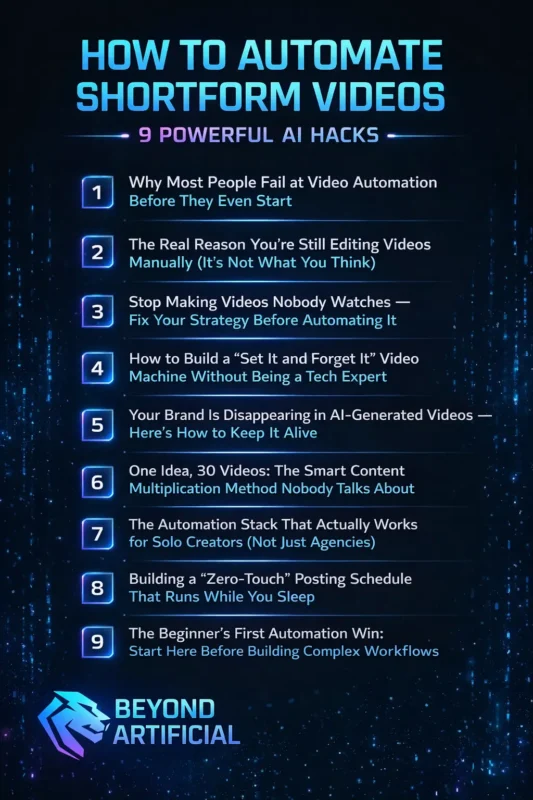
Keep reading to discover the powerful AI hacks that will show you how to automate short-form videos, save hours of editing time, and publish content consistently without burning out.
Creators who want to grow faster with short videos should also review the official YouTube Shorts creator guidelinesto understand how the platform works.
1. Why Most People Fail at Video Automation Before They Even Start.
Let’s be honest: most people fail at video automation not because they lack talent, but because they start with big dreams and no clear plan. They watch gurus online, get excited about passive income, and expect results in just a few weeks. When the money does not come quickly, they give up. What they do not realize is that the problem is not the automation model; it is their mindset and strategy.
Automation only multiplies what you already have. If your idea is weak or your content has no real value, automation will not fix it. It will simply make the failure happen faster. That is why the first step is building a strong foundation. Before using any tool or hiring anyone, choose a niche that actually has an audience. Do not just pick something that sounds interesting: find a topic people are actively searching for.
Instead of choosing a broad niche like “AI tools,” focus on a specific angle such as “AI tools for entrepreneurs.” Clear positioning is what helps some channels grow quickly while others struggle to get attention. Once your niche is clear, treat your content like a real product. Create simple brand guidelines, decide your tone of voice, and use templates so every video feels consistent. Consistency helps viewers recognize and trust your content.
And finally, do not try to do everything alone. Build a simple workflow, organize tasks with tools like Trello and Notion, and focus on creating a system. A clear and organized process is what turns content creation from a stressful side hustle into a real, scalable business.
2. The Real Reason You are Still Editing Videos Manually (It is Not What You Think)
Here is the uncomfortable truth: the real reason many creators still edit videos manually is not because they lack tools. It is because they believe that if they do everything themselves, the video will be better. This belief quietly steals hours from their life every week. If your workflow still includes long hours of trimming clips, searching for B-roll, and making tiny edits frame by frame, you are not just losing time. You are also falling behind creators who have already automated most of their editing work.
Before using AI video tools, many creators spend around 40–50 hours every month just making videos. Automation can reduce a big part of that time and give you hours back in your schedule. So here is a simple tip: stop waiting until you completely understand a tool before using it. Just choose one AI video editor like CapCut, Descript, or VEED, and try creating a video with it this week.
Start by automating the repetitive tasks first. Let AI trim silence, fix colors, and sync audio automatically. These tasks take a lot of time, but do not add creativity to your content. When AI handles the technical work, you can focus on what really matters: storytelling, pacing, and creating moments that make viewers stop scrolling and pay attention. In the end, the goal was never to edit videos perfectly. The real goal is to connect with your audience, and automation helps you spend more time doing exactly that.
3. Stop Making Videos Nobody Watches, Fix Your Strategy Before Automating It.
Let’s have an honest conversation. You have been posting videos consistently, you have even started automating your content, but the views are still very low. After a while, this can make you question whether content creation is really for you. The truth is that many creators feel the same frustration. Most people who automate their content keep uploading video after video, but still see little growth. This usually does not happen because they are lazy.
It happens because they are scaling a strategy that is already weak. Automation without a clear strategy simply means you are producing more content that is not working. Automation should save your time, but it cannot replace your thinking. If your content does not solve a real problem for a real viewer, no tool will fix that. A better approach is to start with research. Before automating anything, use tools like Vidiq or Tubebuddy to find keywords with good search volume and lower competition.
Study the videos that are already ranking and try to create something that is clearer, more useful, or more engaging. Your thumbnail and title also matter more than most creators think. Strong visuals, clear emotions, and honest titles help people decide to click. If viewers feel tricked by a title or thumbnail, they leave quickly, and that hurts your video performance. Instead of thinking about each video separately, try planning a journey for your viewers.
Each video should naturally lead someone to watch the next one. This chain of videos keeps people on your channel longer, which the algorithm rewards. So focus on fixing your strategy first, and then use automation to scale it. When a good system supports strong content, it can help you build a real audience. But if the strategy is weak, automation will only make the problem grow faster.
Many successful creators rely on a content repurposing strategy to turn one long video into multiple short clips for different platforms.
4. How to Build a “Set It and Forget It” Video Machine Without Being a Tech Expert.
If you have ever searched “how to automate videos” and ended up feeling more confused than before, you are not alone. Many guides use complicated terms like APIs, webhooks, and workflows that make automation sound difficult. But the truth is that video automation today is much simpler than most people think. Modern tools allow you to connect apps using simple drag-and-drop systems.
You do not need coding skills, a tech background, or a large team. Once the workflow is set up, many parts of the video creation process can run automatically. You also do not need a studio or expensive equipment. With the right AI tools, a video can be scripted, voiced, and visually created automatically before you upload it. Start small. Your first automation system does not need to be perfect. Just choose one tool, such as Make or Zapier, and connect two simple apps together. For example, a Google Docs file could trigger an AI voiceover or another step in your workflow.
You can also use ready-made templates from no-code platforms like Creatomate. These templates help you avoid building everything from the beginning. Instead, you simply customize what already works. It also helps to decide your brand style early. Choose your colors, fonts, tone, and visual style once, and your automation system can apply those settings to every video automatically. This keeps your content consistent and professional.
Remember, the goal is not to become a technology expert. The goal is to build a simple system that saves time and works in the background. The creator who starts small and improves over time will always move faster than the one waiting for the perfect moment to begin.
5. Your Brand Is Disappearing in AI-Generated Videos. Here is How to Keep It Alive.
Sometimes when creators start automating their videos, they notice something strange. The videos look clean and professional, but they no longer feel like their own work. The personality that made their content special starts to disappear, and audiences can often feel that difference. The problem is that most AI tools are designed to create generic content. They produce a “professional” style that could belong to anyone.
When your videos start looking like everyone else’s, your brand slowly loses its identity. That is why it is important to protect your style before you automate your content. A simple step is to create your own Brand Guide. Write down your colors, fonts, tone of voice, and the type of language you always use. Also, decide the kind of words or style that you never want to use. When you automate videos, use templates that keep these brand elements fixed.
Your logo, colors, and typography should stay the same in every video. Only the message or topic should change. This helps your content stay consistent and recognizable. You should also treat AI tools like a new team member. Give them examples of your best content and adjust the results when they move away from your style. Over time, the system will learn your patterns and produce videos that match your brand more closely.
Remember, your brand is more than just a logo. It is the reason people choose your content instead of hundreds of other automated channels. Protecting that identity is what helps your audience trust and remember you.
Many modern automation tools are powered by artificial intelligence technology that can generate scripts, edit videos, and add captions automatically.
6. One Idea, 30 Videos: The Smart Content Multiplication Method Nobody Talks About.
If you have ever stared at a blank screen trying to think of a new video idea every day, you are not alone. Many creators feel exhausted by the constant pressure to come up with fresh content. Watching other creators post frequently can make it feel like you are falling behind. But the truth is that successful creators are not always creating more ideas. They are using their ideas more intelligently.
This strategy is called content repurposing. Instead of creating new content every day, you take one strong idea and turn it into multiple pieces of content for different platforms. For example, start with one valuable long-form video. A 10–15 minute YouTube video can become the main piece of content for your entire strategy. From that single video, you can create short clips, social media posts, or even email content.
A simple workflow is to dedicate one day to recording your main video and another day to turning it into smaller pieces of content. This approach can give you enough content to post consistently for weeks. You can also use tools like Opus Clip, CapCut, or Descript to automatically turn long videos into short vertical clips for platforms like YouTube Shorts, TikTok, and Instagram Reels.
These short clips work like small previews that attract viewers and guide them back to your main content. In the end, the creator who turns one idea into many pieces of content will grow faster than the creator who struggles to invent a brand-new idea every single day. A smart system saves time, reduces stress, and helps you stay consistent.
7. The Automation Stack That Actually Works for Solo Creators (Not Just Agencies).
If you feel overwhelmed by too many tools, you are not alone. Many solo creators pay for several subscriptions but still end up doing most of the work manually. This usually happens because they collect tools without building a clear system. For example, some creators write ideas in ChatGPT, copy the text into Notion, and then manually schedule posts using Buffer. It may look productive, but it often becomes messy and time-consuming.
The better approach is to create a simple automation pipeline instead of using too many separate tools. A basic AI content stack only needs a few key parts. You can start with a script generator like ChatGPT, a video creation tool such as HeyGen, a simple editor like CapCut, and a workflow connector like Make to link everything together. Automation platforms like Make allow you to connect apps using visual workflows. This means you can see how each step works and fix problems easily if something stops working.
For short-form content, tools like Submagic can automatically cut highlights, add captions, and format clips for platforms like TikTok, Instagram Reels, and YouTube Shorts. The goal is not to use dozens of tools. The goal is to build a small system where everything connects smoothly. For example, adding a video idea to a simple list or document could automatically trigger the script, editing, and clip creation process.
When your tools work together in a clear system, you save time, reduce stress, and produce content much faster, even as a solo creator
8. Building a “Zero-Touch” Posting Schedule That Runs While You Sleep.
Take a moment and think about it. How many times have you stayed awake late, rushed through dinner, or felt stressed because you had not posted content that day? Many creators feel anxious about missing a post, as if skipping one day will ruin all their progress. But the reality is very different. The most successful creators are not online all the time. Instead, they create their content in batches and schedule it to post automatically.
Batch creation means making several videos in one focused session. You can create a week or even a month of content in a single day. After that, scheduling tools publish the videos for you at the best times. It also does not matter if your audience lives in different time zones. Scheduling platforms can publish your content automatically at the right times, even while you are sleeping.
9. The Beginner’s First Automation Win: Start Here Before Building Complex Workflows.
If you have been watching automation tutorials for weeks but still have not built a single workflow, you are not alone. Many beginners save videos, read guides, and keep learning, but never actually start. This usually happens because of information overload, not laziness. When you see complex automation systems online, it can feel overwhelming. Beginners often think they need to automate everything at once. But the smarter approach is to start small.
Instead of building a big system, focus on automating just one repetitive task that takes up your time. Even automating a single step can save you hours every week and give you confidence to continue. A simple first step is to try a basic workflow. Open Make or Zapier, create a simple video template in Creatomate, and fill your content using a spreadsheet or template. When the system generates your first automated video, you will see how powerful automation can be.
The key is to start simple and improve gradually. Your first workflow does not need to be perfect. Think of it as a first draft that you can adjust later. After using your system for a few weeks, review how it works. Keep what saves time and improve what does not. Then slowly add more steps as your confidence grows. Remember, automation is not about building a complex system on day one.
It is about taking the first small step. Once you see your first automation working, it becomes much easier to keep building and improving your workflow.
FREQUENTLY ASKED QUESTIONS (FAQs)
How to script short-form videos?
Most creators overthink short-form video scripts and either get stuck or talk too much. The simple fix is the H.I.P. method: Hook, Information, Promise. Start with a strong hook, share one clear idea quickly, and end with a reason for viewers to follow or click.
What is the short-form video algorithm?
The short-form video algorithm is not complicated. It simply shows your video to more people if viewers watch it, like it, share it, or watch it again. Focus on three things: a strong first 3-second hook, high watch time, and content people want to share.
How to use AI to make short-form videos?
You can use AI to create short-form videos even if you have no editing skills. Simply enter your topic into an AI video tool, and it can generate the script, visuals, voiceover, and subtitles automatically in minutes.
How to create an automated video?
To create an automated video, start with a simple video template and connect it to a data source like a spreadsheet using a no-code tool. Each new entry can automatically generate a new video without manual editing.
How do you get your script noticed?
To get your video noticed, start with keyword research, so your content matches what viewers are searching for. Then open your video with a strong hook in the first few seconds to stop people from scrolling. A clear topic and powerful opening help both viewers and the algorithm find your content.
How to automate shortform videos with AI
Many creators spend hours every week scripting, recording, editing, and posting videos. At the same time, they see other creators publishing content constantly and wonder how they manage to keep up. This often leads to frustration and creative burnout. The truth is, the difference is not talent or speed. The difference is automation. Many creators are still doing everything manually, while others are using AI tools to handle most of the work.
Short-form video is now one of the most powerful content formats online. Platforms like TikTok and Instagram Reels attract millions of viewers every day. This creates a huge opportunity for creators who can produce content consistently. The good news is that modern AI tools can automate many parts of the process. They can help generate scripts, edit clips, add captions, and prepare videos for publishing across multiple platforms. When you learn how to automate your short-form video workflow, several things become easier:
Save time: create a week of content in one session instead of editing every day
Stay consistent: your videos keep posting even when you are busy
Scale your content: one template can help generate many videos quickly
Focus on creativity: AI handles repetitive editing tasks
Grow faster: your content can keep reaching viewers even when you are offline
Learning how to automate short-form videos can also support a profitable YouTube automation business model.
