
 YouTube Automation
Best AI UGC Video Generator – 7 Powerful Tips (Blog #: 87)

You put your heart into your brand, but without the right best AI UGC video generator, your competitors keep taking your audience while you wait for a video editor who charges too much and takes weeks to deliver. Hiring real creators can cost between $150 and $2,000 for just one video, and most small brands cannot keep spending that much on a system that does not grow with them.
The good news is that the best AI UGC video generator tools have changed everything. Now you can create engaging, trust-building videos in minutes, not weeks. Around 93% of marketers say that user-generated content performs better than traditional branded content, yet many brands still struggle to create it regularly at scale.
That is exactly where these powerful AI tools help. In this guide, we share 7 strong picks for the best AI UGC video generator so you can stop guessing, stop overspending, and start growing your brand with confidence.
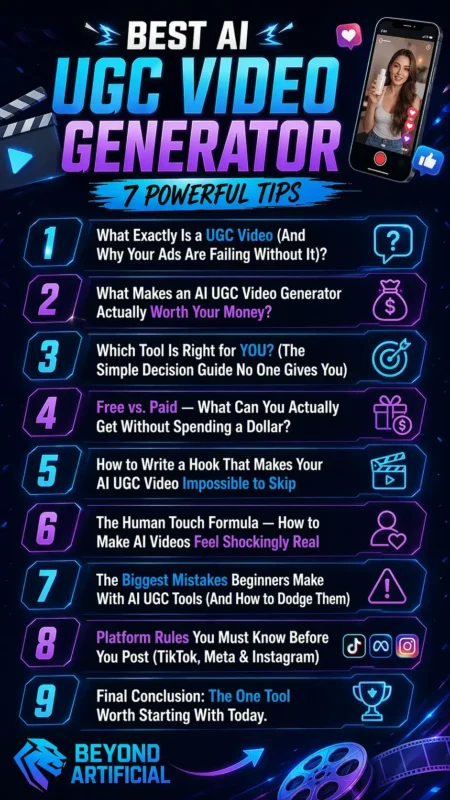
You can explore more tools in our detailed breakdown of the Best Video AI Generator.
1. What Exactly Is a UGC Video (And Why Your Ads Are Failing Without It)?
A UGC video is a short, natural-looking video where a normal person talks about a product as they found it themselves and truly like it. This real and honest feeling is what makes people stop scrolling and trust the video. UGC ads get 4x more clicks than branded content, cost 50% less per click, and convert almost twice as much as traditional polished ads.
If your ads are running but no one is buying, the truth is simple: People can quickly tell when something looks like a corporate ad, and they skip it fast. Think about it, when was the last time you bought something because of a fancy brand video, compared to a real person looking into the camera and saying, “I had this problem, and this product really helped me”? Most people trust the second one more. That is the real power of UGC.
So here is the first tip: do not try to make your UGC video look too perfect. Simple lighting, a casual tone, and even a normal background can build more trust than a professional studio setup. The second tip is to start with the problem, not the product. People need to feel understood in the first 3 seconds, or they will scroll away. You can start with something like, “I was tired of spending money on ads that nobody clicked,” before even mentioning your product.
Also, remember, people trust real people more than scripted brand messages. A customer sharing a true experience is much stronger than any polished commercial. Your job is not just to sell, it is to connect. When your audience feels that connection, your ads stop feeling like ads, and that is when sales start to grow.
2. What Makes an AI UGC Video Generator Actually Worth Your Money?
If you have ever paid for a tool and felt disappointed because it did not work well, then you already know that not every AI UGC video generator is worth your money. The difference between a good tool and a bad one comes down to a few important things. A good tool should be able to create scripts, voiceovers, and full videos using only your product URL.
If you still have to write everything yourself and edit clips manually, then the tool is not really helping you; it is just giving you more work. A useful AI UGC generator also lets you create many ad versions quickly. You can change the script, avatar, tone, or call-to-action and test different creatives fast. This means your money keeps working for you all day, even while you sleep.
Here is the first tip: always check if the tool offers a free trial or demo before you pay. If a platform hides everything behind a paywall and gives no refund option, that is a warning sign. The second tip is to never judge a tool only by how many avatars it has. A tool with 50 realistic and natural avatars can perform much better than one with 1,000 robotic-looking faces. Always ask for a sample video before you decide.
Also, make sure the tool works directly with ad platforms like Meta and TikTok. If you have to download, reformat, and upload every video by yourself, the tool is wasting the time you wanted to save.
The main point is simple: a truly good AI UGC video generator does not just make videos. It saves your time, makes your ads feel more real, and helps your budget go further.
3. Which Tool Is Right for YOU? (The Simple Decision Guide No One Gives You)
Here is a simple truth: most “best tool” lists are made to rank on Google, not to truly help you choose the right tool for your needs, budget, product, and platform. That is why many people pay for the wrong tool and give up before seeing results. The most important question before choosing an AI UGC video generator is not “Which tool is the most popular?” but “What is the one main thing I need this tool to do for me right now?” The right choice depends on what matters most to you, like better avatars, faster batch video creation, or support for many languages.
Trying to find one tool that does everything perfectly usually leads to confusion and no decision. A $50 per month tool that you learn well and use regularly will help you much more than five different tools you barely understand. So here is the first tip: choose one tool based on your biggest problem and use it for at least 30 days before deciding if it works.
The second tip is to never skip the free trial or demo. Even 20 minutes of using a tool can tell you more than hours of reading reviews. The right tool should feel simple and helpful, not stressful and confusing. If you are a small business owner with a limited budget, start with a tool that has a free plan and easy URL-to-video features. This helps you test results without spending too much money.
If you are a marketer running paid ads at scale, focus on tools with batch video creation and direct export to platforms like Meta or TikTok, so your work stays fast and smooth. Start with one platform, create your first strong UGC video, and grow from there. Right now, your goal is not to master every tool; it is to launch one great video quickly and let the results guide your next step.
4. Free vs. Paid: What Can You Actually Get Without Spending a Dollar?
Let’s talk about something most people do not say clearly: the word “free” in the AI UGC world can be very misleading. Many tools call it a free plan, but it is often designed to make you feel limited so you will pay for the full version. Most free plans add a watermark to your videos, give you only a small number of credits, like 5 to 10 videos per month, and some do not even allow commercial use.
This means if you want to run ads or use the videos for business, you could be using a plan that does not legally allow it. Still, free plans can be very useful for one important reason: they help you test the tool before spending money. You can check the avatar quality, the workflow, and the video style to see if it matches your brand. This testing can save you from wasting money on the wrong paid plan.
Many users say credit limits are the biggest problem with free AI video tools. So here is the first tip: use free plans for testing, not for long-term work. Create 2 to 3 videos, check how real they look, and see if the tool feels easy to use. Then decide if it is worth paying for. The second tip is to always check if the free plan allows watermark-free exports. Spending hours making the perfect video and then finding a big watermark on it can be very frustrating.
The real question is not whether free is good or bad. The real question is whether the limits of the free plan are stopping your progress. If you only need a few test videos this month and the free credits are enough, then there is no reason to pay yet.
Move to a paid plan only when one of these things happens: you keep reaching your monthly credit limit, the watermark stops you from running real ads, or you need batch video creation to grow faster. Before that, save your money.
5. How to Write a Hook That Makes Your AI UGC Video Impossible to Skip
Here is the simple truth: you can have the best AI avatar, great editing, and an amazing product, but if the first 3 seconds of your video do not grab attention, people will scroll away without thinking twice. All your time and effort will be wasted. You only have 3 seconds to catch someone’s attention. If your video does not make them feel something in that short time, they will skip it.
That is why the hook is not just important; it is the most important part of the whole video. If the beginning fails, no one will watch the rest. Smart brands treat hooks as separate parts of the video. They create 10 to 20 different hook versions for one video idea and test them quickly. They do not guess which one will work; they let real audience results decide.
Here is the first and strongest tip: always start with the problem, not the product. Begin with something your viewer already feels, like “I was wasting money on ads that nobody clicked.” This makes people feel understood and curious to know more. The second tip is to write at least 5 different hook versions for every video. Make one with curiosity, one with surprise, one with a strong promise, one that speaks directly to your audience, and one that starts in the middle of a story.
Then test them and see which one performs best. Keep the first 2 to 3 seconds focused on one clear idea or one strong emotion. Do not try to say too much at once. Too much information can make people lose interest fast. Simple hooks work better because they are clear and direct.
When you stop trying to say everything and focus only on the one thing your viewer needs to hear most, your hook becomes powerful. That is when people stop scrolling, keep watching, trust your message, and finally buy.
6. The Human Touch Formula: How to Make AI Videos Feel Shockingly Real
There is one thing that can ruin an AI UGC video very quickly: that strange, robotic feeling that makes viewers think, “something feels off.” People often scroll away in the first second, even before they realize why. Many people using AI UGC tools do not fix this because they do not know the small details that make a video feel truly human instead of obviously made by AI.
The best UGC videos do not sound like studio recordings. They sound like simple videos made on an iPhone, natural, personal, and real. This small difference in voice and style can decide if people trust your video or skip it. Even small things like a shaky camera angle, a quick natural reaction, or a small imperfect moment can make your AI video stronger. These details make the video feel real and unscripted, and that is why people trust UGC more than polished brand ads.
Here is the first and most important tip: write your script the way real people speak, not the way marketers write. Use simple words, short sentences, and natural phrases like “honestly” or “I was not sure at first.” This makes your video feel more honest and relatable. The second tip is to always add B-roll footage or real product clips between talking sections. A full 30-second video of one person talking can feel boring and too much like a presentation. Adding product shots makes it feel more like a real recommendation and much more believable.
Real UGC content has small imperfections, and that is a good thing. Do not make your video too polished with perfect framing or heavy effects. The more perfect it looks, the fewer people trust it. Trust is what turns viewers into buyers. The formula is simple: speak like a friend, keep the video natural, and help the viewer feel like someone just like them found something useful. When people see themselves in your video, the sale is already halfway done.
7. The Biggest Mistakes Beginners Make With AI UGC Tools (And How to Dodge Them)
If you have ever spent hours making an AI UGC video, posted it with excitement, and then saw no views or engagement, you are not alone. Most beginners make the same three mistakes that stop their videos from performing well. The biggest mistake is making the video too perfect. Smooth scripts, perfect speaking, and professional-looking video setups often make people think, “This is just an ad.” Real people do not talk in perfect sentences.
When a video looks too polished, trust disappears quickly. Another common mistake is giving the AI a formal marketing script and expecting a natural result. AI can only work well if the input is good. If you want a real UGC-style video, your script should sound natural, simple, and emotional, not like a corporate advertisement. Here is the first tip: never post a video without testing at least 2 to 3 different hooks first.
A general line like “Are you tired of being unproductive?” is much weaker than something specific like “Do you end every day feeling like you got nothing done?” Specific words make people feel understood. The second tip is to avoid using too many AI tools at the same time when you are just starting. This wastes money, time, and confidence. Instead of getting great results from one tool, many beginners get average results from many tools and feel frustrated.
Many failed AI videos could have worked better with stronger scripts, better input, and a smarter platform setup. Most of the time, the problem is not the tool; it is the way the tool is being used. The good news is that fixing your approach costs nothing. The best thing you can do right now is simple: choose one tool, write one honest and natural script, keep the video slightly imperfect, test two different hooks, and learn from the results.
One video that works is far more valuable than a hundred that do not.
8. Platform Rules You Must Know Before You Post (TikTok, Meta & Instagram).
Imagine spending hours creating the perfect AI UGC video, writing the script, making the hook strong, choosing the right avatar, and then your video gets removed, limited, or hidden by the platform because you broke a rule you did not know about. This happens to many creators because platform rules for AI-generated content have changed a lot, and many people still do not know the new rules.
TikTok is now one of the strictest platforms for AI-generated videos. It uses automatic systems to detect and label AI content, even if you do not mention it yourself. This means trying to hide that your video was made with AI is very risky and usually does not work. Meta also adds an “AI info” label to many ads made with generative AI tools. Each platform has different rules, so a video that is fine on Instagram may need full disclosure on TikTok. Treating all platforms the same can lead to expensive mistakes.
Here is the first and most important tip: always use TikTok’s built-in “AI-generated content” option when uploading your video. TikTok says that using this label does not hurt your reach, but not using it when their system detects AI can create problems. Being honest is always safer. The second tip is to think about your ad goal before posting. For normal product ads on Meta and Instagram, proper labeling is usually enough. But for political, social, or sensitive topics, the rules are much stricter, and you may need manual disclosure.
Always know which type of content you are posting. One thing many people do not know is that AI writing tools like OpenAI’s ChatGPT for scripts, captions, or hooks usually do not need disclosure. The rules mostly apply to the actual video and audio content, not the writing process. So you can use AI to write your script without worry, as long as the final video follows platform rules.
The golden rule in 2026 is simple: if you are not sure, disclose it. A clearly labeled AI video that performs well is always better than a hidden AI video that gets removed and damages trust with your audience.
9. Final Conclusion: The One Tool Worth Starting With Today.
After everything you have read, tools, hooks, platform rules, human touch, and common mistakes, there is one thing that separates people who grow from those who do nothing: the habit of waiting just a little longer before starting. Every day you delay is another day your competitors move ahead. In AI UGC, being early matters a lot because fast action leads to faster results, while waiting only makes it harder to catch up.
Many marketers still delay creating AI videos because of fear of cost, trust, or rules. But now you already know the answers to most of these worries. So the only thing left is taking action. Here is the first and most important tip: do not wait for perfection. Your first video does not need to be perfect. A simple, real video posted today will teach you more in a few days than weeks of planning ever will.
The second tip is to choose just one tool that solves your biggest problem. If you have a low budget, start with a free option. If you want realistic videos, choose a tool focused on quality. If you need speed and many videos, pick a tool built for batch creation. Then stick with it for 30 days before changing anything.
AI UGC is now much cheaper and faster than traditional video creation. Instead of paying $150 to $2,000 for one video, you can now create videos for just a few dollars and get results in minutes instead of weeks. The question is no longer whether you should try AI UGC. The real question is how much opportunity you are willing to lose while you keep waiting.
You already have the knowledge, the tools, and the steps. Now the only thing left is simple: start.
FREQUENTLY ASKED QUESTIONS (FAQs)
What is the best AI tool for UGC video?
The best AI tool for UGC videos is the one that helps you create real, natural-looking videos that actually stop the scroll. Good tools can take your idea or product link and turn it into a complete video with script, voice, and avatar in just a few minutes. But honestly, the best one is the one that feels easy for you to use and helps you get videos that look real and actually bring results.
Can I use AI to create UGC content?
Yes, you can absolutely use AI to create UGC content. AI tools can turn your product idea into real-looking videos with scripts, voiceovers, and avatars in just minutes. The key is to keep it natural and human; when it feels real, people trust it and actually stop to watch.
Which AI video generator is best?
The best one is the tool that fits your goal, whether you want fast UGC ads, realistic avatars, or simple product videos in minutes. There is no single perfect tool, but the real winner is the one that feels easy to use and helps you create videos that actually get results.
Which AI video generator is 100% free?
Most AI video generators are not fully 100% free, but many offer free plans or trials to help you get started without paying. These free versions usually have limits like watermarks or fewer videos, but they are perfect for testing before you upgrade.
Is it which AI tool is best for UGC?
The best AI tool for UGC is the one that helps you create real, human-like videos that actually feel natural and stop people from scrolling. There is no single winner, but the best choice is the one that is easy for you to use and consistently produces content that your audience trusts and engages with.
Best ai ugc video generator free
You have an amazing product, but every time you try to make a UGC video, you hit a wall: expensive creators, long wait times, and a budget that disappears before your ad even goes live. The painful truth? Most small brands and creators are stuck paying $500–$2,000 per video while bigger brands flood TikTok and Instagram with scroll-stopping content every single day.
But here is the exciting part: in 2026, the best free AI UGC video generators can turn a product link into a ready-to-post, authentic-looking video in under 5 minutes, with zero filming, zero editing, and zero influencer fees.
These tools give you professional AI avatars, auto-written scripts, and platform-ready formats, so you can test 20 ad hooks in the time it used to take to film just one.
Whether you are a solo founder, an e-commerce brand, or a content creator on a tight budget, this guide will show you exactly which free AI UGC video tool is right for you, and how to launch your first video today.