
 YouTube Automation
How to Fix TikTok Videos After Posting with AI (2026 Guide) – 9 Smart Fixes(Blog#: 79)

You hit “Post”… and instantly notice the mistake. Maybe it is the wrong caption, a weak hook, bad audio, or a typo you can not unsee. Knowing how to fix TikTok videos after posting with AI in 2026 is what separates panicking creators from smart ones who recover their content before the algorithm ignores it. Most guides tell you to delete and repost.
But that is risky, you lose momentum, engagement, and sometimes even reach. There is a smarter way. AI tools can help you fix your caption, improve your hook, upgrade audio, and even boost performance, without starting from zero. So before you delete your video out of frustration, use these AI-powered fixes… and you might end up with a post that performs better than it did the first time.
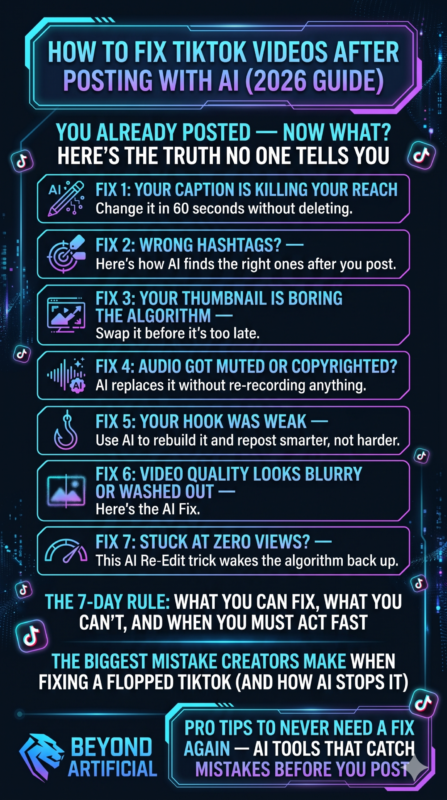
You Already Posted: Now What? Here’s the Truth No One Tells You
That sick feeling when you spot a mistake on your TikTok after posting? Every creator feels it, but no one really explains what to do next. Here’s the truth: In 2026, you can not edit the actual video once it’s live… But you are not stuck. You can still edit your caption, hashtags, cover, and description for up to 7 days, just tap the three dots on your post. And listen, don’t panic-delete.
The moment you post, TikTok starts pushing your video. If you delete it, you lose all views, likes, and momentum instantly. Instead, pause and check what actually went wrong.
- Small caption typo?
- Fix it, do not delete Weak hashtags?
- Update them. Bad cover? Change it
But if the mistake is inside the video (like wrong text or a bad clip), then: Use “Delete and Re-Edit.” This lets you fix the video while keeping your original audio, so you do not have to start from zero. Before doing anything big, always save a clean copy of your video to your device. Because once it’s deleted, it is gone forever. Smart creators do not panic. They fix fast, learn from it, and sometimes… the corrected video performs even better than the original.
If your videos feel off even after posting, chances are deeper issues are affecting your quality. Here is exactly why your videos look unprofessional and how to fix them fast.
Fix 1: Your Caption Is Killing Your Reach: Change It in 60 Seconds Without Deleting.
You posted a good video… waited… and got no reach. Deep down, you know the problem was not the video; it was the caption. A weak caption is like a strong opening with no follow-up. It grabs attention… then loses it. People scroll fast. Your caption is competing with trending sounds and viral content every second. So if you are putting in effort and getting no results, it is not you; it is your approach.
Here’s your simple 60-second fix. Don’t delete. Just edit smart. First, fix your first line (hook). Only the first 125–150 characters show before “more”. If that part is boring, no one clicks. Make it:
- A bold statement
- A question
- Or a scroll-stopper like: “Stop. Before you scroll, read this.”
Next, use real keywords naturally. In 2026, this works better than stuffing hashtags. Add 3–5 keywords your audience actually searches for, but keep it natural. Then, add a simple CTA (call to action). Likes do not matter as much anymore; saves and shares do. Try:
- Save this for later
- You’ll need this again
Also, remove generic lines like “good vibes only.” They do not connect. Instead, say something real and specific. People connect with honesty, not perfection. Write like you are texting a close friend. Now go edit your caption. Sometimes one small change is all it takes to bring your post back to life.
If people still scroll away even after fixing captions, you need to understand why people stop watching your videos in the first place.
Fix 2: Wrong Hashtags? Here’s How AI Finds the Right Ones After You Post.
You spent time picking hashtags… posted with confidence… and then your reach stayed flat. Here’s the hard truth: those hashtags might be the reason your post did not perform. Using irrelevant hashtags, even popular ones, can hurt your reach. Instagram now checks if your hashtags match your content. If they don’t, your post gets ignored.
Hashtags are not magic anymore. They are just a signal. Use them wrong → your content gets buried. Here’s the easy fix: Open any AI tool (like ChatGPT). Paste your caption and ask: “Give me 5 niche-specific hashtags for this content.” You will get better, more relevant hashtags in seconds. Now just edit your post and replace them.
In 2026, Instagram prefers 3–5 strong hashtags, not 30 random ones. Less is better, as long as they match your content. Also, stop copying competitors.
Focus on what your audience searches for. Example: If you’re a fitness creator, use: #mealprep #homeworkouts, not just: #personaltrainer. That small change can bring the right people to your post.
And do not reuse the same hashtags every time. Instagram sees that as spam and reduces your reach. So keep it simple: Use AI, pick better hashtags, and update your post. Sometimes, one small hashtag fix can bring your content back to life.
Fix 3: Your Thumbnail Is Boring the Algorithm: Swap It Before It’s Too Late.
You worked hard on your video… spent hours editing… and then used a random screenshot as your thumbnail. That one small mistake can kill your reach. A bad thumbnail doesn’t just lose clicks — it tells the algorithm “don’t show this.” That’s why your content gets buried. Here’s what most people miss:
- Thumbnails with strong emotions get more clicks
- Most people watch on mobile
- Too much text = people scroll past
If your thumbnail has 5+ words, it’s too much. Now here’s the simple fix: Open Canva. Use a clear photo of your face with real emotion. Add only 3–5 bold words. Do not repeat your title. Instead, create curiosity. Example: Title: How I Grew My Channel Fast. Thumbnail: “This Changed Everything.” That gap makes people click. Also, mix AI + human touch: Use AI for background or colors, but keep your real face for trust.
Quick test: Show your thumbnail to someone for 3 seconds. Hide it and ask: “What was that about?” If they don’t get it → it’s too confusing. Small changes in thumbnails can boost clicks by 20–30%. Your content is already good. You just need a thumbnail that makes people stop and click. Go fix it now, before your reach drops more.
Fix 4: Audio Got Muted or Copyrighted? AI Replaces It Without Re-Recording Anything.
That sick feeling when you open your video and see “audio muted due to copyright claim” is something every creator hates, especially after spending hours creating it. And the worst part? Most people think they have to delete the video and start again. That’s not true. In 2026, YouTube will give you a much better option. The Erase Song feature can remove only the copyrighted music, while keeping your voice, dialogue, and other sounds safe.
Before, this tool used to mute everything, but now it’s much smarter. So your first step should be simple: Go to YouTube Studio, open the copyright claim, and choose “Replace Song” or “Erase Song.” Do not panic, do not delete. Once the music is fixed and the claim is removed, your video can be monetized again, and you do not lose your views, comments, or engagement.
If you want more control, you can use AI tools like Kapwing. It lets you upload your video, separate the audio, remove only the problem part, and replace it with safe music, without re-recording anything. You can also use platforms like Pictory, which give you thousands of royalty-free music tracks. So instead of just fixing the problem, you can actually improve your video with better background music.
If your voice was affected or removed, tools like ElevenLabs or Murf AI can help. They can create a natural-sounding voiceover from your script and match it with your video, no mic or recording needed. So don’t let a copyright issue scare you. Your video is already done. Your content is still valuable.
With the right AI tool, you can fix it, clean it, and get it back to performing, often in just a few minutes.
Fix 5: Your Hook Was Weak, Use AI to Rebuild It and Repost Smarter, Not Harder
You posted something you were proud of… waited… watched the numbers… and then the views just stopped. That feeling hits hard. But here’s the truth: your content did not fail, your hook did. In 2026, the algorithm decides very fast. Sometimes in the first 1–2 seconds. If your opening is weak, people scroll… and your post disappears. That’s why great content can still get no reach.
Most creators don’t realize this: if your hook isn’t strong, your post never gets a chance. Good hooks work because they trigger simple things in the brain:
- Curiosity → “I need to know this.”
- Pattern break → something unexpected stops the scroll
- FOMO → “Am I missing something?”
And the good news? You can fix this with AI. Here’s the simple way: Take your old post. Paste it into ChatGPT. Then write: “Rewrite my opening hook as a warning. Show the problem, increase the pain, and hint at a solution.” Why this works: People react more to avoiding mistakes than chasing success.
Example: Instead of: “How to grow your reach,” Say: “This mistake is killing your reach right now.” For videos: Keep your hook under 3 seconds (both voice + text).
For captions: Make sure your strongest line comes before “read more” (first 100–125 characters). If it’s hidden… it won’t work. Use this simple structure: Hook → Problem → Solution → CTAThat’s what most viral content follows. And one more important thing: Don’t delete your post.
Instead: Fix the hook → repost at the right time. Same content… new opening… completely different results. Sometimes your post didn’t fail; it just needed a better first impression.
A strong hook is just the start; real growth happens when you master retention editing that keeps viewers watching till the end.
Fix 6: Video Quality Looks Blurry or Washed Out After Posting: Here’s the AI Fix.
You filmed your video carefully… good lighting, steady hands, best angle… But after posting, it looked blurry and dull, like it was filmed through a foggy window. That feeling is frustrating. And a lot of creators go through it. Here’s the real reason:
Platforms like YouTube, Instagram, and TikTok compress your video. They reduce the file size to save data. If your video is exported with a low bitrate,the platform removes details to shrink it. That’s why your video looks:
- blurry
- pixelated
- low quality
This is very noticeable in backgrounds like sky or plain walls. Another common issue: If your video looks washed out, it was probably shot in HDR. Some platforms (especially TikTok) don’t handle HDR well. So your colors look faded. Simple fix: Use SDR (Rec. 709) before exporting. Now here’s the easy AI fix (no re-shoot needed):MUpload your video to tools like:
- Fotor
- Kapwing
- HitPaw VikPea
These tools will sharpen your video, reduce noise, and improve colors, and they do it automatically. Another smart trick: Upload your video in 4K, even if it was 1080p. Why?
Platforms give higher bitrate to bigger files → better quality playback. For TikTok users: Before posting, go to More Options and turn ON “High-Quality Uploads.” This setting often turns off after updates.
Final thing to remember: Your content is not bad, your export settings are. Fix the quality once… and your videos will finally look as good as they should.
Fix 7: Stuck at Zero Views? This AI Re-Edit Trick Wakes the Algorithm Back Up.
You posted with hope… waited… refreshed again and again… and seeing zero views feels like your content doesn’t even exist, and that hurts more than anything, but the truth is your content did not fail, the algorithm just did not get a strong reason to push it after the first few seconds. Most creators never realize this, but your video is first shown to a small test audience, and if they do not stop, watch, or react, your reach stops instantly, not because your content is bad, but because your opening and pacing didn’t hit hard enough.
This is where the AI re-edit trick changes everything, because instead of deleting and losing all chances, you can simply adjust the weak parts and give your content a fresh push like it’s brand new. Now here’s the smart fix: take your same video, paste your script into AI, and ask it to rewrite a stronger hook that creates curiosity or urgency, then re-edit your first 2–3 seconds because that’s where the algorithm decides everything.
Change your first visual or frame completely so it doesn’t look repeated, and cut out any slow or boring start because even one second of delay can kill your reach. Add a small pattern interrupt like bold text or a surprising line to stop scrolling, and repost at a time when your audience is actually active. Never upload multiple videos together because they compete with each other, and always treat this as data, not failure, because one small AI-powered re-edit can wake the algorithm back up and push your content the way it should have from the start.
The 7-Day Rule: What You Can Fix, What You Can’t, and When You Must Act Fast.
You posted something, noticed a mistake, and that instant panic hits: “Did I just ruin everything?”, but take a breath, because the 7-day rule means you still have time to fix things and save your post. The truth is simple, but most people miss it: you can’t change the video itself after posting, but you can still edit captions, hashtags, and covers, and those small things matter more than you think.
And here is the part that really matters: the faster you act, the better your chances, because your post is still being tested in those first few days. Now, here is what you should do: start by fixing your first line (hook) because that’s what people see first and decide if they will keep reading or not. Then clean up your hashtags and keywords so your content reaches the right people instead of getting lost, and if your cover or thumbnail looks weak, change it right away because visuals decide clicks.
Do not rush to delete unless the mistake is inside the video, because deleting throws away all your progress, and always save your original post before making big changes. Think of this as a second chance, not a failure, because small, smart edits can still improve your reach while your post is alive. Just do not wait too long, because once the algorithm stops pushing your content, even the best fixes won’t bring it back — so act quickly, stay calm, and give your content the chance it deserves.
The Biggest Mistake Creators Make When Fixing a Flopped TikTok (And How AI Stops It).
You posted, it flopped, and your first reaction was panic, so you deleted it, reuploaded it again and again… and somehow it performed even worse, and that’s the biggest mistake creators make, because the problem was never the content; it was the signals you were sending to the algorithm. The truth is, TikTok treats every video separately and relies on early engagement signals like watch time and completion rate, so randomly deleting and reposting without fixing anything just repeats the same failure.
And what hurts more is this: when you delete too quickly, you remove the chance for the algorithm to find the right audience later, because sometimes videos get picked up after days, not just minutes . Now here’s the smart fix: instead of deleting blindly, take your video to AI and ask it to analyze what went wrong (hook, pacing, or message), then only fix that part before reposting.
Change your first 2–3 seconds completely because that’s where most viewers decide to stay or scroll, and even a small improvement there can change everything. Look at your analytics and find where people drop off, then re-edit that exact moment instead of guessing, because guessing is what keeps you stuck. Also, avoid reposting the same video instantly. Wait, tweak, improve, and then upload like it is a better version, not a repeat.
And most importantly, stop treating a flop like failure, treat it like feedback, because with one smart AI fix, the same content can finally reach the audience it was meant for.
Pro Tips to Never Need a Fix Again: AI Tools That Catch Mistakes Before You Post.
You are tired of posting, fixing mistakes, feeling regret later, and deep down, you wish someone could just catch everything before you hit “Post” so you never go through that frustration again. The truth is, smart creators do not fix content after posting; they use AI to predict performance, spot weak hooks, and optimize everything before publishing, which is something most competitors barely explain.
Tools today can analyze your video, caption, and timing and even tell you if your post will perform well or not before you upload, so you’re no longer guessing; you are posting with confidence. Now here is how you stay ahead: before posting, paste your caption or script into AI like ChatGPT and ask it to improve your hook and clarity, then use AI tools that analyze engagement and suggest better hashtags or posting times so your content gets a stronger start.
Run your video through an AI analyzer to check retention issues or weak moments before uploading, and always preview your content like a viewer because AI works best when combined with your human instinct. Use AI writing tools to remove boring lines and make your message sharper and more emotional, because even small wording changes can change results. Schedule your post using AI-based timing tools so it goes live when your audience is most active instead of random guessing.
And most importantly, slow down before posting, because one extra minute using AI to review your content can save you hours of regret later, and once you build this habit, you’ll stop fixing mistakes… and start posting content that works the first time.
If you want to stop fixing mistakes and start creating smarter content from the start, learn how to automate your video editing for YouTube and TikTok using AI.
FREQUENTLY ASKED QUESTIONS (FAQs)
How do you edit your TikTok videos’ description after posting in 2026?
Yes, you can actually fix your TikTok description after posting, and most people don’t even know this. Just open your video, tap the three dots, choose “Edit Post,” update your caption or hashtags, and press Save. But do not wait too long, you only get 7 days to make changes. Quick tip: before saving, use AI like ChatGPT to rewrite your caption with better keywords. Sometimes, one stronger caption can completely change your reach.
How do I edit TikTok after posting?
If you notice a mistake on your TikTok after posting, don’t panic; you can still fix it. Tap the three dots on your video, choose “Edit Post,” and update your caption, hashtags, or cover within 7 days. If the problem is inside the video, use “Delete and Re-Edit” to fix it while keeping your original audio. For bigger issues like weak hooks or bad subtitles, AI tools like Vizard.ai and CapCut can help you quickly improve and repost your video.
How can I fix a typo in my TikTok caption?
Made a typo in your TikTok caption? Do not worry, you can fix it easily. Open your video, tap the three dots, select “Edit Post,” correct the caption, and press Save. Your views, likes, and comments will stay safe; nothing gets lost. Just make sure to fix it within 7 days, because after that, you won’t be able to edit it anymore.
What is the 3-second rule on TikTok?
The 3-second rule on TikTok is simple: if your video doesn’t grab attention in the first 3 seconds, people scroll, and your reach drops. Start your video with something strong like a bold line, a surprising visual, or a question that makes people stop. If your video already has a weak start, you can fix it by re-editing the first few seconds using tools like CapCut or Vizard.ai. Then repost it with better audio or a stronger hook to give it a fresh chance to perform.
How do I edit a video after uploading?
Once your TikTok video is posted, you can’t edit the actual footage, but you still have options. For small fixes, tap the three dots, choose “Edit Post,” and update your caption, hashtags, or cover within 7 days. If the problem is inside the video, use “Delete and Re-Edit” to bring it back into the editor with your original audio saved. For bigger improvements like better hooks or subtitles, save your video, edit it using tools like Vizard.ai or CapCut, and repost a stronger version.
Conclusion:
You have seen it now, your content does not fail because you are not good enough, it fails because of small mistakes that most creators do not even notice until it is too late. But the difference between creators who stay stuck and those who grow fast is simple: they do not panic, they fix smart, and now with AI, they fix faster than ever. From hooks to captions, thumbnails to audio, every problem has a solution if you know where to look and act in time.
So next time something flops, do not delete it in frustration… pause, adjust, and use the tools you now have. Because your content was never the problem, it just needed the right fix to finally get the reach it deserved.