
 YouTube Automation
How to Start a YouTube Automation Channel -9 Powerful Tips(Blog#:49)

You have probably watched many YouTube automation success stories and thought, “I can do this too.” But when you actually sit down to start, things suddenly feel confusing. How to Start a YouTube Automation Channel is important because most beginners are not lazy; they are simply overwhelmed and do not know where to begin.
The truth is that YouTube automation is not a get-rich-quick trick. It is about building a simple system where ideas, scripts, voiceovers, editing, and uploads work together smoothly. Once that system is in place, your channel can grow even when you are not actively working on it. Creators who succeed focus on systems and consistency. Start by choosing the right niche using data tools like VidIQ, then focus on the three most important parts of every automated video: script, voiceover, and visuals.
Start simple, stay consistent, and your channel will grow with time.
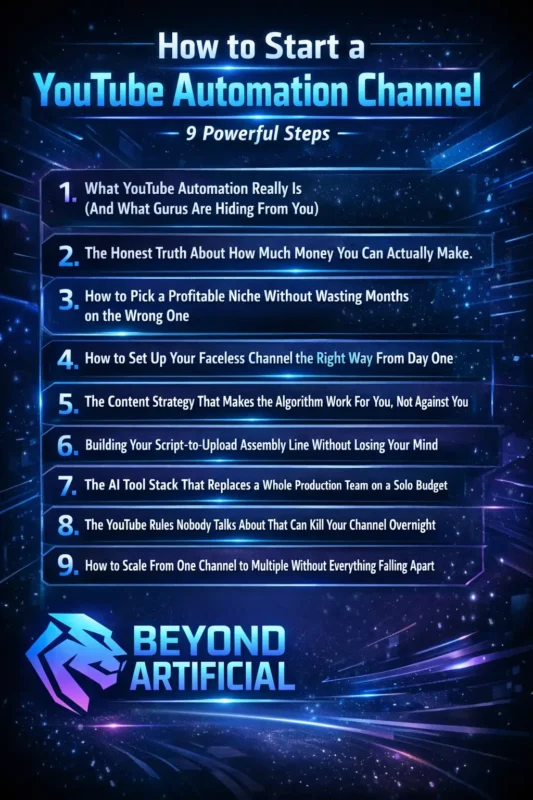
Keep reading to discover the 9 powerful steps that can help you start a YouTube automation channel the right way and build a system that grows your channel faster than you ever expected.
1. What YouTube Automation Really Is (And What Gurus Are Hiding From You).
If you have ever watched a YouTube guru promise passive income, a laptop lifestyle, and fast success, you probably felt excited and thought, “This could be my chance.” But when you actually start, you quickly realize things are not as easy as they made them sound. That feeling of disappointment is not your fault. The truth is that YouTube automation is often explained in a misleading way.
A more honest name for it would be YouTube channel management. It is a real online business that requires strategy, patience, and consistent decisions every week. Automation does not mean doing nothing. It means building systems where some tasks can be outsourced or streamlined, while you still guide the direction of the channel. Before spending money on tools or freelancers, spend time understanding how YouTube actually works. Study successful channels, learn how videos perform, and understand the platform.
Automation works best when it is built on knowledge, not guesswork. Also, remember that most successful channels do not rely on AdSense alone. Many creators grow their income through brand deals, affiliate partnerships, and digital products. YouTube automation can be a powerful business model, but it rewards people who treat it like a real business.
Those who expect instant results usually quit early. If you understand this from the start, you are already ahead of most beginners.
2. The Honest Truth About How Much Money You Can Actually Make.
Let’s talk about the number everyone wants to know: how much money YouTube automation can actually make. You have probably seen screenshots, income reports, and thumbnails claiming people earn thousands of dollars every month. It can make you excited, but also a little unsure if those numbers are real. The truth is that YouTube automation income can range from about $500 to $5,000 per month per channel, depending on your niche, content quality, and consistency.
However, most creators do not reach those numbers in a few months. In many cases, it takes two to three years of consistent uploads to build a strong channel. For example, a small channel with around 10,000 subscribers might earn about $200 per video from ads, while a channel with 1 million subscribers could earn around $20,000. This shows that AdSense is only the starting point, not the final goal. The creators who earn the most money usually add multiple income streams, such as sponsorships, affiliate marketing, and digital products, along with ad revenue.
Your niche also matters a lot. High CPM niches like technology and finance often pay much more per thousand views than entertainment or general topics. Many successful creators experience slow growth in the beginning. Sometimes it takes months before one video performs well and suddenly pushes the channel forward. That is why consistency matters so much. If you treat YouTube automation like a real business and give it 12–18 months to grow, the income potential can be very powerful.
But if you expect instant results, you may quit before your channel ever has the chance to succeed.
3. How to Pick a Profitable Niche Without Wasting Months on the Wrong One
If you have ever spent weeks or even months creating videos in a niche and still received very few views, you know how frustrating that feels. Watching other channels grow quickly while your videos struggle can make you think you chose the wrong path. In many cases, the real problem is not your effort; it is the niche selection. A good niche is not just something you like. It must balance three important things: strong viewer demand, reasonable competition, and clear earning potential.
If even one of these is missing, you could spend a long time building a channel that never grows. Today, simply uploading many videos in any niche is no longer enough. YouTube’s algorithm now favors high-quality and strategic content, which means the research you do before starting a channel is extremely important. Before choosing a niche, use tools like VidIQ or OutlierKit to analyze search volume, competition level, and CPM potential.
A good sign of a profitable niche is seeing several channels with 100K or more subscribers already succeeding in it. Instead of choosing a very broad niche, focus on specific sub-topics. Smaller, focused niches often perform better and can even earn higher revenue. Also, read the comment sections of popular channels in your niche. Viewers often share what they like, what they dislike, and what kind of videos they want to see.
The best niche is not always the most popular one. It is the one where your interest, audience demand, and monetization potential all meet together. Choose carefully, validate your idea with data, and you will give your channel a much stronger chance to grow.
4. How to Set Up Your Faceless Channel the Right Way From Day One.
Many beginners create a YouTube channel in just a few minutes and think they are ready to start uploading videos. But small mistakes made on the first day can quietly limit a channel’s growth for months. These mistakes are easy to miss, but they can affect how your videos perform. When setting up your channel, it is better to create it as a business account instead of a personal one. This keeps your YouTube channel separate from your personal accounts and makes it easier to manage and scale in the future.
You should also verify your channel using your phone number in the settings. Without verification, you cannot upload videos longer than 15 minutes or use custom thumbnails. Custom thumbnails are very important because they can significantly improve your click-through rate. Branding is another key step. Treat your channel name like a real brand and keep the style, tone, and editing consistent across all your videos.
This helps viewers recognize your content and trust your channel. Before uploading your first video, spend a few days exploring your niche. Watch competitor videos, read comments, and interact with the community. This helps you understand your audience and the type of content people want. Another common mistake is using unlicensed music or visuals. If your content uses copyrighted material, your videos can be muted, removed, or demonetized. Always use royalty-free resources such as Pexels, Pixabay, or Epidemic Sound.
Finally, set up your channel professionally from the beginning. Create a clean banner, write a clear description with keywords, and add a simple welcome video. When your channel looks organized and professional, it sends a strong signal to both viewers and the YouTube algorithm.
5. The Content Strategy That Makes the Algorithm Work For You, Not Against You.
Here is something many creators do not realize: if your videos are not growing, it does not always mean your content is bad. Often, the problem is that many creators are still following old YouTube strategies that no longer work. The YouTube algorithm does not focus on how many subscribers you have or how old your channel is. Every time you upload a new video, YouTube first shows it to a small test audience.
If that audience clicks the video, watches for a long time, and interacts with it, the algorithm starts showing it to more people. This means even a brand-new channel can get thousands of views if the content connects with viewers. At the same time, a large channel can still struggle if its videos do not keep people watching. One smart strategy is to stop chasing one viral video and instead create a content path. Make videos that naturally lead viewers to watch another video on your channel. You can also group related videos into playlists so people keep watching.
It is also very important to stay focused on one niche. When your channel consistently talks about one topic, the algorithm understands your audience better and recommends your videos more often. Posting random topics can confuse the algorithm and slow your growth. Remember, the YouTube algorithm is not your enemy. It is simply a system that rewards videos that people truly enjoy watching. When your content creates real interest and engagement, the algorithm naturally helps your videos reach more viewers.
Many creators improve their growth by using YouTube SEO and keyword research tools to find topics that viewers are already searching for.
6. Building Your Script-to-Upload Assembly Line Without Losing Your Mind.
Running a YouTube automation channel can sometimes feel overwhelming. As a solo creator, you may be writing scripts, recording voiceovers, editing videos, designing thumbnails, optimizing SEO, and uploading content all by yourself. Managing all these tasks at the same time is one of the main reasons many beginners burn out before their channel starts growing. The solution is not simply using more tools. The real solution is building a clear workflow system where each step of your content process is organized and easy to manage.
When you start thinking like a system builder instead of trying to do everything manually, running your channel becomes much easier. A good first step is to map your workflow before using any tools. Write down every step from idea to upload. Then identify which tasks take the most time and focus on simplifying or automating those steps first. A typical YouTube automation workflow looks like this: niche research, content planning, script writing, voiceover creation, video editing, thumbnail design, uploading, and SEO optimization.
Think of each step as a small department in your channel. You can also save time by automating repetitive tasks. For example, instead of writing video descriptions manually, you can use AI tools to quickly generate SEO-optimized descriptions with hashtags and timestamps. Tools like ElevenLabs for voiceovers and visual generation tools can help speed up production. When your workflow becomes organized and automated, your channel stops feeling like a stressful job and starts working like the system you originally wanted to build.
7. The AI Tool Stack That Replaces a Whole Production Team on a Solo Budget.
Many creators search for the best AI tools for YouTube automation, but instead of finding a clear answer, they end up more confused. Most articles list dozens of tools with pricing tables and features, which can feel overwhelming for a solo creator who just wants a simple and affordable system. The good news is that AI tools have made video production much cheaper. What once cost $50–$200 per video can now cost only a few dollars while still producing high-quality results. The key is not using many tools, but using the right tools in the right order.
One common mistake beginners make is buying editing or automation tools before learning content strategy and keyword research. Even the most polished video will fail if the idea behind it is weak. A simple way to start is with a three-tool system. Use a tool like VidIQ to find strong video ideas and keywords. Use Descript or Gling for editing. Then use TubeBuddy to optimize titles, tags, and SEO. These three tools are enough to start building a solid workflow.
For faceless channels, many creators also use ElevenLabs for voiceovers and visual generation tools like Midjourney to create visuals quickly. When these tools work together, your content production becomes much faster and more organized. The most important rule is to keep your tool stack small and focused. Using three to five tools that work well together is far more effective than paying for many tools you rarely use. A simple system that you understand and use consistently will always perform better than a complicated setup.
8. The YouTube Rules Nobody Talks About That Can Kill Your Channel Overnight.
Imagine spending months building your YouTube channel, writing scripts, uploading videos, gaining subscribers, and finally getting monetized. Then one day you wake up and see an email saying your channel has been terminated. For many creators, this is a real and painful experience. This usually happens when channels upload low-value or heavily automated content, reuse other creators’ videos with small edits, or try to mislead viewers. The line between smart automation and breaking YouTube’s rules can sometimes be very thin.
YouTube has also updated its monetization policies. The old rule called “repetitive content” is now often described as “inauthentic content.” This means channels that mass-produce low-effort AI videos without originality may lose monetization or even get removed. The safest approach is to treat every video like it was made for real people by a real creator. AI tools can help with brainstorming, outlining, editing, or voiceovers, but you should still add your own value and originality.
Another important rule is to avoid using copyrighted clips or music from other creators. Even if you edit or shorten the content, YouTube’s Content ID system can still detect it and issue strikes. Finally, never try to open a new channel to replace a terminated one. YouTube can detect connected accounts and may remove those channels as well. Creators who build their channels with original content and real value usually have the safest and most stable growth.
When your goal is to help viewers instead of trying to trick the system, your channel has a much better chance of long-term success.
Before uploading content, it is important to understand the official YouTube monetization policies to avoid strikes, demonetization, or channel termination.
9. How to Scale From One Channel to Multiple Without Everything Falling Apart.
Many creators see people running multiple YouTube channels and think it looks easy and exciting. But when they try managing two or three channels at the same time, they quickly feel overwhelmed. Quality drops, schedules become messy, and progress slows down. The truth is that starting multiple channels too early can create more problems instead of more income. Without a proven system, managing several channels at once can turn your workflow into chaos.
A smarter approach is to start with one channel and focus on making it successful first. Once that channel becomes profitable, you can use the experience, systems, and income from it to build another channel more confidently. Before launching a second channel, document every step of your workflow. Create simple checklists for tasks like research, scripting, editing, thumbnail creation, and uploading. These systems make it easier to repeat your success.
As your channel grows, your role should also change. Instead of doing everything yourself, you should focus on strategy, quality control, and planning, while tools or freelancers help with production tasks. When your system is clear and organized, scaling becomes much easier. Each new channel should have its own workflow, niche, and content plan. The key is to scale slowly and carefully.
A creator who builds one strong and profitable channel will usually perform better than someone trying to manage many channels that never fully succeed.
FREQUENTLY ASKED QUESTIONS (FAQs)
How much does it cost to start a YouTube automation channel?
Starting a YouTube automation channel can cost $0 to a few thousand dollars, depending on your approach. If you use free AI tools like ChatGPT, CapCut, and Canva, you can create videos for almost no cost. However, if you outsource editing, voiceovers, and scripts to freelancers, you may spend $600–$850 per month or around $3,000 in the first few months. The best strategy is to start with free tools, test your niche, and invest more only after your channel begins to grow.
What do I need to start YouTube automation?
You need very little to get started. All you need is a YouTube account, a niche idea, and a few basic AI tools for scripts, voiceovers, and video creation. You do not need a camera, studio, or big budget. The most important thing is having a simple and consistent workflow to create and upload videos regularly
What is the best niche to make money in?
Some of the most profitable niches include make money online, digital marketing, and personal finance, because they often have very high CPM rates. However, smaller low-competition niches like English learning, senior health, or legal services can also grow quickly and earn good revenue. The best niche is one with strong viewer demand, good monetization potential, and content you can create consistently.
Which content is best for YouTube automation?
The best content for YouTube automation is evergreen and voiceover-based, meaning it does not require a face or camera. Popular examples include motivational videos, true crime stories, AI or tech news, and finance or self-improvement content. These formats attract large audiences, are easy to produce with stock footage and voiceovers, and work well for long-term channel growth.
What are the biggest mistakes on YouTube?
Most beginners fail because they expect automation to run completely on its own. Even automated channels still need regular monitoring, analytics review, and content planning. Another common mistake is outsourcing too early, before finding a proven video format. The best approach is to build a strong system first, then scale it.
How to start a YouTube automation channel for free
Many people want to start a YouTube automation channel but feel stuck because they think they need money to begin. They see creators using many tools and assume it is expensive. The truth is that you can start a YouTube automation channel for free if you use the right tools. Today, many free platforms can help you create scripts, videos, and thumbnails without spending money. All you really need is your time, effort, and consistency.
Here is what you can start using for free today:
- Channel Setup: Create your YouTube channel using a free Gmail account in just a few minutes.
- Script Writing: Use free tools like ChatGPT to generate video scripts quickly.
- Video Creation: Edit videos and design thumbnails with free tools like CapCut or Canva.
- Stock Footage: Download free images and videos from Pexels or Pixabay.
- SEO Research: Use the free plans of VidIQ or TubeBuddy to find keywords and tags.
- Voiceover: Platforms like InVideo AI can generate voiceovers and help create videos.
With these free tools, you can build and grow a YouTube automation channel even if you start with zero budget. The most important investment is your consistency and willingness to learn.
