
 YouTube Automation
Best Video AI Generator – 9 Powerful Tools for Creators(Blog#:41)

Searching for the best video AI generator can feel confusing when so many tools promise amazing results but do not always deliver. You might spend hours editing videos, adjusting timelines, adding effects, and writing scripts, only to feel tired before your idea is fully finished. The best video AI generator should make your work easier, not harder.
Instead of wasting time on complicated editing, it helps turn your ideas into professional videos in just a few clicks. For content creators, marketers, and YouTubers, the right tool can save time and make video creation much smoother. In this guide, we will explore the 9 best video AI generators that can help you create high-quality videos faster and more easily.
Whether you are making social media content, marketing videos, or YouTube clips, these tools can completely change the way you create videos. Today, powerful AI tools are making video creation easier than ever. Tools like AI script writers and video generators are helping creators produce content faster. If you are also working with AI content, you may want to explore thebest AI humanizer toolsthat improve AI-generated text quality.
I still remember the night I tried to make my first proper video. I was sitting alone in front of my laptop for hours, cutting clips, fixing audio, and changing scenes again and again, but nothing looked the way I imagined in my head. Around 2 a.m., I just leaned back in my chair and felt completely defeated, thinking maybe video creation just is not for me. That feeling when you really want to create something amazing, but every tool only makes it harder.
Then I came across a simple guide about AI video generators, and honestly, I decided to give it one last try. That small discovery completely changed the way I create videos today. The tools I am about to share in this guide are the same ones that helped me to turn my frustration into something that finally felt possible.
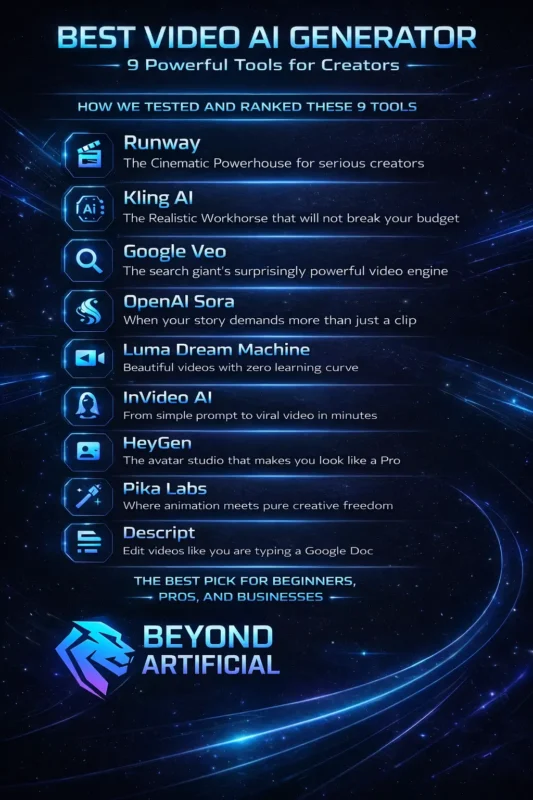
How We Tested and Ranked These 9 Tools.
We did not just search for these tools on Google and list them randomly. We actually tried them ourselves and created real videos to see how they perform. While testing, we focused on four important things: video quality, ease of use, speed, and price. These factors matter because creators need tools that save time and still produce good results.
Each tool was tested with similar prompts and conditions so the comparison would be fair. One thing we quickly learned is that every AI video tool works differently depending on the type of content you want to create. A tool that works well for cinematic videos might not be the best choice for short social media clips. We also paid attention to how beginner-friendly each platform feels.
Creating a simple video shouldn’t require technical skills or hours of learning. Another important thing to remember is that many tools keep their best features in paid plans, so it’s always a good idea to check what the first paid tier offers. After spending many hours testing and comparing these tools, the list below includes the ones that truly work well for creators.
The goal is simple: help you skip the confusion and choose a tool that actually makes video creation easier.
1. Runway (the Cinematic Powerhouse for serious creators)
Runway is more than just another AI video generator. It is a tool that many creators and filmmakers use to turn simple ideas into high-quality videos. With advanced models like Gen-3 and newer updates, Runway can transform text prompts, images, or existing clips into cinematic-looking videos that feel much more professional than typical AI content. One reason many creators like Runway is that it gives your videos a polished look without needing expensive editing software or a big production team.
Whether you are a content creator, marketer, or small business owner, it can help you create videos that look much more advanced than what you might normally produce. A helpful tip when using Runway is to write clear and detailed prompts. The more specific your description is, the better the AI understands what kind of video you want to create. Another useful trick is to try the image-to-video feature.
If you already have a reference image, uploading it can often give better results than using text alone. If the platform feels a bit complex at first, start with the built-in templates. They make it easier to create your first videos, and once you feel comfortable, you can slowly explore the more advanced features.
With a little practice, Runway can become a very powerful tool for creating professional-looking videos quickly. You can explore Runway and test its AI video generation features on theRunway official website.
2. Kling AI ( the Realistic Workhorse that will not break your budget)
Kling AI has quickly become a favorite for creators who want realistic AI videos without spending a lot of money. What makes this tool stand out is its strong motion consistency. Instead of videos that look good for only a few seconds, Kling AI keeps the movement smooth and natural from start to finish, which makes the final result feel much more realistic.
It is a great option for creators who want high-quality video output but also need to keep their budget under control. Many people use it to create engaging content without paying the high prices that some other AI video tools charge. One helpful tip when using Kling AI is to pay attention to the motion settings. Adjusting the movement level can make a big difference between a video that feels robotic and one that looks more natural.
Another useful trick is to combine the text-to-video feature with a clear, storytelling-style script, because Kling AI performs better when the prompt has a strong direction. If your video pacing does not look right, try writing shorter scene descriptions instead of one long prompt.
This often helps the AI understand the flow better and improves the final result. Overall, Kling AI shows that you do not always need expensive tools to create videos that grab attention and keep people watching.
3. Google Veo (the search giant’s surprisingly powerful video engine)
When Google enters the AI video space, expectations are naturally high, and Google Veo is a strong example of why. This AI video generator can create high-quality, realistic videos that often look surprisingly natural. The tool understands things like lighting, movement, and scene details, which helps the generated videos feel more polished and believable. One of the biggest strengths of Veo is how well it understands real-world visuals.
Because it is built with Google’s advanced AI technology, the videos it produces often look more consistent and natural compared to many other tools. A helpful tip when using Veo is to write clear and detailed prompts. Try to describe not only what you want to see, but also the mood, lighting, and environment. These details help the AI create better and more accurate videos.
Another advantage is that Veo fits naturally within Google’s ecosystem. This can be helpful for creators who work on platforms like YouTube or use other Google tools for their content workflow. If your first result is not perfect, try adjusting your prompt by adding camera directions like “wide shot” or “close-up.” Small changes like this can make a big difference in the final video.
Once you start experimenting with Veo, you will quickly see how powerful AI video creation can be.
4. OpenAI Sora (when your story demands more than just a clip)
OpenAI Sora is one of the most talked-about AI video generators right now. What makes it special is that it does not just create short clips; it can generate detailed scenes that feel more like a full visual story. The videos often include realistic environments, smooth movement, and strong visual detail, which makes them feel more cinematic than many other AI tools. Sora works especially well when you have a bigger creative idea that needs more than a simple video.
Instead of just producing a quick clip, it can help bring complex scenes and storytelling ideas to life. This makes it useful for creators who want to experiment with more cinematic or story-driven content. A helpful tip when using Sora is to write prompts like a film director. Try to describe the characters, environment, mood, and even the camera angle. The more details you provide, the better the AI understands the scene you want to create.
Another good strategy is to use Sora for bigger, more creative projects rather than very short social media clips. If a long scene starts to lose consistency, try generating it in smaller connected segments and then combining them together. With the right prompts and a bit of experimentation, Sora can become a powerful tool for turning creative ideas into impressive videos.
OpenAI Sora is designed for cinematic AI video creation. More details are available on theOpenAI Sora page.
5. Luma Dream Machine (beautiful videos with zero learning curve)
Luma Dream Machine is one of those AI video tools that feels simple from the moment you start using it. The interface is clean and easy to understand, so even if you have never used an AI video generator before, you can create your first video in just a few minutes. It focuses on producing high-quality and realistic videos without making the process complicated. What many creators like about Luma Dream Machine is how beginner-friendly it is.
You do not need advanced editing skills or technical knowledge to start creating good-looking videos. The tool is designed to keep things simple while still delivering professional results. A useful tip when writing prompts for Luma Dream Machine is to start with the most important visual element of your scene. Describe the main subject first, then add the surrounding details. This helps the AI understand your idea more clearly and often improves the final video.
Luma Dream Machine also works very well for lifestyle, nature, and everyday scenes. If the generated video feels too short, you can use the extend feature to continue the scene and make the video flow more smoothly. Overall, it’s a great option for creators who want to produce attractive AI videos without dealing with complicated tools.
6. InVideo AI (from simple prompt to viral video in minutes).
InVideo AI is a great option for creators who do not want to spend hours editing a single video. With this tool, you can enter a simple text prompt and quickly turn it into a complete video. It can automatically add things like voiceovers, subtitles, background music, and visuals, which saves a lot of time during the creation process. The platform is designed for content on YouTube, TikTok, Instagram, and marketing videos.
This makes it especially helpful for creators who want to publish content regularly without getting stuck in a long editing process. A helpful tip when using InVideo AI is to mention your target audience in the prompt. When the tool understands who the video is meant for, it often chooses better visuals and pacing that match the audience. Another good practice is to review the video after it is generated. Spending a few extra minutes adjusting the text overlays or music can make the video feel much more polished.
If you are creating longer YouTube videos, you can also paste your full script into the tool so it can generate a more structured video. Overall, InVideo AI makes it much easier for creators to turn ideas into finished videos and stay consistent with their content.
7. HeyGen (the avatar studio that makes you look like a Pro)
HeyGen is an AI video tool that lets you create videos using realistic AI avatars. Instead of recording yourself on camera, you can choose an avatar that speaks your script naturally. The avatars look professional and can present your message clearly, which makes this tool useful for explainer videos, training content, or personal brand videos. One of HeyGen’s most impressive features is its lip-sync technology and video translation.
This means your avatar can speak in different languages without you having to record the video again or hire voice actors. For creators and businesses who want to reach a global audience, this feature can save a lot of time and effort. A helpful tip when using HeyGen is to customize your avatar’s appearance, outfit, and background so it matches your brand style.
This makes your videos look more consistent and professional. Another useful feature is the translation tool, which allows you to reuse your existing videos in multiple languages and reach a much wider audience. If the avatar’s voice feels a little robotic, try adjusting your script by adding natural pauses or emotional cues. Small changes like this can make the final video sound much more natural.
Overall, HeyGen is a great solution for creators who want professional-looking videos without the need for cameras, lighting setups, or complex recording equipment. HeyGen allows you to create AI avatar videos without recording yourself.
8. Pika Labs (where animation meets pure creative freedom).
Pika Labs is a great AI video tool for creators who enjoy animation and creative visual storytelling. Instead of just generating basic videos, it focuses more on artistic styles, motion effects, and animated visuals that make the final result feel unique and eye-catching. What makes Pika Labs different from many other tools is its creative flexibility. It allows you to experiment with different animation styles and visual effects, which gives creators more freedom to try new ideas instead of relying on the same templates every time.
A useful tip when using Pika Labs is to experiment with different styles in your prompts. Trying different animation descriptions can sometimes lead to surprisingly creative results. The tool often performs best when you give it more imaginative and detailed instructions. Pika Labs is especially good for short-form content like Instagram Reels, TikTok videos, or animated intros. These types of videos benefit from the tool’s strong visual style and fast-moving animations.
If you want to learn more, joining the Pika Labs community can also be helpful. Seeing how other creators write their prompts and use the tool can give you new ideas and help you improve your own videos. Overall, Pika Labs is a fun and creative option for anyone who wants to make animated AI videos more easily.
9. Descript (edit videos like you are typing a Google Doc).
Descript is a video editing tool that works in a very simple and different way. Instead of cutting clips on a complicated timeline, you edit your video by editing the text transcript. When you delete or change words in the transcript, the video automatically updates to match those changes. This makes the editing process much easier, especially for beginners.
Many creators like Descript because it removes the stress of traditional video editing software. You do not need advanced editing skills to produce clean and professional-looking videos. It is especially useful for podcasters, educators, coaches, and content creators who mainly work with spoken content. One very helpful feature is Overdub, which lets you fix small audio mistakes without recording again.
You simply type the correct words, and Descript’s AI voice can replace them in your audio. This can save a lot of time when editing. Another useful feature is filler word removal. It can automatically remove words like “um,” “uh,” and awkward pauses, which makes your video sound more polished and confident. If you create longer videos like tutorials or podcast episodes, you can also use Descript’s chapter markers to organize your content into clear sections.
Overall, Descript makes video editing much simpler and helps creators produce professional videos without dealing with complex editing tools.
The Best Pick for Beginners, Pros, and Businesses.
Not every creator has the same needs. Someone who is just starting with AI video tools will usually need something simple and easy to use, while professional creators might look for tools that offer more control and higher-quality results. Businesses, on the other hand, often want tools that help them create content quickly and consistently.
For beginners, tools like Luma Dream Machine and InVideo AI are great starting points. They are easy to use and can produce good-looking videos without requiring much technical knowledge. This makes them perfect for creators who are still learning how AI video tools work.
For more experienced creators who wanthigher-quality and more cinematic results, Runway and OpenAI Sora are strong choices. These tools offer more advanced features and can produce impressive videos when used with detailed prompts. If you are a beginner, it is usually better to start with a simple tool first. This helps you build confidence and understand how AI video generation works before moving on to more advanced platforms. For businesses that need to produce content regularly, tools like HeyGen and InVideo AI can be very useful.
They are designed to help create professional videos quickly, which can save a lot of time when managing marketing or communication content. In the end, the best AI video generator depends on your experience level, budget, and the type of content you want to create. The tools in this list offer different strengths, so you can choose the one that fits your goals the best.
FREQUENTLY ASKED QUESTIONS (FAQs)
What is the best AI video generator for content creators?
The best AI video generator depends on your needs, budget, and the type of content you create. For beginners and social media creators, tools like InVideo AI and Luma Dream Machine are easy to use and help you create videos quickly. For more advanced creators who want cinematic-quality results, Runway and OpenAI Sora are strong options with more powerful features.
How to make 4K quality videos?
To create 4K quality videos, start by using an AI video generator that supports 4K output, such as Runway or Google Veo. Write clear and detailed prompts so the tool understands the scene you want to create. Finally, make sure to select 4K resolution in the export or rendering settings to get the best video quality.
Which AI is best for content creators?
The best AI tool for content creators depends on the type of content you make. For social media and marketing videos, tools like InVideo AI and HeyGen are simple and effective. For creators who want more advanced and cinematic results, Runway and OpenAI Sora are powerful options.
How to access Veo 3 for free?
You can try Veo 3 for free through Google AI Studio by signing in with your Google account. This allows you to test its AI video generation features without paying upfront. For more access and higher limits, you can also join Google’s VideoFX waitlist when it is available.
Which AI generator is completely free?
Some AI video generators offer free plans that let you create videos without paying. Tools like Pika Labs, Luma Dream Machine, and InVideo AI provide free tiers so you can test their features and start creating content. However, free plans usually have limits or watermarks, so upgrading may be needed for full features.
Best Video AI Generator Right Now
You might have a great idea for a video, but when it comes to actually creating it, the process can feel overwhelming. Complex editing software, long hours of cutting clips, and results that do not match your original idea can quickly drain your motivation. Many talented creators face this same challenge; they have great ideas but struggle with the technical side of video production.
The good news is that modern AI video generators have made the process much easier. Today, these tools can turn simple text prompts into high-quality videos in just a few minutes. Instead of spending hours editing, creators can focus more on their ideas and storytelling.
Here is how the right AI video generator can help you:
1. Save time by reducing hours of manual video editing
2. Make video creation easier, even for beginners with no editing experience
3. Produce high-quality videos without expensive equipment or software
4. Help you create content faster so you can publish more consistently
5. Turn simple ideas into ready-to-share videos in just a few minutes
With the right tool, creating videos no longer needs to feel complicated or time-consuming.