
 YouTube Automation
Top AI tools for YouTube Automation – 11 Best tools(Blog#:29)

Top AI tools for YouTube automation can completely transform the way you build your channel, especially when you feel tired, stuck, and overwhelmed. If you spend hours scripting, editing, designing thumbnails, and still see slow growth, these Top AI tools for YouTube automation will open your eyes to a smarter way to work.
Many creators silently struggle. You work late at night, doubt your skills, compare your channel to others, and wonder why growth feels so hard. You do not lack talent; you lack systems that support you. The right AI tools remove that heavy weight from your shoulders. They help you generate scripts faster, edit videos efficiently, create eye-catching thumbnails, and optimize content for views, so you stop feeling exhausted and start feeling in control.
If you truly want to grow in YouTube automation without sacrificing your energy, confidence, and motivation, this guide will give you practical tools that turn frustration into momentum and effort into real results.
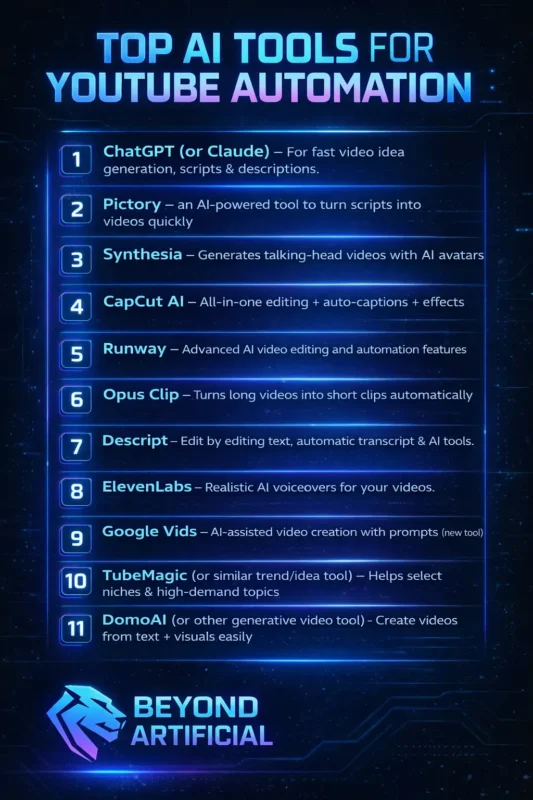
In this guide on Top AI tools for YouTube automation, you will discover powerful AI solutions that reduce pressure, save precious time, and help you stay consistent without burning out. You can also explore theTop 15 New AI Tools in 2026.
Why You Need the Right AI Tools Before You Burn Out
You need the right AI tools before you burn out because doing everything manually slowly drains your energy, creativity, and motivation. When you script, edit, design thumbnails, research keywords, and upload alone, you feel productive at first, but soon you feel exhausted and stuck. Without the right system, YouTube stops feeling exciting and starts feeling like a heavy daily burden.
Start by choosing one reliable AI tool for scripting, so you stop staring at a blank screen for hours. Use an automation tool for editing or captions to save time and protect your mental energy for creative thinking. Set up a simple workflow where each tool handles one clear task instead of jumping between random apps. Most importantly, remind yourself that smart creators use tools to work faster, not harder, so you can grow your channel without sacrificing your peace or passion.
1. ChatGPT or Claude: (for fast video idea generation, scripts & descriptions.)
ChatGPT or Claude can feel like a lifesaver when your mind goes blank, and you have no idea what to post next. These tools instantly generate powerful video ideas, scroll-stopping hooks, full scripts, and SEO-friendly descriptions, so you stop feeling stuck and start moving fast. Instead of sitting for hours in frustration, you finally feel clarity, direction, and creative energy flowing again.
To get the best results, give detailed prompts about your niche, target audience, and the emotion you want your video to create. Ask the AI to write multiple hooks and stronger storytelling versions so you can choose the most engaging one. Always tweak the script by adding your personal tone, real examples, or emotions to make it sound authentic and relatable.
When you use AI as your creative partner, not your replacement, you turn stress into speed and ideas into consistent YouTube growth.
2. Pictory : (an AI-powered tool to turn scripts into videos quickly)
Pictory feels like a rescue button when you have a script ready but no time or skills to turn it into a full video. This AI-powered tool quickly converts your written script into a complete video with visuals, subtitles, and music, so you stop feeling overwhelmed by editing software. Instead of struggling for hours on timelines and cuts, you finally see your ideas come to life in just minutes.
To get better results, write clear and emotionally strong scripts so the AI can match powerful visuals to your message. Always review and adjust the selected stock footage to make sure it truly fits your story and audience. Customize fonts, colors, and branding elements so your video does not look generic like everyone else’s. When you use Pictory strategically, you do not just save time, you turn your stress into speed and your scripts into publish-ready content without burnout.
3. Synthesia: (Generates talking-head videos with AI avatars)
Synthesia feels like a breakthrough when you want professional talking-head videos but feel shy, camera-nervous, or simply do not have recording equipment. This powerful AI tool generates realistic avatar presenters who speak your script naturally, so you can create face-style content without ever turning on a camera. Instead of worrying about lighting, background noise, or multiple retakes, you focus purely on your message and consistency.
To get the best results, write your script in a conversational tone so the avatar sounds natural and not robotic. Choose an avatar and voice that match your niche and audience personality to build trust and connection. Keep sentences short and clear because simple phrasing improves delivery and viewer retention.
When you use Synthesia strategically, you remove fear, save production time, and finally show up consistently on YouTube without anxiety holding you back.
4. CapCut AI: (all-in-one editing + auto-captions + effects)
CapCut AI feels like a blessing when editing starts to feel confusing, slow, and mentally exhausting. This all-in-one tool gives you smart editing features, automatic captions, and eye-catching effects, so you do not need advanced skills to create professional videos. Instead of spending hours cutting clips and typing subtitles manually, you finish your videos faster and with less stress.
To get the best results, always clean your raw footage first and remove unnecessary pauses so the AI works more accurately. Use auto-captions but review and fix small errors to keep your content polished and trustworthy. Add subtle transitions and effects instead of overloading your video, because clean editing keeps viewers watching longer.
When you use CapCut AI strategically, you stop feeling overwhelmed by complicated software and start feeling confident, consistent, and in control of your content.
5. Runway: ( Advanced AI video editing and automation features)
Runway feels like a powerful upgrade when basic editing tools no longer give you the creative control you crave. This advanced AI video platform lets you remove backgrounds, generate visuals, enhance clips, and automate complex edits that usually take hours. Instead of feeling limited by your skills or expensive software, you suddenly unlock professional-level effects with just a few clicks.
To get the best results, start with small features like background removal or object cleanup before jumping into advanced generative tools. Use AI enhancements to improve weak footage, but avoid over-editing so your video still feels natural and authentic. Experiment with its text-to-video or motion tools to add unique visuals that make your content stand out from competitors.
When you use Runway strategically, you stop feeling stuck at an average level and start creating videos that look bold, modern, and impossible to ignore.
6. Opus Clip : (Turns long videos into short clips automatically)
Opus Clip feels like a relief when you spend hours creating one long video and then struggle to turn it into Shorts or Reels. This smart AI tool automatically finds the most engaging moments in your long content and converts them into viral-ready short clips. Instead of manually cutting, resizing, and adding captions, you let AI do the heavy lifting in minutes.
To get better results, record your long videos with strong hooks and clear, punchy statements so the AI can detect powerful moments. Always review the generated clips and adjust captions or framing to match your brand style. Post multiple short clips from one long video to maximize reach and attract new viewers back to your main content.
When you use Opus Clip strategically, you stop wasting valuable content and start multiplying your views without multiplying your workload
7. Descript, Edit by editing text, automatic transcript & AI tools.
Descript feels like magic when traditional video editing starts to feel confusing, slow, and mentally draining. This powerful tool lets you edit your video simply by editing the text transcript, so deleting one sentence from the script automatically removes it from the video. Instead of struggling with complex timelines and tiny cuts, you edit your content as easily as fixing a Word document.
To get the best results, record clear audio because an accurate transcription makes your editing faster and smoother. Use its filler-word removal feature to instantly delete “um” and awkward pauses that reduce professionalism. Take advantage of AI tools like overdub and studio sound to fix mistakes without re-recording everything.
When you use Descript strategically, you stop fearing the editing process and start feeling confident, efficient, and fully in control of your content creation.
8. ElevenLabs: (Realistic AI voiceovers for your videos.)
ElevenLabs feels like a breakthrough when you want professional voiceovers but hate the sound of your own recordings, or do not have a studio setup. This powerful AI tool creates incredibly realistic voices with natural emotions, tone control, and multiple language options. Instead of sounding robotic or flat, your videos suddenly feel alive, engaging, and professionally produced.
To get the best results, write your script in a conversational tone so the AI voice sounds more human and relatable. Experiment with different voices and emotional settings to match your niche and audience mood. Keep sentences shorter and add natural pauses in your script to improve flow and realism.
When you use ElevenLabs strategically, you remove the fear of recording, save hours of retakes, and give your audience a smooth listening experience that builds trust and keeps them watching.
9. Google Vids : (AI-assisted video creation with prompts (new tool))
Google Vids feels exciting and refreshing when you want to create videos quickly, but feel overwhelmed by complicated editing software. This new AI-assisted tool helps you generate structured videos simply by giving prompts, making the creation process smoother and less stressful. Instead of starting from zero and feeling lost, you get guided layouts, smart suggestions, and ready-to-edit visuals within minutes.
To get better results, write clear and specific prompts so the AI understands your topic, audience, and goal. Always customize the generated slides, visuals, and text so your content reflects your brand voice and does not look generic. Use it for explainer videos, tutorials, or presentation-style content where structure matters most.
When you use Google Vids strategically, you stop feeling stuck at the idea stage and start turning simple prompts into organized, publish-ready videos with confidence
10. TubeMagic: ( Helps select niches & high-demand topics).
TubeMagic feels like a relief when you are tired of guessing what to post and hoping something finally works. This kind of trend and idea research tool helps you discover high-demand topics, profitable niches, and keywords people are actively searching for. Instead of uploading random videos and praying for views, you start creating content with real data behind it.
To get better results, always check search volume and competition before finalizing your topic so you don’t enter an overcrowded space blindly. Look for gaps in popular niches where demand is high but quality content is low. Use the tool to analyze competitors and study what titles, formats, and angles bring them consistent views.
When you use a trend research tool strategically, you stop feeling invisible on YouTube and start making smart, confident decisions that actually give your channel a chance to grow.
11. DomoAI (or other generative video tool): Create videos from text + visuals easily.
DomoAI feels powerful when you have creative ideas in your mind, but no advanced editing skills to turn them into real videos. This generative video tool lets you create engaging visuals from simple text prompts, so you do not feel limited by your technical experience. Instead of spending days learning complex software, you can transform words into animated, eye-catching content within minutes.
To get better results, write clear and descriptive prompts so the AI understands the style, mood, and message you want to deliver. Experiment with different visual styles and formats to see what connects best with your audience. Always review and refine the generated output to keep it aligned with your brand identity and storytelling.
When you use DomoAI strategically, you stop feeling stuck behind your skill level and start bringing your imagination to life with confidence and speed.
How These 11 Best Tools Can Turn Your Channel Into a Growth Machine
TheseTop AI tools for YouTube Automation can turn your channel into a real growth machine when you stop using them randomly and start using them strategically. Instead of feeling overwhelmed, exhausted, and stuck at low views, you build a system where every tool handles one specific job perfectly. When scripting, editing, voiceovers, thumbnails, SEO, and repurposing work together, your content production becomes faster, smarter, and more consistent.
Start by creating a simple workflow where one tool generates ideas, another creates the script, and another edits, so you avoid chaos and confusion. Track your results weekly to see which titles, topics, and formats perform best, then double down on what works. Batch-create content using these tools to stay ahead instead of rushing at the last minute and burning out. When you combine these 11 tools with a clear strategy and consistency, you stop chasing growth and start building momentum that makes your channel move forward almost automatically.
FREQUENTLY ASKED QUESTIONS (FAQs)
Which AI is best for YouTube automation?
The best AI for YouTube automation depends on which part of the process you struggle with the most. For scripting and ideas, tools like ChatGPT or Claude work powerfully, while tools like CapCut, Descript, or InVideo handle editing and full video creation smoothly. The smartest strategy is combining the right AI tools into one simple workflow, so you save time, reduce burnout, and grow consistently.
Which AI is best for YouTube scripts?
The best AI for YouTube scripts is the one that turns your ideas into engaging, high-retention content without stress. ChatGPT and Claude are powerful choices because they generate structured scripts, strong hooks, and audience-focused storytelling in minutes. Just give clear prompts about your niche and tone, then personalize the output to make it sound natural, human, and uniquely yours
Which AI tool is very powerful?
The most powerful AI tool depends on what problem you want to solve in your YouTube automation journey. For scripting and strategy, ChatGPT or Claude are extremely powerful, while tools like Runway or InVideo dominate in video creation and editing. The real power comes when you combine the right AI tools into one smart system that saves time, boosts quality, and accelerates growth.
Which AI tool is best for beginners?
The best AI tool for beginners is the one that feels simple, not overwhelming. ChatGPT is a great starting point because it helps with ideas, scripts, and descriptions without any technical skills. Pair it with an easy editor like CapCut, and you can create professional-looking videos without stress or confusion.
What are the top 3 AI platforms?
The top 3 AI platforms depend on what you want to automate on YouTube. For scripting and ideas, ChatGPT leads the way, for video creation tools like InVideo or Runway stand out, and for voiceovers, ElevenLabs delivers powerful results. Using these three together creates a strong, beginner-friendly system that saves time and boosts your channel’s growth.
Top AI tools for YouTube automation are free
Top AI tools for YouTube automation free can completely change your content game, especially when you want to grow but do not have a big budget. If you feel stuck because paid tools feel expensive and risky, the Top AI tools for YouTube automation free can give you a real starting point without financial pressure. You do not need thousands of dollars to automate your channel; you just need smart, free tools that handle the heavy work for you.
These tools help you save time, reduce stress, and stay consistent even if you are working alone. With the right free AI setup, you can finally focus on creativity instead of worrying about cost.
- No upfront investment required
- Automate scripting, editing, and captions
- Publish consistently without burnout
- Test ideas before spending money
- Grow smarter, not harder