
 YouTube Automation
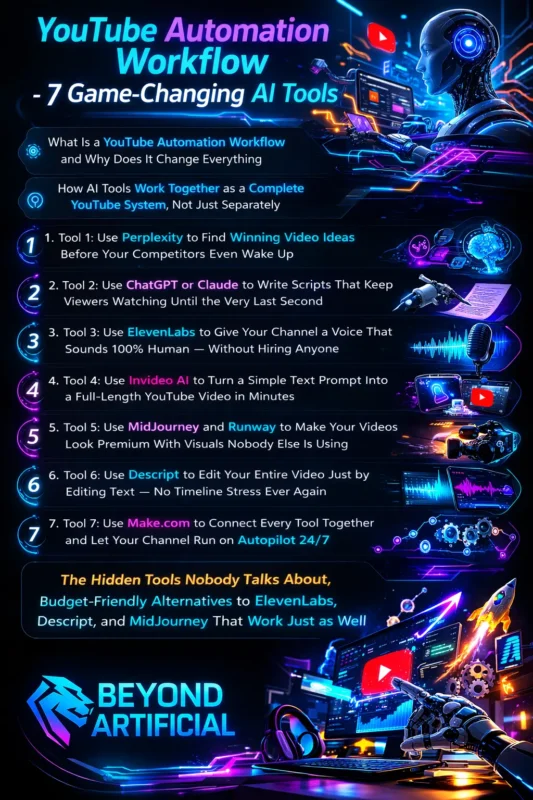
YouTube Automation Workflow – 7 Game Changing AI Tools( Blog#:44)

Running a YouTube channel can take significant time. Writing scripts, recording voiceovers, editing videos, and uploading content every week can quickly become overwhelming. Many creators spend hours building their channels but still struggle to grow. That is where a YouTube automation workflow can make a huge difference.
With the help of the right AI tools, you can automate many of the repetitive tasks that slow you down. From generating video ideas and scripts to editing and publishing, these tools can save time and make your content creation process much easier. In this guide, you will discover 7 game-changing AI tools that can help you build a smarter YouTube automation workflow. By using these tools, you can focus more on creativity while the tools handle the heavy work behind the scenes.
If you want to grow your channel without feeling constantly exhausted, this workflow can completely change how you create videos.
Keep reading to build a strong YouTube Automation Workfiow and before we look at these tools, it helps to understand the full system behind automation. Read ourcomplete YouTube automation guide to see how successful channels run on autopilot.
What Is a YouTube Automation Workflow and Why Does It Change Everything?
A YouTube automation workflow is a simple system where different AI tools help you handle the main steps of creating and publishing videos. Instead of doing everything manually, these tools support tasks like research, scriptwriting, voiceovers, and publishing. For many creators, running a YouTube channel can feel overwhelming. Coming up with ideas, writing scripts, editing videos, and uploading content every week takes a lot of time and energy. A smart workflow helps make this process easier and more organized.
For example, you can use tools like Perplexity for research, Claude for writing scripts, ElevenLabs for voiceovers, and Make.com to connect and automate different tasks. When these tools work together, they create a smoother and faster content creation process. If you often struggle with inconsistent uploads or feel exhausted after making each video, building a workflow can make a big difference. The best way to start is small.
Try automating just one part of your process first, such as scriptwriting with an AI tool. Once you understand how one tool works, you can slowly connect other tools to build a complete system. With time, your workflow becomes more efficient, and creating videos starts to feel much easier and less stressful. Instead of feeling overwhelmed by every step, you can focus more on ideas and growing your channel.
How AI Tools Work Together as a Complete YouTube System, Not Just Separately.
Many creators try a few AI tools but still feel overwhelmed running their YouTube channel. The reason is simple: they use tools separately instead of building a connected system. The real power of YouTube automation comes from how different tools work together. When each tool handles a specific step and passes the result to the next one, the entire content creation process becomes much smoother.
For example, you might use Perplexity to research video ideas, Claude to write the script, and ElevenLabs to create a realistic voiceover. After that, tools like InVideo AI can turn the script into a video, while MidJourney can help create visuals or thumbnails. Finally, platforms like Descript can help with editing, and Make.com can automate publishing.
When these tools are connected in a clear workflow, each one supports the next step. This makes the whole process faster and easier compared to doing everything manually. A helpful tip is to map out your workflow before choosing the tools. Write down each step of your video creation process, from idea generation to publishing. Once you know the order of tasks, it becomes much easier to select the right tools and connect them.
Think of your automation system like a chain. Each tool handles one part of the process, and together they create a complete system that helps you produce videos more efficiently. When your workflow is organized like this, creating videos becomes less stressful and much more manageable.
Tool 1: Use Perplexity to Find Winning Video Ideas Before Your Competitors Even Wake Up.
Coming up with new video ideas can be one of the hardest parts of running a YouTube channel. Many creators spend hours thinking about what to post next, only to feel stuck or unsure if the idea will even work. This is where Perplexity can be extremely helpful. Perplexity is an AI research tool that helps you find trending topics, useful information, and real data from across the internet. Instead of searching through multiple websites, you can ask one question and quickly get organized answers with sources.
For example, you can ask questions like: “What are trending YouTube topics in personal finance?” or “What type of videos are growing fast in the tech niche?” and “What problems are people searching for in fitness or productivity?” These types of questions can help you discover video ideas that people are already interested in watching.
To get better results, try asking specific questions instead of very general ones. The clearer your question is, the more useful the answers will be. You can also ask follow-up questions to dig deeper. For example, you might ask Perplexity to analyze competitors in your niche or show content gaps that other creators are not covering yet. Another advantage is that Perplexity often provides statistics, facts, and sources. This information can help you write stronger scripts and make your videos more trustworthy for viewers.
When you use a research tool like this regularly, you stop guessing what content to create. Instead, you start choosing ideas based on real trends and audience interest, which can make planning your YouTube videos much easier.
Tool 2: Use ChatGPT or Claude to Write Scripts That Keep Viewers Watching Until the Very Last Second.
A strong script is one of the most important parts of a successful YouTube video. If the script is weak or slow at the beginning, viewers may click away within the first few seconds. Tools like ChatGPT and Claude can help make scriptwriting much easier. These AI tools can quickly turn your video idea into a structured script with a clear hook, smooth flow, and a strong ending. Instead of spending hours writing everything from scratch, you can use them to generate a solid first draft and then improve it.
For example, you can ask the tool to write: “an engaging opening hook,” or a clear explanation of the topic, and ” smooth transitions between sections,” a strong conclusion that encourages viewers to stay until the end
Both tools are useful in different ways. Claude is often praised for writing natural, human-like text, while ChatGPT is great for brainstorming ideas, titles, and video descriptions. To get the best results, always provide a clear prompt. Mention your topic, your target audience, and the message you want viewers to take away from the video. The more details you give, the better the script will be.
After generating the script, it is a good idea to read it out loud. This helps you notice any awkward phrases or sentences that might sound unnatural in a video. When used properly, these tools can save a lot of time and help you create scripts that keep viewers interested from the beginning to the end of your video.
Tool 3: Use ElevenLabs to Give Your Channel a Voice That Sounds 100% Human, Without Hiring Anyone.
Many creators hesitate to start a YouTube channel because they do not like recording their own voice, or they feel that hiring a professional voice actor is too expensive. This is where ElevenLabs can be very helpful. ElevenLabs is an AI voice generator that can turn your script into a realistic voiceover. The voices sound natural and expressive, which makes them suitable for many types of YouTube videos, especially faceless channels.
With this tool, you can quickly convert your script into a clear and professional voiceover without recording anything yourself. This saves time and removes the need for expensive microphones or recording setups. One helpful tip is to test different voices before choosing one for your channel. ElevenLabs offers several voice styles, accents, and tones, so you can pick the one that best matches your content and audience.
It is also important to format your script carefully. Adding commas, pauses, and clear punctuation can make the voiceover sound more natural and easier to listen to. For example, a calm and friendly voice may work well for lifestyle or educational content, while a deeper and more serious voice may suit topics like finance or history. Once you find a voice that fits your channel, it can become part of your brand identity and help create a consistent experience for your viewers.
Using tools like ElevenLabs makes it much easier to produce high-quality voiceovers and keep your video production process simple and efficient.
Tool 4: Use Invideo AI to Turn a Simple Text Prompt Into a Full-Length YouTube Video in Minutes.
Editing a YouTube video can take significant time. Finding stock footage, adding subtitles, syncing voiceovers, and arranging everything on a timeline can easily take hours. This is where InVideo AI can make the process much easier. InVideo AI allows you to create a full video by simply giving a text prompt. The tool can automatically select stock footage, add transitions, include subtitles, and build a rough version of your video in just a few minutes.
For creators running faceless YouTube channels, this can save a huge amount of time because you do not have to edit everything manually. To get better results, try writing a clear and detailed prompt. Mention your topic, target audience, video style, and the main message you want to share. The more information you provide, the better the generated video will match your idea.
After the video is created, it is still a good idea to review it carefully. You can replace visuals that do not fit perfectly, adjust pacing, or make small edits to improve the overall flow. Many creators use InVideo AI to generate the first version of their video, and then polish it with another editing tool if needed. This approach helps speed up production while still keeping the final video professional.
With tools like InVideo AI, creating YouTube videos becomes much faster and more manageable, especially if you want to publish content regularly.
Tool 5: Use MidJourney and Runway to Make Your Videos Look Premium With Visuals Nobody Else Is Using.
One common problem many faceless YouTube channels face is using the same stock footage that everyone else is using. When viewers see the same visuals again and again, the content can start to feel repetitive. Tools like MidJourney and Runway can help solve this problem. MidJourney is an AI image generator that allows you to create unique visuals from simple text prompts. Instead of relying on stock images, you can generate custom graphics that match your video topic and style.
Runway helps take those visuals even further. It can turn images into short video clips, add motion effects, or create simple animations. These small visual movements can make your videos feel more dynamic and engaging. When these two tools are used together, they can help give your videos a more original and polished look. A helpful tip is to keep your visual style consistent. Try using similar colors, styles, or themes across your videos so your channel develops a recognizable identity over time.
It is also important to review the generated images before using them. Sometimes AI images may contain small errors, so checking them carefully helps keep your videos looking professional. By combining tools like MidJourney and Runway, creators can produce more distinctive visuals and make their videos stand out from channels that rely only on standard stock footage.
Tool 6: Use Descript to Edit Your Entire Video Just by Editing Text, No Timeline Stress Ever Again.
Video editing can feel difficult, especially if you are not used to working with complex timelines or editing software. For many creators, this step takes the most time and effort. This is where Descript can make editing much easier. Descript automatically converts your video or audio into text. Instead of editing clips on a timeline, you can simply edit the transcript. When you delete a sentence from the text, that part is also removed from the video.
This makes the editing process feel much simpler, almost like editing a document. Descript also includes helpful features that save time. For example, it can automatically remove filler words like “um” or “uh”, which helps your audio sound cleaner and more professional. Another useful feature is Overdub, which allows you to correct small mistakes in your voiceover without recording the entire line again. You can simply type the corrected word, and the tool can generate it in your voice.
Many creators use Descript as the final editing step after generating a rough video with tools like InVideo AI. This allows them to polish the video, fix small issues, and improve the overall flow before publishing. With tools like Descript, video editing becomes much more manageable, even for beginners who do not have advanced editing skills.
Tool 7: Use Make.com to Connect Every Tool and Let Your Channel Run on Autopilot 24/7
When running a YouTube automation workflow, you may end up moving files between tools again and again. Copying scripts, downloading voiceovers, uploading videos, and repeating these steps manually can take a lot of time. This is where Make.com becomes very useful.
Make.com is a workflow automation platform that helps connect different tools together. Instead of handling each step manually, you can create automated workflows where one tool sends its output directly to the next.
For example, your workflow might look like this:
- A script is generated with Claude or ChatGPT
- The script is converted into a voiceover using ElevenLabs
- A video is created using InVideo AI
- The final video is polished in Descript
- Then the video is automatically uploaded or scheduled
Make.com helps connect these steps so the process runs more smoothly. If you are new to automation, it is best to start with a simple workflow first. For example, you might automate the step where a finished video is sent to your publishing platform. Once you understand how one automation works, you can slowly build a more complete workflow. It is also helpful to test each step individually to make sure everything works correctly. This prevents problems later and keeps your system running reliably.
By connecting your tools with Make.com, you can reduce repetitive tasks and create a more efficient workflow for producing and publishing YouTube content.
For official tips on growing and managing a channel, you can explore the YouTube Creator Resources provided by YouTube itself.
The Hidden Tools Nobody Talks About, Budget-Friendly Alternatives to ElevenLabs, Descript, and MidJourney That Work Just as Well.
Many creators are interested in tools like ElevenLabs, Descript, and MidJourney, but the pricing can sometimes feel expensive, especially if you are just starting a YouTube automation channel. The good news is that several budget-friendly alternatives can still help you produce high-quality content. For voiceovers, tools like PlayHT and Murf AI offer realistic AI voices and can work well as alternatives to ElevenLabs. They provide different voice styles and can generate voiceovers directly from your script.
For video editing, CapCut is a popular option. It includes AI-powered editing features and allows you to edit videos quickly without needing complex software. Many creators use it to trim clips, add captions, and polish their videos.
If you need visuals or graphics for your videos, Leonardo AI can be a good alternative to MidJourney. It can generate unique images that match your video topic and style.
Before choosing any tool, it is a good idea to test the free version or trial whenever possible. This helps you understand how the tool works and whether it fits your workflow. It is also important to remember that creating good YouTube content is not only about using expensive tools. Often, a combination of affordable tools used in a smart workflow can produce excellent results.
With the right approach, even beginner creators can build a strong YouTube automation system without spending a large budget on software.
Many experts are now discussing the impact of the latest AI tools for content creation across the creator economy.
FREQUENTLY ASKED QUESTIONS (FAQs)
Which AI is best for workflow automation?
For YouTube workflow automation, Make.com is one of the most powerful and beginner-friendly tools. It allows you to connect different tools so your workflow can run automatically. For example, it can link tools like Perplexity, Claude, ElevenLabs, InVideo AI, and Descript, helping your video creation process move smoothly from one step to the next.
If you are just starting or want a free option, Zapier is also a good alternative for simple automations. However, if you want more advanced workflows and flexibility, many creators prefer Make.com for building a complete automation system.
How is AI changing YouTube?
AI is making YouTube content creation much easier and faster. Today, creators can use AI tools to help with research, scriptwriting, voiceovers, visuals, and video editing. Tools like Perplexity, Claude, ElevenLabs, InVideo AI, and MidJourney allow creators to produce videos with less time and fewer technical skills.
Because of these tools, even beginners can start a channel without expensive equipment, professional editing experience, or showing their faces on camera. AI is simply helping creators focus more on ideas and creativity, while the tools handle many of the technical tasks.
What is the AI tool that makes YouTube videos?
A popular AI tool for creating YouTube videos is InVideo AI. It can turn a simple text prompt or script into a complete video by adding stock footage, transitions, subtitles, and voiceovers automatically. This makes it especially useful for faceless YouTube channels, because you can create videos without advanced editing skills.
For better results, many creators also combine InVideo AI with tools like MidJourney for visuals and ElevenLabs for realistic voiceovers. Together, these tools make the video creation process much faster and easier.
What are the top 5 automation tools?
Some of the most useful tools for building a YouTube automation workflow include:
- Make.com: connects different tools and automates your workflow
- InVideo AI: helps create videos quickly from text prompts
- ElevenLabs: generates realistic AI voiceovers
- Perplexity: helps with research and finding video ideas
- Claude: assists with writing engaging video scripts
When used together, these tools can simplify many parts of the video creation process and help creators manage their YouTube channels more efficiently.
Which type of automation is the most advanced?
The most advanced form of automation for YouTube creators is end-to-end AI workflow automation. This means the entire video creation process runs through a connected system.
For example, tools can work together like this:
- Perplexity finds video ideas
- Claude writes the script
- ElevenLabs creates the voiceover
- InVideo AI builds the video
- Descript helps polish the final edit
- Make.com connects everything and automates the workflow
When these tools are connected, much of the content creation process can run automatically, helping creators save time and stay consistent with their uploads.
YouTube automation workflow 7 game changing ai tools free
Running a YouTube channel can take a lot of time. From researching ideas and writing scripts to editing videos and publishing them, every step requires effort. When you try to handle everything manually, it can quickly become overwhelming. Many creators experience the same problem: they invest hours into their channel, but the growth still feels slow, and the workload keeps increasing. The good news is that things are much easier today thanks to AI tools and automation workflows.
With the right tools, you can simplify many parts of the process. Some tools help you find video ideas, others help with scriptwriting, voiceovers, editing, and even publishing. Many of these tools also offer free plans, which means you can start building your workflow without spending money.
Using these tools together can help you save time and focus more on creating valuable content for your audience.
Here are a few reasons why these AI tools can make YouTube automation easier:
No big budget required: Many of these tools have free versions that are enough to get started
Beginner-friendly: Most tools are simple to use and do not require technical skills
Saves time: Automation reduces repetitive tasks in the video creation process
Faceless channel friendly: AI voiceovers and video tools help create content without recording yourself
Idea generation: AI research tools can quickly suggest trending video topics
By combining the right tools into a simple workflow, creators can manage their channels more efficiently and stay consistent with their content.