
 YouTube Automation
Why Your YouTube Shorts not Getting Views -7 Smart Tips(Blog#:52)

You put your heart into every YouTube Short, the idea, the editing, and the caption, but still get almost no views. Why Your YouTube Shorts not Getting Views is a question many creators are asking today. The truth is, the algorithm is not against you; it is simply reacting to certain signals in your content.
Many creators unknowingly make small mistakes that stop their Shorts from reaching more viewers. These mistakes are common and easy to fix once you understand them. In this guide, you will discover simple tips that can help improve your reach. Apply these tips, and you may finally start seeing your Shorts get the views they deserve.
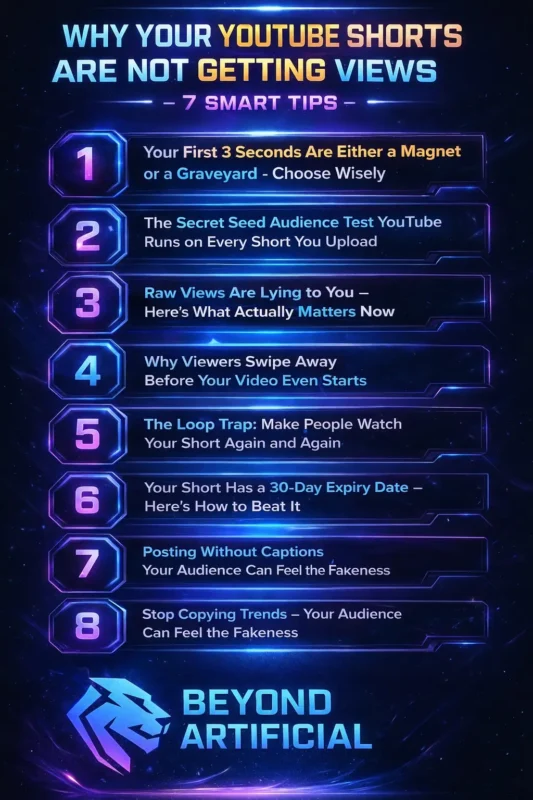
Still wondering why your Shorts get ignored even when you try your best? The truth might surprise you. Keep reading to discover the 7 powerful fixes that can finally help your YouTube Shorts start getting the views they deserve.
1. Your First 3 Seconds Are Either a Magnet or a Graveyard – Choose Wisely.
The truth is, your YouTube Short usually succeeds or fails in the first 3 seconds, and many creators accidentally waste those seconds by starting with slow introductions like “hey guys” while viewers are already swiping away. Those first few seconds are your first impression, and if the beginning feels boring, confusing, or too slow, most people will leave before your video even starts getting interesting.
When too many viewers swipe away early, the YouTube algorithm notices this behavior and stops showing your Short to new audiences. That means your video can die before it ever has a real chance to grow. To improve this, start your Short with action, emotion, or a surprising moment that instantly grabs attention. A powerful trick is to use three things in the first frame: a strong visual, bold on-screen text, and a clear spoken hook, because many viewers watch without sound.
After you upload your Short, go to YouTube Studio and check the “Viewed vs Swiped Away” metric to understand how viewers reacted to your opening. If the number is low, your hook needs improvement. Keep testing different opening styles until you find the one that keeps viewers watching.
Creators who want to improve retention should also follow the official YouTube Shorts best practices shared by YouTube.
2. The Secret Seed Audience Test YouTube Runs on Every Short You Upload.
Every time you upload a YouTube Short, the platform quietly runs a small test on it. Your video is first shown to a small group of viewers, often called the seed audience, and their reaction decides whether your Short will grow or stop there. Many creators feel confused when their video suddenly stops getting views, but it often happens because those first viewers did not stay long enough, or the video reached the wrong audience.
YouTube is evaluating how people react in the early views before showing your content to more users. One important tip is to stay consistent within a single niche, because YouTube selects your seed audience based on the type of content you typically post. Another helpful step is to check Engaged Views in YouTube Studio instead of only looking at total views, because engaged views show how many people actually chose to keep watching.
Also, try to create Shorts people want to watch again, because replaying your video signals to them YouTube Shorts algorithm that your content is interesting. Once you understand this small test, you will realize that the system is not against you — it simply wants proof that viewers enjoy your content before showing it to a bigger audience.
To understand why engagement signals matter so much, you can learn how the YouTube algorithm recommends videos from the YouTube Creator Academy.
3. Raw Views Are Lying to You: Here’s What Actually Matters Now.
If you have ever looked at your YouTube Shorts views and felt excited at first but confused later, you are not alone. Since March 31, 2025, YouTube has changed what a “view” means, and many creators are not yet aware. Now, a raw view can detect when a Short starts playing, even if the viewer quickly swipes away. That means a high view count does not always mean people actually watched your content.
The metric that really matters is Engaged Views, which you can find in YouTube Studio → Short Analytics → Advanced Mode. This number shows how many viewers actually stayed and watched your Short, which is the signal the algorithm trusts most. A helpful way to think about it is simple: total views show your reach, but engaged views show your real impact.
If you focus on improving engagement rather than chasing big numbers, your Shorts will grow faster, and your channel will move closer to monetization. Understanding engagement is important because it directly impacts how YouTube Shorts monetization works for creators.
4. Why Viewers Swipe Away Before Your Video Even Starts.
Sometimes viewers swipe away from your YouTube Short before it even really starts, and it can feel frustrating when you worked hard on the video. In the Shorts feed, people typically scroll quickly, so they may not have chosen your video; it simply appeared while they were scrolling. That means your first visual frame has only a moment to grab their attention before they move on.
If the opening frame looks plain, slow, or confusing, many viewers will swipe away without giving your content a chance. A helpful tip is to open YouTube Studio and select a strong cover frame that is visually compelling and creates curiosity. Also, avoid starting your Short with a blank screen, a logo, or silence, because many viewers watch with sound turned off. Instead, start with a clear visual, bold on-screen text, or action that instantly catches the eye.
When you check your analytics, try to keep your “Viewed vs Swiped Away” rate above 70%, because that usually means your opening is strong enough to keep people watching.
5. The Loop Trap: Make People Watch Your Short Again and Again.
Sometimes something surprising happens with a YouTube Short: a viewer finishes the video and, instead of swiping away, they watch it again without even realizing it. This usually happens when the ending smoothly connects back to the beginning, creating a natural loop that makes the Short feel satisfying to rewatch. Each replay counts as a view, which signals to the YouTube algorithm that people enjoy your content.
Many creators focus only on the beginning of their Shorts, but the ending is just as important for encouraging viewers to stay or watch again. A useful tip is to end your Short with a line or question that connects back to your opening, making viewers curious enough to hear the start again. After your video gets some views, check the retention graph in YouTube Studio. If the line remains steady or even increases above the 100% average view duration, it indicates people are replaying your Short.
Try to design your content so that at least some viewers replay it, because even a small number of replays can help your Short reach a much wider audience.
6. Your Short Has a 30-Day Expiry Date: Here is How to Beat It.
Many creators feel confused or even disappointed when a YouTube Short that once performed well suddenly stops getting views. In many cases, this happens because older Shorts receive fewer impressions after about 28–30 days, as the algorithm begins to prioritize newer content. That means your video did not suddenly become bad: it just became less fresh in the system.
Unlike long-form videos that can take months or years to grow, Shorts often function more like quick signals that help the algorithm understand your channel. A simple way to check this is to open YouTube Studio, filter your Shorts by publish date, and compare the impressions of videos older than 30 days with your newer uploads. If you see older Shorts receiving far fewer impressions, it simply means the platform is prioritizing newer content.
To manage this without feeling overwhelmed, batch-record several Shorts in one day so you always have fresh videos ready to post. When you understand this pattern, you can stop worrying about old Shorts slowing down and focus on posting consistently with a smarter and less stressful workflow.
7. Posting Without Captions Is Silently Killing Your Reach.
Many creators spend hours making a YouTube Short but upload it without captions, not realizing how much that can hurt their views. The truth is that a large number of people watch Shorts with the sound off, especially when they are in public places, at work, or late at night. If your message only exists in audio, many viewers will miss it and quickly scroll away.
Studies show that videos with captions can get more views and better watch time because viewers can follow the message even without sound. A helpful tip is to add burned-in captions directly in your video, instead of relying only on YouTube’s automatic captions, which can sometimes appear late or make mistakes. Another smart trick is to include your main keywords in your spoken lines, because YouTube can read captions and use them to understand what your video is about.
You can also try translated captions if your audience speaks more than one language, which can help your Shorts reach viewers in different countries. Adding captions is not just a small detail; it helps more people understand your content and gives your Short a better chance to grow.
8. Stop Copying Trends: Your Audience Can Feel the Fakeness.
Many creators try to copy trending Shorts because they hope it will bring quick views, but it can feel disappointing when the video still fails. This often happens because the trend does not match your channel’s real niche or style, so the audience does not connect with it. When viewers swipe away quickly, the algorithm receives negative signals and may start showing your content to the wrong people.
Over time, copying unrelated trends can confuse the algorithm about who your actual audience is. A better approach is to adapt trends instead of copying them completely. For example, you can use a trending sound or format but apply it to your own niche, like sharing a quick tip, idea, or story related to your content topic. You can also compare your trend-based Shorts and original Shorts in YouTube Studio analytics to see which ones keep viewers watching longer.
In most cases, your authentic content performs better, which shows that building your own style is much more powerful than chasing every trend.
9. One Analytics Number That Tells You Everything About Why Your Views Are Dead.
Many creators open YouTube Studio after a Short performs badly and feel confused by all the numbers they see. Views, watch time, impressions, and other stats can make it hard to know which metric actually matters first. One of the most important numbers to check is the “Viewed vs Swiped Away” rate, because it shows how many people stopped to watch your Short instead of quickly scrolling past it.
If this percentage is low, it usually means your first few seconds are not grabbing attention. You can find this metric by opening YouTube Studio → Content → Shorts → clicking the analytics icon on your video, where the percentage will appear in your Shorts’ analytics. If your Viewed vs Swiped Away rate is good but your views are still low, then you should check your Average Percentage Viewed, which shows how much of the video people watch.
Higher retention usually tells the algorithm that your content is interesting and worth showing to more viewers. Once you focus on these key metrics instead of every number on the dashboard, it becomes much easier to understand what needs improving in your Shorts.
FREQUENTLY ASKED QUESTIONS (FAQs)
How to gain views on YouTube Shorts?
Getting views on YouTube Shorts can be difficult if your video does not grab attention quickly. Focus on a strong first-second hook, keep viewers watching with engaging content, and encourage early interaction by pinning a question in the comments. When your Short gets good retention and early engagement, the algorithm is more likely to show it to more viewers.
Why do my YouTube Shorts get no views?
Your YouTube Shorts may get no views if viewers swipe away quickly, your hook is weak, or an important setting like “Made for Kids” is limiting engagement. Another reason can be low retention during the first test, which YouTube shows to a small audience. Check your Viewed vs Swiped Away rate, audience settings, and engaged views in YouTube Studio to understand what needs fixing.
How do I go viral on YouTube Shorts?
To go viral on YouTube Shorts, start with a strong first-second hook that instantly grabs attention and makes viewers stop scrolling. Focus on content that creates emotion or curiosity and encourages people to watch again or share it. When your Short gets good retention and early engagement, the algorithm is more likely to push it to a larger audience.
Which type of Shorts are most viewed on YouTube?
Entertainment, gaming, and quick how-to tips are among the most viewed types of YouTube Shorts because they grab attention quickly and are easy to watch and share. Shorts that are short, engaging, and emotional often perform the best. Choosing a topic you enjoy and staying consistent in that niche can help your Shorts attract more viewers over time.
Is 20k views considered viral?
Getting 20k views on a YouTube Short is a great result, especially for a small or new channel. However, it is usually not considered fully viral yet, since viral Shorts often reach 100k views or more within a few days. Still, 20k views is a strong sign that your content is working and can grow even bigger with the right strategy.
How to get more views on YouTube Shorts for free.
You might feel frustrated when you keep posting YouTube Shorts, trying different tips, and still see very few views. After a while, it can even start to feel like getting views without spending money is impossible. But the truth is that many creators are growing their Shorts without any budget at all: they are simply using the right free strategies.
You do not need expensive tools, ads, or a huge audience to start improving your reach. Small actions taken at the right time can make a big difference in how the algorithm reacts to your video. Here are a few simple and free ways to help your Shorts get more attention:
- Choose a strong cover frame in YouTube Studio so your Short looks interesting before people watch it.
2. Pin a question as the first comment to encourage viewers to reply and increase engagement.
3. Share your Short in your Community tab soon after posting to give it an early boost.
4. Share the Short on another platform like WhatsApp status or Instagram Stories to bring extra viewers.
5. Reply to comments quickly, especially in the first 24 hours, because active conversations can help your video grow.