
 YouTube Automation
How to do Collaborative Video Editing -9 Proven Strategies(Blog#:24)

Struggling with messy timelines, confusing feedback, and constant file sharing can slowly drain your creative energy. How to do collaborative video editing is a question many teams ask when projects start becoming messy and confusing. When multiple people edit the same project without a clear system, it often leads to mistakes, delays, and frustration for the whole team. Important ideas get lost in long email threads, different versions pile up, and the final video does not always match the original vision.
But collaborative video editing can completely change the way your team works. Instead of working separately and fixing problems later, collaborative editing allows everyone to work together smoothly in one organized workflow. When your team shares ideas, edits, and feedback in real time, the process becomes faster, easier, and far more creative. Deadlines feel less stressful, communication becomes clearer, and every team member can contribute their best ideas without confusion.
Mastering collaborative video editing helps you turn chaos into clarity and teamwork into real creative power. With the right strategies, tools, and workflow, your team can create high-quality videos that truly reflect everyone’s effort and vision.
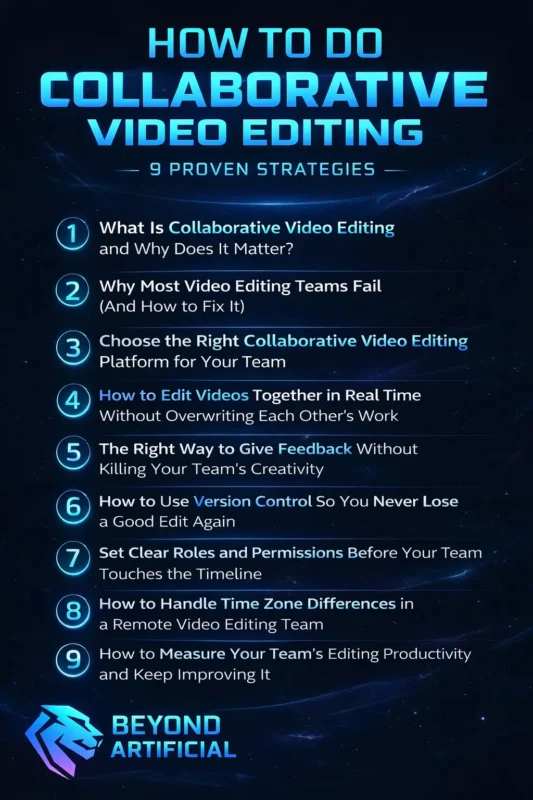
These 9 proven strategies will guide you step by step, helping you transform scattered editing into a seamless, productive, and inspiring creative experience.
1. What Is Collaborative Video Editing and Why Does It Matter?
Collaborative video editing means multiple editors work together on the same video project at the same time. They share files, ideas, and feedback in one place instead of sending files back and forth through emails or messages. This makes the editing process faster, smoother, and less stressful for everyone. It is important because editing alone can slow down the whole project. When deadlines are tight and the workload is heavy, solo editing can become exhausting and reduce creativity.
But when a team works together properly, they finish videos faster, create better quality content, and actually enjoy the creative process. To make collaboration easy, always start by setting up one central workspace where all team members can access the same files and timeline from the beginning. This keeps everyone on the same page and avoids confusion. Also, assign clear roles to each team member. When everyone knows their responsibility, work becomes organized, and mistakes are reduced.
Another important habit is leaving clear and direct comments on the timeline. Instead of sending confusing messages, use simple notes so teammates understand exactly what changes are needed. Teams that communicate well, stay organized, and respect each other’s ideas always create more professional and engaging videos.
2. Why Most Video Editing Teams Fail (And How to Fix It)
Many video editing teams do not fail because they lack talent; they fail because they do not have a clear system. It can be very frustrating to see a great project fall apart just because of poor communication and messy files. When responsibilities are not clear, deadlines are missed, files get overwritten, and no one knows which version is final, the whole team feels stressed and confused. Without a proper workflow, even skilled editors waste hours fixing simple mistakes that could have been avoided.
That’s why it’s important to create a clear project plan before anyone starts editing. Every team member should know what their role is, what they need to do, and when their work must be completed. Always use a proper file naming system so everyone can easily find the latest version of the project. One wrong or unclear file name can create confusion and waste valuable time. It’s also helpful to have short team meetings at least twice a week.
Regular communication helps catch small problems early before they become big issues. Successful editing teams treat their workflow like an organized system that keeps improving. They stay organized, communicate clearly, and respect deadlines. When a team works this way, collaborative video editing becomes smooth, productive, and much more enjoyable for everyone.
3. Choose the Right Collaborative Video Editing Platform for Your Team
Choosing the wrong collaborative video editing platform is like starting a project with a weak foundation. At first, everything may seem fine, but when deadlines get tight and pressure increases, problems start to appear. The wrong platform can slow your team down, create confusion, and hurt team morale. The right platform, however, can completely change how your team works. It can turn stressful and messy editing sessions into smooth and productive creative teamwork.
Different platforms offer different benefits. For example, Adobe Premiere Pro Team Projects is powerful for professional teams already using Premiere Pro. CapCut is simple and user-friendly, especially for online creators. Kapwing is great for browser-based teamwork, and VEED.IO is easy to use for quick collaborative projects. Before fully committing to any platform, test it with a small project first. This helps you discover any limitations before you use it for an important deadline.
Also, do not choose a platform just because it is popular. Instead, check if it supports real-time editing, clear permission settings, version control, and if it’s simple enough for every team member to use comfortably. Make sure your platform works well with your cloud storage system, such as Frame.io or Dropbox. If your editing platform and storage system do not work smoothly together, your team will face unnecessary delays and confusion. The right platform does more than just hold your files.
It becomes the central hub of your team’s workflow, keeping everyone connected, organized, and focused on creating high-quality videos together.
4. How to Edit Videos Together in Real Time Without Overwriting Each Other’s Work
Real-time collaborative video editing can be amazing for teams, but without a clear system, it can quickly become stressful. One wrong move and someone’s hard work can get overwritten or lost. That’s why having simple rules in place is so important. The key to editing together safely comes down to three main habits. First, divide the timeline into clear sections and assign each section to one editor. When everyone knows which part they are responsible for, there is less risk of overlapping edits.
Second, use platform features like clip or sequence locking. Many tools, including Adobe Premiere Pro Team Projects, have conflict detection that alerts you if two people try to edit the same sequence. Learning how to use these features properly helps prevent mistakes. Third, always communicate before making big changes. Never make major timeline adjustments without telling your team first. A silent change, like moving clips or restructuring a sequence, can accidentally damage someone else’s work.
A quick message in the team chat can prevent a lot of frustration. It’s also smart to save and sync your project every 20 to 30 minutes. Frequent syncing means that if something goes wrong, you only lose a few minutes of work instead of hours. When editors respect each other’s sections, communicate clearly, and use collaboration tools correctly, real-time editing becomes smooth and exciting instead of stressful and risky.
5. The Right Way to Give Feedback Without Killing Your Team’s Creativity
Poor feedback can quietly damage a collaborative video editing team. When feedback is unclear or too harsh, editors may feel confused, unappreciated, or discouraged. Over time, this can reduce creativity and make teamwork stressful instead of enjoyable. Good feedback should not only point out mistakes but also respect the editor’s effort and explain clearly what needs to be improved. The goal of feedback is to help the whole team move toward the same creative vision.
How you give feedback is just as important as what you say, because negative or careless comments can hurt an editor’s confidence. Always leave feedback at the exact timestamp on the timeline using comments or annotation tools. This makes your message clear and easy to understand. Avoid vague comments like “fix this part” because they create confusion and waste time. Instead, be specific about what needs to change.
Use a simple feedback method: first mention what is working well, then explain what needs improvement, and finally give a helpful suggestion. This keeps feedback respectful and useful at the same time. Teams should also make a rule that every piece of feedback must be clear and actionable, so editors know exactly what to change and why it matters. When a team builds a habit of kind, clear, and helpful feedback, editors feel more confident and motivated.
This leads to better teamwork, smoother editing, and videos that truly reflect everyone’s best ideas.
6. How to Use Version Control So You Never Lose a Good Edit Again
Losing your best edit because someone saved over it or the project crashed is very painful for any video editor. Sadly, many teams only realize how important version control is after they have already lost important work. Version control is like a safety system for your project. It keeps track of every change made, saves different versions, and lets you go back to an older version if something goes wrong. This means your team never has to worry about losing hours of hard work.
Tools like Adobe Premiere Pro Team Projects and Frame.io include built-in version control to protect your edits automatically. Before making big changes to your timeline, always create a manual save or checkpoint with a clear name. This allows your team to try new ideas without fear, because you can always return to the earlier version if needed. Also, never depend on only one auto-save system. Technology can fail at any time, so always keep a second backup using cloud storage like Dropbox or Google Drive.
It’s also important to name your saved versions clearly. Include the date, editor’s name, and what changes were made. Avoid confusing names like “final,” “final2,” or “lastfinal” because they create problems later. When your team takes version control seriously and stays organized with backups and clear file names, everyone feels more confident.
Editors can work creatively without fear of losing their progress, and the whole team can produce better videos with less stress.
7. Set Clear Roles and Permissions Before Your Team Touches the Timeline
A collaborative video editing project can quickly become messy if every team member has full access to everything. When everyone can change any part of the project at any time, files get overwritten, mistakes happen, and no one knows who is responsible. This creates confusion and frustration for the whole team. Clear roles and permissions help keep the project organized. They are not about controlling people; they are about protecting each editor’s work and making sure everyone can focus on their own tasks.
When each team member knows their role, the editing process becomes smoother and more professional. Many editing platforms, like Adobe Premiere Pro, CapCut, and VEED.IO, allow you to set permissions for each person. You can assign roles such as editor, reviewer, or viewer. Setting these roles from the beginning helps prevent accidental changes and keeps the project safe. Before starting the project, sit down with your team and clearly decide who will do each task.
For example, one person can handle the rough cut, another can manage color grading, someone else can edit audio, and one person should give final approval. Clear responsibilities save time and reduce stress later. Avoid giving full editing access to everyone by default. Limit access based on each person’s role. This is not about distrust; it’s a smart way to keep the project organized and protected. Also, review roles and permissions at different stages of the project. As the project moves from rough editing to final delivery, responsibilities may change.
When every team member understands their role and access level, teamwork becomes faster, smoother, and more enjoyable.
8. How to Handle Time Zone Differences in a Remote Video Editing Team
Working with a video editing team in different time zones can feel frustrating. You might finish an important edit late at night and then wait many hours for feedback from a teammate in another country. This delay can slow down the project and make teamwork feel disconnected. But time zone differences do not have to stop your progress. Successful remote teams use smart systems so the project keeps moving even when not everyone is online at the same time.
The main problem is usually not the time difference; it’s the lack of a clear workflow. Start by creating a shared team calendar that shows everyone’s working hours in their own time zone. This helps you know exactly when teammates are available and avoids confusion or missed deadlines. Always leave clear handoff notes when you finish your work. The next editor should easily understand where you stopped and what needs to be done next.
Avoid vague messages like “check this later.” Instead, write clear instructions, add comments on the timeline, and explain any important changes. You can also record a short video or voice note to explain your edits so the next person understands quickly. Use tools that support asynchronous communication, such as video messages and timestamp feedback. These tools allow team members to review, comment, and continue work without needing everyone online at the same time.
When your team respects time differences, communicates clearly, and leaves proper handoff notes, remote collaboration becomes smooth. Instead of slowing you down, different time zones can actually help your project move forward all day and night.
9. How to Measure Your Team’s Editing Productivity and Keep Improving It.
Many video editing teams work very hard but never check how well their workflow is actually working. Because of this, they keep facing the same delays, stress, and missed deadlines again and again without knowing the real reason. Measuring your team’s productivity is not about controlling people or putting pressure on them. It’s about understanding where the workflow is slow, what is working well, and how the team can improve. When you track your progress, you can fix problems early and give editors more time to focus on creative work.
Successful editing teams track simple things like how long each editing phase takes, how quickly feedback is given, how many revision rounds happen, and whether deadlines are met. These numbers help you clearly see where the workflow needs improvement. After finishing each project, hold a short team discussion. Let everyone share what went well, what caused stress, and what should be improved next time. This habit helps the team grow and work better with every new project.
Also, remember the human side of productivity. If someone keeps missing deadlines, it may be because of unclear instructions, too much workload, or lack of support, not laziness. Always understand the real problem before judging. Use simple project management tools like Notion, Trello, or Frame.io to track progress and spot delays early. Reviewing progress weekly helps prevent small issues from becoming big problems.
When your team regularly checks its performance, improves its workflow, and supports each other, work becomes faster, less stressful, and much more creative.
FREQUENTLY ASKED QUESTIONS (FAQs)
Can two people edit the same video?
Yes, two people can edit the same video at the same time using modern collaborative editing platforms. Tools like Adobe Premiere Pro Team Projects, CapCut Online, and Kapwing let multiple editors work together with real-time updates and cloud syncing. By dividing the timeline into clear sections, using locking features, and communicating before making major changes, teams can avoid overwriting each other’s work. With the right system in place, real-time collaboration becomes smooth, fast, and highly creative for every editor involved.
What video editing software is collaborative?
The best video editing software for collaboration can make teamwork faster, easier, and far more creative. Tools like Adobe Premiere Pro with Team Projects, CapCut Online, Kapwing, VEED.IO, and DaVinci Resolve allow teams to edit together in real time using cloud storage and shared timelines. These platforms help everyone stay connected, organized, and updated without messy file sharing. The right choice is the one that fits your team’s budget, workflow, and skill level, so everyone can create smoothly without wasting time.
Which app is best for collaboration?
The best app for collaborative video editing depends on your team’s size, skills, and workflow. Adobe Premiere Pro Team Projects is perfect for professional teams, while CapCut Online is great for beginners who want simple and smooth collaboration. Kapwing and VEED.IO are excellent for small teams and creators who need powerful features without a difficult learning curve. Always test an app with your team first, because the best tool is the one everyone can use easily and confidently from day one.
What is the best video collaboration platform?
The best video collaboration platform is one that keeps your team connected, organized, and stress-free while creating together. Frame.io is a top choice for its easy timestamped feedback, smooth Adobe integration, and powerful review tools, while Adobe Premiere Pro Team Projects, Kapwing, and VEED.IO also offer excellent collaboration features for different team needs and budgets. The right platform should provide real-time syncing, strong version control, and a simple feedback system everyone can use confidently. When your tools are clear and reliable, your team can focus fully on creativity instead of technical problems.
How to make a collaboration video?
Creating a collaboration video becomes easy and exciting when your team follows a clear system from the start. Choose a cloud-based platform like CapCut Online or Kapwing, upload all media to shared storage, and assign clear roles so everyone knows their part. Use real-time comments and feedback tools to keep communication fast, clear, and organized throughout the project. When your team respects ideas, communicates openly, and works together smoothly, the final video becomes more powerful than anything one person could create alone.
How to do collaborative video editing online
Doing collaborative video editing online can feel stressful when your team is in different places, files are scattered, and every project begins with confusion about the latest version. But it does not have to be this way. With the right system, your team can work together smoothly, stay organized, and enjoy the creative process without constant frustration. Online collaborative editing is now easier and more beginner-friendly than ever.
When your team uses a clear workflow and the right tools, everyone can work in one shared space where files are easy to find, feedback is simple, and no one loses their edits. Here’s how you can make online team editing work in a smooth and organized way:
1. Start by choosing a cloud-based editing platform like CapCut, Kapwing, or VEED.IO. These platforms allow your whole team to access the same project from anywhere, so everyone stays connected and updated
2. Upload all your videos, images, music, and other files to one shared cloud storage folder before editing begins. This saves time and prevents the common problem of missing or hard-to-find files
3. Clearly assign roles and editing sections to each team member. When everyone knows their responsibility in the timeline, work becomes more organized, and mistakes are reduced
4. Use the platform’s built-in comment and annotation tools to leave feedback directly on the timeline. This keeps feedback clear and avoids long, confusing email or chat messages
5. Schedule short daily or weekly team meetings to stay connected, review progress, and solve small issues before they turn into bigger problems
When your team follows a simple and organized workflow like this, online collaborative video editing becomes easier, faster, and much more enjoyable for everyone involved.