
 YouTube Automation
How to Automate Video Editing with AI –9 Powerful Secrets(Blog#: 73)

Every minute you spend stuck in manual video editing is a minute your competitor is posting content and pulling your audience away, and if that hits a little too close, keep reading. You already know how it feels: messy timeline, endless cuts, and your creativity slowly turning into frustration.
But here is the good part… learning how to automate video editing with AI does not just save time, it changes everything. It lets you focus on ideas, not stress. In this guide, you will discover 9 powerful secrets that help you edit faster, create better, and take back your time and energy.
Whether you are a tired content creator, a busy marketer, or someone just starting, this is for you, right now.
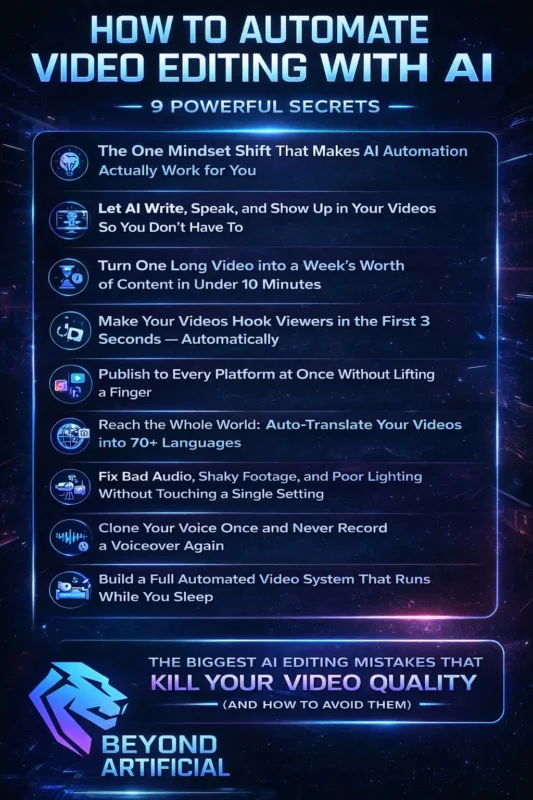
If you are just getting started, understanding a clear AI video editing workflow step by step can help you build a system that actually works instead of guessing everything blindly.
The One Mindset Shift That Makes AI Automation Actually Work for You.
Most creators fail at AI video automation not because the tools are bad, but because they still think as manual editors, and that mindset holds them back from the start. The real shift is simple: stop seeing yourself as an editor, and start thinking like a director. Your job is to guide the vision, not cut every frame. Once you accept that AI is your assistant, not your replacement, everything becomes easier; the tools start working with you, not against you.
Here is your first step: write down the three most time-consuming parts of your editing. That is exactly what you should automate first. Then start small. Pick just one task this week, like removing silences or adding captions, and let yourself feel how much time it saves. Also, stop over-fixing AI results. If you keep editing everything again, you are still stuck in manual mode. Trust the first version, review once, and move forward.
The creators who win with AI are not the ones with the best tools; they are the ones who let go, save time, and use that energy to create more and grow faster. Before you fully rely on automation, it is important to understand the difference between AI vs manual video editing and where each approach actually delivers better results.
1. Let AI Write, Speak, and Show Up in Your Videos So You Don’t Have To
If you have ever stared at the camera, felt nervous, re-recorded the same intro again and again, or hated hearing your own voice, this is for you. That struggle ends here. Now, AI can do everything for you: write your script, generate a natural voice, and even show a realistic avatar on screen. You do not need a camera, mic, or studio anymore.
Tools like HeyGen, ElevenLabs, and Synthesia can turn a simple idea into a complete video in minutes, with script, voice, visuals, and captions. Here is the key tip: do not write robotic prompts. Write your script like you are talking to a friend, because AI voices sound much more real when the script feels human. Next, choose one AI voice and stick with it. Consistency builds trust, and over time, that voice becomes your brand.
Want to go deeper? Clone your own voice using tools like ElevenLabs, so AI speaks for you while still sounding like you. The creators growing fastest today aren’t the best on camera; they are the ones using AI to handle the performance, so they can focus fully on powerful ideas and content that connects.
2. Turn One Long Video into a Week’s Worth of Content in Under 10 Minutes
Right now, you probably have videos sitting unused, either on your hard drive or buried on your channel, and that is a huge missed opportunity. The truth is, one good 30–60 minute video can give you everything: TikTok clips, YouTube Shorts, Instagram posts, even blog content. Tools like Opus Clip and Vizard can turn one video into multiple pieces of content in minutes, without manual editing.
This is not just saving time; it is a strategy shift. One video can become a full week of content across platforms. Here is the key tip: before using AI, watch your video once and mark your best 2–3 moments, the parts that really hit. AI is powerful, but you still know what feels impactful. Next, do not post the same clip everywhere.
- TikTok → fast, energetic
- LinkedIn → calm, valuable insights
- YouTube Shorts → strong story
Always adjust content for each platform. Also, do not ignore old videos. Go back 3–6 months, your best past content can perform even better now with fresh AI edits. The creators winning right now aren’t making more videos; they are using AI to turn one video into many, and spending that saved time connecting with their audience and growing faster.
3. Make Your Videos Hook Viewers in the First 3 Seconds, Automatically.
You can spend hours making a perfect video, but if the first 3 seconds do not grab attention, no one will watch it. And honestly, that hurts more than most creators admit. The truth is simple: most people decide in under 3 seconds whether to stay or scroll. So if your video starts slowly, you lose them instantly. The good news? AI can fix this. Tools like StreamLadder, StoryLab, and Vmake can create strong hooks for you, with text, visuals, and emotional openings in seconds.
Here is the key tip: your hook must work without sound. Add bold text in the first and second, because most people watch videos on mute. Next, do not rely on one hook.
Let AI generate 2–3 different versions and test them. What you think works best is often not what your audience prefers. Also, do not start from the beginning.
Start mid-action or with the most interesting moment, pull viewers straight into the best part.
At the end of the day, the algorithm does not reward effort; it rewards attention. And if your first 3 seconds stop the scroll, everything else finally gets a chance to shine.
If your videos are not holding attention, you should first understand why people stop watching your videos before trying to automate everything.
4. Publish to Every Platform at Once Without Lifting a Finger.
If you have ever spent hours uploading the same video to YouTube, TikTok, Instagram, and LinkedIn, changing format, rewriting captions, and copying hashtags, you know how draining it feels. The good news? You do not have to do that anymore. AI tools like Buffer, FeedHive, Repurpose.io, and quso.ai let you upload your video once, and they automatically post it everywhere, with the right format and timing.
This is not just easier, it is how you stay consistent without burning out. Here is the key tip: do not use the same caption on every platform.
Let AI adjust it for each one:
- LinkedIn → professional & valuable
- TikTok → casual & engaging
- YouTube Shorts → keyword-focused
Next, do not guess when to post. Let AI choose the best time; it analyzes when your audience is most active and posts at the perfect moment. Also, set this up just once.
Spend 20–30 minutes connecting your accounts, and it can save you 5–10 hours every week. The creators growing fast today are not working more; they have automated their posting. While others are still uploading manually, their content is already live, already reaching people, and growing in the background.
5. Reach the Whole World: Auto-Translate Your Videos into 70+ Languages.
Right now, millions of people around the world would love your content, but they can not understand it because it is only in one language. And that is costing you a huge audience. The good news? AI can fix this. Tools like HeyGen, Rask AI, and VideoDubber can translate your videos into multiple languages, clone your voice, and sync it perfectly, all in minutes.
This means one video can become many, reaching audiences in different countries without creating new content. Here is the key tip: use AI dubbing instead of subtitles.
People connect more when they can listen, not read, so engagement stays higher. Next, always check a short part of the translated video. Make sure the tone still feels natural, not robotic.
Also, do not try to target every language at once. Start with 2–3 strong ones like: Spanish, Portuguese. Hindi. Then grow step by step. The creators who win globally are not just making more content; they are using AI to break language barriers and reach people everywhere, without extra effort.
6. Fix Bad Audio, Shaky Footage, and Poor Lighting Without Touching a Single Setting.
If you have ever uploaded a video and then saw comments like “bad audio” or “too dark,” it hurts, especially when you tried your best without expensive gear. But here is the truth: your video is not bad… It is just unfinished. AI tools can now fix almost everything for you. Tools like Adobe Podcast, Opus Clip (audio enhancer), Topaz Video AI, and VEED.IO can clean audio, fix lighting, and stabilize footage in one click.
That means even a phone-recorded video can look and sound professional in minutes. Here is the most important tip: always fix your audio first. People can forgive bad visuals, but bad sound makes them leave instantly. Next, do not overuse stabilization. Keep it around 70%, too much makes your video feel unnatural.
Also, always check your video on your phone. Most people watch on mobile, and what looks good on desktop may not look right there. At the end of the day, your audience does not care about your camera or setup; they care about your message. And now, with AI fixing the technical stuff, nothing is stopping you from creating professional content.
7. Clone Your Voice Once and Never Record a Voiceover Again.
If you have ever looked at your script and felt tired just thinking about recording, setting up your mic, finding silence, doing multiple takes, and still not liking your voice, this is for you. Voice cloning can remove all of that stress. Tools like ElevenLabs, Murf, and HeyGen let you record your voice once, and then AI speaks every script for you in your exact tone and style.
That means no more recording again and again. Your voice becomes automatic. Here is the key tip: record your voice sample in a quiet place, speak naturally, and record at least 2 minutes. Because this one recording decides how all your future voiceovers will sound. Next, always check usage rights before using it for business. Some tools do not allow commercial use on free plans.
Also, use proper punctuation in your scripts. Commas and pauses help AI sound natural; without them, it sounds robotic. The creators growing fastest aren’t recording more; they are using AI to stay consistent, save time, and keep their voice strong in every piece of content.
8. Let AI Track What’s Working and Tell You Exactly What to Fix Next Time.
If you have ever posted a video, kept checking your analytics, and saw no growth, it can feel really discouraging. But the truth is, it is usually not about your talent; it is about not knowing where viewers are leaving your video. AI tools can now show you exactly that. Tools like Virlo, Colossyan, and YouTube’s retention graphs can track your video second by second and tell you where people lose interest. This turns guesswork into clear direction.
Here is the key tip: stop focusing only on views, focus on audience retention. Views show clicks, but retention shows if people actually stayed and watched. Next, always check the first 30 seconds. This is where most viewers drop off, so make sure your video gives value early. Also, compare your best videos with your worst ones.
AI helps you find patterns, what worked, and what did not, so you can repeat success. The creators who grow fastest are not just posting more; they are learning from data and improving with every video they make.
9. Build a Full Automated Video System That Runs While You Sleep.
Somewhere right now, a creator is waking up, checking their phone, and seeing new followers, new views, and new videos already published, all while they were asleep. The difference? They built a system. Today, tools like AutoShorts, AutoClips, and BigMotion can automate everything — from script → voice → visuals → posting — across TikTok, YouTube, Instagram, and more.
But here is the truth most people do not tell you: automation only works if your strategy is clear first. Step 1 (Most Important): Build your foundation. Before using any tool, write down:
- Your niche
- Your target audience
- Your 3 content pillars
- Your brand tone
Without this, you will automate random content that grows the wrong audience. Step 2: Warm up your account. If your account is new, do not post daily immediately. Start with 3 posts per week for 2 weeks, or platforms may limit your reach. Step 3: Keep a human check. Even with automation, spend 10 minutes weekly reviewing content. This keeps your brand consistent and avoids mistakes.
This is not about working less; it is about working smart. The real goal is not just one viral video… It is building a system that creates, posts, and grows your content every day, even when you are not working.
The Biggest AI Editing Mistakes That Kill Your Video Quality (And How to Avoid Them).
You have probably felt this: you used AI to edit your video, posted it with confidence, and then people said it felt “robotic” or “generic.” That feeling hurts. But here is the truth: AI is not the problem; how you use it is. AI gives you a strong first draft, not a finished video. If you accept everything without checking, your content will feel average. Here are the biggest mistakes to avoid:
- Not checking captions properly
- Over-editing until it looks fake
- Using random AI music without checking rights
Most important tip: always review captions. Play your video and read captions along with the audio; small mistakes can damage your credibility fast. Do not overuse AI effects. Keep enhancements around 60–70% so your video still feels natural.
Always check music rights. Just because AI suggests it does not mean it is safe to use; this can affect monetization.
To build a complete system, you also need the best AI tools for video editing in 2026 that actually automate your workflow without slowing you down.. At the end, the best creators do not fully rely on AI; they use it smartly. AI does the heavy work, but you do the final touch, and that is what makes your content feel real, trustworthy, and worth watching.
FREQUENTLY ASKED QUESTIONS (FAQs)
Can AI automatically edit videos?
Yes, AI can fully edit your videos automatically. Tools like Opus Clip, Descript, CapCut, and VEED.IO can cut silences, add captions, improve visuals, and prepare your video for publishing. You just upload your video, choose basic settings, and AI does the rest, turning hours of editing into minutes.
Can CapCut do an auto-edit?
Yes, CapCut is a powerful free tool that can automatically edit your videos. It removes silences, adds captions, stabilizes footage, and formats videos for TikTok, YouTube Shorts, and Instagram, all in minutes. You just upload your video, and CapCut’s AI handles the rest, completely free and without watermarks.
Which AI tool is best for video editing?
The best AI video editing tool depends on your needs:
Opus Clip → best for turning long videos into short viral clips
Descript → best for editing with text (transcript-based)
CapCut → best free option for beginners
Adobe Podcast → best for improving audio
Simple answer: Start with CapCut (free), then use OpusClip if you want to scale faster.
What are the 5 steps of editing?
The 5 traditional steps of video editing are:
- Rough cut (arrange footage)
- Fine cut (remove mistakes)
- Color & audio polish
- Add captions/graphics
- Export & publish
Today, AI can handle all of this automatically using tools like Opus Clip, Descript, Adobe Podcast, VEED.IO, and Buffer. You just upload your video, and AI completes all steps in minutes instead of hours.
What is better than CapCut?
CapCut is great, but some tools are better for specific tasks:
Opus Clip → better for turning long videos into viral shorts
Descript → better for text-based editing & voice cloning
VEED.IO → better for captions & audio cleaning
Adobe Podcast → best for high-quality audio
Simple answer: Use CapCut as your base, then add 1–2 tools depending on your needs for better results.
How to automate video editing with AI for free
You work hard on your videos, but editing takes hours, and most “free” AI tools either add watermarks, limit features, or slow you down. It is frustrating. But here is the truth: you do not need expensive tools to automate your editing. You can build a full workflow using free AI tools right now. Here is a simple setup.
- CapCut: auto captions, removes filler words, no watermark. Best for quick editing and final export
- Opus Clip: turns long videos into short viral clips. Perfect for TikTok, Shorts, Reels
- VEED.IO: subtitles, formatting, basic editing. Good all-in-one browser tool
- Adobe Podcast: cleans your audio in one click. Makes your voice sound professional
- Pictory: turns scripts or blogs into videos. Best for faceless or automated content
Simple workflow: Clean audio (Adobe Podcast). Edit + captions (CapCut / VEED). Create short clips (Opus Clip). Generate extra videos (Pictory) . You do not need money to start; you need the right system. The creators growing fastest are not using expensive tools… They are using smart workflows that save time and keep them consistent.