
 YouTube Automation
How retention editing doubles your views – 9 Proven Tricks(Blog#:71)

You are uploading videos every week, but your views just are not growing. And deep down, you already feel it….your editing might be the real problem. How retention editing doubles your views is not just a catchy line. It is a proven strategy that top creators use, while others keep blaming their niche or thumbnails.
The truth is, editing is no longer just post-production; it is what decides whether people stay or leave. One wrong cut can quietly kill your video before the algorithm even gives it a chance. Most creators struggle with this. In fact, the average YouTube retention rate is only around 23%, which means viewers drop off very quickly.
In this guide, you will learn 9 proven tricks to turn your editing into a powerful growth tool, so every second of your video keeps viewers watching instead of clicking away.
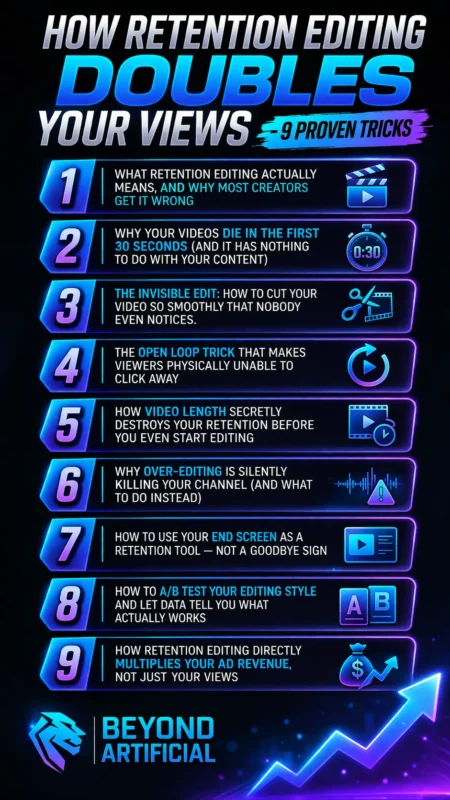
If you are still struggling with low retention, you should first understand why people stop watching your videos, because most creators lose viewers before their content even starts delivering value.
1. What Retention Editing Actually Means, And Why Most Creators Get It Wrong.
Most creators think retention editing means fast cuts, flashy transitions, and lots of sound effects, but that is actually a big mistake you might be making without realizing it. Retention editing is not about making your video look busy or exciting. It is about making sure every second gives your viewer a reason to stay. The real problem is usually not your title or thumbnail; it is your editing style. One small mistake in your editing can change how your whole channel performs.
So here is your first tip: before you even start editing, ask yourself one simple question: “Is every second giving value, or am I just filling time?” Our second tip is to stop copying big creators like MrBeast blindly. More editing does not always mean better results. What really works is giving clear value at the right pace for your audience. Your third tip is to open YouTube Studio and check your retention graph. Look at your last few videos and find the exact moment when viewers start leaving.
That point shows you exactly what is going wrong. And your final tip, your first 10–15 seconds matter the most. If you give strong value early, people stay longer. If you delay it, they leave.
2. Why Your Videos Die in the First 30 Seconds (and it has nothing to do with your content).
You spend hours scripting, filming, and editing your video… but people still leave in the first 30 seconds. And honestly, that feeling is real and frustrating. But here is the truth:
The first 30 seconds decide whether your video grows or dies. And the problem is not your topic; it is your structure, pacing, and how fast you deliver value. If your intro is slow, over-explains things, or takes too long to get to the point, viewers leave. And when most people leave early, the algorithm stops pushing your video, no matter how good the rest of the video is.
Simple Tips: Start with the result: Rewrite your first 10 seconds. Tell viewers exactly what they will get right away. Remove slow intros: Delete logo animations, “hey guys welcome back,” and slow music. Every second matters; do not waste it. Check your retention graph: Go to YouTube Studio and find where people drop (especially around 30 seconds). That drop shows your hook is weak. Change your structure: Show examples first, explain later. People stay when they see value quickly.
Simple Line to Remember: Win the first 30 seconds, and you win the video.
3. The Invisible Edit: How to Cut Your Video So Smoothly That Nobody Even Notices.
Here is something most people do not realize: The best editors are not the ones whose edits you notice; they are the ones you don’t notice at all. That is what keeps viewers watching. When editing feels too flashy or distracting, it pulls people out of the video. But when editing is smooth and invisible, it guides the viewer’s emotions without them even realizing it.
Good editing feels natural. Bad editing feels awkward, and that is when people leave. Simple Tips: Use J-cuts and L-cuts. J-cut: next audio starts before the scene changes, L-cut: current audio continues into the next scene. These make your video feel smooth and connected. Cut on action, not silence: Make cuts during movement (like hand gestures or motion). This makes transitions feel natural and keeps the flow strong.
Hide jump cuts with B-roll: If you remove pauses or mistakes, cover the cut with extra footage, so viewers do not notice the edit at all. Edit based on emotion, not time: Cut when something important happens (a reveal, reaction, or shift). This creates a natural rhythm that keeps people watching.
Simple Line to Remember: The best editing is invisible, but its impact is powerful. To achieve smoother and more professional cuts, using the best video editing software for teams can help you maintain consistency and flow across your edits.
4. The Open Loop Trick That Makes Viewers Physically Unable to Click Away.
Your viewer’s brain naturally hates unfinished things, and that is exactly why the open loop technique works so well. An open loop means you tease something important early in the video but reveal it later, which keeps viewers curious and watching. It is the same reason people binge-watch shows: they want answers. Videos that use this technique get higher watch time because viewers stay to see what happens next.
To use it properly, start your video by hinting at something valuable coming later, like a key tip or result, and delay the full reveal until later in the video. You can also use multiple open loops by not revealing everything at once, so viewers keep watching for the next part. Always try to close one loop and open another, so there is never a moment where the viewer feels “done.”
And if your video starts losing attention halfway, remind viewers that something important is still coming. This pulls them back in and keeps them watching till the end.
5. How Video Length Secretly Destroys Your Retention Before You Even Start Editing.
You might think your editing is the problem, but the truth is, you may have already lost before editing even starts, when you decide on your video length. Making your video longer just for the sake of it can hurt your performance. If you add extra content just to hit 8–10 minutes, viewers feel it, and they leave. And when people leave early, your video stops growing. The truth is simple: A short video with high retention will always beat a long video with low retention.
YouTube does not care about length; it cares about how much people actually watch. Find your ideal video length: Go to YouTube Studio and check your average view duration. That shows how long people actually watch your content. Do not stretch videos for ads: Adding filler just to reach 8 minutes will hurt retention. Less but valuable content always wins.
Match length with value: Before recording, ask: “Does this topic really need this much time?” If not, keep it shorter and stronger. Use chapters in long videos: Help viewers jump to what they need. This keeps them on your video instead of leaving.
Do not make videos longer; make them better.
6. Why Over-Editing Is Silently Killing Your Channel (And What to Do Instead).
Here is a hard truth: You might be spending hours adding zooms, cuts, sound effects, and transitions… And that effort could actually be hurting your retention. Over-edited videos feel chaotic. Viewers get tired, especially audiences over 25, and they leave faster. The biggest mistake? Editing to impress… instead of editing to help the viewer. Your editing style should match your audience, not show off your skills.
Simple Tips: Check if you are over-editing: Watch your last videos at 1.5x speed. If it feels too fast or overwhelming, you’re overdoing it. Match your editing to your audience: For mature audiences, keep it simple. Use longer clips, fewer cuts, and soft transitions. Focus on value, not effects: Some creators use very simple editing and still get millions of views. Why? Because people care about what they are saying.
Keep changes controlled: Add visual changes every 15–25 seconds. Use effects only when needed (important moments). Simple Line to Remember: Simple editing + strong value is equal to high retention.
Instead of overloading your video with effects, focus on smart tools. These are the best AI tools for video editing that can help you simplify your workflow without hurting retention.
7. How to Use Your End Screen as a Retention Tool, Not a Goodbye Sign.
Most creators treat the end screen like a simple goodbye, a few random boxes, a subscribe button, and that’s it. But that is a big mistake. When someone finishes your video, they are most interested at that moment. And that is your best chance to make them watch another video. Your end screen is not the end; it is a chance to keep them on your channel longer.
Simple Tips: Choose your next video manually: Do not leave it on “best for viewer.” Pick a video that directly relates to what they just watched. Tell viewers what to watch next: Before your video ends, say something like: “Watch this next video to learn…” This increases clicks. Give space for the end screen: Start wrapping up 15–20 seconds early. Keep the screen clean so viewers can clearly see the next video
Check your end screen performance: Go to YouTube Studio → Analytics → End Screens. See which videos get clicks and improve the rest. Simple Line to Remember: Your end screen is not the end; it is your next opportunity.
8. How to A/B Test Your Editing Style and Let Data Tell You What Actually Works.
Here is the truth: Most creators are just guessing. You upload videos based on what feels right or what others are doing, and that guessing is quietly costing you views. A/B testing changes everything. Instead of guessing, you let your audience tell you what works through their behavior. A/B testing simply means testing two versions and seeing which one performs better.
Simple Tips: Test one thing at a time: Change only one element (like hook, pacing, music, or B-roll). So you know exactly what made the difference. Use YouTube’s Test & Compare: Test different thumbnails and titles. YouTube will show which one performs better. Focus on real metrics: Do not just look at clicks. Check watch time and retention, that is what really matters.
Give your test time: Run it for at least 7 days. Try to get enough views before deciding. Make testing a habit: Test → Analyze → Improve → Repeat. This is how real growth happens. Simple Line to Remember: Stop guessing, start testing.
9. How Retention Editing Directly Multiplies Your Ad Revenue, Not Just Your Views.
You are working hard to get more views and subscribers… But here is a truth most creators never hear: You can earn more money without getting more views, just by improving your retention. Yes, really. Better retention means people watch longer → see more ads → and your income increases. So the money you are missing is not in more views… It is in better editing.
Simple Tips: Focus on 50% retention: Below 50% = average performance. Above 50% = YouTube pushes your video more. Crossing this line can change everything. Place ads smartly: Put mid-roll ads at natural breaks (topic change, pause). So viewers do not leave when ads appear. Check your best earning videos: Go to YouTube Studio → Revenue. Find videos with high RPM + high retention. That is your winning formula.
Stop chasing only views: 100K views with low retention = low money. 100K views with high retention = double money. Simple Line to Remember: More retention = more money (even with the same views).
If you are planning to turn your editing into a real income stream, understanding how much video editing costs in 2026 will help you price your work and maximize your earnings.
FREQUENTLY ASKED QUESTIONS (FAQs)
Is 50% viewer retention good?
The average retention is around 23%, so reaching 50% already puts you ahead of most creators and helps YouTube recommend your video. If you push it to 65%+ with better editing (strong hooks, smooth cuts, open loops), YouTube starts promoting your video much more aggressively.
What should you do to increase the viewer retention of a longer video?
Longer videos do not need to be shorter; they need to be edited smarter. Break them into clear sections, add small attention resets (B-roll, zooms, text), and keep giving value every minute. When your video feels engaging instead of long, retention improves, and YouTube pushes it more.
What is the golden rule of editing?
The golden rule of editing is simple: if something does not add value, cut it. Every second of your video should either teach, engage, or create curiosity. If a moment feels like it’s wasting the viewer’s time, they will leave, no matter how good the rest is. Before adding anything, ask yourself one question: “Will this make viewers stay or leave?” This mindset is what helps videos grow.
What does 90% retention mean?
90% retention means your video is performing at an elite level. It shows that almost everyone who clicked stayed until the end, which sends a very strong signal to YouTube to push your content to more people. To reach this, you need a strong hook in the first few seconds, clean editing with no boring moments, and content that delivers exactly what your title promises.
What is the 3:2:1 rule in video editing?
The 3:2:1 rule is a simple editing rhythm that keeps your video engaging. For every 3 seconds of talking, add 2 seconds of B-roll or a visual change, then 1 second of text or a highlight. This creates a natural flow that keeps viewers interested and stops them from getting bored, helping your retention stay strong throughout the video.
How retention editing doubles your views on TikTok
You are posting on TikTok every day… But your views stay stuck at 200, 300, maybe 500. And slowly, it kills your confidence, especially when others with less skill go viral. But here is the truth: TikTok growth is not about trends, timing, or even content quality. It is about retention editing. If your editing does not keep people watching, TikTok stops pushing your video.
The good news? This is completely fixable. Fast editing can increase retention. Strong opening cuts boost it even more. And a powerful hook in the first second makes a huge difference. The power to grow is already in your editing; you just need to use it right.
- TikTok only cares about retention: If people leave in the first 2 seconds, your video dies. No matter how good the rest is.
- First 3 seconds = everything: A strong opening can double your retention. A weak intro kills your reach instantly
- Loops increase views: Seamless endings make people rewatch. Short videos (under 15 sec) get more replays
- Retention controls growth: Better retention = more reach. More reach = more followers. And future videos perform better, too.