
 YouTube Automation
How Accurate Is Grammarly AI Detector? 9 Honest Truths(Blog#:40)

If you have ever wondered How Accurate Is Grammarly AI Detector is, you are not alone. Many writers, students, and professionals worry about this every day. Imagine submitting your work and suddenly seeing Grammarly AI Detector mark your original writing as AI-generated. That moment can create panic, frustration, and confusion. Understanding How Accurate Is Grammarly AI Detector is now very important for anyone who writes or publishes content online.
The truth is that Grammarly’s AI Detector is helpful, but it is not perfect. Sometimes it can make mistakes and flag human-written content as AI. That is why these honest truths are important.
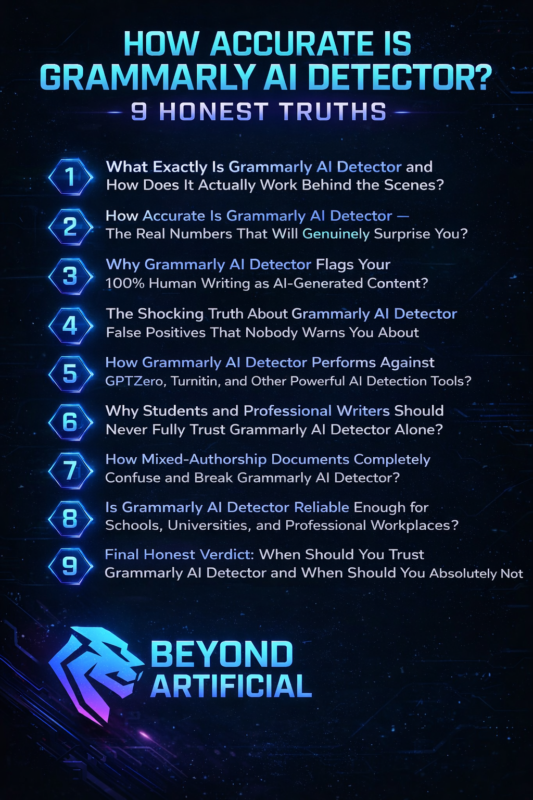
They will help you understand how Grammarly’s AI Detector works, where it performs well, and where it can go wrong. By the end, you will have a clearer idea of whether you should fully trust its results or not.
1. What Exactly Is Grammarly AI Detector and How Does It Actually Work Behind the Scenes?
The Grammarly AI Detector is a tool inside Grammarly that checks your writing to estimate whether it was written by a human or generated by AI. It looks at things like sentence structure, word choices, and writing patterns to make this guess. Unlike a plagiarism checker that searches for copied text, this tool studies patterns that often appear in AI-generated writing. Understanding how this detector works is important for students, writers, and professionals who want to avoid their original work being flagged as AI.
While the tool can be helpful, it is not perfect, and sometimes it may flag human writing incorrectly. One useful habit is to run your content through the Grammarly AI Detector before submitting important work. This way, you can see if anything gets flagged and make changes if needed. Another helpful tip is to vary your sentence length—mix short sentences with longer ones—because AI writing often has very similar sentence patterns.
It also helps to include personal opinions, experiences, or specific examples in your writing. These human details make your content sound more natural and less like AI-generated text. When you understand how the Grammarly AI Detector analyzes writing, it becomes much easier to use it as a helpful tool instead of something you constantly worry about.
2. How Accurate Is Grammarly AI Detector: The Real Numbers That Will Genuinely Surprise You?
When Grammarly AI Detector flags your writing, it can feel stressful and confusing. Many writers and students immediately assume the tool must be right. However, the reality is that AI detection tools, including Grammarly’s, are not perfectly accurate. In different tests, their accuracy has been reported to range roughly between 50% and 87%, which means they can sometimes misidentify human writing as AI-generated.
This is important because teachers, employers, and publishers may rely on these tools when reviewing content. If people trust the result without understanding its limits, genuine human work could be questioned unfairly. That is why it is better to treat Grammarly AI Detector as a helpful indicator, not a final decision. Grammarly itself explains that its results are probabilistic, meaning the tool estimates the likelihood that text might be AI-generated rather than giving a guaranteed answer.
A smart approach is to check your content with multiple AI detectors such as GPTZero, Copyleaks, or Originality AI. When several tools give similar results, you get a clearer picture. If the results are very different, it shows that no single detector should be fully trusted on its own. Another helpful habit is to save your writing drafts, outlines, and editing history. This record can prove that your work was created by you if someone ever questions it.
When you understand the real limits of Grammarly AI Detector accuracy, you can use the tool wisely, without unnecessary stress about your writing.
3. Why Grammarly AI Detector Flags Your 100% Human Writing as AI-Generated Content?
It can feel very frustrating when you spend time writing something original, and Grammarly AI Detector still marks it as AI-generated. Many writers and students experience this problem, and it often feels unfair. The reason is simple: the detector does not truly understand your ideas or emotions. Instead, it analyzes patterns such as sentence structure, vocabulary, and writing style.
Sometimes, strong human writing can look similar to AI writing. Clear sentence structure, formal vocabulary, and smooth flow are qualities that both AI models and skilled human writers can produce. Because of this overlap, the detector may occasionally flag genuine human work as AI. There are a few simple ways to reduce the chances of false flags. One helpful tip is to use natural conversational language, including contractions like “you’re” or “it’s,” which often appear in human writing.
Another good practice is to add personal experiences, opinions, or real-life examples, because these details make your content sound more authentic. You can also try to vary your vocabulary and sentence style. Mixing simple words with more advanced terms and using different sentence lengths can make your writing feel more natural. When you understand why Grammarly AI Detector sometimes mislabels human content, it becomes easier to manage the tool without feeling discouraged about your writing.
4. The Shocking Truth About Grammarly AI Detector False Positives That Nobody Warns You About.
A false positive happens when an AI detector marks human-written content as AI-generated. While the term may sound technical, it can create real problems for writers and students. Imagine submitting an original essay or article, only to have it flagged by Grammarly AI Detector. In some situations, this may lead teachers, editors, or employers to question the authenticity of your work.
The reality is that false positives can happen with many AI detection tools, including Grammarly. These systems analyze patterns in writing, such as sentence structure, vocabulary, and flow. If your writing is very clear, consistent, and well-structured, the tool might sometimes mistake it for AI-generated content. Because of this, it is important to treat AI detection results carefully. A helpful step is to check your content with Grammarly AI Detector before submitting it, so you can review any sections that might be flagged.
If something looks suspicious, you can adjust the wording or add more personal voice and examples. Another good practice is to save your drafts, outlines, and editing history. These records can show how your writing developed over time and help prove that the work is genuinely yours. Finally, remember that AI detection tools should not be used as the only proof of whether content is written by a human or AI. Using multiple tools and reviewing the content manually provides a more balanced and reliable approach.
Understanding the possibility of Grammarly AI Detector false positives helps you stay prepared and confident while using these tools as part of your writing process.
5. How Grammarly AI Detector Performs Against GPTZero, Turnitin, and Other Powerful AI Detection Tools?
When you compare Grammarly AI Detector with other popular tools like GPTZero, Turnitin, and Originality AI, you start to see clear differences in how they work and what they are best used for. Each tool is designed for a slightly different purpose, so their results and accuracy can vary. For example, GPTZero focuses mainly on detecting AI-generated text. Because of this, many people use it as a dedicated AI detection tool to double-check content. Turnitin, on the other hand, is widely used by schools and universities to protect academic integrity.
Its reports often carry more weight in academic settings because many institutions rely on it for plagiarism and AI checks. Another tool, Originality AI, is commonly used by content creators and publishers. It offers more detailed analysis and can sometimes provide deeper insights into whether a piece of content might be AI-generated. Compared with these tools, Grammarly AI Detector is designed more as a quick writing assistant feature rather than a full professional detection system. It can give a helpful estimate, but it should not always be treated as the final judgment.
A good approach is to check important content with more than one tool. For example, you might run your text through Grammarly first and then verify the result with tools like GPTZero or Originality AI. When several tools show similar results, you can have more confidence in the conclusion. By understanding how Grammarly AI Detector compares with other AI detection tools, you can make smarter decisions and avoid relying too heavily on just one detector.
6. Why Students and Professional Writers Should Never Fully Trust Grammarly AI Detector Alone?
If you are a student submitting an important assignment or a professional writer publishing content, it can be risky to rely only on Grammarly AI Detector. While the tool can be helpful, it was not designed to be the final authority on whether writing is human or AI-generated. Its results should be seen as guidance rather than a definite judgment. AI detection tools sometimes make mistakes, and relying on a single result can lead to misunderstandings.
For example, a piece of human-written content may occasionally be flagged as AI. Because of this possibility, it is always better to check your writing with multiple AI detection tools before drawing any conclusions. One useful strategy is to combine Grammarly AI Detector with other tools such as GPTZero or Turnitin. When several tools give similar results, the overall assessment becomes more reliable.
Students can also protect themselves by keeping drafts, outlines, and research notes that show how their work was developed. This writing history can help demonstrate that the content is original if questions ever arise. For professional writers, developing a clear personal writing style can also help. Including opinions, experiences, and unique perspectives makes content sound more natural and human.
By using Grammarly AI Detector carefully and alongside other tools, students and writers can make more informed decisions and avoid relying too heavily on a single AI detection system.
7. How Mixed-Authorship Documents Completely Confuse and Break Grammarly AI Detector?
Many documents today are written through collaboration. A project might include work from multiple writers, along with small sections that were created or edited with AI tools. When this happens, Grammarly AI Detector can sometimes struggle to analyze the document correctly. The reason is simple: the tool evaluates the overall writing patterns of a text. If human-written sections and AI-assisted sections are mixed together, the detector may become less accurate. It might flag some human parts as AI-generated or miss some AI-assisted sections entirely.
This can lead to results that do not fully reflect how the document was actually created. One helpful approach is to check each section of the document separately instead of scanning the entire file at once. This can give you a clearer idea of which parts may be triggering AI detection results. It is also useful to keep track of who wrote each section, especially in collaborative projects. Saving drafts, version history, or notes about contributions can help explain the writing process if questions come up later.
Some writers also choose to use additional AI detection tools for a second opinion, especially when reviewing collaborative content. Comparing results from different tools can provide a more balanced understanding. By understanding how mixed-authorship documents affect tools like Grammarly AI Detector, you can review your collaborative work more carefully and avoid confusion when checking for AI-generated content.
8. Is Grammarly AI Detector Reliable Enough for Schools, Universities, and Professional Workplaces?
Many schools, universities, and workplaces are starting to use AI detection tools to check whether content might be AI-generated. One of these tools is the Grammarly AI Detector. While it can provide helpful insights, it is important to understand that it was not designed to be the only system used for serious academic or professional decisions. AI detectors estimate the likelihood that text may have been written by AI.
However, their accuracy can vary, and results are not always perfect. Because of this, relying only on a single tool can sometimes lead to misunderstandings or incorrect conclusions about a writer’s work. For students, it is often helpful to ask instructors to review content using multiple tools or methods if questions about AI use arise. Looking at several sources of evidence can give a more balanced view of the situation.
Educators and employers can also take a careful approach by treating AI detection results as one piece of information, rather than the final decision. Reviewing a writer’s drafts, editing history, and writing style can provide additional context that automated tools may miss. As AI technology continues to develop, institutions are also encouraged to review and update their policies regularly. This helps ensure that decisions remain fair and accurate as detection tools evolve.
Understanding the limits of tools like Grammarly AI Detector can help students, educators, and professionals make better decisions and maintain fairness when evaluating written work.
9. Final Honest Verdict: When Should You Trust Grammarly AI Detector and When Should You Absolutely Not?
After looking at how Grammarly AI Detector works, its accuracy limits, and the possibility of false positives, one thing becomes clear: the tool can be helpful, but it should be used carefully. Grammarly AI Detector works best as a personal writing assistant. It can help you notice parts of your content that may sound too robotic or similar to AI-generated text. In this way, it can act as an early warning tool while you are editing your work before submitting or publishing it.
However, it should not be treated as the final authority on whether a piece of writing is human or AI-generated. AI detection tools are still developing, and their results are not always perfectly accurate. Because of this, important academic or professional decisions should never rely on one detector alone. A smart approach is to use Grammarly AI Detector during your editing process, and if needed, check your content with other detection tools as well. Comparing multiple results can provide a clearer picture.
It is also helpful to save your drafts, notes, and editing history. These records can show how your writing developed over time and help demonstrate that your work is original if questions ever arise. In simple terms, Grammarly AI Detector is useful as a guide, not a judge. When you understand its limits and use it alongside other tools and evidence, you can feel more confident about your writing and how it is evaluated.
FREQUENTLY ASKED QUESTIONS(FAQs)
Is Grammarly AI detect accurate?
Grammarly AI Detector can give a helpful estimate, but it is not fully reliable. Like most AI detection tools, its results are not always accurate and it may sometimes flag human-written content as AI. For better results, it is recommended to check your content with multiple AI detectors and treat Grammarly’s score as a guide rather than a final decision.
Can I use Grammarly to avoid AI detection?
Grammarly can help improve your writing, but it cannot guarantee that AI-generated content will avoid AI detection. Its suggestions for grammar, tone, and sentence structure may make the text sound more natural, but advanced detectors can still identify AI patterns. The best approach is to rewrite the content in your own words and add personal insights or examples to make it truly human-written.
Is Grammarly AI detector similar to Turnitin?
No, they are different tools. Grammarly AI Detector is mainly a writing assistant feature that estimates whether text might be AI-generated. Turnitin is a specialized academic integrity platform widely used by schools and universities for plagiarism and AI checks. Because of this, Turnitin results usually carry more weight in academic settings.
Is it okay to use Grammarly as a student?
Yes, using Grammarly as a student is generally acceptable. It helps improve grammar, clarity, and vocabulary in your writing. However, it should be used as an editing tool, not to replace your own ideas or original work. Always follow your school’s policies regarding AI and writing tools.
Is Grammarly AI detector free?
Yes, Grammarly offers a free version of its AI Detector, but it comes with some limitations, such as a lower word count and fewer features. For more advanced analysis and higher limits, you may need Grammarly Premium or Business.
How accurate is Grammarly AI detector reddit
Many people on Reddit have shared their experiences with the Grammarly AI Detector, and the opinions are mixed. Some users say the tool is helpful, while others report that it sometimes flags completely human-written content as AI-generated. These discussions often come from students, writers, and professionals who have tested the tool with their own work. What makes these Reddit conversations useful is that they show real experiences from everyday users rather than official marketing claims.
By reading these discussions, you can better understand how people are using the tool and what problems they sometimes face. Many Reddit users also share helpful tips, such as checking content with multiple AI detectors and keeping drafts or notes that show how the writing was created.
Here are some common points shared by Reddit users:
1. Some users report false positives on human-written content
2. Many comparisons show different results between AI detection tools
3. Writers share tips to reduce the chances of AI flags
4. Users recommend saving drafts and writing history as proof of originality
5. Many agree that Grammarly AI Detector should be used as a guide, not the final decision
These community insights can help you understand the real-world performance of Grammarly AI Detector and use the tool more wisely when checking your writing.