
 YouTube Automation
Best Paraphrasing Tools for Content Creation -9 Proven Picks(Blog#:35)

Writing fresh content every day is not easy. Many creators spend hours rewriting the same paragraph and still feel their words do not sound right. That is why many writers use the best paraphrasing tools for content creation. These tools help you rewrite sentences, improve clarity, and create unique content faster.
As deadlines approach, this process can become stressful and time-consuming. Instead of struggling with the same text again and again, you can quickly generate a better version of your ideas. In this guide, we will explore the 9 best paraphrasing tools for content creation that can help bloggers, marketers, and content creators write better and save time.
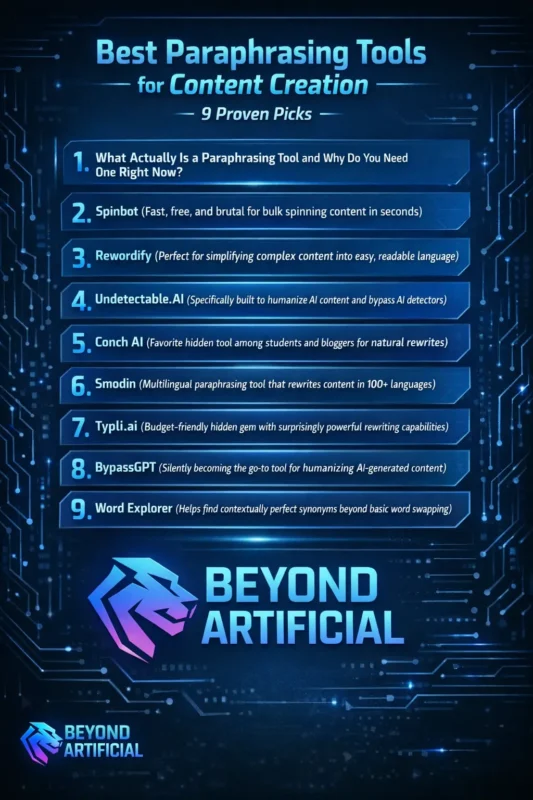
The good news is that the right paraphrasing tools can make content creation much easier. They help you rewrite sentences faster, improve clarity, and save valuable time. Keep reading to discover proven paraphrasing tools that can make writing easier and help you create better content before your next deadline.
If you also work with AI-generated text, check out our guide on theBest AI Humanizer Tool to learn how to make AI content sound more natural and human.
1. What Actually Is a Paraphrasing Tool and Why Do You Need One Right Now?
A paraphrasing tool is an AI writing tool that helps you rewrite existing text in new words while keeping the original meaning the same. It is very helpful when you feel stuck rewriting the same sentences again and again. Many content creators, students, bloggers, and marketers use paraphrasing tools to save time and make their writing clearer. Instead of struggling with the same paragraph for hours, you can quickly generate a better version of your content.
These tools do more than just replace words. They can improve sentence structure, adjust tone, and make your writing easier to read while keeping your message clear. To get the best results, paste the paragraph you want to improve and review the rewritten version carefully. You should always make small edits to keep your content natural and personal.
Most tools also offer different modes like creative, formal, or fluency. Testing these modes can help you find the version that fits your writing style best. Once you start using paraphrasing tools regularly, you can save time, reduce writing stress, and make content creation much easier.
2. Spinbot( fast, free, and brutal for bulk spinning content in seconds)
Spinbot is a free paraphrasing tool that quickly rewrites your content in just a few seconds. You simply paste your text, click the button, and the tool creates a new rewritten version of your content. This makes Spinbot helpful for bloggers, SEO professionals, and content creators who need to rewrite content quickly without spending a lot of time.
Before using Spinbot, it is a good idea to clean your text first. Remove extra spaces or formatting so the tool can produce a clearer result. You should also review the rewritten content carefully before publishing it. Sometimes the tool may change words in a way that slightly affects the meaning, so a quick edit can improve the final result. Many writers use Spinbot for the first draft rewrite and then improve the text using tools like Grammarly or Wordtune.
This simple two-step process can help make the content more natural and polished. Using Spinbot in this way can save time and make rewriting content much easier.
3. Rewordify (perfect for simplifying complex content into easy, readable language)
Rewordify is a helpful paraphrasing tool that turns complex or difficult text into simple, easy-to-understand language. It is especially useful when your content feels too technical or hard for readers to follow. Many writers accidentally use words or sentences that are too complicated. When this happens, readers may lose interest and leave the page. Rewordify helps fix this by simplifying the language while keeping the original meaning.
Instead of only replacing difficult words, the tool can also improve sentence structure and make your writing clearer and smoother. A good way to use Rewordify is to paste your most technical or complicated paragraphs into the tool first. These are usually the parts that readers find hardest to understand. Rewordify also highlights the words it simplifies.
This feature helps you see what changed and can teach you how to write clearer sentences in the future. By using Rewordify regularly, you can create content that is easier to read, easier to understand, and more enjoyable for your audience.
4. Undetectable.AI (specifically built to humanize AI content and bypass AI detectors)
Undetectable.AI is a tool designed to rewrite AI-generated content so it sounds more natural and human. It helps improve the tone of AI text and can reduce the chances of it being flagged by some AI detection tools. Many writers use AI tools to create content, but sometimes the text can sound robotic. Undetectable.AI helps solve this problem by rewriting the content in a more natural and readable way.
The tool also includes an AI checker that lets you test your content before publishing. This helps you see how detectable the text might be and gives you a chance to improve it. To get better results, choose the correct writing mode, such as academic, marketing, or casual. This helps the tool adjust the tone of the rewritten content. It is also better to rewrite short sections of text instead of pasting very long content at once. Smaller sections usually produce clearer and more natural results.
When used carefully, Undetectable.AI can help make AI-generated content smoother, more readable, and closer to human writing.
5. Conch AI (favorite hidden tool among students and bloggers for natural rewrites)
Conch AI is a useful paraphrasing tool that many students and bloggers use to rewrite content in a more natural and human-like way. It helps improve sentences so they sound smoother and easier to read. Sometimes rewritten content can still feel stiff or unnatural. Conch AI helps solve this by understanding the context of your text and rewriting it while keeping the original meaning and tone.
One helpful feature of Conch AI is its browser extension, which allows you to rewrite content directly inside tools like Google Docs or blogging platforms. This makes the writing process faster and reduces the need for constant copy-pasting. You can also use Conch AI for important sections like introductions and conclusions, where clear and natural language is especially important for keeping readers engaged.
The tool also provides multiple sentence suggestions, so you can choose the version that best matches your writing style. By using Conch AI regularly, writers can create content that feels more natural, readable, and engaging for their audience.
6. Smodin (multilingual paraphrasing tool that rewrites content in 100+ languages)
Smodin is a powerful paraphrasing tool that can rewrite content in 100+ languages. It helps writers reach a global audience by making their content easier to understand in different languages. Many creators have great ideas but struggle to share them with readers who speak other languages. Smodin helps solve this problem by rewriting and translating content while keeping the original meaning.
Unlike simple translation tools, Smodin also improves the structure and clarity of your sentences so the content sounds more natural. A good strategy is to start by rewriting your most important articles or pages. Turning high-value content into multiple languages can help you reach more readers without creating completely new content.
However, it is always a good idea to review the translated content carefully or check it with a native speaker if possible. This helps make sure the message sounds natural. By using Smodin regularly, you can expand your content to new audiences and make your writing accessible to readers around the world.
7. Typli.ai (budget-friendly hidden gem with surprisingly powerful rewriting capabilities)
Typli.ai is a budget-friendly paraphrasing tool that helps writers rewrite content clearly and professionally. It is a good option for students, bloggers, and content creators who want useful rewriting features without paying for expensive tools. Many rewriting tools can be costly, but Typli.ai offers helpful features at a more affordable price. It can improve sentences, adjust tone, and rewrite content so it sounds smoother and easier to read.
The tool also includes different templates that help you structure your content quickly. This makes it easier to start writing or rewriting without spending too much time setting things up. Typli.ai also allows you to change the tone of your writing, such as professional, casual, or creative. Choosing the right tone can help your content connect better with your audience.
Even though it is affordable, Typli.ai can still handle long-form content rewriting and produce clear, natural results. By using Typli.ai regularly, writers can save money while still creating polished and engaging content.
8. BypassGPT (silently becoming the go-to tool for humanizing AI-generated content)
BypassGPT is a tool designed to rewrite AI-generated content so it sounds more natural and human. Many writers use it to improve AI text that may otherwise sound robotic or unnatural. When content is created with AI, it can sometimes be detected by AI detection tools. BypassGPT helps rewrite the content in a way that improves its flow and makes it feel more like human writing.
The tool does more than just replace words. It can also change sentence structure and writing patterns to make the text clearer and easier to read.For better results, it is helpful to rewrite content in smaller sections instead of pasting a very long article at once. This usually produces more natural output. BypassGPT also allows you to adjust the readability level, which helps match the tone of the content to your target audience.
When used carefully, BypassGPT can help improve AI-generated content and make it smoother, clearer, and more natural for readers.
9. Word Explorer (helps find contextually perfect synonyms beyond basic word swapping)
Word Explorer is a useful writing tool that helps you find better synonyms based on the context of your sentence. Instead of simply replacing a word with a random synonym, it suggests words that fit naturally with your sentence. Many writers face a common problem when paraphrasing. They replace a word with a synonym, but the new word changes the meaning or makes the sentence sound awkward.
Word Explorer helps avoid this issue by suggesting more accurate and natural word choices. This tool focuses on context, meaning it looks at the entire sentence before recommending alternative words. This helps keep your writing clear and natural. It is best to use Word Explorer during the final editing stage of your content. Once your sentences are already written, the tool can help improve word choice and make your writing stronger.
A helpful tip is to read your sentence out loud after choosing a synonym. This makes it easier to notice if the new word sounds natural. You should also check multiple suggestions instead of selecting the first option. Sometimes the second or third suggestion fits the sentence better.
Using Word Explorer regularly can help improve your vocabulary and make your writing clearer, more expressive, and more professional.
FREQUENTLY ASKED QUESTIONS (FAQs)
What is the most powerful paraphrasing tool?
QuillBot is one of the most powerful paraphrasing tools. It offers multiple rewriting modes, a grammar checker, and a summarizer to improve content quickly. Some writers also combine QuillBot with Undetectable.AI to make AI-generated text sound more natural.
Can I use ChatGPT for paraphrasing?
Yes, you can use ChatGPT for paraphrasing. It can rewrite your content with clearer sentences, better tone, and smoother flow when you give clear instructions. However, one limitation is that the rewritten text may still show AI writing patterns, which can sometimes make the content sound less natural.
What are 5 paraphrasing techniques?
The five common paraphrasing techniques are:
- Changing sentence structure
2. Replacing words with suitable synonyms
3. Switching between active and passive voice
4. Breaking long sentences into shorter ones
5. Reordering ideas while keeping the same meaning
These techniques help make content clearer, avoid repetition, and improve readability. Many writers also use tools like QuillBot or Wordtune to make paraphrasing faster and easier.
Which app is better for paraphrasing?
QuillBot is one of the most popular and reliable paraphrasing apps. It offers multiple rewriting modes and works well for essays, blog posts, and marketing content. However, the best app depends on your needs. For example, BypassGPT is useful for humanizing AI content, Smodin supports multiple languages, and Typli.ai is a budget-friendly option. Many writers start with QuillBot and then use other tools depending on their content goals.
Is there a better Paraphraser than QuillBot?
Yes, some tools can perform better than QuillBot in certain areas. For example, WordAi is known for more human-like bulk rewrites, Undetectable.AI focuses on improving AI-generated text, and Wordtune helps keep your original writing tone.QuillBot is still a strong all-around tool, but many writers use multiple paraphrasing tools together to get the best results for different writing needs.
Best paraphrasing tools for content creation on Android
Many content creators write ideas on their Android phones, but rewriting content on mobile can sometimes feel difficult and slow. Most powerful writing tools are designed for desktops, which can make it frustrating for people who work mostly on their phones. The good news is that many Android-friendly paraphrasing tools are now available. These tools allow you to rewrite and improve your content directly from your phone, without needing a laptop.
With the right Android paraphrasing tool, you can easily:
1. Rewrite or rephrase paragraphs directly from your Android device
2. Improve sentence clarity and adjust the tone of your writing
3. Create more natural and plagiarism-free content
4. Use different rewriting modes, such as creative, formal, or fluency
5. Save time by rewriting content quickly while working on the go
Using a good paraphrasing tool on Android makes it easier to write, edit, and improve content anytime and anywhere, whether you are traveling, commuting, or simply working away from your computer.