
 YouTube Automation
AI vs Manual Video Editing: what actually works-9 Proven Ways(Blog#: 72)

Every hour you spend manually editing a video is an hour your competitor spends uploading one, and that gap is exactly why understanding AI vs manual video editing: what actually works and the proven ways to use both smartly, can change your content game.
You sit there on your timeline, dragging clips, fixing audio again, adjusting colors… and suddenly hours have gone by, yet the video still does not feel right. That frustration is real, and so many creators go through it every day while trying to keep up with platforms that demand speed, consistency, and quality at the same time. AI vs manual video editing is not about choosing one over the other; it is about using both together.
Smart creators are already doing this to create more content, reduce stress, and actually enjoy the process again. Once you learn these 9 proven ways to combine both, you will stop wasting time and start editing with a system that finally works.
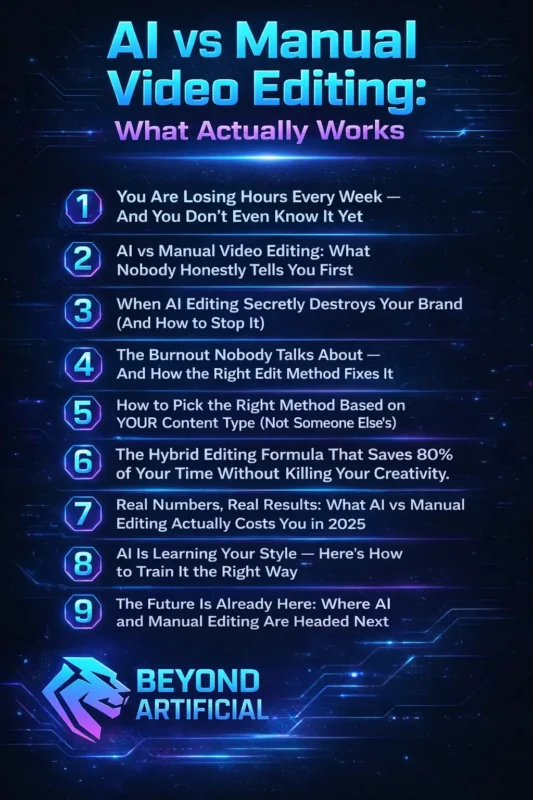
If you want to understand how AI vedio editing actually works in practice, check out our detailed guide on AI video editing workflow step by step.
1. You Are Losing Hours Every Week, and You Do Not Even Know It Yet
Right now, without even realizing it, you are probably spending 8 to 20 hours every week just on video editing, and that is time you can never get back. A single 10-minute YouTube video can easily take 6 to 10 hours to edit. And if you are posting two or three videos a week, you are not running a content business anymore; you are stuck in an editing cycle that slowly drains your energy, creativity, and growth.
The worst part? Most creators do not notice it. It feels like “just part of the process”, until one day you realize you have not even worked on new ideas because you are still editing old footage. So here is what you can do:
Track your editing time. For one week, write down every minute you spend editing, cuts, captions, color, everything. The total will surprise you. Separate your tasks. Do rough cuts on one day, captions on another, and final edits later. Switching tasks again and again quietly doubles your time. Use AI where possible. Let AI handle things like silence removal, auto-captions, and basic cuts. This frees you to focus on creativity, the part only you can do.
Your time is not just time; it is your energy, your ideas, and your future. Start protecting it, and everything about your content journey will improve.
2. AI vs Manual Video Editing: What Nobody Honestly Tells You First.
Here is the truth most AI vs manual video editing articles do not say: AI is not magic, and manual editing is not dead. If you do not understand both properly, you will waste time and money, and start blaming yourself when the real problem is your approach. AI is great for saving time on boring tasks like captions, silence removal, and rough cuts. But when your video needs emotion, something that makes people laugh, feel, or share, AI struggles. It sees clips, but you understand people. And that difference matters.
Manual editing gives you full control and emotional impact, but it costs time, energy, and has a learning curve that many beginners underestimate. So here is what you should do:
Be clear about your goal: Ask yourself: Do you need speed and volume, or depth and emotion? This one answer will guide everything. Test AI on small content first: Do not use it on your most important video. Try it on a simple clip, watch carefully, and see where it works and where it fails. Improve your filming first: Bad lighting and poor audio can not be fully fixed by AI or editing. Spend a little time recording better, and your results will improve instantly.
This is not a battle between AI and manual editing. The creators who grow are the ones who stay flexible, learn both, and use the right method at the right time.
3. When AI Editing Secretly Destroys Your Brand (And How to Stop It).
AI editing is quietly changing your brand in a way you do not notice; it slowly replaces your unique voice, style, and personality with something safe and generic. It may look fine, but it stops feeling like you to your audience. AI tools are trained on huge amounts of content, so they often produce “average” results. And average is dangerous, because it makes you forgettable in a world where people decide in seconds whether they like you or not.
Even big brands have faced this problem when AI content felt inconsistent or off. For creators, it is the same; the moment your content starts feeling “AI-made,” your audience loses connection without even saying it. So here is how to protect your brand:
Create your brand guide first: Before using AI, write down your tone, colors, style, and the emotions you want people to feel. AI can not follow what you have not defined. Do a “brand check” before posting: Watch your video like a new viewer. Ask yourself: Does this feel like me, or does it feel generic? Use AI only for technical work: Let AI handle captions, silence removal, and rough cuts, but keep storytelling, tone, music, and creative decisions in your control.
Your brand is not just how your videos look; it is how people feel when they watch you. Protect that, and you protect your growth.
4. The Burnout Nobody Talks About, And How the Right Edit Method Fixes It.
Nobody tells you this when you start, but most creators do not burn out because of a bad niche or lack of passion… they burn out because they spend too many hours stuck in the editing timeline. By the time your video is finally done, you are so exhausted that you can not enjoy it, and you do not even feel like creating the next one. Studies show that creators who spend 20+ hours a week on editing and other unpaid work are much more likely to feel stressed and burned out.
And for most people, it does not happen suddenly , it builds slowly, one long editing session at a time, until something you loved starts to feel heavy. Here is how to protect yourself:
Let AI handle draining tasks. Use AI for things like silence removal, captions, rough cuts, and resizing videos. Save your energy for creativity. Work in batches, not daily pressure. Film multiple videos in one day. Let AI process the heavy work, then come back fresh to add the creative touch. Set a strict editing time limit. Give yourself a max of 2 focused hours per day, then stop. You’ll do better work in 2 fresh hours than 6 tired ones.
You did not start creating to feel drained sitting in an edit timeline. You started because you had something meaningful to share, and the right editing system helps you keep that spark alive.
5. How to Pick the Right Method Based on YOUR Content Type (Not Someone Else’s).
One of the biggest mistakes creators make is copying someone else’s editing workflow, following a big YouTuber or viral creator step by step, then feeling confused when it does not work for them. The problem is not your talent. It is that their method was built for their content, their audience, and their goals, not yours. The truth is simple: the best editing method depends on your content style, your skill level, and your workflow. If those do not match, you will work harder but get worse results.
For example, if you create fast, trend-based short videos (TikTok or Reels), AI editing is usually the smarter choice because speed matters most. But if you create longer YouTube content, manual editing helps you control pacing, storytelling, and emotion. If you are working with others, using collaborative video editing strategies can help you scale faster without losing quality. Here is what you should do: Decide your main goal. Ask yourself: is my content about speed and volume, or depth and emotion?. Speed → use more AI. Emotion → keep more control manually.
Match your method to the platform. Short-form = fast, AI-assisted edits. Long-form = slower, thoughtful manual editing.Test both approaches. For one week, edit your usual way. Next week, try the opposite. See what feels better and what performs better. You do not need to edit like your favorite creator. You need to edit in a way that fits you, and once you do that, your content will feel more natural, more consistent, and more powerful.
6. The Hybrid Editing Formula That Saves 80% of Your Time Without Killing Your Creativity.
The hybrid editing formula is what fast-growing creators are using in 2025,but most people never learn it properly, so they stay stuck. Here is the simple idea: AI does the boring, repetitive work, ike organizing clips, cleaning audio, removing silence, and adding captions. You keep control of the creative parts, storytelling, pacing, emotions, and flow. This way, you are not losing creativity… you are finally giving it space.
A video that used to take 6–15 hours can now be done much faster with AI handling the heavy work, while you still keep full creative control. That means more time, more ideas, and less stress. Here is how to use it: Split your tasks clearly. Make two lists: Tasks that feel boring → give them to AI. Tasks that feel creative → keep them yourself. That becomes your workflow.
Start with AI first. Before editing manually, run your footage through AI. Let it remove silence, create a rough cut, and add captions. Then come in fresh and focus only on improving the story. Protect your creative control. Do not let AI decide your pacing, music, or storytelling. Those are the things that make your content unique. The future is not AI replacing you, it is AI supporting you.
To apply this hybrid system, you need the best AI tools for video editing in 2026 that handle the technical workload efficiently. Once you use this method, editing stops feeling heavy… and starts feeling creative again.
7. Real Numbers, Real Results: What AI vs Manual Editing Actually Costs You in 2026
Most creators choose how they edit based on feelings or trends, but when you look at the numbers, everything changes. The cost difference between AI editing and manual editing in 2026 is huge. If you create around 12 videos a month:
- AI tools usually cost $30–$200/month
- A freelance editor can cost $600–$6,000+/month
Over a year, that can mean saving thousands of dollars, money you could invest back into your content or equipment. But here is what most people miss: Working with an editor also costs you time, briefing them, reviewing edits, giving feedback, waiting for revisions. That hidden time cost adds up fast. Here is what you should do:
Calculate your real cost. Do not just count money, include your time. Add hours spent managing edits, then multiply by what your time is worth. You will see the true cost clearly. Use a hybrid approach. Combine AI + manual editing. AI handles volume and speed, while you (or an editor) focus on important videos. This keeps quality high without overspending. Think of editing as an investment. If a $30 AI tool saves you 10–15 hours a week, and you use that time to create more content or earn even one client. the return is massive.
The creators who win are not the ones who spend the least.They are the ones who spend smart, and protect their time like it is money.
8. AI Is Learning Your Style: Here is How to Train It the Right Way.
Here is something exciting, AI editing tools are not fixed tools, they are learning systems. Every edit you make, every change you apply, and every preference you set is helping them understand your style better. That means your content does not have to look generic forever. The more you guide AI, the more it starts to feel like you.
Many modern AI tools can learn your style over time, your colors, pacing, captions, and overall vibe. In just a few weeks of consistent use, your results can start looking much more personal. Here is how to train AI the right way: Create a style reference. Make a simple folder or document with:
- Your color style
- Caption style
- Music vibe
- Editing pace
- 3–5 of your best videos
Use this as a guide for every project.
Always refine AI output. Do not just accept what AI gives you. Adjust pacing, transitions, and tone, then save those edits as presets. Your corrections teach the AI what “good” looks like for you. Be consistent with feedback. If you keep fixing the same things (like timing, music, or cuts), AI will learn that pattern and start doing it automatically. The key shift is this: Do not treat AI like a shortcut, treat it like a student. The creators who train their AI today will have a powerful, personalized system in a few months… while others will still be stuck with generic results.
9. The Future Is Already Here: Where AI and Manual Editing Are Headed Next.
The future of video editing is not far away, it is already happening right now. And creators who understand this early are gaining a big advantage. AI tools are growing fast. In the next few years, they will be able to handle things like lighting, scenes, and edits with simple commands. This means even beginners will be able to create content that once needed a full team.
But here is the exciting part: As AI gets better, the real advantage will not be the tool, it will be how you use it. Your creativity, storytelling, and understanding of your audience will matter more than ever. because those are things AI still can not replace. Here is how to prepare:
Think like a creative director: Do not see yourself as just an editor. Focus on guiding AI with clear ideas, emotions, and direction, that is what will set you apart. Try new AI tools regularly: Explore one new tool each month. You do not need to master it, just understand what it can do. Early users always win. Improve human skills: Use the time AI saves to get better at storytelling, audience connection, and creativity. These are the skills that will always matter most.
The future is not here to replace you, it is here to remove the boring work so you can focus on what truly matters. If you start now, you wouid not struggle to catch up later,
you will already be ahead. If you want to stay ahead in this AI-driven future, understand why video editing matters for business and how it drives real growth.
FREQUENTLY ASKED QUESTIONS (FAQs)
Is AI replacing video editors?
AI is not replacing video editors: it is only replacing the boring, repetitive tasks like silence removal, captions, and rough cuts. Smart editors use AI as a helper, not a replacement. AI handles the technical work, while humans focus on storytelling, emotion, and creativity. Think of AI as your assistant, fast and efficient, but it still needs you to give meaning to the story.
Is video editing still in demand in 2026?
Yes, video editing is more in demand than ever in 2026. AI has made content easier to produce, but also more crowded. That is why creators now need editors who can add emotion, storytelling, and real human touch. The demand has not dropped, it has shifted. Editors are now valued for creativity and strategy, not just basic editing. If you combine creative skills with smart AI use, you become highly valuable to creators and brands.
Is video editing a good career after AI?
Video editing after AI is still a great career, even better than before. AI removes the boring work and leaves the creative part for you. That means more focus on storytelling, ideas, and personal style. If you learn to use AI and improve your creativity, you will become more valuable, not less. The key is simple: adapt and grow with AI, and your career will grow too.
Is editing a high income skill?
Yes, video editing is a high-income skill in 2026. Top editors can earn high hourly rates or monthly retainers, especially when they deliver strong results for brands. The key is not just editing, it is storytelling and results. Clients pay for videos that grow their business, not just cuts and transitions. If you combine creative skills with AI tools, you can work faster, earn more, and build a scalable career.
Does AI video editing work?
Yes, AI video editing works, and it works very well for the tasks it is built for. It can quickly handle silence removal, captions, rough cuts, resizing, and basic audio cleanup, saving up to 60–80% of your time. The key is to use AI for technical work, not creative decisions. Let AI do the repetitive tasks, and you focus on storytelling and emotion. Used this way, AI does not just work, it makes your editing faster and better.
Ai vs manual video editing cost
Every month, thousands of creators spend money on video editing, through tools, freelancers, or their own time, without knowing if they are spending it the right way. The AI vs manual editing decision is not just about money… it is about whether your budget is helping you grow or quietly holding you back. Here is the good news:
Once you understand the numbers, the right choice becomes clear, and it is usually simpler and more affordable than you think.
When you split your editing between AI and manual work, you can save money, get more time back, and grow your content faster without burning out. Here is how it really works:
- AI tools are low cost: Around $20–$79/month, and can help you create many videos. Compared to $50–$150/hour for a freelance editor
- Manual editing has hidden costs: Time spent on revisions, explaining your style, and waiting for edits can double the real cost
- AI is best for speed: Handles captions, silence removal, rough cuts, and resizing quickly
- Manual editing is best for quality: Needed for storytelling, emotions, branding, and detailed control
- Hybrid is the smartest option: Use AI for technical work and keep creative control yourself. This gives you professional results at a much lower cost
The goal is not to spend less, it is to spend smart, save time, and grow faster without stress.