
 YouTube Automation
AI Video Editing Workflow Step by Step 2026 Guide – 9 Best Tips(Blog#:67)

You spent 6 hours editing a video, but it still does not look the way you imagined. If that feels familiar, this AI Video Editing Workflow Step by Step guide is exactly what you need. This workflow helps you break free from the tiring cycle of cutting, trimming, and re-editing footage that drains your creativity before you even publish.
In 2026, smart creators do not work harder; they work smarter. They use AI to create polished, professional videos in much less time with these 9 best strategies. You should focus on your ideas and storytelling, not on slow, technical editing work that AI can do faster and better.
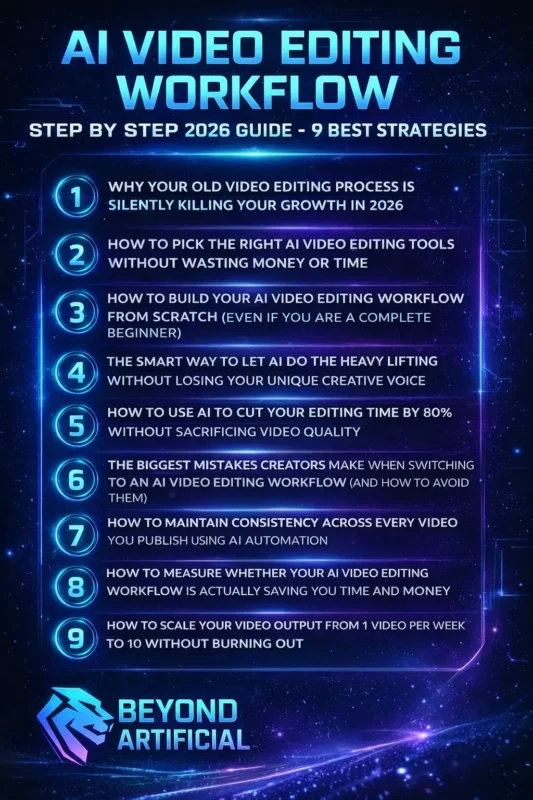
Read this guide carefully, because what you are about to learn can completely change the way you create videos, forever.
1. Why Your Old Video Editing Process Is Silently Killing Your Growth in 2026.
Every day you sit down to edit, your old workflow slowly takes your time, energy, and creativity. While you are still searching through footage for a few seconds of the right clip, other creators have already automated that work and uploaded their videos. The truth is simple: your old process does not just slow you down, it stops your growth while others move ahead using smarter systems.
Tip 1: Track how much time you spend editing each week. If it is more than half of your total time, your workflow is the problem, not your skills. Tip 2: Look at your last three videos and list all the repeated tasks you did, like cutting silence, adding captions, or fixing audio. Most of these can now be done by AI in minutes. The good news is that AI can save 60–90% of your time. This means you can focus more on creativity and storytelling instead of technical work.
Tip 3: Start small, replace just one manual task with an AI tool this week. You will quickly see how much time you have been losing and how fast you can grow once you work smarter.
2. How to Pick the Right AI Video Editing Tools Without Wasting Money or Time.
Choosing the wrong AI video editing tool not only wastes money but also wastes your time. And constantly switching tools every few weeks is something many creators struggle with. If you are just starting, you might still wonder if video editing is really hard for beginners, but with AI, the process becomes much easier. The right tool is not the one with the most features; it is the one that solves your specific problems and makes your workflow easier.
Right now, the market is full of AI tools, and it can feel confusing. That is why your first step is to understand what you actually need before spending any money. Tip 1: Write down your top 3 editing problems, like captions, cutting silence, or resizing videos. The best tool is the one that fixes your problems, not the most popular one. Tip 2: Always test the free version on a real project, not just a sample. This shows if the tool actually fits your way of working. AI can save a lot of time, even up to 14 hours per project, and reduce costs. But this only happens when you choose the right tool for your workflow.
Tip 3: Stick with one tool for at least 30 days. The creators who save time are not using the “best” tool; they are the ones who know how to use their tool really well.
3. How to Build Your AI Video Editing Workflow from Scratch(even if you are a complete beginner).
If you have ever looked at so many AI tools and tutorials that your brain just shuts down, do not worry. Building an AI video editing workflow is much easier than it seems. AI does not replace your creativity; it just removes boring, repetitive tasks. Once you understand this, starting becomes much less scary and much more exciting. Most creators do not have a content problem; they have a workflow problem. And as a beginner, you have an advantage: you can build the right system from the start.
Start step by step. Step 1: Start with just one task. Automate something simple like removing silence, adding captions, or fixing audio. One small win builds confidence. Step 2: Do not follow the most popular tools. Choose tools that solve your biggest problem. This makes your workflow faster with each project. Step 3: Keep it simple for the first 30 days. Use a basic workflow with just three steps, from raw footage to finished video. Simple works better than perfect.
The creators who succeed with AI are not the ones who learn everything at once; they are the ones who start small, stay consistent, and improve step by step.
4. The Smart Way to Let AI Do the Heavy Lifting Without Losing Your Unique Creative Voice.
Here is the fear many creators do not say out loud: You use AI, and your video starts to feel like it could be made by anyone. That loss of personal style is what holds people back. But the truth is simple: AI does not replace your creativity. It only handles boring tasks like cutting silence, resizing, or adding subtitles. The important parts, your ideas, your style, your voice, are still yours. AI tools can even help you make stronger content faster. They remove the hard work so you can focus on storytelling and emotion.
Step 1: Before using AI, write down 3 things that make your style unique, like your pacing, humor, or storytelling. This helps you protect your identity. Another step: Always review your video after AI finishes. Ask yourself: “Does this feel like me, or just a template?” This simple check keeps your content original. Some tools can even learn your style over time, so your videos stay consistent and unique.
Step 3: Think of AI as your assistant, not your boss. Let it handle the tiring tasks, but keep the creative decisions for yourself. That way, your content stays personal, just faster and easier to create.
5. How to Use AI to Cut Your Editing Time by 80% Without Sacrificing Video Quality.
If you have ever finished editing at 2 AM, tired and confused, why does a 2-hour task take all day? It is not your skill. The real problem is that most of your time is spent on tasks that AI can now do in minutes. Today, AI tools can save up to 80% of your editing time and even reduce costs. Many projects that used to take days or weeks can now be done much faster with similar quality.
The gap between where you are and your ideal workflow is not talent or money; it is knowing what to give to AI. Step 1: Start with the biggest time-wasters, removing silence, adding captions, and fixing audio. AI can handle these quickly and easily. Step 2: Use text-based editing for talking videos. You can edit by simply deleting words from the text instead of working on a timeline, which makes everything faster.
Step 3: Batch your work. Instead of editing one video at a time, process multiple videos together using AI tools. Saving 80% of your time is not just a promise; it happens when you stop doing repetitive tasks and let AI handle them for you. Understanding how much video editing really costs in 2026 also shows how much time and money AI can actually save you.
6. The Biggest Mistakes Creators Make When Switching to an AI Video Editing Workflow (and How to Avoid Them).
No one tells you this, but many creators switch to AI editing, get excited, and within a few weeks feel more confused and behind than before. It is not because AI does not work; it is because they do not know what mistakes to avoid. The biggest mistake is trusting AI too much. AI can make errors, miss context, or create videos that feel “off.” One bad video can hurt the trust you’ve built with your audience.
People can tell when content is made without human review, and they do not like it. Tip 1: Never publish AI output as it is. Always watch your video once like a viewer and check if it feels right. This simple habit protects your quality. Tip 2: Do not keep switching tools every week. Pick one tool and learn it properly. Constant switching wastes time and gives poor results. Tip 3: Always check licenses for AI music, clips, or assets. Using the wrong content can get your video removed or your channel penalized.
Creators who succeed with AI do not use the most tools; they use them carefully, review everything, and treat AI as a helper, not the final decision-maker.
7. How to Maintain Consistency Across Every Video You Publish Using AI Automation.
Here is a truth many creators realize too late: your audience does not just watch your videos; they connect with how your videos feel. When your thumbnails, colors, fonts, or audio keep changing, that feeling breaks, and viewers slowly lose trust. In 2026, consistency matters a lot. Your style, visuals, captions, and structure should look and feel the same in every video. Smart creators now use AI systems to keep everything consistent automatically, instead of doing it manually.
AI also helps reduce stress. It handles repetitive work, so you can stay consistent even when your energy is low. Tip 1: Create a simple brand kit in your AI tool, choose your fonts, colors, intro style, captions, and music tone. This keeps every video consistent without extra effort. Tip 2: Use batch editing. Apply the same style to multiple videos at once. This helps you post more content in less time. Tip 3: Make a small checklist before publishing: thumbnail style, hook, captions, outro, and audio quality. Check every video before posting.
The creators people trust are not always the most talented; they are the most consistent. And AI makes that consistency much easier. Many creators now rely on how collaborative video editing workflows work to maintain consistency across multiple videos.
8. How to Measure Whether Your AI Video Editing Workflow Is Actually Saving You Time and Money.
Here is a truth most creators avoid: You might be paying for AI tools every month and feeling productive, but you do not actually know if your workflow is saving you time or money. The reality is, AI can give huge results, faster videos, and better output. But if you’re not seeing that, the problem is not AI… It is that you are not measuring your workflow.
Before improving anything, you need to know your starting point, how many videos you make, how long each one takes, and how much it costs. Tip 1: This week, time yourself editing one full video. Write down every step and how long it takes. This shows you where your time is really going. Tip 2: Track 3 simple things every month:
- Number of videos
- Total editing hours
- Total tool cost
Then calculate your cost per video. This makes everything clear.
Tip 3: Also track your energy. Are you less tired? More consistent? Enjoying the process more? That matters too. The creators who win with AI do not use the tools; they measure what works, fix what does not, and improve step by step.
9. How to Scale Your Video Output from 1 Video Per Week to 10 Without Burning Out.
Scaling to 10 videos a week sounds exciting, until making even one video feels exhausting. But the real problem is not your effort or skill. It is that you are trying to grow using a slow, manual workflow in a fast, AI-driven world. Today, creators using AI can produce much more content in less time and at a lower cost. The difference is not a bigger team; it is a smarter system.
Tip 1: Grow step by step. Start small, go from 1 video to 3 by automating captions and silence removal. Then move to 5 videos by using batch editing. Tip 2: Create once, use everywhere. Make one long video, then use AI to turn it into Shorts, Reels, TikToks, and more. One piece of content can become many. Tip 3: Protect your energy. Let AI handle the technical work. Save your energy for ideas, storytelling, and creativity.
You do not need to burn out to grow; you need a system that helps you work faster, easier, and smarter.
FREQUENTLY ASKED QUESTIONS (FAQs)
How to start AI video editing?
Starting AI video editing feels hard only because it looks complicated, but it is actually simple. You do not need experience or expensive equipment. AI tools can handle tasks like cutting, captions, and basic editing for you.
Just start with one free tool like CapCut or Descript. Upload one video, let AI remove silences and add captions, and you will see results quickly. Most people create their first good-looking video on the same day. Once you see that, your confidence grows, and the rest becomes much easier.
What is the golden rule of editing?
Most creators focus on effects and transitions, but the real rule is simple: story comes first. Every cut and clip should support your story, not just look good. First, organize your content, then build your story, and only after that add effects. When you focus on the viewer instead of fancy edits, your videos feel more professional. AI helps by handling technical work, so you can focus on strong storytelling.
What is the 3:2:1 rule in video editing?
Imagine working for months on your videos and losing everything in one night because you had no backup. That is why the 3:2:1 rule is so important. It is very simple:
- Keep 3 copies of your files
- Store them on 2 different devices (like your PC and an external drive)
- Keep 1 copy online or off-site (like cloud storage)
This way, even if something goes wrong, your work is always safe. In 2026, with AI creating more files than ever, backups are not optional; they protect your entire work.
How to make an AI workflow?
Building an AI workflow is not complicated; it is actually very simple. Start by finding the parts of your editing process you do not enjoy or that take too much time. Those are the best places to use AI. You do not need a complex system. The best workflow is the one you can use every day without stress. Simple 3-step method:
- Find your biggest problem (like captions, audio, or cutting clips)
- Pick one AI tool that solves it
- Connect it to your next step and keep building slowly
For example, start with text-based editing, then add audio cleanup, then auto captions. In just one week, you can build a workflow that saves hours, costs very little, and gives you more energy to focus on creativity.
What software is used for AI video editing?
In 2026, there are many AI tools, but the real question is not which ones exist; it is which one is right for you. The best tool depends on your level:
- Beginner / Social Creator: Use CapCut. It is free, fast, and easy
- Talking Videos / Podcasts: Use Descript: great for editing with text
- Short Clips from Long Videos: Use Vizard: best for turning content into shorts
- Professional Editing: Use Adobe Premiere Pro: more control and advanced features
- Free Powerful Option: Use DaVinci Resolve: strong editing with no cost
No matter your level or budget, there is a tool that fits your needs. The key is to choose one that matches your workflow and goals.
How does AI work in video editing?
AI in video editing is like having a smart assistant that does all the boring work for you. It can quickly find the best clips, create transcripts, add captions, fix audio, and adjust colors, all in minutes instead of hours. This means you do not have to spend time on repetitive tasks. You can focus on what really matters: your story, ideas, and creativity.
AI Video Editing Workflow Step-by-Step Guide for YouTube Automation
You have been putting in your time, your effort, and your late nights, yet you still feel unseen and undervalued. The truth is, in 2026, success is not just about hard work; it is about having the right system. When you understand the AI Video Editing Workflow Step by Step 2026 Guide for YouTube Automation, you stop relying on effort alone and start working with a smart strategy.
The goal is not to work harder; it is to build a workflow that finally gives your talent the reach and results it deserves. Here is what this guide will help you do:
- Build a complete AI workflow to turn your ideas into professional videos, without burnout
- Shift your mindset so you stop undervaluing your work and start growing with confidence
- Use smart automation to save time and focus on creativity
- Follow a step-by-step system made for creators who are tired of doing everything alone
AI can save 60–90% of your time, which means you can start creating faster, with more energy and clarity. And when your workflow matches your value, people do not just notice your content, they remember it.