
 YouTube Automation
How much does video editing cost in 2026 – 9 Hidden Truths(Blog#:66)

Zayn thought he was saving money. He searched how much does video editing cost in 2026 because he did not want to overpay or choose the wrong editor. He hired someone for just $50 per video, quick delivery, no questions asked. But when the video came back, the pacing felt off, the music did not match, and viewers started dropping within the first two minutes.
Trying to save a few dollars ended up costing him growth, time, and confidence.
This is the reality most creators face in 2026. Video editing prices can range anywhere from $25 to $150 per hour, or $100 to $500+ per video, and without understanding how much video editing cost in 2026 actually depends on quality, it is easy to make the wrong decision. The cost of video editing is not just about numbers. It is about quality, results, and how your content actually performs after publishing.
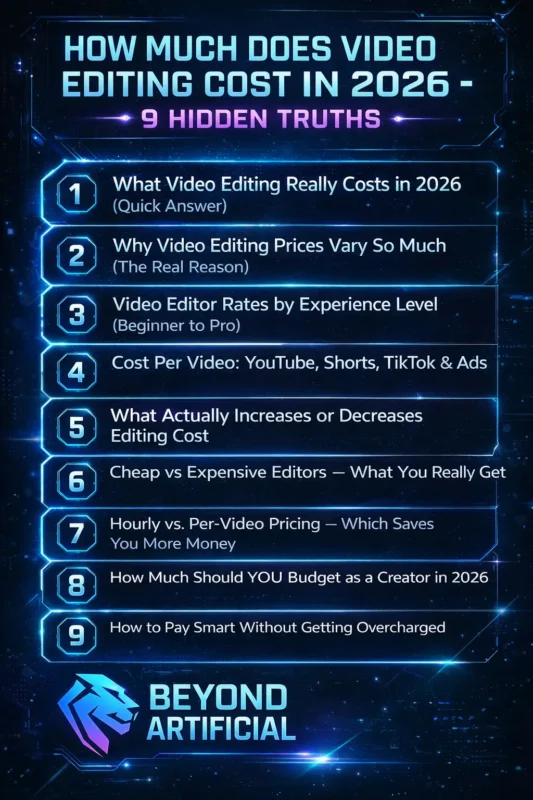
Keep reading to understand what video editing really costs in 2026, so you can avoid costly mistakes and invest in the right editor with confidence
1. What Video Editing Really Costs in 2026 (Quick Answer).
If you have ever searched “how much does video editing cost” and still felt confused, you are not alone. Most guides just show numbers without explaining what those prices actually mean for you. In 2026, video editing can cost anywhere from $25 to $150+ per hour. A simple video might cost around $250, while a high-quality project can go up to $15,000 or more. The difference is not random; it depends on things most people don’t think about.
The truth is, the cheapest option often ends up costing more. Low-cost editors can lead to delays, too many revisions, and poor results. Tip 1: Before checking prices, be clear about your needs, video length, style, effects, and deadline. A clear plan can save you 20–30% of your cost. Also, always ask what’s not included in the price. Extra revisions, music, and urgent delivery are common hidden costs.
Tip 2: If your budget is limited, choose a mid-level editor ($40–$80/hour) instead of a beginner. They usually deliver better quality and save you time on revisions. Once you understand what affects pricing, everything becomes clearer, and you can make smarter decisions without feeling confused.
2. Why Video Editing Prices Vary So Much (The Real Reason)
If you have ever received very different quotes for the same video, like $200, $800, and even $2,500, and felt confused, it is not your fault. Most people do not understand why prices vary so much. In 2026, video editing is not just about cutting clips. You’re paying for the editor’s experience, the complexity of your footage, the tools they use, the number of revisions, and sometimes even their location.
For example, a simple YouTube video is very different from a complex project with multiple cameras, effects, and advanced editing. That is why prices can be so different. Tip 1: Always send the same clear brief to every editor — include video length, style reference, deadline, and revisions. This helps you compare quotes fairly. Another important factor is your raw footage. If your footage is messy, shaky, or poorly organised, the editor will need more time, which increases the cost.
Tip 2: Spend some time organising your footage into labelled folders before sending it. This can save hours of work and reduce your total cost. Once you understand that pricing depends on experience, complexity, and preparation, those confusing quotes start to make sense, and you can choose more confidently.
3. Video Editor Rates by Experience Level (Beginner to Pro).
Many people choose a video editor the same way they choose a hotel: they go for the cheapest option that looks okay, but later regret not spending a little more. In 2026, video editors usually charge:
- Beginner: $20–$45/hour
- Mid-level: $45–$85/hour
- Expert: $85–$150+/hour
But the real difference is not just skill or speed; it is how well they understand your video. A beginner can edit clips, but an experienced editor knows how to create emotion and keep viewers watching. Tip 1: For most YouTube and social media content, a mid-level editor ($45–$85/hour) is the best choice. You get good quality without paying too much. Also, hiring the cheapest editor can actually cost more. You may need more revisions, spend extra time fixing issues, and still not get the result you want.
Tip 2: Always ask for 2–3 similar completed projects before hiring. If they cannot show relevant work, they may not have the right experience. The goal is not to choose the cheapest or the most expensive, but to choose the right level for your needs. When you do that, your money gives you better results instead of frustration.
Editing skill level plays a big role in pricing, especially since many beginners are still learning how hard video editing really is to master.
4. Cost Per Video: YouTube, Shorts, TikTok & Ads.
Many creators do not realise this early: the platform where your video will be posted changes how much editing should cost. Treating a TikTok video the same as a YouTube video is a common and expensive mistake. In 2026, editing costs usually look like this:
- YouTube videos: $300–$1,500
- Short ads: $250–$1,200
- Event videos: $500–$2,500
- Short-form videos (TikTok/Reels): $5–$300+ per video
The big difference in short-form pricing comes down to quality. A cheap edit may look okay, but a high-quality edit can grab attention in the first few seconds and keep viewers watching. Another hidden cost is creating videos for multiple platforms. If you want one video for YouTube, TikTok, Reels, and ads, it can feel like paying for four separate edits, unless you plan it properly.
Tip 1: Tell your editor all the platforms you want to use from the start. A good editor can prepare all versions together and save you time and money. Cheap editors often use basic templates and may not understand how to keep viewers engaged, especially on TikTok or Reels, where the first few seconds matter the most. Tip 2: Always ask for examples of short-form videos that performed well, not just ones that look good. Strong editing is about keeping people watching, not just adding effects.
When you match your editing style and budget to the right platform, you stop wasting money and start creating content that actually grows your audience.
5. What Actually Increases or Decreases Editing Cost.
Most people do not realize this, but one of the biggest factors affecting your video editing cost is you, not just the editor. How you prepare your footage can increase or reduce your total cost. Clean, well-shot footage is easier to edit and saves time. But poor lighting, bad audio, or messy clips force the editor to spend extra hours fixing problems, and that means higher costs for you.
There are also hidden costs that many people do not expect. Fast delivery (24–48 hours) can increase the price by 25–50%. Licensed music and extra revisions can also add to your final bill. Tip 1: Record your videos in good lighting, organise your files into labelled folders, and give a clear brief (style, tone, deadline). This can reduce your editing cost by 20–40%. Another important factor is revisions. If your feedback is unclear or scattered, costs can increase quickly.
Tip 2: Always send feedback in one clear message instead of multiple small messages. This keeps the process smooth and avoids extra charges. Once you understand that your preparation and communication affect the cost, you gain more control and can manage your budget much better. Editing cost also depends on your system performance, especially if you are working with heavy footage, which is why understanding how much RAM you need for 4K video editing can make a big difference.
6. Cheap vs Expensive Editors: What You Really Get.
Most people do not realize this, but one of the biggest factors affecting your video editing cost is you, not just the editor. How you prepare your footage can increase or reduce your total cost. Clean, well-shot footage is easier to edit and saves time. But poor lighting, bad audio, or messy clips force the editor to spend extra hours fixing problems, and that means higher costs for you.
There are also hidden costs that many people do not expect. Fast delivery (24–48 hours) can increase the price by 25–50%. Licensed music and extra revisions can also add to your final bill. Tip 1: Record your videos in good lighting, organize your files into labeled folders, and give a clear brief (style, tone, deadline). This can reduce your editing cost by 20–40%. Another important factor is revisions. If your feedback is unclear or scattered, costs can increase quickly. Tip 2: Always send feedback in one clear message instead of multiple small messages. This keeps the process smooth and avoids extra charges.
Once you understand that your preparation and communication affect the cost, you gain more control and can manage your budget much better.
7. Hourly vs. Per-Video Pricing, Which Saves You More Money.
Many people feel stressed when they hire an editor on an hourly rate. At first, the price seems okay, but as the project continues and you keep asking for small changes, the cost keeps increasing without you realizing it. With hourly pricing, you can only guess the final cost. But with per-project pricing, you know the exact amount from the start, and that is why many people prefer it in 2026.
Hourly rates can get expensive quickly. A 5-minute video might take 5–10 hours to edit, which can turn a small project into a much bigger bill than expected. Tip 1: Choose per-project pricing when your video requirements are clear (like YouTube videos or ads). This helps you control your budget. Use hourly pricing only when the project is unclear or changing. If you create content regularly, there’s another smart option.
Tip 2: Ask for bulk pricing or a monthly retainer. If you produce 4–6 or more videos per month, this can reduce your cost per video and make your workflow smoother. In the end, the pricing model you choose affects both your budget and your working relationship. The clearer you are from the start, the more money and time you will save.
8. How Much Should YOU Budget as a Creator in 2026?
If you are a creator wondering where your money is going, you are not alone. Income in the creator world is not stable; one month can be great, and the next can be much lower. That is why you should always plan your budget based on your lowest earning months, not your highest ones.
Tip 1: Keep an emergency fund for 6–12 months. Your income can change anytime, so this gives you safety. Tip 2: Save 30–40% of every payment for taxes. This helps you avoid stress when tax time comes. Tip 3: Invest 10–20% of your income back into your content, better tools, learning, or hiring help. This helps your channel grow faster. Tip 4: Do not depend on just one platform. Build your presence on multiple platforms to stay safe and stable.
If you manage your money like a business, not a hobby, you will grow faster and stay more secure in the long run.
9. How to Pay Smart Without Getting Overcharged.
Many creators feel frustrated when they realise platforms are taking a cut of their earnings without them fully noticing. Small fees like 10–12% may not seem big at first, but they add up over time. Another problem is using multiple platforms. It becomes hard to track your income, and you may lose money without realising it. Traditional banks can also be expensive. They charge high transfer fees, give poor exchange rates, and sometimes take days to process payments.
Tip 1: Always check the fee structure before using any platform. For example, some platforms take around 8–12%, while others add extra processing fees. Tip 2: If you work internationally, look for cheaper payment options. Some newer methods can reduce fees to less than 1%, compared to 3–7% from traditional transfers. Tip 3: Use payment services with low withdrawal fees. Some charge only $1–$3 instead of $15–$45 like banks. Tip 4: Keep your payments organised. Using too many platforms makes it harder to track your money and increases the chance of hidden fees.
If you manage your payments smartly, you can save a lot of money and keep more of what you earn.
FREQUENTLY ASKED QUESTIONS (FAQs)
Is video editing a good career in 2026?
Yes, video editing is a growing and in-demand skill. In 2026, editors can earn a good income, and demand is increasing across YouTube, social media, and business content. It offers flexible work options like freelancing or full-time jobs, making it a strong career choice with long-term potential.
How much to charge for a 20-minute video edit?
A 20-minute video is not a small project. Editing usually takes about 1–4 hours per minute, so a 20-minute video can take 20 to 80 hours to complete. At mid-level rates ($45–$85/hour), this means the cost can range from $900 to $6,800, depending on the complexity. The final price depends on factors like footage quality, editing style, and number of revisions, not just the video length.
Is editing a high-income skill?
Yes, video editing can be a well-paying career. Many editors earn between $50,000 to $140,000+ per year, depending on their skills and experience. Editors who understand storytelling, audience behaviour, and platform trends can charge higher rates and earn even more.
What is the golden rule of editing?
The most important rule is simple: the story comes first. Good editing should feel natural and almost invisible. Viewers should focus on the content, not notice the editing. Before making any cut, ask yourself: Does this improve the story? If it does not, it is better to remove it.
How much do YouTubers pay editors?
Most YouTube editors charge around $30–$60 per hour, or $400–$1,200 per video, depending on experience and complexity. However, editors can often earn more in corporate work, so many YouTube editors are actually underpaid. If you work regularly with a channel, try to set a monthly or retainer deal for stable income. Also, use a simple payment structure, take a deposit before starting, part payment after the first draft, and the final payment before delivery.
How much does video editing cost in 2026 per hour?
Let’s be honest, you have probably seen a video editing price that shocked you, or hired a cheap editor and did not like the final result. In 2026, video editing can cost anywhere from $10 to $300 per hour. This big price difference is why many people either overpay or get poor results.
The confusion is normal, but once you understand what affects these prices, you can make better decisions and choose the right editor with confidence. This guide will help you understand pricing clearly so you can budget wisely, avoid mistakes, and get better results without overspending.
Here are the main factors that affect video editing cost:
1. Experience level: beginners: $20–$35/hour, mid-level: $40–$80/hour, experts: $100–$150+/hour
2. Rush delivery: fast delivery (24–48 hours) can increase the cost by 25–50%
3. Location: Editors from different regions charge different rates
4. AI tools: modern tools can speed up editing and sometimes reduce cost
5. Revisions: most editors include limited revisions; extra changes cost more