
 YouTube Automation
How to Make Videos for YouTube Automation – 7 Smart Ways(Blog#:62)

Right now, many people want to start a YouTube channel but feel stuck because they do not know how to make videos for YouTube automation without a camera, studio, or expensive skills. The truth is, most beginners do not start, not because they can not, but because no one shows them a simple and affordable way to do it.
But here is the good news: you do not need to show your face, use your voice, or spend money to start YouTube automation. You just need the right process and the right tools. In this guide, you will learn 7 smart ways to create videos from idea to finished upload.
Whether you are a beginner or someone struggling to grow, these steps will help you create videos easily and with confidence.
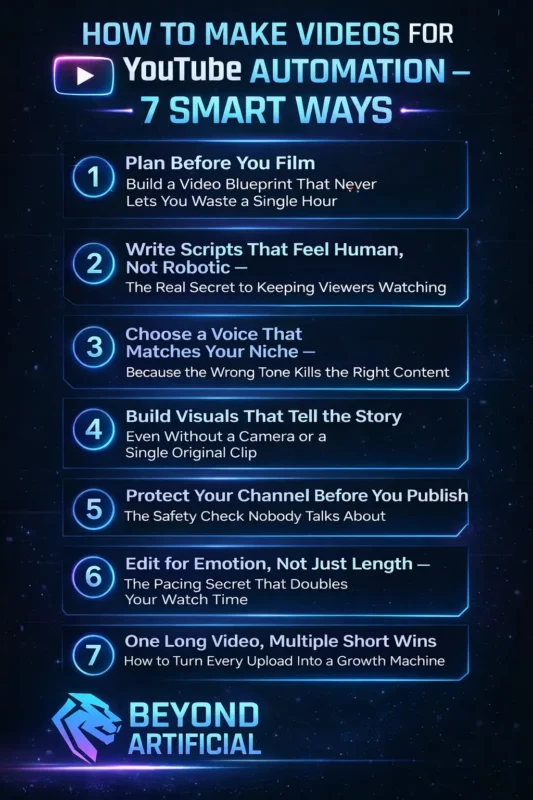
Keep reading to learn the exact step-by-step process to create YouTube automation videos that actually get views and grow your channel fast.
1. Plan Before You Film: Build a Video Blueprint That Never Lets You Waste a Single Hour.
If you have ever started making a YouTube automation video, felt excited, and then got stuck not knowing what to do next, that is not a talent problem; it is a planning problem. Good planning makes everything easier. Without it, you waste time, feel confused, and lose motivation. With it, you can finish a video faster and with less stress. A “video blueprint” is just a simple plan before you start. It includes your topic, idea, structure, visuals, and keyword. This helps you stay focused and work faster.
Tip 1: Use the “5-box blueprint.” Before making a video, write: Title Hook (opening idea), 3 main points, Call to action, Target keyword. This simple step saves time and removes confusion. Tip 2: Choose a clear content angle. Do not just say “how to save money.” Say “why people fail to save money in their 20s.” A specific angle makes your video more interesting and clickable. When your plan is clear, everything else becomes easier: your script, your visuals, and your final video.
Stop skipping planning. Just 10–15 minutes of planning can save you hours of frustration later.
2. Write Scripts That Feel Human, Not Robotic (the real secret to keeping viewers watching)
It feels very discouraging when you upload a video, and people leave within the first 30 seconds, especially when you worked hard on it. In most cases, the problem is not your idea, but your script sounding too robotic or boring. Many YouTube automation creators face this because their script feels like a textbook instead of a real conversation.
The best way to fix this is simple: write the way you naturally speak. Your script should sound like you are talking to one person, not giving a formal lecture. When your tone feels human and friendly, people stay longer, and your video performs better because YouTube promotes content with high retention. One important habit is to always edit your AI-generated script. Do not just copy and paste it. Go through each sentence and make it more natural. Replace difficult or formal words with simple ones, break long sentences into shorter ones, and add casual phrases like “here’s the thing” or “think about it.” This small step makes a big difference.
Another powerful trick is to talk directly to your viewer. Use words like “you” and add lines that connect with their feelings, such as “if you have ever felt this, you are not alone.” This makes your content feel personal and keeps viewers emotionally engaged. AI tools can help you create scripts faster, but they cannot replace the human touch. Before publishing, always review your script and make sure it sounds real. When your viewer feels like you are speaking directly to them, they stop skipping and start watching your video till the end.
3. Choose a Voice That Matches Your Niche, Because the Wrong Tone Kills the Right Content.
Imagine spending hours making a video, writing the script, creating a voiceover, editing everything, and then people leave in the first 30 seconds. Not because your content is bad, but because your voice tone feels wrong for your niche. This is a common mistake that many YouTube automation creators do not realize. A robotic or flat voice can hurt your video, but the real problem is when the voice does not match your content. For example, a cheerful voice on a serious true crime video feels wrong, and a dull voice on a motivational video feels boring. Your voice should match the mood of your niche so viewers feel comfortable and stay longer.
The goal is to sound like a real person who understands the topic. When your voice matches the emotion of your content, viewers trust you more and keep watching without thinking about it. One important step is to create a “voice identity” for your channel. Pick one voice and use it in all your videos. This builds familiarity and trust. Changing voices again and again can confuse your audience and reduce engagement.
Another useful trick is to change your pacing. Speak a bit slower when explaining something important and a bit faster during exciting or energetic parts. This keeps your viewer’s attention and makes your video feel more natural. Your voice is not just a small detail; it directly affects your watch time and retention. So instead of focusing only on tools, take time to choose a voice that truly fits your niche. This one decision can make a big difference in your channel’s growth.
4. Build Visuals That Tell the Story, Even Without a Camera or a Single Original Clip.
One of the biggest mistakes in YouTube automation is creating a strong script but using boring, generic stock footage. This makes your video look like every other channel, and viewers lose interest. Even if your script is good, weak visuals can stop people from coming back. Instead of using random stock clips, try to use visuals that match your story. When your visuals and script show the same emotion, viewers stay engaged and watch longer.
Today, AI tools like Runway ML, Leonardo AI, and Midjourney can help you create unique visuals in seconds, so you do not have to spend hours searching for footage. The key is to match emotion with visuals. If your script is serious or suspenseful, your visuals should feel the same. If they do not match, viewers get confused and lose interest. Another important tip is to change visuals quickly. Don’t keep one clip on screen for too long. Try to switch visuals every 3–4 seconds to keep the video dynamic and engaging.
Also, grab attention in the first few seconds and consider adding captions, so people can understand your video even without sound. Stop using overused stock clips. Focus on creating a unique visual style for your channel. When your visuals feel fresh and match your content, viewers are more likely to stay, subscribe, and come back for more.
5. Protect Your Channel Before You Publish: The Safety Check Nobody Talks About
Imagine waking up one day and finding out your YouTube channel is demonetized or even deleted. Not because you did something wrong, but because you did not know about certain rules. This is happening to many YouTube automation creators. YouTube has become stricter about AI-generated and low-effort content. If your videos are repetitive, not original, or fully automated without human input, they can be demonetized.
Also, using copyrighted clips or music, even by mistake, can lead to claims or strikes. To stay safe, always do a simple check before uploading your video. Make sure your footage is copyright-free, your music is properly licensed, your title is not misleading, and your content adds real value. Do not rely only on AI; always add your own touch. Another important step is using the AI disclosure label in YouTube Studio. If your video uses AI-generated or altered content, be honest about it. This helps you avoid problems and builds trust with both YouTube and your audience.
YouTube is getting better at detecting reused or low-quality content, so shortcuts do not work anymore. Take a few extra minutes to check everything before uploading. Because one small mistake can cost you your entire channel, but a simple safety check can protect everything you have built.
6. Edit for Emotion, Not Just Length, The Pacing Secret That Doubles Your Watch Time.
Many YouTube automation creators spend hours editing their videos, but still see viewers leave after a few minutes. The problem is not bad editing; it is editing without thinking about emotion. Editing is not just about cutting clips or making videos shorter. It is about creating a story that keeps people interested from start to finish. Even simple content works better when it follows a flow: beginning, middle, and a strong ending.
Good editing has rhythm. Your video should feel smooth and natural, not slow or boring. The goal is to keep the viewer engaged all the way through. One useful method is the “stimulate-calm-re-engage” pattern. This means you mix calm explanations with small moments of energy, like quick visuals, reactions, or highlights. This keeps viewers interested without overwhelming them. Another important tip is to edit based on emotion. Do not cut randomly; make cuts when the feeling or tone changes. This creates a natural flow that keeps people watching without even realizing it.
Also, many people watch videos without sound. So adding clear captions is very important. It helps viewers stay connected even when they are not listening. Stop thinking of editing as just a technical task. It’s actually one of the most powerful ways to keep viewers watching and improve your video performance.
7. One Long Video, Multiple Short Wins, How to Turn Every Upload Into a Growth Machine.
Many creators upload one video a week and feel tired, but their growth stays slow. The problem is that they are not using the full potential of their content. Every video you upload can be turned into many Shorts, but most people do not do this. Short-form content is huge right now. Shorts get massive views every day, and they help your channel grow faster. If you don’t create Shorts from your long videos, you are missing a big opportunity.
One long video can give you many Shorts. You do not need to create new content, just reuse what you already made. Tools like OpusClip or Munch can help you quickly turn your video into multiple short clips. One smart strategy is to guide viewers from Shorts to your full video. At the end of each Short, add a message like “watch the full video on my channel.” This helps bring more people to your long videos.
Another tip is to keep your clip length right. Educational Shorts work best around 45–60 seconds, while entertainment clips perform better around 30–45 seconds. Creators who use Shorts regularly grow faster, get more views, and gain more subscribers, without extra hard work. Stop thinking of one video as just one piece of content. Think of it as many pieces.
When you turn one video into multiple Shorts, you grow faster without doing more work.
FREQUENTLY ASKED QUESTIONS (FAQs)
How to create automated videos for YouTube?
Creating automated YouTube videos is simple once you follow a clear process. First, choose a topic and research ideas, then write a script, create a voiceover, edit your video, and upload it. You can do all of this using free tools like ChatGPT for scripts, ElevenLabs for voiceovers, CapCut for editing, and Canva for thumbnails. Once you learn this system, you can repeat it again and again to grow your channel without needing a camera or prior experience.
How to start your own YouTube automation?
Starting a YouTube automation channel is easier than most people think. You just need a simple system that goes from idea → script → voice → edit → upload. Begin by choosing a high-paying niche, pick a few free tools, and stay consistent by uploading at least one video per week. Once your system is set, your channel can grow steadily and become a real source of income over time.
Can ChatGPT create a YouTube video?
Yes, ChatGPT can be very useful for creating YouTube videos. It helps you write scripts quickly, which can then be turned into full videos using AI tools for voiceovers, visuals, and editing. This means you can create videos faster without needing a camera or advanced skills. However, the best results come when you use ChatGPT as a helper, not a replacement, and add your own ideas and creativity.
Does YouTube pay for automated videos?
Yes, YouTube does pay for automated videos, but only if they include real human value. If your content is fully AI-generated with no original input, it may not be monetized. The key is to use AI as a tool, not a replacement. Add your own ideas, storytelling, or perspective to every video. Content like commentary, tutorials, and reviews can still earn money as long as it is unique and useful.
How to start YouTube automation with AI?
Starting YouTube automation with AI is simple. You choose a topic, research ideas, write a script, create a voiceover, edit the video, and upload it, all using free tools on your laptop. Tools like ChatGPT can even help you plan your video with voiceover, visuals, and timing. The goal is to build a simple system that works step by step, so you can create videos faster and grow your channel without needing advanced skills or a lot of time.
How to make videos for YouTube automation for free?
If you have been delaying starting your YouTube automation channel because you think you need expensive tools, that belief is holding you back. The truth is, you can create professional, monetizable videos completely for free. You do not need money, a camera, or a microphone to get started. Today, free tools are powerful enough to help you script, create voiceovers, edit videos, design thumbnails, and upload content that can compete with big channels.
The best part is that many of the top tools in 2025 and 2026 are free and offer high-quality results without limits. Here are the tools you can start using right now:
- ChatGPT (Free): Write scripts, hooks, titles, and descriptions
- Google AI Studio (Free): Create high-quality voiceovers
- CapCut (Free): Edit videos with effects, captions, and transitions
- Canva (Free): Design eye-catching thumbnails
- Pexels & Pixabay: Get free stock videos and images
- VidIQ (Free): Find good keywords and video ideas
- OpusClip (Free): Turn long videos into Shorts automatically
You do not need to spend money to start. You just need the right tools and the decision to begin today.
