
 YouTube Automation
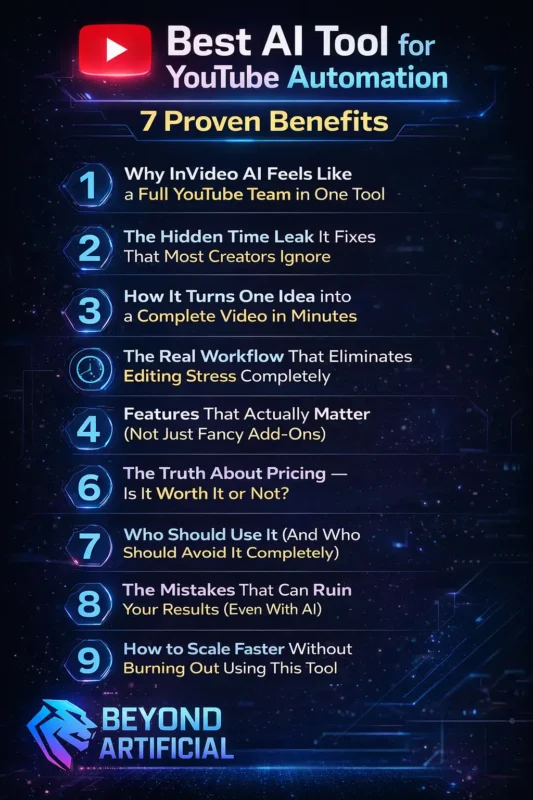
Best AI Tool for YouTube Automation – 7 Proven Benefits (Blog#:60)

Most creators already know about AI tools, but they are still stuck working long hours, uploading inconsistently, and losing motivation. That is because knowing about tools and actually using the best AI tool for YouTube automation are two very different things. AI tools help by automating time-consuming tasks like scriptwriting, video editing, subtitles, and content repurposing.
This saves time, reduces stress, and makes it easier to stay consistent without losing quality. But the real power of the best AI tool is not just speed; it is how it changes your entire workflow. When the right tool handles the heavy work, you get your time and creative energy back. These 7 proven benefits are not just ideas; they are already working in the real world.
The AI creator economy is growing fast, and many automation channels are making consistent income every month. If you feel like you are working harder but growing slower, these benefits will show you why and help you finally turn things in your favor.
The best AI tool for YouTube automation right now is InVideo AI, and it is changing how creators build and scale channels. Instead of juggling multiple tools, it handles everything from idea to final video in one place. You simply give a prompt, and it turns it into a ready-to-publish video within minutes. If you ar e tired of slow growth, burnout, and confusion, this is the tool that can finally flip everything in your favor.
Now let’s break down exactly how it works, from features to real workflow.
1. Why InVideo AI Feels Like a Full YouTube Team in One Tool.
If you have ever stayed up late staring at an unfinished video, wondering how other creators post consistently without burning out, InVideo AI might be the solution you have been looking for. InVideo AI is not just a simple tool. It works like a full video production system inside your browser. With just one prompt, it can create a complete video, including script, visuals, voiceover, and editing, in minutes.
The platform automatically makes hundreds of creative decisions for you. It selects visuals, generates voiceovers in multiple languages, and edits everything together without you needing advanced skills. One powerful feature is the “Magic Box.” Instead of editing manually, you can simply type commands like “remove this scene” or “add a better intro,” and the AI updates your video instantly.
A very important tip: always connect your YouTube account and follow platform guidelines when using AI content. This helps you stay safe from monetization issues. You can also take it a step further by using a scheduling tool, so your videos publish automatically without extra effort. If you have tired of spending hours editing or struggling to stay consistent, InVideo AI does not just save time, it makes the entire process easier and more manageable.
2. The Hidden Time Leak It Fixes That Most Creators Ignore.
Most YouTube creators are not failing because they lack ideas; they are failing because they are wasting time without realizing it. A single 10-minute video can take 7 to 15 hours to create, and poor workflows can increase that time even more. One major hidden problem is task switching. When you jump between long videos and Shorts, your focus breaks, your speed drops, and you feel mentally exhausted.
Here is a simple tip: do a time audit for one video. Track how much time you spend on each step, like research, scripting, editing, and uploading. Most creators are surprised to see that editing alone takes the biggest chunk of time. Another powerful strategy is content batching. Plan and create multiple videos in advance so you do not feel pressure every time you need to upload.
Also, keep a few ready-made videos as a backup. This helps you stay consistent even when you are busy or stuck. Once you find where your time is leaking and fix it with the right AI tool, everything becomes easier, and you finally feel in control of your channel.
3. How It Turns One Idea into a Complete Video in Minutes.
Imagine this: you open your laptop, type one simple idea, and within minutes, InVideo AI creates a full video for you. It writes the script, selects visuals, adds a voiceover, and edits everything into a ready-to-publish video. Instead of using multiple tools, everything happens in one place. You do not need editing skills or hours of work; the AI handles it for you.
One important tip: always write a clear and detailed prompt. Include your topic, audience, tone, and video length. The better your prompt, the better your final video will be. Another smart shortcut is to use pre-built templates. These help you create videos faster without starting from scratch every time. But do not skip this step; always do a quick review before publishing. AI is fast, but a short manual check helps you fix small mistakes and make your video look more professional.
If you have ever felt stuck staring at a blank screen, InVideo AI removes that stress completely and makes video creation feel simple and exciting.
4. The Real Workflow That Eliminates Editing Stress Completely.
Imagine this, you open your laptop, type one simple idea, and within minutes, InVideo AI creates a complete YouTube video for you. It writes the script, picks visuals, adds a natural voiceover, and edits everything automatically. Instead of using multiple tools, everything happens in one place. You do not need editing skills or hours of work; the AI handles it all.
InVideo AI can even create long videos from a single prompt, making it perfect for full YouTube content without manual editing. Here is an important tip: always give a clear and detailed prompt. Include your topic, audience, tone, and video length. A better prompt gives you a better video. Another smart trick is to use pre-built templates. They help you create videos faster and save a lot of time.
But do not forget, always do a quick check before publishing. Fix small mistakes so your video looks professional, not fully AI-made. If you have ever felt stuck staring at a blank screen, InVideo AI removes that stress and makes video creation simple and fast.
5. Features That Actually Matter (Not Just Fancy Add-Ons).
Most tool reviews list a lot of features, but the real question is simple: which features actually help your channel grow? InVideo AI focuses on what really matters: speed and consistency. It can create a full first draft video from a simple prompt in just a few minutes, which saves a huge amount of time. It is also designed specifically for YouTube.
When you enter an idea, it automatically structures the video in a way that fits YouTube content, helping you stay aligned with what works on the platform. Instead of trying everything, focus on the three main features first:
- Text-to-video generation
- Magic Box editing (simple commands to change anything)
- Multi-language export (to reach a global audience)
One important thing to know, AI videos can sometimes look similar. To stand out, customize your visuals and colors, and add your own branding. Also, for complex topics, always review and adjust visuals before publishing. A quick check can make your video look much more professional. If you have ever paid for tools with too many useless features, InVideo AI is different; it focuses on what actually helps you create faster and grow your channel.
6. The Truth About Pricing: Is It Worth It or Not?
Before paying for any AI tool, you need to know exactly what you are getting, because choosing the wrong plan can waste your money. InVideo AI offers different plans for different levels. There’s a free option with limited features, and paid plans that give you more video time, better quality, and extra assets. For most creators, the Plus plan is the best choice. It gives you enough features to create regular content without spending too much.
A smart tip: choose yearly billing instead of monthly. It saves you money without changing anything else. Also, be careful, every time you regenerate or redo a video, it can use up your credits. So instead of starting over, use small edits to fix your video and save your limit. When you look at the value, this tool can replace multiple things like editing software, stock footage, and voice tools, which means you are actually saving money overall.
If you are unsure about the price, think of it this way: the real cost is not the tool, it is the time you keep wasting doing everything manually while others are growing faster.
7. Who Should Use It (And Who Should Avoid It Completely).
Here is the truth: InVideo AI can be amazing for the right creator, but frustrating for the wrong one. It works best for people who create videos regularly, like YouTube creators, faceless channels, marketers, and beginners. It helps you make videos fast without needing advanced editing skills. It is perfect for simple content like educational videos, motivation, or quick explainers.
But if your content needs very detailed branding or high-end storytelling, it may feel limited. A smart tip: always try the free plan first. Use it for a couple of weeks to see if it fits your style before spending money. Also, be careful, sometimes the editor can lag or crash. So always export your video as soon as it is ready to avoid losing your work. Another important thing: even though videos are created quickly, you may still need to make small edits.
If your content needs heavy customization, it can take extra time and credits. If you are a beginner, a faceless creator, or someone who wants speed and consistency, InVideo AI is a great choice. But if you need perfect control and detailed customization, it may not be the best fit.
8. The Mistakes That Can Ruin Your Results (Even With AI).
One of the worst moments in YouTube automation is getting almost done with a video, and then everything falls apart. Many creators spend time and money, only to end up with videos that do not look right or can not be used. This often happens because of issues like wrong visuals, poor lip sync, or inconsistent scenes. And fixing these problems can cost extra credits if you keep regenerating the video.
But here is the truth: most failures are not because of the tool, but because of poor strategy. A better approach can fix most of these problems. First tip: approve your script and structure before editing anything. If you start editing too early, you will waste credits on changes later. Second mistake to avoid: do not create the same type of video again and again. Platforms like YouTube prefer original and valuable content, not repeated AI-style videos.
Also, always test your content using the free plan before upgrading. This helps you avoid wasting money if the tool does not match your needs. If you have faced these problems, do not worry, it is normal. Most successful creators made these mistakes at the start, learned from them, and improved their strategy. If you want, I can now write a powerful conclusion + CTA that drives clicks and conversions
9. How to Scale Faster Without Burning Out Using This Tool.
Growing a YouTube automation channel without a system does not lead to success; it leads to burnout. Many creators try to post more videos before fixing their workflow, and that only makes things harder. With AI tools like InVideo, you can automate most of the work, like scripting, visuals, voiceovers, and editing. This gives you more time to focus on strategy and growth.
Some creators are already doing this successfully. They work fewer hours but grow faster because they follow a smart system instead of doing everything manually. A simple approach is to follow a 3-hour workflow:
- 1 hour for planning and ideas
- 1 hour for reviewing and editing AI videos
- 1 hour for checking analytics and improving content
Another smart tip: Do not hire help too early. First, build your own system and workflow. Once it works well, then you can bring in someone to handle uploads and small tasks. You can also scale further by starting another channel using the same system. This helps you grow faster without starting from zero again. If you build the right system, your channel can run smoothly without taking over your life, and that is the real goal of YouTube automation.
FREQUENTLY ASKED QUESTIONS (FAQs)
Which AI is best for scripting YouTube videos?
It depends on your content style. Use Claude for clear, professional, and informative scripts (great for educational videos). Use ChatGPT for engaging, conversational, and storytelling-style scripts. A smart approach is to use both, write the main script with Claude, then improve the hook and tone with ChatGPT for better engagement.
How to start YouTube automation AI?
No, it is actually simple. You just need to choose a niche, create a script, generate a voiceover, make the video, and upload it; all of this can be done with AI tools. You do not need editing or technical skills to start. Many free tools can handle most of the work for you. The most important step is to start, pick a niche, create your first video, and publish it.
Best AI video generator for long videos.
InVideo AI and StoryShort AI are great choices. Both can create full 10–30 minute videos from a single prompt, including script, visuals, voiceover, and editing. StoryShort AI is especially good for documentary-style content and high-quality videos. A key tip: always use tools that create YouTube-optimized scripts, so viewers stay engaged throughout the video.
Is AI video monetized on YouTube?
Yes, but only if you add your own value. You can use AI for scripts, editing, and videos, but fully AI-made content with no human input may not be monetized. To stay safe, always add something original, like your voice, ideas, or storytelling. Simple rule: use AI as a tool, not a replacement.
Can ChatGPT make YouTube videos?
No, ChatGPT cannot create videos directly. It can not make visuals or export video files. But it is very useful for ideas, scripts, and SEO. You can then use a tool like InVideo AI to turn that script into a full video. Simple workflow: ChatGPT for script, video tool for creation.
Which AI tool is best for YouTube automation for free
Let’s be honest, starting a YouTube channel feels hard when you have ideas, motivation, and energy, but no money. It feels like you are stuck before you even take the first step. Like everyone else, you are moving forward, and you are just waiting for the right time or the right budget. But here is the truth most people do not tell you, you do not actually need money to start.
Right now, you can use free AI tools to write scripts, generate voiceovers, and even create full videos. You can build a complete YouTube automation workflow without spending anything. The real problem is not money… It is confusing. Most beginners waste weeks trying random tools, getting poor results, and then thinking this does not work. That is why this section is important. Here, you will discover:
- Free AI tools that actually help you create quality videos
- The hidden limits that can slow your growth (and how to avoid them)
- A simple setup to create videos step by step, without feeling overwhelmed
- The right time to upgrade: so you do not waste money too early
- A clear path to go from zero to your first 1,000 subscribers
Once you understand this, everything starts to feel easier. You stop overthinking, stop waiting, and finally start taking action. Because at the end of the day, the biggest thing holding most people back is not money,, it is not knowing where to begin. And now, you do.