
 YouTube Automation
How Many YouTube Shorts Should I Post a Day – 9 Best Tips(Blog#:53)

You post YouTube Shorts every day and put your heart into each video, but the views still stay at zero, and that can feel very frustrating. The question “How Many YouTube Shorts Should I Post a Day?” is not only about numbers; it is about your time, effort, and the hope that your channel will finally start growing. Many people searching for How Many YouTube Shorts Should I Post a Day are not lazy creators.
They are hardworking people who are trying their best but still feel invisible on the platform. You deserve a clear and honest answer, not confusing advice that does not really help. Many creators keep guessing how many Shorts they should upload, and this confusion often stops their channel from growing.
If you are serious about growing with Shorts, you should also understand how YouTube Shorts monetization actually works, because posting strategy and earnings are closely connected.
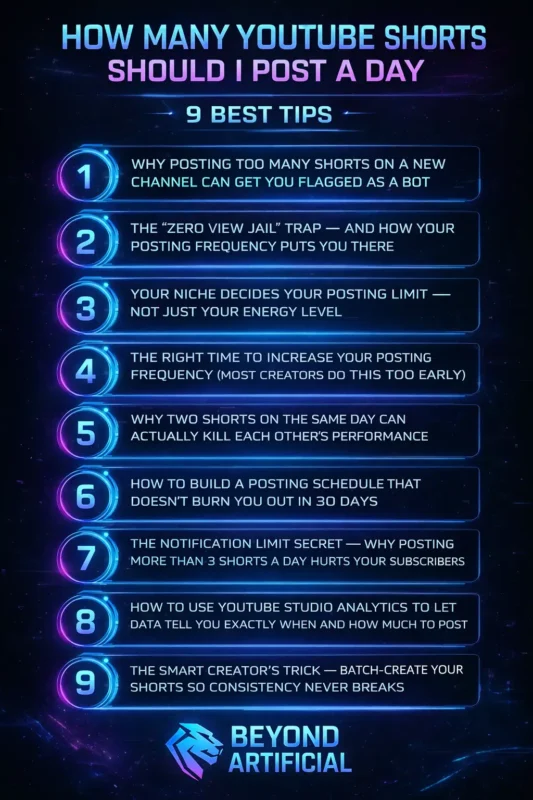
In this guide, you will learn 9 simple and proven tips to find the right posting strategy for your channel so you can grow without feeling stressed or overwhelmed. Keep reading to discover the exact YouTube Shorts posting strategy that can finally start bringing real results.
1. Why Posting Too Many Shorts on a New Channel Can Get You Flagged as a Bot.
Many new creators are never told this, and it quietly harms their channels before they even have a chance to grow. When you upload too many YouTube Shorts in one day on a brand-new channel, the algorithm may not see your excitement; it can see it as suspicious activity. YouTube’s system is designed to detect spam, so a sudden flood of uploads can make your channel look like a bot trying to game the platform.
So here is your first tip: if your channel is new, do not post more than 2–3 Shorts per day during your first 30 days. Also, space them 3–4 hours apart so the algorithm sees natural human activity. Try to keep your content varied as well, change titles, visuals, and story angles so your uploads do not look repetitive. Most importantly, add a human touch to your videos with your voice, personality, or unique editing style.
Slow, consistent, and natural growth is the safest way to build a channel that lasts.
2. The “Zero View Jail” Trap: And How Your Posting Frequency Puts You There.
If you have ever posted a YouTube Short and watched it stay at zero views, that feeling is frustrating, and many creators experience the same thing. The truth is that YouTube tests every Short with a small group of viewers first. If people quickly swipe away or do not engage, the algorithm simply stops pushing the video, and it may stay at very low views.
Here is an important thing many creators do not realize: posting too many Shorts too quickly can hurt your results. When you upload several videos without giving each one time to be tested, the algorithm receives many weak signals and may start treating your channel as low quality. So here is a smart tip: after posting a Short, give it 24–48 hours before uploading the next one. This time allows the algorithm to test your video and collect engagement data. The first 48 hours are very important for Short’s reach, and posting too frequently can divide your audience’s attention.
Another key tip is to focus on the first 3 seconds of your Short. Start with a strong hook that makes viewers curious so they keep watching. Also, try to stay in one clear niche for your first 15 videos so the algorithm can understand your content and show it to the right audience. You are not shadowbanned; most creators just need a better posting rhythm and a stronger strategy.
Once you improve that, your chances of getting views can increase much faster. For a deeper understanding, you can read YouTube’s official guidelines for creating Shorts, which explain how Shorts are distributed on the platform.
3. Your Niche Decides Your Posting Limit, Not Just Your Energy Level
Many creators focus too much on how many Shorts to post per day, but they forget one very important factor: their niche. Your niche quietly decides how often you should post. For example, a gaming channel can easily upload daily because the content is quick and easy to create, while an educational channel usually performs better with fewer but more detailed videos.
When creators ignore this and try to post too often, they quickly feel tired, and their content quality drops. Think of it like cooking: a chef cannot make 10 high-quality gourmet meals every day, but a street food seller can easily serve many meals quickly. Your content niche works the same way. So before choosing your posting schedule, ask yourself one simple question: Does my niche require research, filming, or heavy editing?
If the answer is yes, choose a posting schedule you can manage consistently and slowly increase it as your workflow improves. It is always better to post consistently than to post too much and then disappear for weeks. Also, try to stay focused on one clear niche, because this helps YouTube understand your content and show it to the right audience. Your niche is not a limitation; it is actually a powerful advantage. When your posting schedule matches your niche, growth becomes easier and more natural.
4. The Right Time to Increase Your Posting Frequency (Most Creators Do This Too Early)
Many creators reach a moment when their views start growing, or a Short goes semi-viral, and their first reaction is to post more and more videos quickly. But increasing your posting frequency too early can actually harm your channel. When creators rush to upload more content without a proper system, the quality drops, videos become repetitive, and viewers start losing interest. Once engagement falls, the algorithm also stops pushing the content to new audiences.
Here is a smarter approach: do not increase your posting frequency too quickly. First, make sure you have posted consistently for about 30 days, your videos are keeping viewers watching for a good portion of the video, and your subscriber growth is slowly increasing. These signs show that your content is working. When you are ready to post more, increase slowly. For example, if you are posting one Short per day, move to two and then watch the results for about two weeks. Only increase again if your views and engagement remain strong.
Also, remember a simple rule: test for 30 days, review at 60 days, and improve by 90 days. Growing a channel is not about rushing to upload more videos; it is about improving quality and scaling up at the right time. When your content and system are ready, posting more will feel natural instead of stressful.
5. Why Two Shorts on the Same Day Can Actually Kill Each Other’s Performance.
Imagine spending time making two YouTube Shorts, posting them on the same day, feeling proud, and then seeing both get almost no views. This can be very confusing and discouraging for many creators. One reason this happens is that YouTube usually does not promote multiple Shorts from the same channel at the same time. When you post two videos close together, they can compete with each other for attention. Instead of helping your growth, they can split the views and reduce the momentum of both videos.
So here is an important tip: always space your Shorts at least 4–6 hours apart if you post more than one in a day. If your channel has fewer than 1,000 subscribers, it is often better to treat each Short as a single spotlight post and give it time to perform before uploading another. Another smart rule is this: if your first Short is already getting good views or engagement, do not post another one immediately. Let that video continue gaining traction before adding a new upload.
Posting two Shorts in one day does not always mean double growth. In many cases, giving each video enough time and attention can help it perform much better.
6. How to Build a Posting Schedule That Does Not Burn You Out in 30 Days.
That moment when you wake up and feel tired just thinking about making another Short is not laziness; it is creator burnout, and many creators experience it. Burnout usually happens when people choose a posting schedule that is too hard to maintain for a long time. Many creators plan their schedule based on their most energetic days, but real life, stress, and creative blocks eventually make that schedule impossible to follow.
Here is an important tip: build your posting schedule around your worst day, not your best day. Ask yourself how many Shorts you can realistically create even when you feel tired or busy, and use that number as your normal posting plan. Consistency over time is far more powerful than posting a large number of videos for a short period. Another helpful strategy is to batch-create your content. Record several Shorts in one session and schedule them to post later. This removes the daily pressure of filming new content every day.
| Creator Level | Shorts Per Day | Shorts Per Week | Best Strategy |
| New Creators | 0–1 | 3–4 | Focus on learning hooks, niche clarity, and consistency |
| Growing Channels | 1 | 5-7 | Maintain strong retention and consistent posting |
| Established Channels | 1–3 | 7-14 | Batch-create content and post during peak audience hours |
| High-Volume Creators | 2–3 | 14-21 | Space uploads 4–6 hours apart to avoid audience fatigue |
The safest growth strategy for most creators is 1 to 2 high-quality Shorts per day. Posting more than this can reduce engagement and split your audience’s attention, especially on smaller channels.
Also, remember that taking breaks is healthy. A short rest can help you return with fresh ideas and better creativity. Try to keep at least one rest day each week so you can recharge. Your posting schedule should support your creativity, not drain it.
7. The Notification Limit Secret: Why Posting More Than 3 Shorts a Day Hurts Your Subscribers.
Here is something many creators do not know: YouTube may stop sending notifications to subscribers if you upload too many videos in a short time. If you publish more than three videos within a short period, the platform can temporarily pause notifications for up to 24 hours. This means your subscribers may not even know you posted a new Short. This can be frustrating because you might think posting more will help you reach more people, but sometimes it has the opposite effect.
Too many notifications can also cause notification fatigue, where viewers feel overwhelmed and may ignore your uploads or even unsubscribe. So here is a simple tip: do not post more than three Shorts in 24 hours, and always space them 4–6 hours apart so each video has its own chance to reach your audience. Another interesting strategy is to sometimes turn off the “notify subscribers” option for Shorts. If many of your subscribers are inactive and do not interact with your videos, those weak signals can make the algorithm think your content is not engaging.
In reality, most YouTube Shorts grow through algorithm recommendations, not notifications. That means your main focus should be creating engaging content and posting at a smart, balanced pace rather than uploading as many videos as possible.
8. How to Use YouTube Studio Analytics to Let Data Tell You Exactly When and How Much to Post.
Many creators open YouTube Studio Analytics, feel confused by all the numbers, and then never check it again. But ignoring your analytics can slow down your channel’s growth more than any weak title or thumbnail. Inside YouTube Studio, there is a very useful tool in the Audience tab called “When your viewers are on YouTube.” This section shows a heatmap with darker colors that indicate the times when your audience is most active.
These times give you a strong clue about when your Shorts have the best chance to get views and engagement. Here is a simple tip: go to YouTube Studio → Analytics → Audience, scroll down to the heatmap, and look for the darkest purple areas. Try posting your Shorts about 30 minutes before those peak hours so your video is already available when more viewers come online.
Another helpful step is to check the Real-Time Report after posting a Short. Watch how your video performs during the first 24–48 hours, and compare the results of different posting times. Over time, this will help you discover which hours work best for your channel. Try to review your analytics regularly because your audience behavior can change as your channel grows.
Your data is not just numbers: it is valuable feedback that can guide you toward smarter posting and better growth.
9. The Smart Creator’s Trick: Batch Create Your Shorts So Consistency Never Breaks.
Imagine waking up on Monday with no stress about what to post, because your Shorts for the whole week are already filmed and scheduled. Many successful Shorts creators work this way. Instead of making one video every day, they batch-create 7–14 Shorts in one session, giving them one or two weeks of content ready in advance. The truth is that inconsistency is often not a motivation problem; it is a system problem. Batch creating content helps solve that.
So here is a simple tip: choose one day each week to film several Shorts at once. During that time, focus only on filming. Later, edit the videos in one session and schedule them through YouTube Studio. This approach saves time and removes the daily pressure of creating new content. It also allows your Shorts to be posted automatically at the best times for your audience. Another helpful tip is to always keep at least 7 ready-to-post Shorts saved as a backup. This way, if you get busy, tired, or run out of ideas, your posting schedule will stay consistent.
Batch creation does not just make posting easier; it helps you stay consistent, reduce stress, and build a stronger channel over time. If you want to scale your posting without burnout, building a smart YouTube automation workflow can help you create and schedule content much faster.
FREQUENTLY ASKED QUESTIONS (FAQs)
How many times can I post on YouTube Shorts a day?
YouTube does not set a strict daily limit for Shorts, but posting too many in one day can reduce your reach. Since YouTube only sends a limited number of notifications to subscribers, extra uploads may not get the same visibility. The safest strategy is to post 1–3 high-quality Shorts per day, spaced a few hours apart. This gives each video a better chance to be seen, engaged with, and promoted by the algorithm.
How much money is 1000 views on YouTube Shorts?
YouTube Shorts usually earn about $0.04–$0.06 per 1,000 views, so the ad revenue alone is often quite small. YouTube also keeps a large share of the ad revenue, which further reduces creator earnings.
Because of this, most creators use Shorts mainly to grow their audience and drive traffic to other income sources like brand deals, long-form videos, affiliate links, or their own products. Shorts are best seen as a growth tool, not the main source of income.
Do longer Shorts make more money?
There is no minimum length required to monetize a YouTube Short. Any Short under 60 seconds can earn money through YouTube’s Shorts revenue-sharing pool. However, the most important factor is viewer retention, not length. A strong 30-second Short with high engagement can perform better than a longer video that loses viewers early. Many creators use Shorts mainly to attract new viewers and then guide them to longer videos, where the earning potential is usually higher
Which pays more, YouTube Shorts or videos?
Long-form YouTube videos usually earn 10–50 times more per view than Shorts. For example, 1 million long-form views might earn around $1,500–$6,000, while 1 million Shorts views may earn only about $50–$150.
Because of this, many creators use Shorts to attract new viewers and then guide them to their long-form videos, where the earning potential is much higher. This combination helps channels grow faster and earn more over time.
Do YouTubers get paid less for Shorts?
Yes. YouTube gives about 45% of Shorts ad revenue to creators, while the platform keeps the rest to cover costs like music licensing and operating the Shorts system. Because of this, Shorts usually earn much less per view than long-form videos.
For most creators, Shorts revenue is relatively small. That is why many successful channels use Shorts mainly to grow their audience, and then earn more through long-form videos, brand deals, affiliate links, or other income sources.
How many YouTube Shorts should I post a week?
Planning your weekly Shorts schedule can feel overwhelming. Many creators sit down to decide how many videos to post and still feel unsure if they are doing it right. The truth is that there is no single perfect number; the best posting frequency is the one you can maintain without lowering your watch time and completion rate.
When your schedule matches your energy, niche, and audience behavior, posting becomes much easier and more consistent. Here is a simple weekly plan you can follow:
- New creators: Start with 3–4 Shorts per week. This is enough to help the algorithm understand your channel without overwhelming you.
- Growing channels: Aim for 3–7 Shorts per week. This range often works better than posting every day if your retention stays strong.
- Batch-create your content: Film several Shorts in one session and save them as drafts. This removes the daily pressure of filming and editing.
- Match your content with the day: Post educational or informative Shorts on weekdays, and entertaining or light content on weekends when people are more relaxed.
- Avoid missing multiple days: Missing one day is normal, but try not to miss two days in a row, because consistency helps maintain your channel’s momentum.
A simple, sustainable weekly plan is often the best strategy for steady YouTube Shorts growth.