
 YouTube Automation
Best Collaborative Video Editing Software -9 Essential Steps(Blog#:25)

Choosing the wrong collaborative video editing software does not just slow your team down; it can delay deadlines, block creativity, and make every project stressful. Editors get frustrated, teamwork becomes messy, and even simple tasks start taking too long. The Best collaborative video editing software does the opposite. It gives your team one shared space where everyone can work together smoothly, share ideas easily, and create better videos as a team.
With so many options available, finding the best collaborative video editing software can feel confusing. But once you understand what features actually matter, choosing the right one becomes much easier. Whether you manage a small content team or a large remote editing group, these steps will help your projects become faster, smoother, and more creative.
Stop wasting time on slow, confusing editing tools. Choose the best collaborative video editing software today and turn your team into a fast, creative video powerhouse. If you are planning a professional editing workflow, you may also want to explore whether video editing on Linux is a good option for your setup.
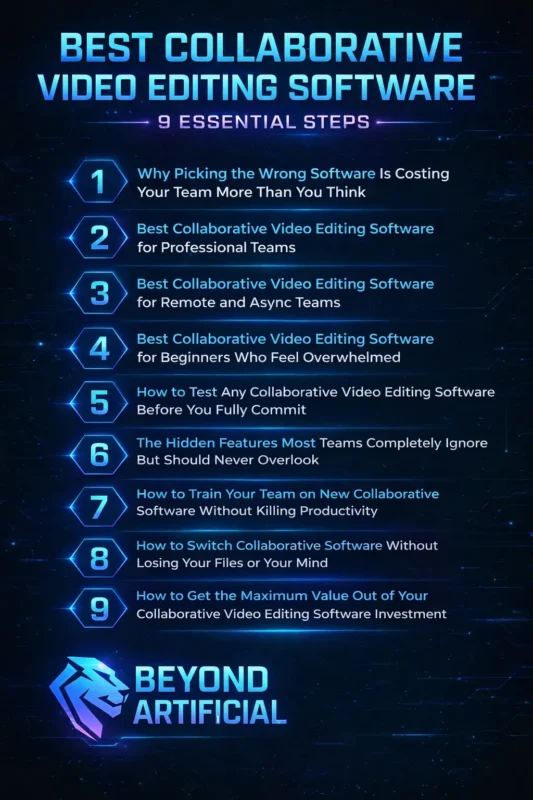
These 9 essential steps will help you choose, set up, and use the right software so your team stops wasting time on technical problems and focuses on creating videos that truly connect with audiences.
1. Why Picking the Wrong Software Is Costing Your Team More Than You Think
Every day your team struggles with the wrong collaborative video editing software, you lose time, creativity, and motivation. Deadlines get missed, files get confused, feedback becomes messy, and small technical problems slowly turn into big workflow disasters. The wrong software does not just slow things down; it hurts team morale, wastes hours on file transfers and version issues, and can even cost you clients. Most teams do not realize their repeated project problems are actually caused by their tools, because the damage happens little by little until everything feels overwhelming.
Start by calculating the real cost of your current software. Track how many hours your team loses each week to crashes, miscommunication, and fixing mistakes. When you see the total time and money wasted, it becomes clear whether your tool is helping or hurting your growth. Do not stick with software just because your team is used to it. Familiarity can keep you stuck in an inefficient system. Instead, involve your editors in choosing the right tool; they understand the daily challenges better than anyone.
When you finally choose software that truly matches your workflow and team size, everything changes. Projects move faster, stress drops, communication improves, and your team starts enjoying the creative process again.
2. Best Collaborative Video Editing Software for Professional Teams.
Professional video editing teams work under constant pressure. Tight deadlines, demanding clients, and complex projects leave no room for software crashes or technical problems. That’s why the best collaborative video editing software must be fast, reliable, and easy for the whole team to use without slowing creativity. For professional teams, tools like Adobe Premiere Pro with Team Projects and Frame.io are among the best choices. They allow multiple editors to work together, give clear timeline-based feedback, and keep all files and comments organized in one place.
This helps teams avoid confusion and deliver projects on time. Even if your team already uses Premiere Pro, adding Frame.io as your main review and approval platform can make a huge difference. It keeps client feedback, internal reviews, and final approvals in one clean system instead of messy email chains and scattered messages. If your team works with large, high-quality video files, always use proxy workflows. Proxies are lower-resolution versions of your files that keep editing smooth and fast without slowing down computers.
Also, make sure version control and automatic backups are always turned on to protect important projects from file loss. When professional teams choose the right collaborative software and learn its best features, everything improves. Editing becomes faster, communication gets clearer, clients stay happy, and your team can focus fully on creating amazing videos instead of fixing technical problems.
3. Best Collaborative Video Editing Software for Remote and Async Teams.
Running a remote video editing team without the right software can feel chaotic. Files get lost, feedback is scattered in emails, and editors working in different time zones struggle to stay updated. Without proper tools, projects slow down, and teamwork becomes confusing. The best collaborative video editing software for remote and async teams should keep projects moving even when editors are not online at the same time.
Tools like Frame.io make this easier with frame-by-frame comments and clear feedback, while browser-based editors like Kapwing and VEED.IO allow team members to work from anywhere without downloading heavy files. Always choose software that shows a full activity log of edits, comments, and changes. This helps remote editors understand what happened while they were offline and keeps everyone on the same page. Avoid tools that require everyone to be online together, because that defeats the purpose of remote work.
A smart tip is to record short Loom videos when finishing an editing phase and attach them to the project. These quick walkthroughs help the next editor understand your work and continue smoothly without needing a live meeting. When you use the right collaborative software, distance stops being a problem. Your team stays connected, projects move faster, and working across time zones becomes a powerful advantage instead of a challenge.
4. Best Collaborative Video Editing Software for Beginners Who Feel Overwhelmed
Feeling overwhelmed by collaborative video editing software as a beginner is normal. It does not mean you lack talent; it simply means you haven’t found the right tools yet. With the right beginner-friendly software, editing can quickly change from stressful to exciting. The best collaborative video editing software for beginners should be easy to use, safe for making mistakes, and strong enough to grow with your skills.
Kapwing is a great starting point because it has a simple drag-and-drop interface, works in your browser, and allows teams to edit together without confusion. Always choose software that includes built-in tutorials, helpful tips, and a support community. These guides help you when you get stuck and make learning faster and easier. Do not be afraid of making mistakes; most tools have undo buttons, autosave, and version history to protect your work.
Focus on learning just a few important features first, like timeline editing, sharing files, and basic commenting. Once you understand these basics, advanced tools will feel much easier to use. Remember, every expert editor was once a beginner. With the right collaborative software and a little practice, you will build confidence, improve your skills, and start enjoying the editing process step by step.
5. How to Test Any Collaborative Video Editing Software Before You Fully Commit.
Choosing collaborative video editing software without testing it first can lead to big problems later. It may seem exciting at first, but under real deadlines and pressure, the wrong software can slow your team down, confuse editors, and damage productivity. The best way to test editing software is by running a real trial project with your team. Use your actual video files, follow your normal workflow, and let everyone try the platform together.
This helps you see how the software performs in real working conditions, not just in a quick demo. Always include your whole team in the testing process. A tool that feels easy for one editor might feel confusing for another. Team feedback is important because everyone needs to feel comfortable using the software for smooth collaboration. During the trial, do not just look at features; test how the software handles teamwork.
Check if multiple editors can work without conflicts, if feedback and version history are clear, and if mistakes can be fixed easily. Keep a shared note of any problems or confusion your team faces. If your team finishes the test project feeling confident, comfortable, and excited to use the software again, you have found the right tool. Proper testing saves time, avoids stress, and helps your team choose software that truly supports your creative workflow.
6. The Hidden Features Most Teams Completely Ignore But Should Never Overlook
Many collaborative video editing teams spend a lot of time choosing the right software, but after selecting it, they only use the basic features. As a result, they miss powerful tools already built into the platform that could save time and reduce stress. Some commonly ignored features include detailed permission controls to protect certain parts of a project, automatic proxy creation for smoother remote editing, custom notifications to avoid constant alerts, and workflow analytics that show where delays happen.
These tools can greatly improve teamwork, but most teams never explore them. The reason is simple: once teams learn the basics, they stop digging deeper. They do not check updates or explore advanced settings, so they miss new features that could solve their biggest problems. A smart solution is to schedule a short team session every few months to explore advanced features together. Also, always read update notes when new versions are released; they often include useful improvements.
It also helps to assign one person as the “software expert” who stays updated on new features and shares tips with the team. When you fully use the tools you’re already paying for, your workflow becomes faster, smoother, and much more efficient.
7. How to Train Your Team on New Collaborative Software Without Killing Productivity
Introducing new collaborative video editing software without proper training can quickly reduce productivity and frustrate your team. Instead of feeling excited about the upgrade, editors may feel confused, stressed, and overwhelmed, especially when deadlines are approaching. Even the best software will not help if your team does not know how to use it properly. That’s why training should be treated as an ongoing process, not a one-time session. Every team member learns differently, so they need time and support to feel comfortable with new tools.
Start training during a low-pressure period when there are no major deadlines. This gives your team time to explore the software, ask questions, and build confidence. Avoid teaching everything in one long session; instead, break learning into small, simple steps so everyone can follow easily. Create helpful internal resources like short screen-recorded tutorials, quick guides, and step-by-step instructions based on your team’s real workflow. These materials help editors solve problems quickly without interrupting others for help.
When you train your team with patience and clear guidance, the transition becomes smooth and positive. Your team feels more confident, works faster, and starts enjoying the new collaborative tools instead of struggling with them.
8. How to Switch Collaborative Software Without Losing Your Files or Your Mind
Switching collaborative video editing software while your team is still working on active projects can feel risky and stressful. If you do not plan properly, you could lose files, delay deadlines, and create confusion across the team. The two biggest mistakes teams make are moving everything at once and not creating a full backup before starting. Both problems are avoidable with simple planning. Before you switch, make sure every project file, asset, and archive is safely backed up and checked.
A smooth migration should happen in three clear phases. First, back up everything. Second, run both the old and new software at the same time for a few weeks. Third, fully switch to the new platform only after active projects are finished or safely moved. Do not migrate your most important or complex projects during the transition. Finish those in your current software. Start using the new platform only for new incoming projects once your team feels comfortable with it.
Running both systems together for four to six weeks gives your team a safety net. If something goes wrong in the new software, work can continue in the old one. With careful planning and patience, switching software does not have to be chaotic. It can be a smooth transition that makes your team stronger, more confident, and ready for better collaboration in the future.
9. How to Get the Maximum Value Out of Your Collaborative Video Editing Software Investment
Many teams pay for collaborative video editing software but use only a small part of its features. It’s like buying an expensive car and driving it only in first gear. When this happens, teams do not get the full value or performance they expected. Getting the most value from your software does not mean using every feature. It means understanding which tools actually solve your team’s problems, save time, and improve collaboration. When you focus on the right features, projects move faster, and your team works more smoothly.
A good habit is to review your software every few months. Check which features your team uses often, which ones you ignore, and which tools you have not explored yet. This simple review can reveal useful features that can fix workflow issues and save hours of work. Also, do not let your subscription renew automatically without checking if your plan still fits your team’s needs. As your team grows or changes, you may need different features or a better pricing plan.
Encourage your team to share tips, shortcuts, and new features they discover. When everyone shares what they learn, the whole team becomes more skilled and efficient. When you fully use the software you are paying for, it stops feeling like an expense and starts becoming a powerful tool that saves time, improves teamwork, and helps you create better videos.
Your editing software matters, but hardware plays an equally important role, which is why choosing the best CPU for video editing can dramatically improve performance.
FREQUENTLY ASKED QUESTIONS (FAQs)
What video editing software allows collaboration?
Choosing the right collaborative video editing software can instantly remove file confusion, miscommunication, and workflow stress from your team. Powerful tools like Adobe Premiere Pro, DaVinci Resolve, Frame.io, Kapwing, CapCut Online, and VEED.IO offer real-time editing, cloud sharing, and clear feedback systems that keep everyone perfectly in sync. The best choice depends on your team’s workflow. Professional teams often prefer Premiere Pro with Frame.io, while smaller or remote teams love the simplicity of Kapwing and CapCut Online. When you match the software to your team’s needs, collaboration becomes faster, smoother, and far more creative.
What is the best app to edit videos together?
The best app to edit videos together is the one that keeps your entire team confident, connected, and stress-free while working. Frame.io is perfect for professional teams needing precise feedback and deep integrations, while Kapwing and CapCut Online are ideal for simple, browser-based collaboration for creators and small teams. For large, complex projects, DaVinci Resolve offers powerful cloud-based shared editing built for serious production work. The smartest move is to test the app with your full team and choose the one that everyone, especially your least technical member, can use comfortably every day.
What is the 321 rule of video editing?
The 3-2-1 rule of video editing is the smartest way to protect your work from sudden loss or technical disasters. Always keep 3 copies of your project, save them on 2 different storage types like cloud and external drive, and store 1 copy offsite for extra safety. This simple backup system protects your videos from crashes, deletions, or hardware failure. When you follow the 3-2-1 rule, you edit with confidence knowing your hard work is always safe and secure.
Can two people edit a video at the same time?
Yes, two people can edit a video at the same time using modern collaborative editing software, and it can dramatically speed up your workflow. Tools like Adobe Premiere Pro Team Projects, DaVinci Resolve, Kapwing, and CapCut Online allow real-time multi-user editing with cloud syncing and version control. To make teamwork smooth, divide the timeline into clear sections, use track locking features, and communicate before making big changes. When done right, two editors working together can create faster, better, and more professional videos without conflicts or confusion.
Can two people edit a video at the same time?
Yes, two people can absolutely edit a video at the same time thanks to modern collaborative editing software that makes teamwork fast and seamless. Platforms like Adobe Premiere Pro Team Projects, DaVinci Resolve, Kapwing, and CapCut Online use cloud syncing and smart conflict detection to keep both editors perfectly aligned. To avoid mistakes, simply divide the timeline into clear sections, use locking features, and communicate before making major changes. When done right, simultaneous editing saves time, boosts creativity, and turns collaboration into a powerful advantage.
Best Collaborative Video Editing Software Free
Finding the best collaborative video editing software can feel confusing. Every tool promises amazing results, but many teams still struggle with mixed file versions, missed feedback, and messy workflows that turn creative projects into stressful ones. Many teams try using different tools, sending files back and forth, and hoping everything works, but this only creates more confusion. What your team really needs is one smooth system where everyone can work together easily and stay connected.
The right collaborative video editing software becomes your team’s creative center. It keeps everyone in sync, improves communication, and helps you create better videos without stress or delays. Here’s what the best collaborative video editing software should do for your team:
1. Give every editor access to the same updated project files from anywhere, without slow file transfers
2. Allow multiple editors to work on the same project at the same time without overwriting each other’s work
3. Provide a clear feedback and commenting system so you do not rely on confusing emails or messages
4. Protect your work with automatic version control and secure cloud backup
4. Grow with your team as projects become bigger and deadlines become tighter
With the right software, your team can work faster, communicate better, and enjoy the creative process again.